Your Update Button Is Lying to You About Houston Cybersecurity
Patch Management vs Automatic Updates: What Houston Businesses Need to Know – Why MSP Patch Management Beats Turning On Automatic Updates
A plain-English guide for Houston owners on what patch management really is, and why auto-updates alone won't keep you safe.
Houston cybersecurity comes down to a boring question most owners never ask: when a software vendor ships a fix for a security hole, how fast does that fix actually land on every machine you run? That process is patch management, and for most small businesses it is the widest gap between feeling secure and being secure.
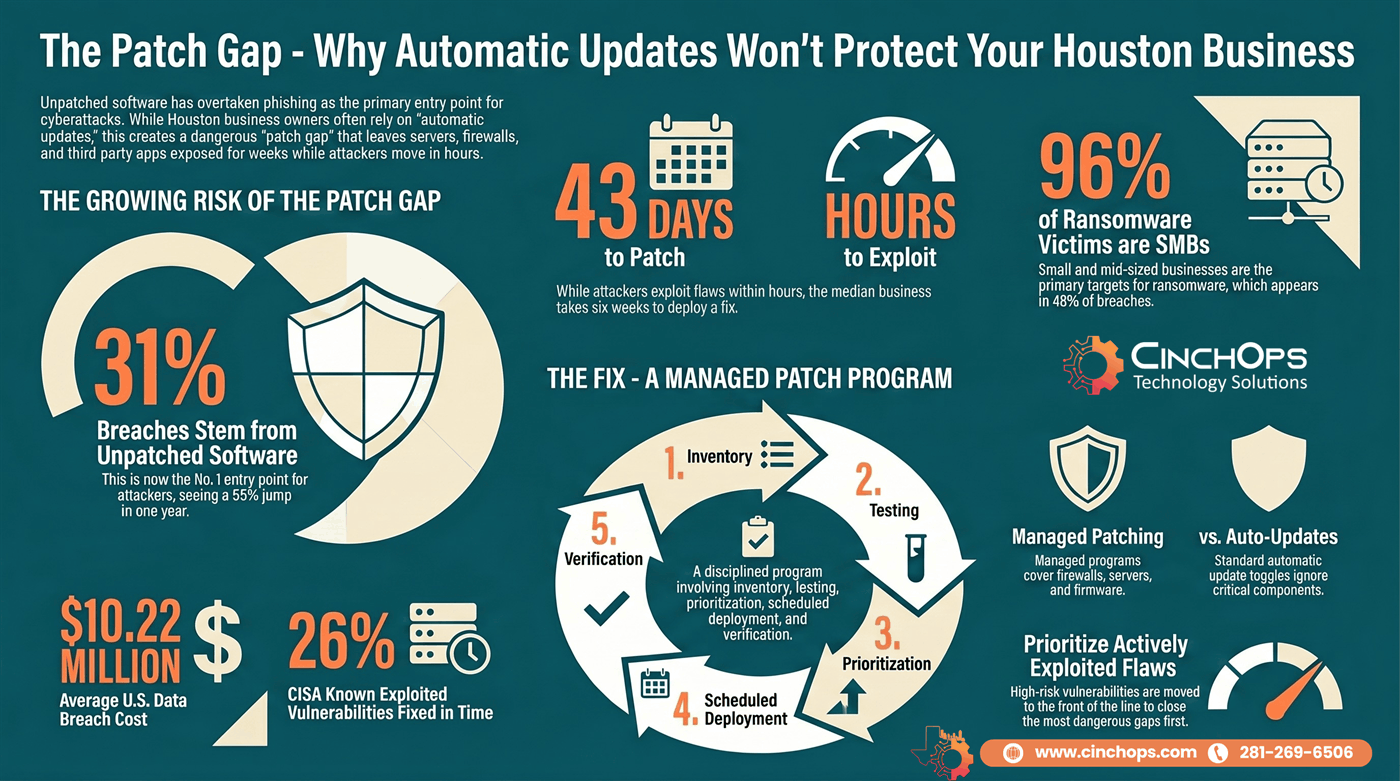
The reason this matters more than it did two years ago is in the numbers. The 2026 Verizon Data Breach Investigations Report found that exploitation of unpatched vulnerabilities became the single most common way attackers get in, behind 31% of breaches, up from 20% the year before. That is a 55% jump in one year, and it pushed vulnerability exploitation past stolen passwords and phishing for the first time in the report's history. The fix for almost every one of those holes already existed. It just had not been applied yet.
So the obvious response is "I'll just turn on automatic updates." Reasonable instinct, and better than nothing. But auto-updates are a feature on one machine, not a strategy across a business. They cover part of your software and ignore most of it, they install blind with no testing, and they tell you nothing when they quietly fail. This guide walks through what patch management really is, why the breach data should worry every Houston SMB, where automatic updates run out of road, and what an MSP does differently.
What Is Patch Management?
Start here if "patch" and "update" sound like the same thing.
Patch management is the ongoing process of identifying, acquiring, testing, and applying software updates, called patches, across all of an organization's systems to fix security flaws, bugs, and stability problems. It is a managed cycle, not a one-time setting, and it covers operating systems, applications, firmware, and network hardware.
A patch is a small piece of code a vendor releases to correct a specific problem in software that is already installed. Microsoft, Apple, Google, and thousands of other vendors ship them constantly. Some patches add features, but the ones that matter for security close a hole that attackers can use to get in. CISA describes patches as repairs for known weaknesses, and the agency is blunt that applying them quickly is one of the most effective things any business can do to stay safe.
People mix up "patch" and "update," and the difference is worth nailing down. A patch is a targeted fix, often security-related, for something broken. An update is the broader bucket that includes patches plus feature changes and improvements. Every security patch is an update; not every update is a security patch. The reason that distinction matters: a business can be running the "latest version" of something and still be missing a critical security patch on a different system entirely.
- Security patches close a known vulnerability that attackers can exploit. These are the time-sensitive ones.
- Bug fixes correct crashes, errors, and stability problems that hurt productivity but are not always security issues.
- Feature updates add or change how software works. Useful, but not why patch management exists.
- Firmware updates fix the low-level code inside firewalls, routers, printers, and other hardware, the gear most businesses forget has software at all.
Why Patch Management Is the Front Line of Cybersecurity Now
The breach data shifted. Patching went from hygiene to the main event.
Patch management matters because unpatched software is now the most common entry point for attackers. The 2026 Verizon DBIR found vulnerability exploitation was the initial access vector in 31% of breaches, ahead of stolen credentials, and the median time businesses took to patch a known flaw stretched to 43 days, up from 32 the year before.
Think about what that 43-day median means in practice. A vendor publishes a fix, which also tells every attacker on the planet exactly what to attack. The 2026 DBIR notes that with AI in the mix, the window between a flaw becoming public and being attacked has shrunk from months to hours. Meanwhile the average business is still six weeks away from applying the fix. That space in the middle is where the breach happens.
The cost side is just as ugly. IBM's 2025 Cost of a Data Breach Report put the average breach in the United States at $10.22 million, the highest of any country in the world. Most small businesses in Katy or Sugar Land are not absorbing a number with that many zeros and staying open. Even a fraction of it, plus downtime and lost trust, is enough to end a 30-person company.
Here is the part that should sting a little. The 2026 DBIR also found organizations fully fixed only 26% of the vulnerabilities on CISA's Known Exploited Vulnerabilities list, the catalog of flaws confirmed to be under active attack, down from 38% the year before. These are not theoretical risks. They are the bugs CISA can prove criminals are using right now, and three out of four still are not getting patched in time.
Why Turning On Automatic Updates Is Not a Patch Strategy
Auto-updates help. They also miss most of what an attacker can reach.
Automatic updates are not a patch strategy because they only cover a slice of your software, install with no testing, and fail silently. They handle Windows and a few major apps on machines that stay online and get rebooted. Firewalls, switches, servers, drivers, and most third-party software sit outside that net entirely.
Start with coverage, because this is the gap most owners underestimate. Windows Update keeps Windows and some Microsoft apps current. It does nothing for your firewall, your network switch, your VPN appliance, your line-of-business accounting software, your PDF reader, your browser plugins, or the firmware in your office printer. That equipment runs software too, and it is exactly where the 2026 DBIR says attackers are now concentrating. An auto-update toggle on a laptop never touches any of it.
Then there is the testing problem. Automatic updates install whatever ships, the moment it ships, on every machine at once. Most of the time that is fine. Occasionally a vendor pushes a patch that breaks a critical app, knocks a line-of-business tool offline, or blue-screens a fleet of PCs. When that happens with auto-updates, you find out because the whole office calls at once. A managed program catches it on a test group of a few machines first.
The quiet killer is failure with no alarm. A patch needs a reboot the user keeps postponing. A laptop is off for two weeks on a job site in The Woodlands. An update errors out and rolls back. With automatic updates, nobody is watching, so nobody knows. The machine sits unpatched and looks fine. No visibility means no proof, and "I think we're patched" is not an answer your cyber insurance carrier accepts after an incident.
- Partial coverage: auto-updates skip network gear, servers, firmware, and most third-party apps, the places attackers now target most.
- No testing: patches install everywhere at once, so a bad one takes down the whole office instead of one test machine.
- Silent failure: skipped reboots, offline devices, and rolled-back installs leave machines unpatched with no alert.
- No prioritization: a critical actively-exploited fix waits in the same queue as a minor cosmetic update.
- No reporting: when an auditor or insurer asks what is patched, there is no record to show them.
Do you actually know what is unpatched right now?
Most Houston businesses have more gaps than they think, especially on servers, firewalls, and third-party apps. A quick assessment finds them before an attacker does.
Talk to CinchOpsTurning on auto-updates feels like you've handled security. It hasn't. The breaches I see are almost never "they had no updates." They're "Windows was current, but the firewall firmware was three years old," or "a patch failed in March and nobody knew until the ransomware note showed up." Patching is a program you run, not a box you check.
How Is MSP Patch Management Different?
The difference is everything auto-updates skip: scope, testing, priority, and proof.
MSP patch management is different because it runs as a managed, full-stack program instead of a per-device toggle. A managed services provider keeps a live inventory of every device, tests patches before broad rollout, prioritizes actively-exploited flaws first, schedules deployment around your hours, and reports on what is and is not patched.
The first thing an MSP does is build an inventory, because you cannot patch what you do not know you have. Using remote monitoring and management tooling, the provider sees every laptop, server, firewall, and switch across your business, including the machine in the back office everyone forgot about. That single step closes the most common gap in small business security: the device nobody was tracking.
From there the cycle is what auto-updates can never do. Patches get tested on a small ring of machines before they touch the whole company, so a bad update is caught early instead of company-wide. Critical fixes for flaws on the CISA Known Exploited Vulnerabilities list jump the line, because a bug under active attack should not wait behind a printer driver. Deployment is scheduled around your business, not whenever Microsoft decides. And every cycle ends with a report, so you can prove what is patched to an auditor, an insurer, or yourself.
| Capability | Automatic Updates | MSP Patch Management |
|---|---|---|
| Coverage | OS and a few apps only | OS, apps, servers, firmware, and network gear |
| Testing | None, installs blind | Tested on a pilot ring first |
| Prioritization | All patches treated equally | Actively-exploited flaws fixed first |
| Failed patches | Silent, often missed | Caught, retried, and remediated |
| Visibility and proof | None | Reporting for audits and cyber insurance |
| Timing | Whenever the vendor ships | Scheduled around your business hours |
How CinchOps Can Help You Get Patching Right
CinchOps is a managed IT services provider based in Katy, Texas, serving small and mid-sized businesses across the Houston metro area. CinchOps specializes in cybersecurity, network security, managed IT support, VoIP, and SD-WAN for businesses with 10 to 200 employees.
Patching is one layer of a real defense
Closing the patch gap stops most opportunistic attacks, but it works best alongside monitoring, backups, and email security. CinchOps runs patch management inside a complete program with managed IT support for Houston businesses.
Explore CinchOps managed IT services →Patch management is one of those jobs that is simple to describe and hard to actually finish across a whole business. Inventory every device, test before you deploy, fix the dangerous things first, and prove it got done. That is what we run for our clients, so the 43-day gap the DBIR measured does not become your breach.
- Through managed IT support, we inventory every device and run a tested, scheduled patch cycle across your whole environment.
- With managed cybersecurity, we prioritize actively-exploited vulnerabilities from the CISA KEV list so the dangerous gaps close first.
- For business continuity and disaster recovery, we make sure a bad patch or a missed one never takes the business offline for long.
- Across industries like law firms, CPA firms, and construction, we tune the patch schedule to how the business actually runs.
- From Houston to Katy and Sugar Land, we support businesses across the metro.
If your patch plan today is "automatic updates are on, I think," you have the riskiest setup there is: the feeling of safety without the substance. The 2026 DBIR is clear that unpatched software is now the front door attackers prefer, and a toggle on one laptop does not lock it. Get patching owned, tested, and verified once, and the most common cause of a breach stops being your problem. If you want a straight read on where your patching stands today, talk to CinchOps.
Frequently Asked Questions
What is patch management?
Patch management is the ongoing process of finding, testing, and applying software fixes, called patches, across all of a business's systems to close security flaws and bugs. It covers operating systems, applications, firmware, and network hardware. It is a managed cycle that runs continuously, not a single setting you switch on once and forget.
Is turning on automatic updates enough for a small business?
No. Automatic updates only cover the operating system and a few major apps on machines that stay online and get rebooted. They skip firewalls, servers, network gear, and most third-party software, they install with no testing, and they fail silently. A managed patch program covers the full environment and verifies that fixes actually got applied.
What is the difference between a patch and an update?
A patch is a targeted fix, often for a security flaw, in software that is already installed. An update is the broader category that includes patches plus new features and improvements. Every security patch is an update, but not every update is a security patch, so a system can be on the latest version and still miss a critical fix.
How fast should security patches be applied?
As fast as practical, because attackers move within hours of a fix going public. The 2026 Verizon DBIR found the median business takes 43 days to patch a known flaw, which is far too slow. Critical vulnerabilities on CISA's Known Exploited Vulnerabilities list should be prioritized and patched within days, not weeks.
Why use an MSP for patch management instead of doing it in-house?
An MSP runs patch management as a full program: a live device inventory, testing before rollout, risk-based prioritization, scheduling around your hours, and reporting you can show an auditor or insurer. For most Houston small businesses, an MSP delivers that discipline far cheaper than hiring the staff and tools to do it well in-house.
Discover More
Resource