Houston Business Disaster Recovery Guide: What Your Houston Business Actually Needs
Generic Checklists Don’t Account for Your Specific Business Risks – Your Backup Isn’t a Plan Until You’ve Tested It Under Pressure
Hurricanes, ransomware, and flash floods don't wait for you to finish your DR plan. Here's how to build one that works.
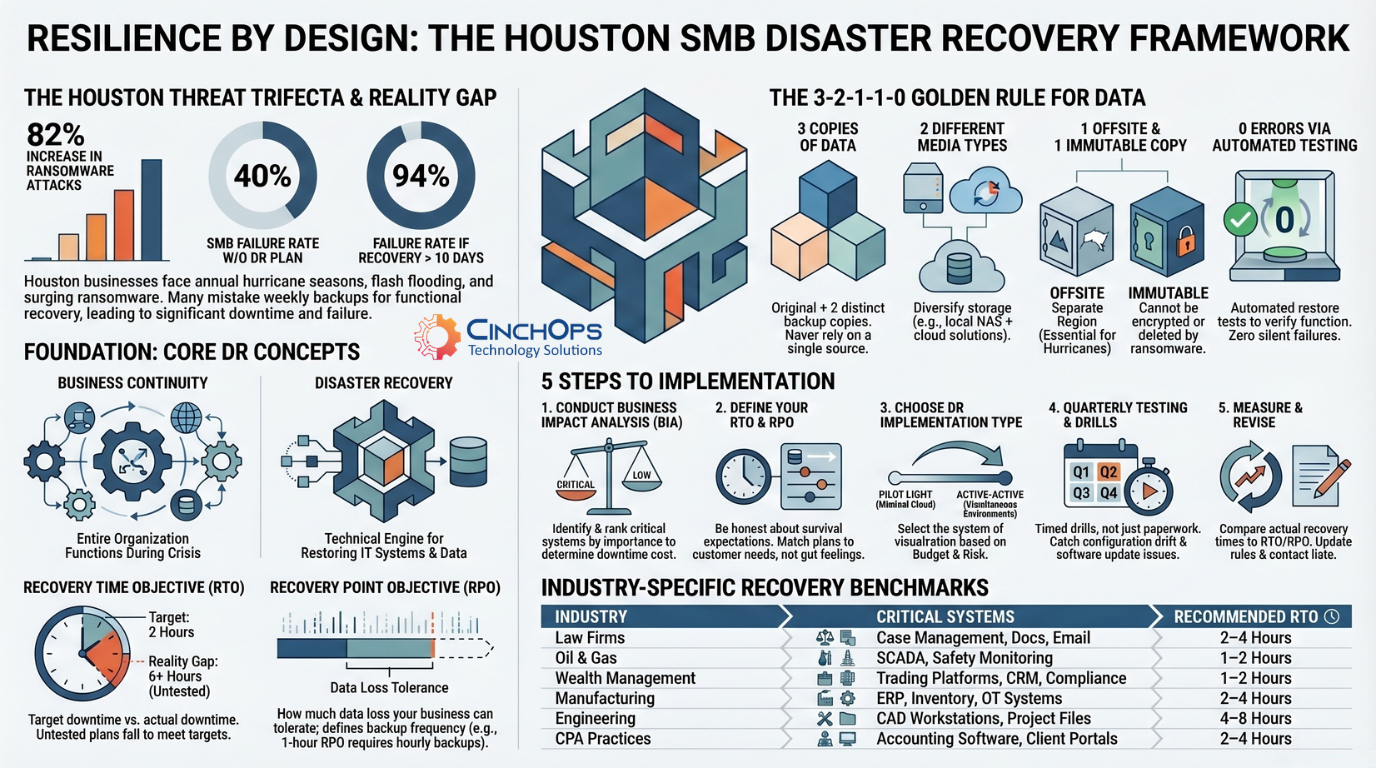
Texas businesses operate under a set of pressures most other states don't deal with simultaneously. Hurricane season, flash flooding in the Houston metro, and a rising wave of ransomware attacks that don't care how small your company is. Over 40% of SMBs that experience a major incident without a disaster recovery plan never reopen their doors. That's not a scare tactic - it's a stat most managed IT providers see play out in real time.
Most small and mid-sized business owners in Texas either treat disaster recovery as an afterthought or confuse it with running a weekly backup. This guide cuts through the noise, defines the core concepts clearly, and gives you a practical framework to build real resilience - whether you're running a 10-person firm in Katy or a 150-person operation in Dallas.
| Point | Details |
|---|---|
| DR means more than backups | Disaster recovery is a structured plan for restoring full operations, not just saving data copies. |
| Texas SMBs are high risk | Local threats like hurricanes, floods, and ransomware make DR essential for Texas businesses. |
| Quarterly testing is critical | Regular test drills catch hidden failures and ensure plans actually work under pressure. |
| Hybrid DR is often best | A mix of cloud and on-premises methods balances affordability and resilience for most SMBs. |
| Customize, don't copy | The best disaster recovery plans are tailored to your unique IT setup, risks, and resources. |
Disaster recovery is a documented, structured approach - often part of a business continuity plan - that enables an organization to quickly resume IT-dependent operations after an unplanned disruption. Notice the word "documented." A plan that lives in someone's head isn't a plan. It's a hope.
Disaster recovery is closely related to, but distinct from, business continuity. Think of them as two sides of the same coin. Business continuity covers how your entire organization keeps functioning during a disruption. Disaster recovery focuses specifically on restoring your IT systems and data. One is the big picture; the other is the technical engine that powers it.
Four terms you need to know:
- Business Impact Analysis (BIA): Identifies which systems are most critical and what it costs when they go down. For a Houston-area law firm, that might be case management software. For a retailer, it's the point-of-sale system.
- Recovery Time Objective (RTO): How long you can afford to be down. If your RTO is four hours, your systems must be back online within four hours of a failure.
- Recovery Point Objective (RPO): How much data loss you can tolerate. An RPO of one hour means you need backups running at least every hour.
- Business Continuity Plan (BCP): The broader document that outlines how your whole organization responds to and recovers from disruptions, with DR as a key component.
Common disaster scenarios Texas SMBs face:
- Hurricanes and tropical storms causing physical infrastructure damage
- Flash flooding knocking out on-site servers - a very real risk in the Houston metro
- Ransomware attacks encrypting critical business data
- Hardware failures from power surges during storms
- Human error like accidental file deletion or misconfigured systems
Businesses that experience a major data loss event have a 94% chance of not surviving if recovery takes longer than 10 days. The math is unforgiving.
With a grasp of DR fundamentals, here's a straightforward numbered process to follow:
- Conduct a Business Impact Analysis. Identify your most critical systems, rank them by operational importance, and estimate the cost of downtime for each.
- Set your RTO and RPO. Be honest. Most SMBs overestimate how long they can survive without key systems. If your gut says "a day," your customers probably expect "an hour."
- Select your backup method. The 3-2-1-1-0 backup rule is the current standard: keep 3 copies of your data, on 2 different media types, with 1 stored offsite, 1 copy immutable or air-gapped, and 0 errors verified through automated restore testing. For a Sugar Land accounting firm, that might mean local NAS storage, a cloud backup in a separate region, an immutable copy that ransomware can't touch, and monthly automated restore tests to confirm everything actually works.
- Choose your DR implementation type. Options range from simple backup/restore (lowest cost, longest recovery) to pilot light (minimal cloud environment kept warm), warm standby (scaled-down live copy), hot site (full mirror ready to go), and active-active (both environments running simultaneously). Match the approach to your actual risk tolerance and budget.
- Test and revise. A plan that's never been tested is a theory, not a strategy.
Optimistic RTO miscalculations are one of the most common and costly DR mistakes we see with managed IT Houston clients. Businesses set an RTO of two hours, but their actual recovery process takes six. That gap is where companies lose customers and revenue.
Immutable Backups Are the Baseline
For Texas businesses, immutable backups - backups that cannot be altered or deleted, even by ransomware - are no longer optional. They protect against both flood-damaged servers and ransomware that targets backup systems directly.
Learn about CinchOps business continuity services →Store at least one backup copy in a geographically separate region. If a hurricane hits the Gulf Coast, both your office and a nearby data center could go offline simultaneously. Cloud storage in a different region changes that equation entirely.
Not Sure Where Your DR Plan Stands?
Get a free assessment of your current disaster recovery readiness. We'll identify gaps before a storm or ransomware attack does it for you.
Schedule a Free DR Assessment| Approach | Key Features | Cost Profile | Main Risks | Best For |
|---|---|---|---|---|
| Cloud/DRaaS | Geo-redundancy, scalable, low upfront | Pay-as-you-go, potential egress fees | Internet dependency, vendor lock-in | SMBs with limited hardware budget |
| On-Premises | Full control, fast local recovery | High CapEx, ongoing maintenance | Single-site risk, physical damage | Businesses with strict data control needs |
| Hybrid | Combines local speed with cloud resilience | Moderate, balanced investment | Complexity, requires management | Most Texas SMBs balancing cost and risk |
Hybrid approaches deliver the best cost-to-resilience tradeoff for most SMBs, combining the fast local recovery of on-premises with the geographic redundancy of cloud. Before choosing, ask yourself:
- How fast do I genuinely need to recover? Hours vs. days changes everything.
- Is my business in a flood zone or hurricane corridor?
- Do I have compliance requirements that restrict where data can be stored?
- What's my actual IT budget for DR - not the ideal budget, the real one?
- Do I have internal staff to manage a hybrid setup, or do I need a managed IT support provider?
"The businesses that survive disasters aren't always the ones with the biggest budgets. They're the ones who tested their plan before the storm hit."
One warning worth repeating: don't assume your cloud DR is working just because it's configured. Untested multi-region setups fail more often than vendors admit. Silent replication errors, misconfigured failover triggers, and untested restore processes are common. We've seen it firsthand with Cypress and Woodlands area businesses who assumed their cloud failover was solid until they actually tried to use it.
| Failure Cause | Prevention Best Practice |
|---|---|
| Backups never verified | Automated restore tests monthly |
| Outdated contact lists | Review roles and contacts quarterly |
| RTO/RPO set unrealistically | Validate with timed recovery drills |
| Single-site infrastructure | Add offsite or cloud redundancy |
| No staff training | Role-specific tabletop exercises |
A practical four-step testing process:
- Prepare. Define the scenario (ransomware attack, flood, hardware failure), assign roles, and notify participants.
- Simulate. Run the actual recovery process - not a walkthrough. Restore from backup. Spin up failover. Time everything.
- Measure. Compare actual recovery time and data loss against your RTO and RPO targets.
- Revise. Update the plan based on what you found. Then schedule the next test.
Why quarterly? Because silent backup failures and optimistic RTOs extend actual recovery times by 2x or more in real incidents. Annual testing simply doesn't catch the slow drift of configuration changes, staff turnover, or software updates that quietly break your recovery chain.
For Texas SMBs, evolving ransomware threats add another layer of urgency. Immutable, offsite backups protect against both flood-damaged servers and ransomware that targets backup systems directly. These aren't edge cases in Texas. They're regular occurrences.
Document not just the technical steps, but the people. Who calls the IT provider? Who authorizes the failover? Who communicates with customers? Role clarity during a crisis is often the difference between a two-hour recovery and a two-day one.
Generic DR templates miss the things that actually matter for your business. They don't account for your specific workforce, your regional flood risk, your vendor dependencies, or the fact that your IT person might be on vacation when the hurricane hits. A checklist can tell you to "back up your data." It can't tell you whether your backup is actually restoring correctly, or whether your team knows what to do when the phones go down.
Perfect zero-downtime is also unaffordable for most SMBs, and that's okay. The goal isn't perfection. It's survival through prioritization. Know which three systems, if restored first, keep your business alive. Everything else is secondary.
The real test of DR readiness isn't a completed document. It's a timed drill where your team actually restores systems from backup under pressure. We've seen Texas businesses with beautiful 40-page DR plans fail their first real test because nobody had practiced the steps. Build the habit of hands-on drills - not just paperwork reviews - and your plan will earn its keep when it matters most.
| Industry | Top DR Risk | Critical Systems | Recommended RTO |
|---|---|---|---|
| Law Firms | Client data breach, ransomware | Case management, document storage, email | 2-4 hours |
| CPA Practices | Tax season data loss, compliance gaps | Accounting software, client portals, file servers | 2-4 hours |
| Construction | Project delays, field connectivity loss | Project management, estimating, payroll | 4-8 hours |
| Oil & Gas | OT/IT convergence failure, hurricane damage | SCADA systems, safety monitoring, compliance | 1-2 hours |
| Manufacturing | Production line downtime, supply chain disruption | ERP, inventory management, OT systems | 2-4 hours |
| Wealth Management | Regulatory penalties, client data exposure | Trading platforms, CRM, compliance systems | 1-2 hours |
| Engineering Firms | CAD/design file loss, project deadline failure | CAD workstations, project files, collaboration | 4-8 hours |
| Energy & Utilities | Grid/infrastructure failure, regulatory breach | SCADA, monitoring systems, compliance logs | 1-2 hours |
Every one of these industries has unique compliance requirements and operational dependencies that a generic DR template can't address. A managed IT Houston provider familiar with your vertical can tailor your DR plan to the systems that actually keep your revenue flowing - and the regulations that keep your business licensed.
Quick DR Readiness Self-Assessment
If you checked fewer than 5, your business has gaps that could turn a disruption into a closure. A free DR assessment can pinpoint exactly where you stand.
CinchOps is a managed IT services provider based in Katy, Texas, serving small and mid-sized businesses across the Houston metro area. CinchOps specializes in cybersecurity, managed IT support, network security, VoIP, and SD-WAN for businesses with 20 to 200 employees. If this guide has clarified what disaster recovery actually involves, the next step is making sure your plan fits your business - not just a generic template.
- Full DR assessment - We evaluate your current backup infrastructure, RTO/RPO targets, and recovery processes against your actual business requirements and regional risk profile.
- Hybrid DR design and deployment - We build cloud and on-premises recovery solutions sized for your budget, compliance needs, and recovery speed requirements.
- Immutable backup implementation - We deploy ransomware-proof backup systems with geographic redundancy so your data survives both storms and cyberattacks.
- Quarterly DR testing and drills - We run timed recovery exercises, measure your actual RTO against your targets, and update your plan based on real results.
- Industry-specific DR planning - From law firms to oil and gas to manufacturing, we tailor your DR plan to the systems and compliance requirements specific to your vertical.
- 24/7 monitoring and incident response - When a disaster hits at 2 AM on a Saturday, our team is already responding - not waiting for a Monday morning ticket.
Whether you need a complete business continuity and disaster recovery strategy or want to pressure-test your existing plan, our managed IT Houston team can help you close the gaps fast. Visit CinchOps to schedule a consultation.
Frequently Asked Questions
Is disaster recovery only for large enterprises?
Small and mid-sized businesses are actually more vulnerable because they rarely have dedicated recovery teams or large budgets. Over 40% of SMBs that experience a major incident without a disaster recovery plan never reopen. A managed IT Houston provider can build an affordable DR plan sized for your business.
What is the difference between disaster recovery and data backup?
Data backup is saving copies of files. Disaster recovery is a full strategy that restores critical systems, applications, and operations within defined time and data loss targets. Backup is one tool inside the disaster recovery toolbox - without a tested recovery process, defined RTOs, and documented roles, backup alone is not disaster recovery.
How often should a disaster recovery plan be tested?
Quarterly testing is the recommended standard for Texas SMBs. Annual tests frequently miss silent failures caused by configuration drift, staff changes, or software updates. Timed drills that measure actual recovery against RTO and RPO targets are the only reliable way to confirm your disaster recovery plan works under real conditions.
Should Texas businesses prioritize cloud or on-premises disaster recovery?
A hybrid approach balances cost and resilience best for most Texas SMBs. On-premises provides fast local recovery, while cloud adds geographic redundancy critical during hurricane season. The right fit depends on data sensitivity, compliance requirements, budget, and recovery speed needs specific to your business.
What unique disaster recovery challenges do Texas SMBs face?
Texas businesses face hurricanes, flash flooding, and ransomware attacks that can destroy both physical infrastructure and digital systems simultaneously. Immutable offsite backups stored in a geographically separate region and quarterly tested disaster recovery plans that account for both physical and cyber threats are essential for Texas SMBs.
Discover More
Sources
Resource