


How to Secure Remote Work: Proven Steps for Texas Businesses
The Office Left the Building. Your Security Strategy Needs To Catch Up – Home Office. Coffee Shop. Construction Site. Every Device Is a Door
Cybersecurity Houston: A Field Guide to Securing Your Remote Workforce
How Houston small businesses can lock down distributed teams without overspending on tools they don't need.
Cybersecurity Houston business owners face today looks nothing like the perimeter-defense thinking of five years ago. When everyone worked in one office, securing the network meant securing the building. That model collapsed the moment your accountant started taking the laptop home and your sales team began working from coffee shops along the Energy Corridor. Now every employee's home Wi-Fi, every personal phone, every public hotspot is part of your attack surface.
CinchOps is a managed IT services provider based in Katy, Texas, serving small and mid-sized businesses across the Houston metro area, including Katy and Sugar Land. CinchOps specializes in cybersecurity, network security, managed IT support, VoIP, and SD-WAN for Houston businesses with 10 to 200 employees.
We see the same gaps repeatedly across Houston-area companies: unsecured routers, unmanaged devices, and well-meaning employees who weren't trained to spot the threats coming at them. This guide walks through how to actually fix it.
Assess Your Current Remote Work Risks
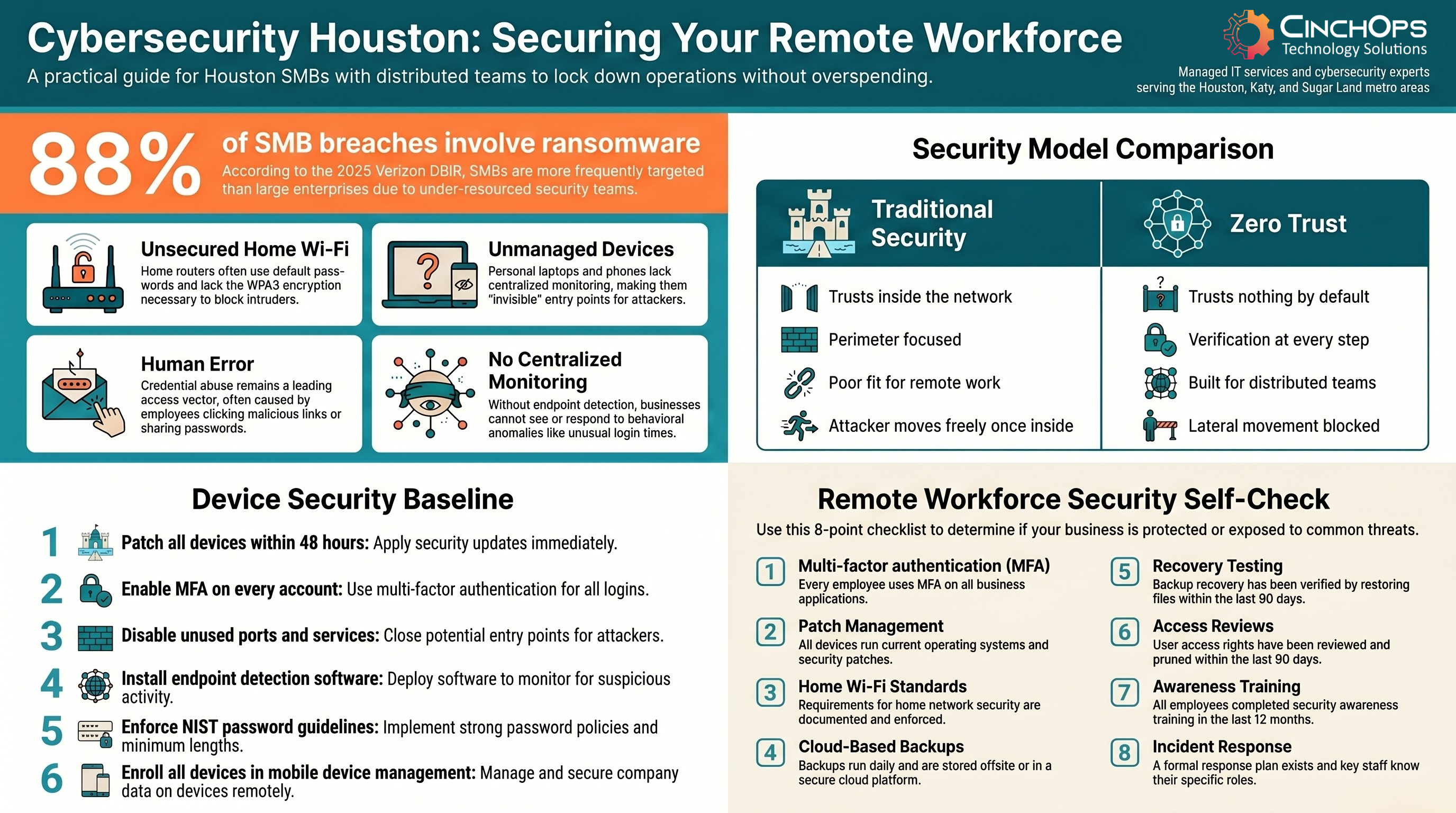
Most Houston small businesses underestimate how much their attack surface grew when remote work became permanent. The risks cluster in four areas: unsecured home Wi-Fi networks, outdated or unmanaged employee devices, human error, and the absence of centralized monitoring. Each is a door an attacker can walk through.
Traditional perimeter security assumes everyone sits inside a protected corporate network. Remote work blows that assumption apart. The 2025 Verizon Data Breach Investigations Report found ransomware appeared in 88% of breaches at small and mid-sized businesses, compared to just 39% at large enterprises. Attackers have figured out that smaller companies typically have weaker incident response, slower patch cycles, and under-resourced security teams.
Where to start your risk assessment:
- Inventory Every Device. Catalog every device that touches company data, including personal phones and laptops employees use occasionally.
- Review Access Rights. Remove permissions employees no longer need, and check for credentials still active for former staff.
- Find MFA Gaps. Identify which business systems still lack multi-factor authentication on every login.
- Locate Unmonitored Endpoints. Find devices connecting remotely to your network without endpoint detection software running.
- Audit Backup Coverage. Check backup practices for gaps specific to remote work, especially files stored only on local laptops.
Watch for behavioral anomalies too. Unusual login times, large data transfers, or access to systems an employee rarely uses can all signal an insider threat or compromised account.
In 35 years working in IT, the most common pattern I see in Houston companies is the quarterly access review that never happens. Terminated employees with active credentials and forgotten personal devices with company data are two of the most preventable breach entry points.
Lay the Groundwork: Secure Workspace and Devices
Once you know where the gaps are, the next move is locking down the basics. None of this requires a six-figure budget, but skipping it is one of the most expensive mistakes a growing Houston business can make.
Start with the physical workspace. Employees should lock screens when they step away, work in private locations when handling sensitive data, and never leave devices unattended in public. Simple habits prevent real incidents.
On the network side, every remote employee's home router is a potential entry point. Securing home Wi-Fi requires WPA3 encryption, a strong unique passphrase, disabled WPS, and regular firmware updates. Public Wi-Fi should stay off-limits for company work unless a trusted VPN is active.
For devices, follow this baseline:
- Patch Within 48 Hours. Require operating system updates to be applied within 48 hours of release.
- Enable MFA Everywhere. Turn on multi-factor authentication for every business application and email account, with no exceptions.
- Disable Unused Services. Shut down ports and services not actively needed on company-issued and approved personal devices.
- Install EDR Software. Put endpoint detection and response on every machine that accesses company data.
- Enforce Strong Passwords. Align password policies with NIST SP 800-63B guidelines for length, complexity, and rotation.
- Use MDM. Enroll devices in mobile device management so IT can push patches and remotely wipe lost or stolen hardware.
Default router passwords are publicly documented. They are the first thing an attacker will try. Firmware updates are equally non-negotiable since they patch vulnerabilities under active exploitation.
Implement Zero Trust Security for Remote Access
Zero trust security is a framework that treats every user, device, and connection as untrusted until verified. Every login, every device, and every connection request is treated as potentially hostile until proven otherwise, regardless of whether it originates inside or outside your network.
This is a fundamental shift from the old castle-and-moat model where anything inside the perimeter was assumed safe. Once an attacker gets past a traditional perimeter, they can often move freely through your systems. Zero trust blocks that lateral movement by requiring verification at every step, so a compromised credential in one department cannot unlock the entire business.
Once an attacker gets past a traditional perimeter, they can often move freely through your systems. Zero trust blocks that lateral movement by requiring verification at every step, so a compromised credential in one department cannot unlock the entire business.
Core zero trust controls Houston businesses should implement:
- Network Segmentation. Isolate each department or system so access is granted only to those who actually need it.
- MFA on Every Login. Require multi-factor authentication for every authentication event, every time, no carve-outs.
- Device Posture Checks. Verify each device meets security standards (patching, EDR active, encryption on) before granting access.
- Continuous Traffic Monitoring. Log and alert on activity across the whole network, not just edge traffic.
- Least-Privilege Access. Limit users to the systems and data their specific role requires, nothing more.
Zero trust is not a product you buy. It is a framework you build. Start with MFA and access segmentation, then layer in device posture checks and continuous monitoring as your program matures.
"In Houston, the businesses that get hit hardest aren't the ones with the most data. They're the ones who treated security as a checklist instead of a practice. The remote workforce makes that mistake more expensive than ever."
Protect Data: Encryption and Reliable Backup
Controlling who gets in is only half the equation. You also need to protect the data itself, both when it sits on a device and when it travels across the internet.
For data at rest (files stored on laptops, desktops, and mobile devices), full-disk encryption is the standard. BitLocker on Windows and FileVault on Mac are built-in tools that encrypt everything on a drive so a stolen device yields nothing useful to an attacker. For data in transit, mandate VPN use and encrypted communication platforms. Unencrypted email and file transfers are easy targets on any network, and doubly so on home or public Wi-Fi.
Backup and disaster recovery is where many Houston businesses discover their gaps only after a crisis hits.
Steps to build a reliable backup practice:
- Mix Local and Cloud Storage. Choose a solution that supports both, so a single failure point doesn't take out your recovery options.
- Automate Daily Backups. Run them at minimum daily, with critical systems backed up more frequently.
- Set Retention Policies. Keep multiple versions of files so you can recover from ransomware that encrypted your most recent data.
- Test Recovery Quarterly. Actually restore files. Confirming a backup completed is not the same as proving you can recover.
- Match Frequency to Tolerance. A business that can lose 24 hours of data is fine on daily backups. One that can't needs hourly or continuous.
Offsite and cloud backups consistently outperform on-premises backup devices for distributed teams. If your office floods or a local server fails, cloud backups remain accessible from anywhere.
Concerned About Your Remote Workforce Security?
Get a free 15-minute consultation with a CinchOps security expert. We'll review your current setup and identify the gaps that matter most.
Talk to CinchOpsWhy Checklists Alone Won't Secure Your Remote Workforce
Here is the uncomfortable truth most security guides skip: you can implement every technical control on this list and still suffer a breach. The reason is almost always the same. Someone clicked a link they should not have, shared a password, or bypassed a security step because it felt inconvenient that day.
The 2025 Verizon DBIR identified
The 2025 Verizon DBIR identified credential abuse as the leading initial access vector at 22% of all breaches, with vulnerability exploitation right behind at 20%. The same report puts the median ransomware payment at $115,000, a serious hit for any Houston SMB, and that doesn't include downtime, recovery costs, or lost customer trust.
Technical tools create the conditions for security. People determine whether those conditions hold. The businesses that genuinely protect their remote workforces do something different. They build a culture where security is understood as every employee's responsibility, not just the IT department's problem.
That means ongoing training, not a one-time onboarding video. It means regular conversations about real threats, not just policy documents. And it means rewarding employees who flag suspicious activity rather than treating security as a burden.
Industry-Specific Remote Work Risks for Houston Businesses
Remote work risk varies by vertical. A Houston law firm protecting client privilege has a different exposure than a Pearland construction company managing site documentation. Use this table to find your industry and the controls that move the needle most.
| Industry | Primary Remote Risk | Critical Control | Compliance Driver |
|---|---|---|---|
| Law Firms | Client data exposure on personal devices | MFA + encrypted email + DLP | ABA Model Rule 1.6, Texas Bar |
| CPA Firms | Tax records, client financial data | Full-disk encryption + DLP | IRS Pub 4557, FTC Safeguards |
| Construction | Mobile device theft, BYOD field use | MDM + remote wipe | Contract data protection clauses |
| Oil & Gas | OT/IT convergence, remote operator access | Network segmentation + zero trust | TSA pipeline directives, CISA |
| Engineering | CAD file theft, IP exposure | EDR + access controls | Client NDA, export control |
| Wealth Management | Client account takeover | MFA + transaction monitoring | SEC, FINRA, Reg S-P |
Whatever industry you operate in across the Houston metro, the principle holds: identify the data that would do the most damage if breached, then build your controls outward from there. Houston business owners can also tap regional resources like the Greater Houston Partnership and Katy Area Chamber of Commerce for peer security discussions and local cybersecurity events.
Your Houston Remote Work Security Self-Check
Remote Workforce Security Checklist
- Every employee uses multi-factor authentication on all business applications
- All employee devices accessing company data run current operating systems and security patches
- Home Wi-Fi requirements are documented and enforced for every remote worker
- Backups run daily and are stored offsite or in a cloud platform
- Backup recovery has been tested by actually restoring files in the last 90 days
- User access rights have been reviewed and pruned in the last 90 days
- All employees completed security awareness training in the last 12 months
- An incident response plan exists and key staff know exactly what their role is
How CinchOps Can Help
Securing a distributed workforce is not a one-time project. It is an ongoing practice that changes as threats evolve and your business grows. CinchOps works with Houston-area businesses to design, implement, and manage the kind of layered security strategy this guide describes.
Here is how we help:
Here is how we help:
- Risk Assessments. Thorough security reviews that identify gaps specific to your industry and remote work setup.
- Zero Trust Implementation. Architecture design and deployment built around your existing infrastructure, not a rip-and-replace project.
- Endpoint Protection and MDM. Coverage across every employee device, with central management and remote wipe capability.
- 24/7 Monitoring. Houston-area teams who know your business, watching your network around the clock.
- Secure Backup and Recovery. Cloud-based backup designed for distributed teams, with quarterly recovery testing built in.
- Security Awareness Training. Programs built around real threats targeting Houston SMBs, not generic compliance videos.
From day one we work as an extension of your team, not a vendor with a quarterly check-in. Most Houston businesses don't need a full-time CISO. They need a managed IT partner with a defined SLA and 24/7 monitoring. That's the work we do.
Frequently Asked Questions
What is cybersecurity for Houston remote workers?
Cybersecurity for Houston remote workers means the policies, tools, and practices that protect company data when employees work outside the office. This includes secured home Wi-Fi, multi-factor authentication on every account, endpoint protection on each device, encrypted communications, and regular backups stored in the cloud or offsite locations.
How much does cybersecurity cost for a Houston small business?
Cybersecurity for a Houston small business typically costs $100 to $300 per employee per month through a managed IT provider. This pricing covers endpoint protection, monitoring, MFA, backup, and patch management. Costs vary based on company size, industry compliance requirements, and the service level agreement the Houston business needs.
What is zero trust security and does my Houston business need it?
Zero trust security is a framework that treats every user, device, and connection as untrusted until verified at every access point. Houston businesses with remote workers benefit significantly from zero trust because it stops attackers from moving laterally if one account or device is compromised, no matter where employees connect from.
Do Houston small businesses need a VPN for remote work?
Houston small businesses should require a VPN for any remote work involving sensitive company data, especially when employees use home or public Wi-Fi. A VPN encrypts traffic between the employee device and company systems, making it much harder for attackers to intercept credentials, files, or communications on untrusted networks.
How often should Houston businesses test backup recovery?
Houston businesses should test backup recovery at least quarterly, with critical systems tested monthly. Testing means actually restoring files and confirming they are intact, not just verifying backups completed. Untested backups regularly fail when needed most, leaving Houston companies unable to recover from ransomware or hardware failure incidents.
Discover More
Related cybersecurity reading for Houston business owners.
Resources
Sources
- The 2025 Verizon Data Breach Investigations Report found ransomware was present in 88% of small and mid-sized business breaches, compared to 39% at large enterprises
- The 2025 Verizon DBIR identified credential abuse (22%) and vulnerability exploitation (20%) as the leading initial access vectors, with a median ransomware payment of $115,000
- NIST SP 800-46 Rev. 2: Guide to Enterprise Telework, Remote Access, and Bring Your Own Device (BYOD) Security
- NIST SP 800-63B Digital Identity Guidelines: Authentication and Lifecycle Management
- CISA Zero Trust Maturity Model Version 2.0: Federal guidance applicable to private sector adoption


