


What Should Be in a Managed IT Contract? (Houston 2026 Guide)
What A Fair Managed IT Clause Says And What A Trap Clause Says – Six Questions To Ask An IT Company Before Signing A Contract
A clause-by-clause walkthrough for Houston businesses: term, auto-renewal, exit handover, SLA remedies and per-user pricing.
What should be in a managed IT contract? There are 6 things, in plain words: how long the term runs, how it renews and how much notice stops the renewal, how either side can end it, what the provider hands back when it ends, what the service level agreement measures and pays when it is missed, and what the per-user price includes.
Our own position comes first so you can weigh everything after it. CinchOps provides managed IT support specifically for small and mid-sized businesses in the Houston area at a flat $100 to $250 per user per month, with no long-term contracts, no hidden fees and no cancellation penalties. The reasoning is on our no contracts, no hidden fees page. Most providers do use a term contract, and a term contract is not a trap by default. A badly written one is. This guide is built to work on any provider's paper, including a month-to-month agreement like ours.
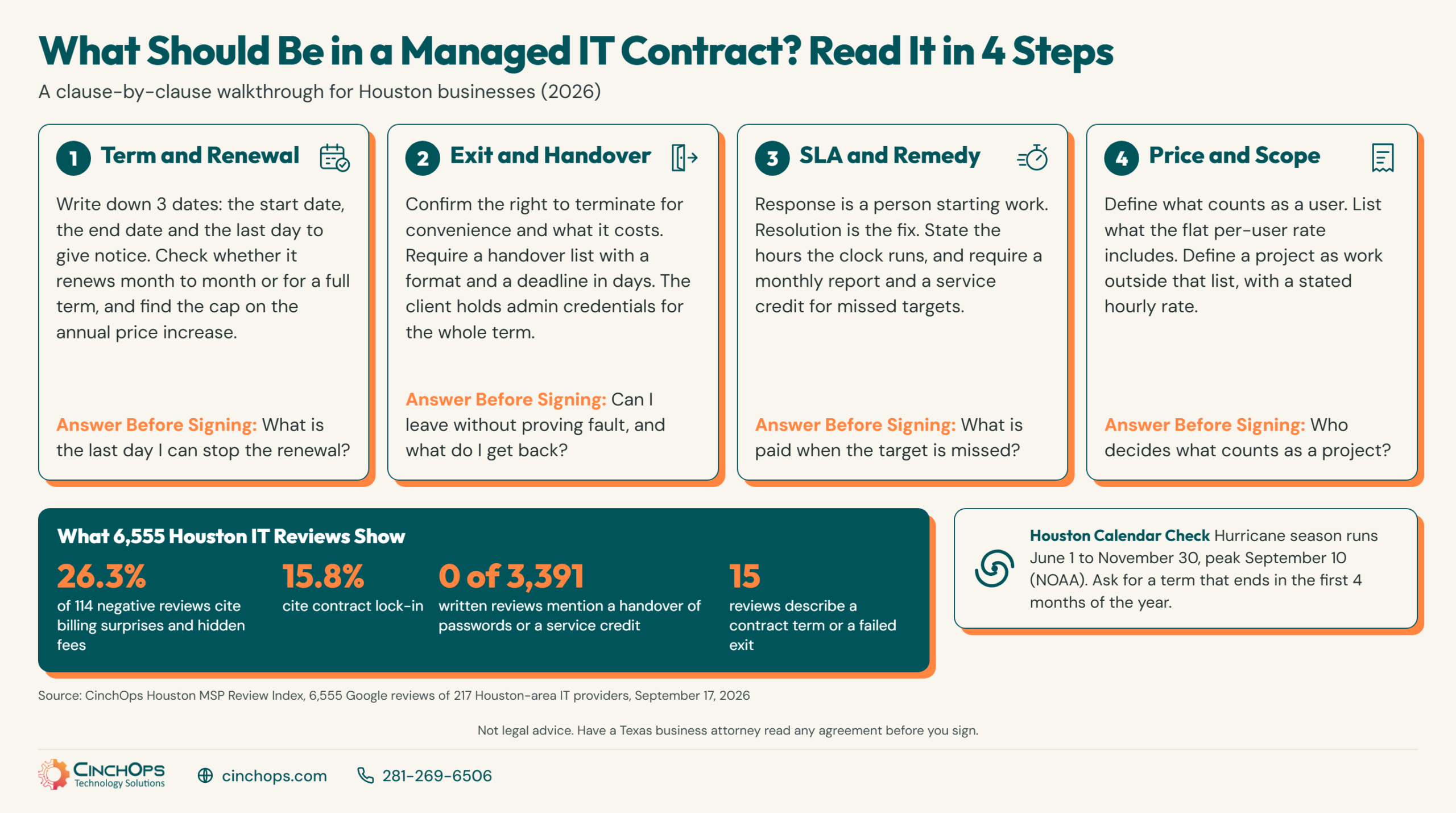
The Houston MSP Review Index, CinchOps' study of 6,555 Google reviews of 217 Houston-area IT providers (September 17, 2026 snapshot), themes 114 negative reviews with written detail. Billing surprises and hidden fees appear in 26.3% of them and contract lock-in in 15.8%. For this guide CinchOps went one level deeper. On September 18, 2026 we searched the 3,391 written reviews in the Index's July 13, 2026 collection, the last full text export, for contract vocabulary: contract, agreement, renewal, termination, cancel, locked in, notice, hidden fee, handover, passwords, documentation. The search returned 89 raw matches. Every one was read by hand, and 15 turned out to describe a term of a managed IT contract or what happened when a customer tried to leave.
One caution before the steps. This guide is not legal advice. CinchOps is an IT provider, not a law firm. Every clause below is treated as a business term to negotiate before signature, and whether a renewal or termination clause is enforceable as written is a question for a Texas business attorney, who should read any agreement of real size before you sign it.
Step 1: Find the Term, the Auto-Renewal and the Notice Window
Three dates decide when a business can leave. Locate all three before reading anything else.
A managed IT contract's term clause sets how long you are committed, the auto-renewal clause sets what happens when that period ends, and the notice window sets the last day you can stop it. Find all 3 dates first, because together they decide when a Houston business can actually leave its IT provider.
An auto-renewal clause is a sentence that starts a new term automatically unless one party gives written notice before a deadline. A notice window is the number of days before the end of the term by which that notice must arrive. Neither is sinister. A provider needs to plan staffing, and a client does not want support to stop on a date nobody was watching. The trouble starts when the renewal is for another full term, the window is long, and the contract says nothing about the provider reminding you.
- Write the 3 dates on the first page. Start date, end date and the last day notice can be given. If the contract makes you calculate them, ask the provider to type them in.
- Ask what the renewal renews into. Month to month after the first term is a very different promise from another 36 months.
- Ask how notice is given. Email to a named address is fair. Certified mail to an address buried in an exhibit is how deadlines get missed.
- Find the escalator. If the price can rise during the term, the contract should state a cap and the date it applies.
Here is the Houston part, and almost nobody negotiates it. The term end date is a choice, and on the Gulf Coast the calendar matters. The NOAA National Hurricane Center puts the Atlantic hurricane season at June 1 to November 30, with the peak on September 10 and most activity between mid-August and mid-October. Take an illustrative contract with a 60-day notice window. If the term ends October 31, the notice deadline is September 1, 9 days before the peak, and the handover to a new provider runs through October, still inside the season. If the same contract ends April 30, the deadline is March 1 and both dates fall outside it. A provider change is the one month when two companies hold pieces of your network, so ask for a term that ends in the first 4 months of the year. It costs the provider nothing, and it is far easier to get before signature than after.
If a renewal notice is what sent you here, CinchOps' guide to switching managed IT providers in Houston covers the renew-or-switch decision and the audit that starts a move. This step only asks you to know your dates.
Step 2: Write the Exit Before You Sign - Termination and the Handover
How either side ends the agreement, what it costs, and what comes back to you.
Termination for convenience is a clause that lets a party end the contract without proving the other side did anything wrong, usually with written notice and sometimes a fee. A managed IT contract should say whether the client has that right, what it costs, and exactly what the provider hands back, by what deadline and in what format.
Most agreements carry two exits. Termination for cause applies when one side breaks the contract and fails to fix it within a cure period. Termination for convenience is the no-fault door, and it is the one to read closely. Some contracts give it only to the provider. Some give it to the client at the price of every remaining month in the term, which is a 3-year commitment with extra steps. A fairer version states a fee that shrinks as the term runs, or no fee after the first year, or ties the right to leave to repeated SLA misses.
The clause that matters most on the way out is the one reviews never mention. Across 3,391 written reviews, 0 describe a handover of credentials, documentation or data at the end of a contract. CinchOps' reading is that the handover goes unreviewed because it happens after the customer has stopped writing reviews about the old provider. It still decides how the first month with the new provider goes. A contract should list what comes back, the format, a deadline in days, and whether the outgoing provider will answer the incoming provider's questions at a stated hourly rate.
Two named sources back the last row of that checklist. Advisory AA22-131A, published May 11, 2022 by CISA, the NSA and the FBI with the cybersecurity agencies of the United Kingdom, Australia, Canada and New Zealand, tells customers to disable managed service provider accounts that are no longer managing infrastructure, and notes that this "can be overlooked when a contract terminates." The same advisory says contractual arrangements should specify that a provider will not reuse admin credentials across multiple customers. On the Microsoft side, a provider usually manages a Microsoft 365 tenant through granular delegated admin privileges. Microsoft's partner documentation says such a relationship lasts up to 2 years and can auto-extend by 6 months until someone ends it, and that the customer can remove a partner's delegated administration privileges in the Microsoft 365 admin center. Put that removal on the exit list by name.
A handover clause that depends on reaching the old provider is weakest in Houston in exactly the weeks it gets tested. Hurricane Beryl struck Texas on July 8, 2024, and the Supreme Court of Texas' emergency order 4 days later noted "difficulties with access, electricity, internet, travel, and communication" for people trying to meet court deadlines. The fix costs nothing: have the contract state that the client holds a current copy of every admin credential and the network documentation in a vault the client owns, refreshed on a schedule, for the whole term. Then an exit, or an emergency, never waits on someone else's office reopening.
Step 3: Make the SLA Define Its Clock and Pay a Remedy
A response promise is only as good as its definitions, its report and its consequence.
A service level agreement (SLA) is the part of a managed IT contract that promises how fast the provider responds and what happens when it does not. A useful SLA defines response separately from resolution, states the hours the clock runs, sets targets by priority, reports results monthly and pays a service credit when a target is missed.
Start with the two words that get blurred in sales meetings. Response is a person beginning work on the ticket. Resolution is the problem being fixed. An automated "we received your request" email is neither, and a contract that counts it as a response has promised you very little. Then check the clock. "Within 1 hour" means one thing if the clock runs around the clock and another if it runs during business hours on weekdays, and for a Houston business the contract should say what happens to those hours when a storm closes the provider's own office.
Priority levels are the third definition to pin down. If the provider alone decides what counts as Priority 1, the provider alone decides which promise applies. A fair SLA describes each level in business terms, such as "the whole office cannot work" or "one person is blocked," and lets the client dispute a classification.
Then comes the part most SLAs leave out. One of the 15 contract reviews came from an organization whose provider answered complaints by saying it was meeting its contractual SLAs, while the reviewer said call times had grown and nobody on staff wanted to open a ticket anymore. Without a monthly report the client can read, that argument has no referee. Without a remedy, it has no point. The usual remedy is a service credit, a stated percentage of the monthly fee returned when a target is missed. The better one adds a right to terminate without a fee after repeated misses in a stated period. In 3,391 written reviews, 0 mention a credit or any other SLA remedy, which suggests few Houston businesses have ever collected one.
- Ask for last month's SLA report for a client your size, with the name removed. A provider that measures its targets can produce one the same day.
- Ask who owns security duties. CISA advisory AA22-131A says a contract should specify whether the provider or the customer owns responsibilities such as hardening, detection and incident response.
- Ask about incident notice. The same advisory says contracts should detail how and when a provider notifies the customer of an incident affecting the customer's environment. That is a service level too, and it belongs in writing.
Step 4: Pin Down What the Per-User Price Includes and What Bills as a Project
The scope schedule, not the monthly rate, decides what managed IT really costs.
Per-user pricing is a flat monthly fee for each person the provider supports, and a managed IT contract should list what that fee includes and what is billed separately. CinchOps publishes $100 to $250 per user per month for Houston-area businesses. Whatever the rate, the scope schedule decides the real cost, because everything outside it arrives as a separate invoice.
Billing is where Houston IT relationships break most often. In the Houston MSP Review Index, billing surprises and hidden fees lead every complaint theme at 26.3% of 114 negative reviews in the September 17, 2026 edition. The contract cut agrees in miniature: 4 of the 15 contract reviews describe hidden fees, disputed invoices or charges that kept coming, and 1 describes a trip fee charged on top of the monthly rate every time someone had to come on site. Three reviews go the other way and praise a flat or all-inclusive agreement by name, because the writer knew what the bill would be.
The arithmetic is simple once the scope is fixed. A 25-person Houston office at CinchOps' published range pays $2,500 to $6,250 per month, depending on tier: Launch at $100 to $125, Mission at $125 to $175 and Explorer at $175 to $225 or more per user per month. A lower rate with a thin schedule can cost more by December than a higher rate that includes the work. CinchOps' managed IT pricing guide for Houston breaks the range down further. Per-user pricing is how CinchOps bills, never per device.
The table below compares what a fair clause and a trap clause say for each of the 7 clauses covered in the 4 steps of this managed IT contract guide, so a contract can be checked against it line by line.
| Contract clause | What a fair clause says | What a trap clause says |
|---|---|---|
| Term length | States the start and end dates in writing. Month to month, or a fixed term short enough to plan around. | A multi-year term whose end date you have to calculate, paired with a fee for every remaining month. |
| Auto-renewal | Renews month to month or for a short stated period, and the provider must send a written reminder before the deadline. | Renews for another full term automatically, with no duty to remind the client. |
| Notice window | A short window, with notice accepted by email to a named address. | A long window, with notice valid only by certified mail to an address listed in an exhibit. |
| Termination for convenience | Either party can end the agreement with written notice. Any fee is stated and shrinks over the term. | Only the provider can leave without cause. The client leaving early owes all remaining months. |
| Exit handover | Lists what is returned, the format and a deadline in days. The client holds admin credentials for the whole term. | Silent on handover, or makes it conditional on paying a final invoice the client disputes. |
| SLA and remedy | Defines response and resolution, hours and priorities. Monthly report, a service credit, and a right to leave after repeated misses. | "Commercially reasonable efforts," or targets with no report and no consequence. |
| Price and scope | Per-user fee with "user" defined, a schedule of included services, a project definition with rates, and a capped annual increase. | Scope described as "as needed." The provider decides what a project is, and the increase has no cap. |
Holding a Contract You Have Not Signed Yet?
Walk the 4 steps with a Houston provider that works without long-term contracts, and compare the answers with the paper on your desk.
Talk to CinchOpsIn 35+ years doing this, I have never seen a contract keep a client happy who wanted to leave, and I have never seen a good provider need one to keep a client who was happy. Read the exit clause first. If you can live with how it ends, the rest is detail you can negotiate.
See How a Provider Without Long-Term Contracts Writes It Down
CinchOps publishes its terms: no long-term contracts, no hidden fees and no cancellation penalties, with managed IT services billed at a flat rate per user. Read the commitment, then hold it to the same 4 steps as any other agreement.
Read the CinchOps commitment →How CinchOps Helps Houston Businesses Sign IT Agreements They Can Leave
CinchOps is a managed IT services provider based in Katy, Texas, serving small and mid-sized businesses across the Houston metro area. CinchOps specializes in cybersecurity, network security, managed IT support, VoIP, and SD-WAN for businesses with 10 to 200 employees.
How CinchOps measures against the 4 steps - judge for yourself:
- Term and exit (Steps 1 and 2). CinchOps operates on a Zero-Zero-Zero model: no long-term contracts, no hidden fees and no cancellation penalties, plus a 30-day satisfaction guarantee. Ask us for the handover list in writing anyway.
- SLA and remedy (Step 3). The CinchOps help desk responds in under 15 minutes. Ask what hours that clock runs and what remedy applies if we miss it, and get both answers in writing.
- Price and scope (Step 4). A flat monthly rate of $100 to $250 per user. Ask for the scope schedule and read it against the invoice illustration above the comparison table.
- Track record. CinchOps is about 2 years old and is led by a founder with 35+ years in IT, so ask for our longest-standing client and call them.
- Help desk, patching, monitoring and security run under one flat per-user rate, delivered as managed IT support and cybersecurity services.
- Backups are geo-redundant outside the Gulf Coast flood zone and restore-tested on a schedule, under business continuity and disaster recovery, so a hurricane that closes the office does not also take the backups.
- Budget and renewal planning sit with virtual CIO services, including a second read of a scope schedule before a Houston business signs one.
- CinchOps supports law firms, CPA firms and construction companies, with local teams for managed IT in Houston, Katy, Sugar Land, Cypress and The Woodlands.
The contract on your desk was written by the other side, in a week when everyone is on their best behavior. Spend an hour on the 4 steps before you sign it, write your 3 dates on the first page, and have an attorney read anything you cannot explain back. If you would like to compare it with an agreement that has no term to escape from, talk to CinchOps.
Frequently Asked Questions
What should be in a managed IT contract?
A managed IT contract should state the term with its start and end dates, how it renews and the notice deadline, how either side can terminate and at what cost, what the provider hands back at exit, what the SLA measures and pays when missed, and what the per-user price includes versus what bills as a project.
What should I ask an IT company before signing a contract?
Ask an IT company for 6 things in writing before signing: the last day you can stop the renewal, the cost of leaving early, the list of credentials and documentation you get back, last month's SLA report for a client your size, the schedule of included services, and the hourly rate for project work.
How do I get out of a managed IT contract?
Read the termination and renewal clauses, put the notice deadline on a calendar, inventory every credential and license the provider holds, and send written notice exactly the way the contract requires. Ask a Texas business attorney to review any early termination fee. Remove the old provider's admin access once the handover is complete.
What does a managed IT contract cost in Houston?
Managed IT in Houston is commonly billed as a flat monthly rate per user. CinchOps publishes $100 to $250 per user per month, with no long-term contracts, no hidden fees and no cancellation penalties, so a 25-person office pays $2,500 to $6,250 per month. Confirm what the rate includes before comparing quotes.
What is an auto-renewal clause in a managed IT contract?
An auto-renewal clause starts a new contract term automatically unless one party gives written notice before a deadline called the notice window. Check what the agreement renews into, how many days of notice it requires, how notice must be delivered, and whether the provider has to remind you before the deadline passes.
Who should hold the admin passwords under a managed IT contract?
The client should hold a current copy of every admin credential for the whole term, in a vault the client owns. CISA advisory AA22-131A tells customers to disable provider accounts that no longer manage their systems and warns that this step can be overlooked when a contract terminates.
Discover More
Resource
Sources
- CinchOps Houston MSP Review Index (September 17, 2026 edition) - 217 Houston-area IT providers, 6,555 Google reviews, 114 negative reviews themed; contract-vocabulary search over the 3,391 written reviews in the July 13, 2026 collection run September 18, 2026
- CISA, NSA, FBI and partner agencies, Advisory AA22-131A, "Protecting Against Cyber Threats to Managed Service Providers and their Customers" (May 11, 2022)
- Microsoft Learn, Partner Center, "GDAP frequently asked questions" (relationship duration and auto extend)
- Microsoft Learn, Partner Center, customer removal of a partner's delegated administration privileges
- NOAA National Hurricane Center, Tropical Cyclone Climatology (season June 1 to November 30, peak September 10)
- Supreme Court of Texas, Misc. Docket No. 24-9042, emergency order after Hurricane Beryl (July 12, 2024)
- CinchOps, "No Long-Term Contracts. No Hidden Fees. No Excuses. The CinchOps Way."


