


Backup Testing for Houston Businesses: The Restore Test
Your Backup Is Only As Good As Your Last Successful Restore – Detection And Recovery Are Different Capabilities
When Did You Last Restore Something?
Houston businesses back up every night and find out on the worst possible morning that nobody ever checked whether the restore works.
Backup testing is the only evidence that your data is actually recoverable. Everything else is a dashboard telling you a job finished, which is a different claim entirely.
A green checkmark in a backup console means a process ran. It does not mean the files inside that copy will open, that the application will start, or that your team can get through the restore before customers notice. Those are separate questions, and the only way to answer them is to run a restore on purpose, on a calm Wednesday, before you need it.
CinchOps runs documented restore tests for construction firms, CPA practices, and law firms across the Houston metro area, with backup copies held geo-redundantly outside the Gulf Coast flood zone. In 35+ years doing this, the pattern almost never changes: the backup job was fine, and the recovery was the part nobody had ever rehearsed. A backup and disaster recovery audit shows whether that is true of yours before you need the recovery.
Why Do Untested Backups Fail?
Backups fail quietly, and the failure surfaces at the exact moment you have no time to troubleshoot it.
Backup testing means restoring real production data from a backup copy on a schedule, then confirming the files open, the applications run, and the whole recovery finished inside a window your business can survive.
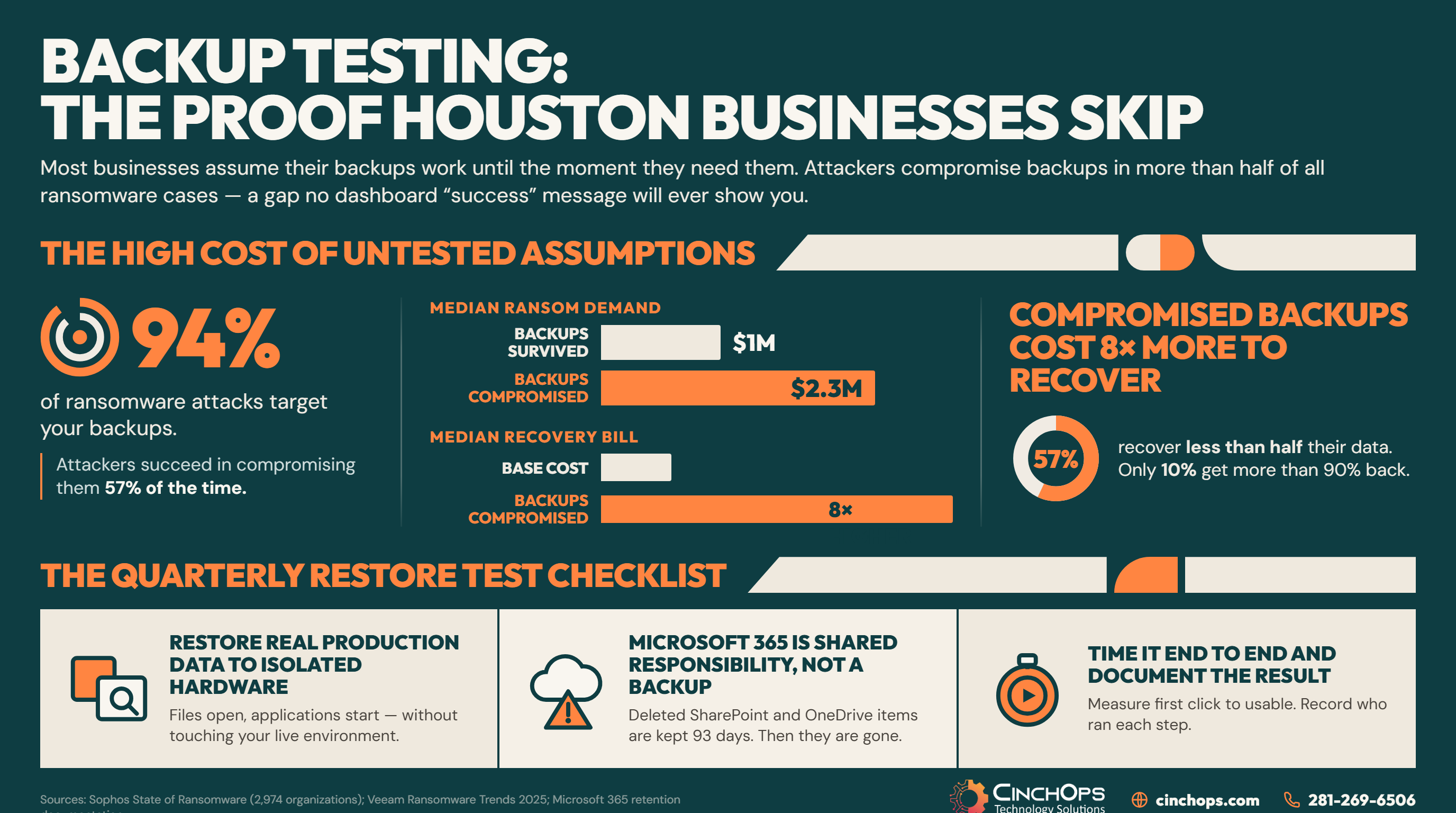
The strongest argument for testing is that attackers already know your backups are the thing standing between them and a payment. Sophos, in its research on compromised backups, found that 94% of ransomware victims said attackers tried to compromise their backups, and 57% of those attempts succeeded. That study surveyed 2,974 organizations hit by ransomware. In the energy, oil, gas, and utilities sector, which matters in this market, the success rate reached 79%.
The consequences are not subtle. In the same Sophos research, organizations whose backups were compromised faced a median ransom demand of $2.3M against $1M for those whose backups held, paid the ransom at 67% versus 36%, and carried a median recovery bill roughly eight times higher. Only 26% of the compromised-backup group was fully recovered within a week, against 46% of the group whose backups survived.
Veeam's 2025 ransomware research puts the recovery gap plainly: only 10% of attacked organizations recovered more than 90% of their data, while 57% recovered less than half of it. Sophos' State of Ransomware 2025, a survey of 3,400 IT and security leaders across 17 countries, found backup-based recovery at its lowest rate in six years.
None of that requires an attacker, though. Most of the failures we find in a first restore test are boring:
- Scope drift. A new server, share, or SaaS app got added and nobody added it to the backup selection. The job still reports success because it backed up everything it was told to.
- Silent corruption. Files degrade or a configuration changes after a software update, and the copy stays unreadable for months without triggering an alert.
- Credential rot. The service account used by the backup agent expired or lost permissions on one system, and only that system stopped being protected.
- No known-good point. Retention is short enough that by the time anyone notices a problem, every copy in the chain already contains it.
- Nobody has ever done it. The restore is technically possible and takes four hours instead of 20 minutes because the person doing it is reading documentation for the first time.
Microsoft 365 Keeps Your Files for 93 Days, Not Forever
Cloud platforms operate on shared responsibility. Microsoft keeps the service running. Recovering your data is your job.
Microsoft 365 is not a backup. It is a live production system with a recycle bin, and a recycle bin is a grace period, not a recovery plan. A separate Microsoft 365 backup keeps mailboxes, SharePoint and OneDrive recoverable after the recycle bin has emptied.
Per Microsoft's own documentation, deleted SharePoint and OneDrive items are retained for 93 days from the moment of deletion. That window covers both the site recycle bin and the site collection recycle bin; emptying the first one does not restart the clock. When a user account is deleted, their OneDrive is retained for a default of 30 days before it moves to the site collection recycle bin for 93 days.
Those numbers are generous for an accident someone catches on Tuesday. They are useless for a problem discovered in the next fiscal quarter, which is exactly when billing errors, missing case files, and bad document versions tend to surface.
| What happens | Microsoft 365 on its own | A tested backup |
|---|---|---|
| Employee deletes a shared folder | Recoverable from the recycle bin for 93 days from deletion | Restored from any retained point in time under your policy |
| Employee leaves and the account is deleted | OneDrive retained 30 days by default, then 93 days in the site collection recycle bin | An independent copy that is not tied to a license |
| Someone saves over the good version | Version history, if it is enabled and the good version is still within the limit | Point-in-time restore of the whole data set, not one file at a time |
| Ransomware encrypts a synced folder | Encrypted versions sync to the cloud; recovery depends on clean versions surviving | A clean copy taken before the attack, held separately |
| Problem is discovered four months later | Gone | Still recoverable if retention was set for it |
| Proof that any of this works | None. Nothing in the platform tests your recovery for you. | A dated restore log with a measured recovery time |
The trap in that table is the last row. Everything above it is a policy decision you can make in an afternoon. The last row is a habit, and habits are the part that gets skipped.
Your Monitoring Tool Can Tell You It Broke. It Cannot Put It Back.
Detection budgets have grown fast. Recovery budgets have not, and the gap shows up in the hours after an alert.
Detection and recovery are separate capabilities. Buying more of the first does nothing for the second, and most businesses have spent almost entirely on the first.
Modern monitoring is genuinely good. It flags unusual activity, catches a failed job, and wakes the right person at 4 a.m. faster than any human rotation ever did. Then it stops. It will not rebuild a file server, re-point an application, or tell your office manager what to say to the client calling at 8:15.
A smoke detector is worth every dollar and has never once put out a fire. It buys you time. What you do with that time was decided months earlier, by whether anyone practiced.
This is also where the cost of downtime stops being a technology number. Your team experiences an outage as a ticket with an ETA. Your customers experience it as a business that was not there, and they price that into every future interaction. The hard costs of idle staff and delayed delivery are recoverable. The prospect who reached out mid-outage, got nothing, and quietly moved to the next name on their list never appears in any report you will read afterward. There is no dashboard for the deal you did not know you were in.
Run This Restore Test Before Hurricane Season Peaks
A real restore test takes an afternoon and settles questions that a backup report cannot answer.
A restore test is only valid if it uses real production data, runs on separate hardware, and gets timed. Anything short of that is a demo.
NOAA's 2026 Atlantic hurricane outlook calls for a below-normal season, with 8 to 14 named storms, 3 to 6 hurricanes, and 1 to 3 major hurricanes. A quiet forecast is the most dangerous input a Houston business can be given, because it invites exactly the wrong conclusion. Season severity forecasts predict basin activity. They predict nothing about the water that reaches your server closet.
Run the test on the schedule below regardless of the forecast:
Two rules make the difference between a test and a performance. Do not tell the team the date in advance after the first run, and do not let the person who built the backup be the person who restores it. You are testing the documentation, not the engineer who already knows the answers.
- Quarterly is the floor. Monthly for anything covered by HIPAA, a cyber insurance policy, or a client contract with a recovery clause.
- Rotate the target. File server this quarter, line-of-business application next, Microsoft 365 mailbox and SharePoint after that. Testing the same easy workload four times a year proves one thing four times.
- Record the failures. The first test is supposed to break. A test that passes cleanly on the first attempt usually means the scope was too small.
- Re-test after any material change. A new application, a server migration, or an office move invalidates the last result.
When was your last successful restore?
If the answer is a shrug, that is the finding. We will run the first test with you and hand you the results either way.
Talk to CinchOpsNobody has ever called me to say their backup failed. They call to say their restore failed. Those are two different sentences, and most businesses do not learn the difference until the worst possible morning.
A backup you have never restored is an untested assumption
CinchOps builds and tests recovery for Houston-area businesses through business continuity and disaster recovery services, with copies held geo-redundantly outside the Gulf Coast flood zone and a measured recovery time you can hold us to.
See CinchOps BCDR services →How CinchOps Can Help You Prove Your Backups Work
CinchOps is a managed IT services provider based in Katy, Texas, serving small and mid-sized businesses across the Houston metro area. CinchOps specializes in cybersecurity, network security, managed IT support, VoIP, and SD-WAN for businesses with 10 to 200 employees.
We run the restore test, document what broke, fix it, and re-run it. Most first tests turn up something, which is the point of doing them on a schedule instead of under pressure.
- Through business continuity and disaster recovery, we set retention to match how late your business actually discovers problems, not the platform default.
- Through managed IT support, restore testing runs on a calendar at a flat monthly rate per user, so proving recovery is not a line item you have to approve each time.
- Through cybersecurity, backup copies are held immutable and separated from production credentials, which is what defeats the 57% success rate Sophos measured on backup compromise attempts.
- Through cloud services, Microsoft 365 mail, SharePoint, OneDrive, and Teams get a backup that outlives the 93-day recycle bin.
- We work across Houston, Katy, Sugar Land, and Cypress, with recovery requirements tuned per industry for construction, CPA firms, law firms, and oil and gas.
You do not need a bigger backup budget. You need one afternoon, a stopwatch, and the willingness to find out something is broken while it is still cheap to fix. Pick a date this quarter, put it on the calendar, and treat the first failure as the return on the exercise. If you would rather not run it alone, talk to CinchOps and we will run it with you.
Frequently Asked Questions
How often should a business test its backups?
Quarterly is the practical floor for most small and mid-sized businesses. Move to monthly if you are covered by HIPAA, hold a cyber insurance policy with a recovery clause, or have client contracts specifying uptime. Re-test after any server migration, new application, or office move, since those invalidate your last result.
What does backup testing cost in Houston?
At CinchOps, restore testing is included in managed IT support at a flat monthly rate per user rather than billed per test, so the price tracks headcount and does not move when you actually use it. That matters, because testing billed as a project is the first thing cut from a tight quarter.
Does Microsoft 365 back up my data?
No. Microsoft operates a shared responsibility model: Microsoft keeps the platform available, and protecting your data is your responsibility. Deleted SharePoint and OneDrive items are retained 93 days from deletion, which is a grace period rather than a backup. Anything discovered after that window is gone.
What is the difference between a backup and a disaster recovery plan?
A backup is a copy of your data. A disaster recovery plan is the documented sequence that turns that copy back into a working business: who acts, in what order, on what hardware, and inside what time limit. The copy is worthless without the sequence, and the sequence is unproven until somebody runs it.
How long should a full restore take?
There is no universal number. The right target is the longest outage your business can absorb without losing revenue or customers, decided before the test rather than discovered during one. Measure the actual restore, compare it against that target, and treat any gap as the work item.
Discover More
Resource
Sources
- Sophos, The Impact of Compromised Backups on Ransomware Outcomes - survey of 2,974 organizations hit by ransomware; 94% backup compromise attempt rate, 57% success rate, ransom demand and recovery cost comparisons.
- Sophos, The State of Ransomware 2025 - survey of 3,400 IT and cybersecurity leaders across 17 countries; backup-based recovery at a six-year low.
- Veeam, 2025 Ransomware Trends and Proactive Strategies Report - 10% of attacked organizations recovered more than 90% of their data; 57% recovered less than half.
- Microsoft, Restore items in the recycle bin deleted from SharePoint or Teams - 93-day retention from the moment of deletion.
- Microsoft Learn, OneDrive retention and deletion - 30-day default retention for a deleted user's OneDrive, then 93 days in the site collection recycle bin.
- NOAA, 2026 Atlantic Hurricane Season Outlook - 8 to 14 named storms, 3 to 6 hurricanes, 1 to 3 major hurricanes.


