


Claude for Small Business: AI Houston Owners Can Actually Run
A Practical Look At AI For Houston Companies – Setting Up Claude For Small Business The Right Way
Anthropic just shipped an AI tool built for small companies, not the chatbot you already tried. Here is what it does and how to adopt it safely.
Anthropic shipped Claude for Small Business, and it is a different animal than the chatbot most owners have poked at. This release does not just answer questions. It connects to the tools you already run, pulls your real numbers, and completes multi-step jobs while you approve the results. For a Houston small business, that is the line between a novelty and a tool that earns its keep.
Owners who have been searching for "AI Houston" help have mostly found generic advice. This is more concrete. Claude for Small Business is a one-click plugin that links to QuickBooks, PayPal, HubSpot, and the rest of your stack, then runs workflows like a month-end close or a weekly cash brief. The catch, and there is always a catch, is that an AI tool reaching into your books and your inbox needs to be set up with the same care you would give any new hire with system access.
What Anthropic Actually Released
Claude for Small Business is a packaged solution, not a new model. Here is what is in the box.
Claude for Small Business is a one-click plugin that installs a set of skills and common automations built for popular business tools. It runs inside Claude Cowork in the desktop app. The pitch from Anthropic is that it works on day one with no lengthy setup and no help from IT, so a small company can run its first workflow the same afternoon it installs.
What separates this release from a standard chatbot is that it carries out end-to-end work. You delegate the task, Claude does the steps, and you keep the decisions. The release covers a few moving parts:
- A one-click plugin that bundles the small business skills and automations together.
- Connectors to the apps you already use, which pass your data and context to Claude.
- A guided start where you install the plugin, toggle it on in Claude Cowork, and ask Claude to "get me started."
- A free training course on using AI well, built specifically for small business staff.
What It Connects To and What It Runs
The connectors are the point. They are how Claude moves from talking to doing.
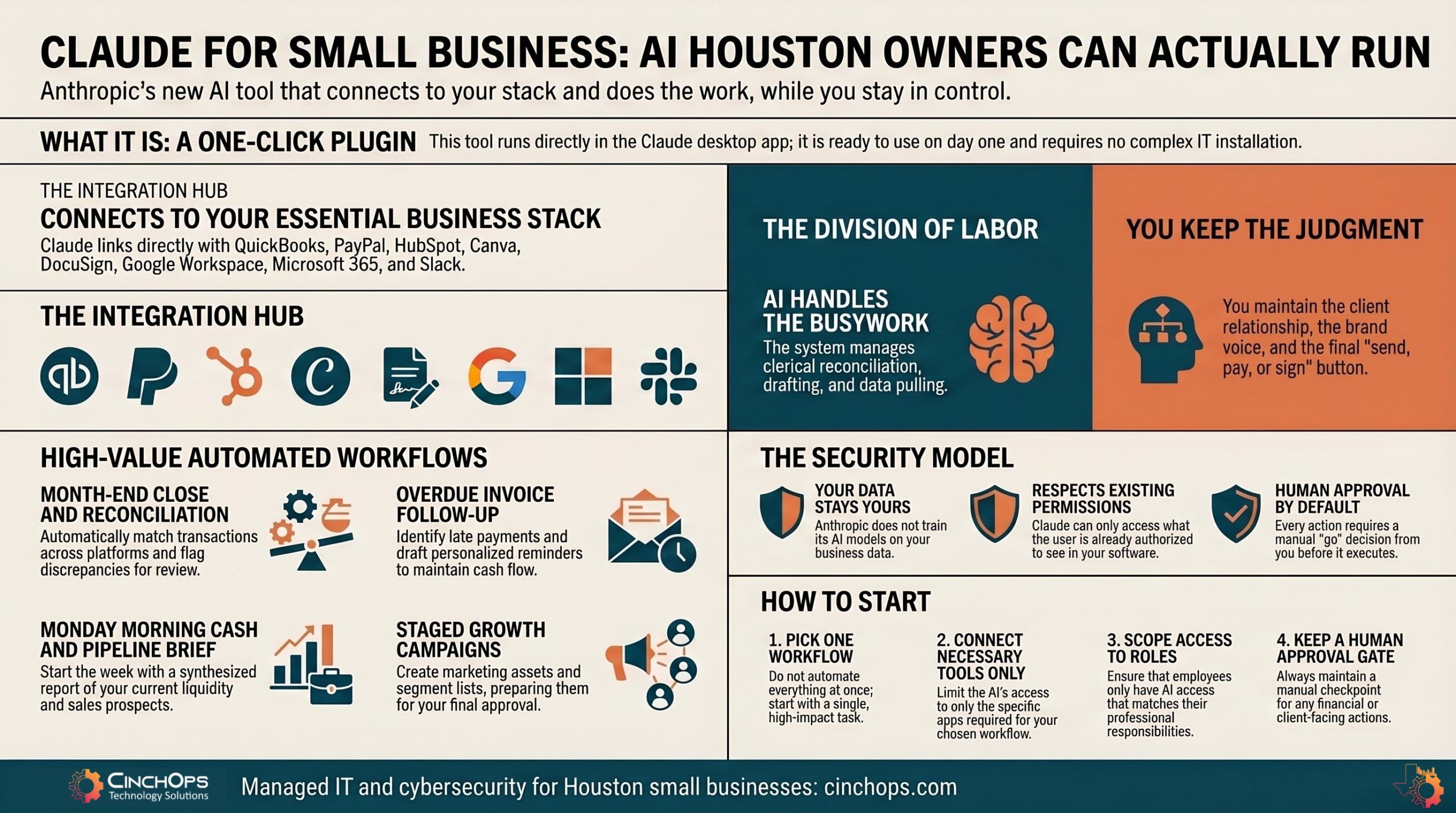
Claude for Small Business connects to QuickBooks, PayPal, HubSpot, Canva, DocuSign, Google Workspace, Microsoft 365, and Slack, with more in the catalog. Connecting those tools is what lets it run jobs across them instead of just describing what you should do. The headline workflows in the release look like this:
- Month-end close. Reconcile QuickBooks transactions against PayPal settlements, flag what does not match, and write a plain-English profit and loss narrative ready to forward to your accountant.
- Payroll prep. Pull cash position, rank overdue invoices that could close a gap, and draft a reminder email for each one. You review and send.
- The Monday brief. Combine cash from QuickBooks, settlements from PayPal, pipeline from HubSpot, and your calendar into the three things that need you today, delivered in Slack.
- Growth campaigns. Find your weakest revenue month from last year, draft a promo, build the assets in Canva, segment the list in HubSpot, and stage the send. Nothing goes out until you approve it.
Early users describe the same shift. A coffee company COO said the tool surfaced problems he did not know he had. A manufacturer called the old constraints simply gone. The pattern is consistent: hours of clerical work disappear, and owners spend that time on the parts of the business that move revenue.
| Workflow | What Claude Handles | What You Still Own |
|---|---|---|
| Month-end close | Reconciliation, mismatch flags, P&L narrative | Whether the numbers are right and what to do next |
| Invoicing follow-up | Ranks overdue accounts, drafts reminders | Tone with the client and the send button |
| Marketing campaign | Strategy draft, Canva assets, list segments | The offer, the brand voice, the go decision |
| Weekly brief | Pulls cash, pipeline, and calendar into one view | Which priority gets your attention first |
The Security Model Is the Part That Matters
An AI tool that touches your books and your contracts is an access-control question, not just a productivity one.
Anthropic built the security story into the release rather than bolting it on, and it shows. The model does not train on your business data. Claude respects the permissions you already set in each tool, so if a staff member cannot see something in Gmail or DocuSign today, they cannot see it through Claude either. By default, you approve each action before it runs, and you can see which tool Claude is about to touch.
That is the right design, and it is only half the job. The default settings protect you, but a small business still decides who connects what and which roles get access. Misconfigured access is where the risk lives, and that part is on you.
- Scope access to roles. Your front-desk hire does not need AI reaching into payroll. Match Claude's reach to the access your people already have.
- Keep a human gate on anything that sends, pays, or signs. Let Claude prepare. Keep yourself on the trigger.
- Log what the AI touched. Keep a record of which tools it reached into and when, the same as any employee with system access.
- Confirm the data policy in writing. Anthropic states it does not train on your data. Hold every AI vendor to that same standard.
The companies that get value out of this release are the ones who treat the connectors like keys to the building. You would not hand a new hire every key on day one. Same rule applies to AI.
This Is Where an MSP Earns Its Keep
Most owners can install a plugin. Fewer can tell whether the connectors are scoped right, whether sensitive data is exposed, and whether the audit trail would survive a cyber insurance claim. That gap is exactly what we close. See our CTO and CIO services for the strategy side and cybersecurity for the guardrails.
Lock down your AI rollout →Thinking About Rolling Out AI?
We will help you connect Claude for Small Business to the right tools, scope access correctly, and keep it monitored so your data stays where it belongs.
Talk to CinchOpsPricing and Setup Are Both Light
There is no enterprise procurement cycle here. That is the appeal and the trap.
On price, Anthropic lists Claude Pro for individuals and Claude Team for a whole business, with current rates published at claude.com/pricing. On setup, connectors are one click and the plugin installs in a few minutes. You do not need an IT department to start, which is exactly why so many teams will start without one.
Getting going follows a simple order:
- 1. Download the desktop app and the Small Business plugin. Both come straight from Anthropic.
- 2. Toggle the plugin on in Claude Cowork and ask Claude to get you started.
- 3. Connect only the tools your first workflow needs. Not the whole stack. Prove value on one job first.
- 4. Keep yourself in the approval loop for anything that sends money or leaves the company.
The Free AI Fluency Course Is Worth an Afternoon
The tool is the easy part. Your team knowing how to use it well is what returns the investment.
Adoption fails when owners buy a tool and assume staff will figure it out. Alongside the release, Anthropic offers a free AI Fluency for Small Businesses course, built with PayPal and two real small businesses. It teaches a simple model called the 4D Framework: Delegation, Description, Discernment, and Diligence.
In plain terms, that is knowing what to hand to AI, how to ask for it clearly, how to check the result, and how to use it responsibly. It is short, it is free, and it works with any chatbot. For a Houston owner who wants the whole team using AI well rather than one power user doing it alone, that is a smart hour spent before you scale anything.
How CinchOps Can Help Houston Businesses Adopt AI
The opportunity is real. So is the risk of doing it sloppily. This is the part we handle.
CinchOps is a managed IT services provider based in Katy, Texas, serving small and mid-sized businesses across the Houston metro area. CinchOps specializes in cybersecurity, network security, managed IT support, VoIP, and SD-WAN for businesses with 10 to 200 employees. When a Houston company wants to adopt Claude for Small Business without exposing client data, we handle the setup, the access controls, and the ongoing monitoring so the rollout is safe from day one.
- Through managed IT support, we wire AI tools into your existing systems and keep them patched and watched.
- With business process automation, we sort which workflows are worth handing to AI and which are not.
- Through cybersecurity, we scope connector permissions to roles and keep an audit trail of what the AI touches.
- We serve owners across Houston, Katy, and Sugar Land, with industry experience for CPA firms, construction companies, and wealth management firms.
Adopt the tool, keep the guardrails, and AI becomes an advantage for your Houston business instead of a liability. That balance is what CinchOps is built to deliver.
Frequently Asked Questions
What is Claude for Small Business?
Claude for Small Business is a one-click AI plugin from Anthropic that runs in the Claude Cowork desktop app. It connects to tools like QuickBooks, PayPal, HubSpot, and Slack, then completes multi-step tasks such as month-end close or invoice follow-up while you approve the results. It is built for small companies, not enterprises.
Is it safe to connect Claude to QuickBooks and email?
It is safe when access is scoped correctly. Claude respects the permissions you already set in each tool, does not train on your business data, and by default asks you to approve each action. The risk comes from granting broad access without controls, which is where an IT partner like CinchOps reduces exposure for Houston businesses.
How much does Claude for Small Business cost?
Anthropic lists standard pricing as Claude Pro for individuals and Claude Team for a whole business, with current rates at claude.com/pricing. The larger cost for most small businesses is doing the rollout right: setup, access controls, and staff training. That investment is small next to the cost of a misconfigured AI tool.
Do I need an IT person to set it up?
You can install the plugin yourself in a few clicks, and connectors are one click each. You do not need IT to start, but you do need someone to verify connector permissions, protect sensitive data, and keep an audit trail. CinchOps handles that layer so AI adds output without adding security gaps.
What can a Houston small business actually do with it?
A Houston small business can reconcile its books against payments, follow up on overdue invoices, build a weekly cash and pipeline brief, and stage marketing campaigns, all from inside Claude. The fastest payoff is removing repetitive back-office work so owners focus on revenue decisions instead of clerical tasks.
Discover More
Resource
Sources


