


What IT Services Should Every CPA Firm Have? (2026 Checklist)
A Practical Review Of Accounting Firm IT Coverage – Ten Services, Seven Warning Signs, One Checklist
The ten services a Houston accounting firm should have in place before tax season, and how to spot the gaps.
IT services for CPA firms cover 10 core areas, and the ones accounting firms most often lack are not help desk or hardware. They are compliance support, identity management, and tested backups.
CinchOps delivers managed IT built specifically for CPA firms across the Houston metro at $100 to $250 per user per month, with help desk requests answered in under 15 minutes (typically faster). Firms usually discover their gaps in one of two ways: a compliance question they cannot answer, or a February where something broke and the answer took two days.
A modern accounting practice runs on tax preparation software, document management, secure client portals, and Microsoft 365, with staff working from home for a meaningful part of the year. That combination sets a higher floor than most small businesses need.
Why do CPA firms need different IT services than other small businesses?
The data an accounting firm holds changes the requirement.
CPA firms handle tax returns, Social Security numbers, payroll records, banking details, and financial statements, which places them under the FTC Safeguards Rule and IRS written-security-plan expectations that most small businesses never face.
The practical effect is that several services other businesses treat as optional are baseline here. Security awareness training is not a nice-to-have when a single well-written wire-transfer email during filing season can move real money. Documented risk assessment is not paperwork when a regulator asks what you did.
There is also a load problem no other vertical has in quite the same shape. A CPA firm's technology demand roughly doubles for 10 weeks and then returns to normal. Systems that are adequate in September are the constraint in March.
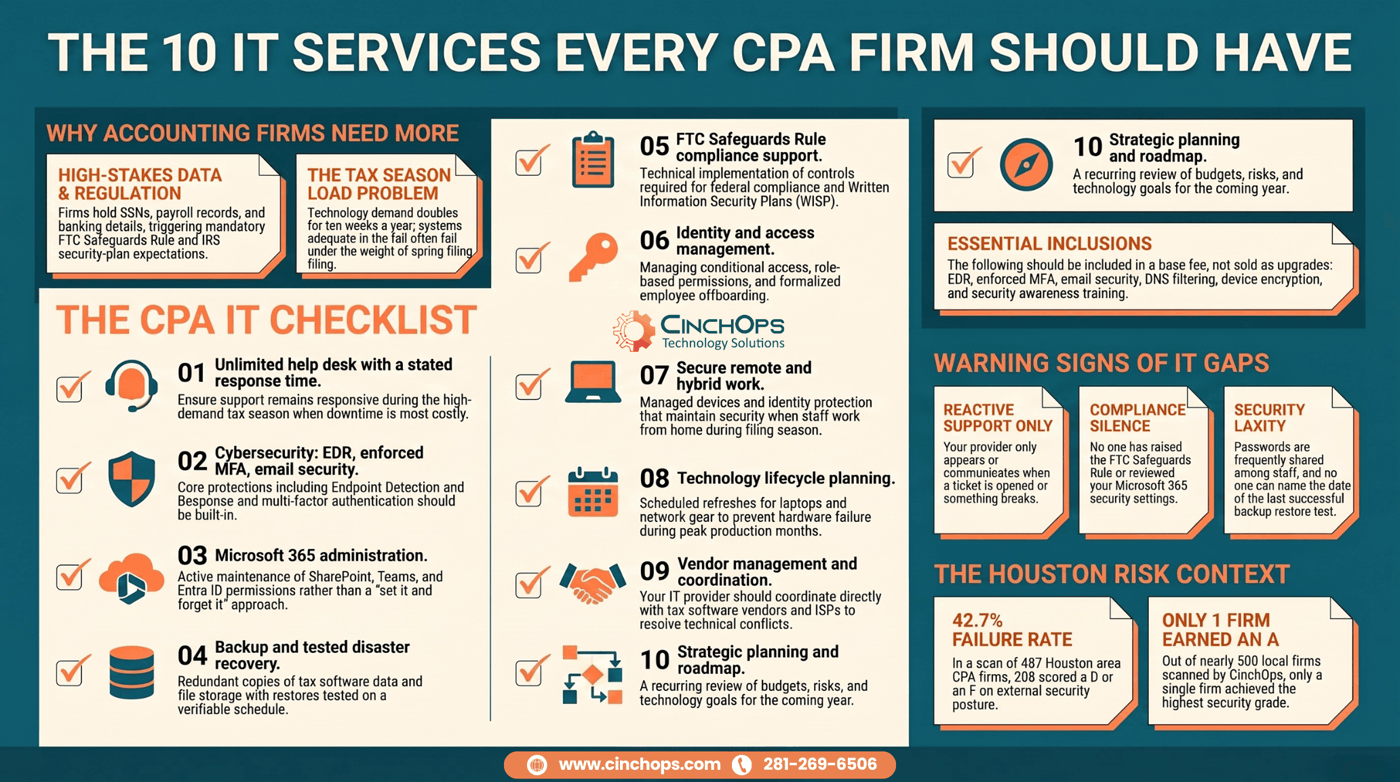
What are the 10 IT services every CPA firm should have?
The complete stack, in the order gaps usually appear.
The 10 services are responsive help desk, cybersecurity, Microsoft 365 management, backup and disaster recovery, compliance support, identity and access management, secure remote work, technology lifecycle planning, vendor management, and strategic IT planning.
- Responsive help desk. Unlimited support with a stated response time. Ask whether the commitment changes in March, because for many providers it quietly does.
- Cybersecurity. Endpoint detection and response, enforced MFA, email security, DNS filtering, encryption, and monitoring. Built in, not bolted on.
- Microsoft 365 management. Exchange Online, SharePoint, Teams, OneDrive, and Entra ID configured and actively maintained rather than set once and left.
- Backup and disaster recovery. Covering Microsoft 365, file storage, tax software data, and servers, with restores tested on a schedule you can name.
- Compliance support. The technical controls behind the FTC Safeguards Rule and a Written Information Security Plan.
- Identity and access management. MFA, conditional access, role-based permissions, and a real offboarding process.
- Secure remote work. Managed devices, mobile security, and identity protection that hold up when half the firm is remote in March.
- Technology lifecycle planning. Scheduled refresh for laptops, firewalls, and network gear instead of replacement after failure.
- Vendor management. Your provider coordinating with the tax software vendor, the ISP, and the copier company so your office manager does not.
- Strategic IT planning. A named review cadence covering budget, risk, and what happens next year.
What cybersecurity should be included rather than sold separately?
The controls that belong in the base agreement.
Endpoint detection and response, enforced multifactor authentication, email security, DNS filtering, device encryption, and security awareness training should sit inside a CPA firm's managed IT fee rather than appearing as optional upgrades.
The test is simple. If a control is one a regulator would expect a firm holding taxpayer data to have, it is baseline. Pricing it as an add-on produces a lower headline number and a higher real one, and it tends to mean the firm goes without until something forces the purchase.
Our own scanning supports treating this as urgent rather than theoretical. The CinchOps Houston Area Security Scorecard scanned 763 CPA firms across the Houston metro and found 55.5 percent scoring a D or an F on external security posture. One firm earned an A.
What compliance support should a CPA firm's IT provider actually give?
Where the provider's job starts and stops.
An IT provider should implement and document the technical controls behind the FTC Safeguards Rule and a Written Information Security Plan, including MFA, encryption, logging, access control, backup testing, and security training records.
What they should not do is act as your legal or regulatory advisor. The line is worth stating plainly because both sides get it wrong. Providers overpromise compliance, and firms assume buying a security product delivered it. Neither is true.
- Risk assessment support. Inventorying where client data lives, who can reach it, and which systems carry it.
- Control implementation. MFA, encryption at rest and in transit, endpoint protection, logging, and monitoring.
- Documentation. Network diagrams, access records, and training completion that hold up when someone asks for evidence.
- Vendor oversight input. Helping evaluate the security posture of the tax software and payroll platforms you already use.
- Annual review. Revisiting controls when the firm, the technology, or the threat picture changes.
Not sure which of the 10 you are missing?
Most firms can identify their gaps in a 30-minute conversation. The answers are usually the same three or four.
Talk to CinchOpsWhat are the warning signs a CPA firm has IT gaps?
Seven signals worth checking this week.
A CPA firm likely has service gaps if support only appears when something breaks, nobody has raised compliance, Microsoft 365 security has never been reviewed, or backups have not been restore-tested.
- Support is reactive. You hear from your provider only when you open a ticket.
- Compliance has never come up. No one has mentioned the FTC Safeguards Rule or a WISP to you.
- Microsoft 365 was configured once. Nobody has reviewed permissions, sharing, or Defender policy since onboarding.
- Passwords get shared. Staff still pass credentials around for shared systems.
- Backups are assumed. Nobody can tell you the date of the last successful test restore.
- Budgeting is reactive. Hardware is replaced after failure rather than on a cycle.
- There is no roadmap. Nothing written covers the next 12 months.
What we typically see in accounting firm IT environments
The recurring shape of the gaps.
The gaps cluster in the same places: partial MFA, an unreviewed Microsoft 365 tenant, backups nobody has restored, and no written security plan.
MFA is usually on, but not for everyone, and the exceptions are almost always the people with the most access. SharePoint and OneDrive sharing settings are whatever they were on day one, which frequently means documents are reachable more widely than the firm believes. The provider has never opened CCH Axcess, UltraTax CS, Lacerte, or Drake Tax, so anything application-adjacent becomes a conference call. And the roadmap, if it exists, is a hardware list.
In 35+ years doing this, the single most useful hour a firm can spend is a permissions review on Microsoft 365. It is unglamorous, it never gets budgeted, and it routinely finds folders that half the office can open and should not.
Firms ask me which security product they should buy. Usually the honest answer is none yet. Turn on MFA for everybody including the partners, test a restore, and fix your SharePoint sharing. That is three things, it costs almost nothing, and it closes more risk than most of what gets sold.
Tax season finds the gap you did not close
Backups, remote access, and response times all get tested at once between January and April. Our business continuity services exist so that test is not the first one you run.
See business continuity services →How CinchOps Can Help Your CPA Firm
CinchOps is a managed IT services provider based in Katy, Texas, serving small and mid-sized businesses across the Houston metro area. CinchOps specializes in cybersecurity, network security, managed IT support, VoIP, and SD-WAN for businesses with 10 to 200 employees.
- Through managed IT support, firms get all 10 services under one agreement rather than assembling them from three vendors.
- Our cybersecurity services put EDR, enforced MFA, email security, and awareness training in the base fee.
- Cloud services and Microsoft 365 administration cover the identity and permissions work most firms are missing.
- Our CPA firm IT services are built around accounting workflows and tax-season load.
- We support firms in Houston, Katy, Sugar Land, and The Woodlands.
Work the list in order of consequence, not cost. Identity, backups, and Microsoft 365 permissions close more real risk per dollar than anything else on the checklist, and all three are usually fixable within a month. If you want an outside read on which of the 10 your firm is actually missing, talk to CinchOps.
Frequently Asked Questions
What do IT services cost for a CPA firm in Houston?
IT services for a Houston CPA firm cost $100 to $250 per user per month. A 10-user firm pays $1,000 to $2,500 monthly, a 25-user firm $2,500 to $6,250, a 50-user firm $5,000 to $12,500, and a 100-user firm $10,000 to $25,000. Compliance scope and security depth set the placement.
Is cybersecurity separate from managed IT for accounting firms?
It should not be. For a firm covered by the FTC Safeguards Rule, endpoint detection and response, enforced MFA, email security, and awareness training are baseline services. A provider itemizing them as optional upgrades is quoting a number below what the firm will actually need to spend.
Does an IT provider need to know our tax software?
Yes, at the infrastructure level. The vendor supports the application itself, but your provider should understand how CCH Axcess, UltraTax CS, Lacerte, or Drake Tax interact with your network, Microsoft 365, backups, printing, and remote access. That boundary is where most unresolved issues live.
Which IT service do CPA firms overlook most often?
Strategic planning. Firms buy support and security, then never schedule the conversation about budget, refresh cycles, compliance review, and next year's risks. The result is reactive spending, emergency hardware purchases, and compliance work that only happens after someone asks for evidence.
Is unlimited help desk worth it for an accounting firm?
For most firms, yes. Per-ticket billing turns tax season into a cost you cannot forecast, and it quietly discourages staff from reporting problems early. Predictable support cost matters more in a business whose workload doubles for 10 weeks each year.
Discover More
Sources

