


Phishing Simulation Small Business: What the Results Actually Reveal
The Click Rate Is The Start, Not The Verdict – Coaching Beats Shaming Every Single Time
A fake phishing email tells you more about your Houston team than any policy doc. Here is how to read the numbers without blaming people.
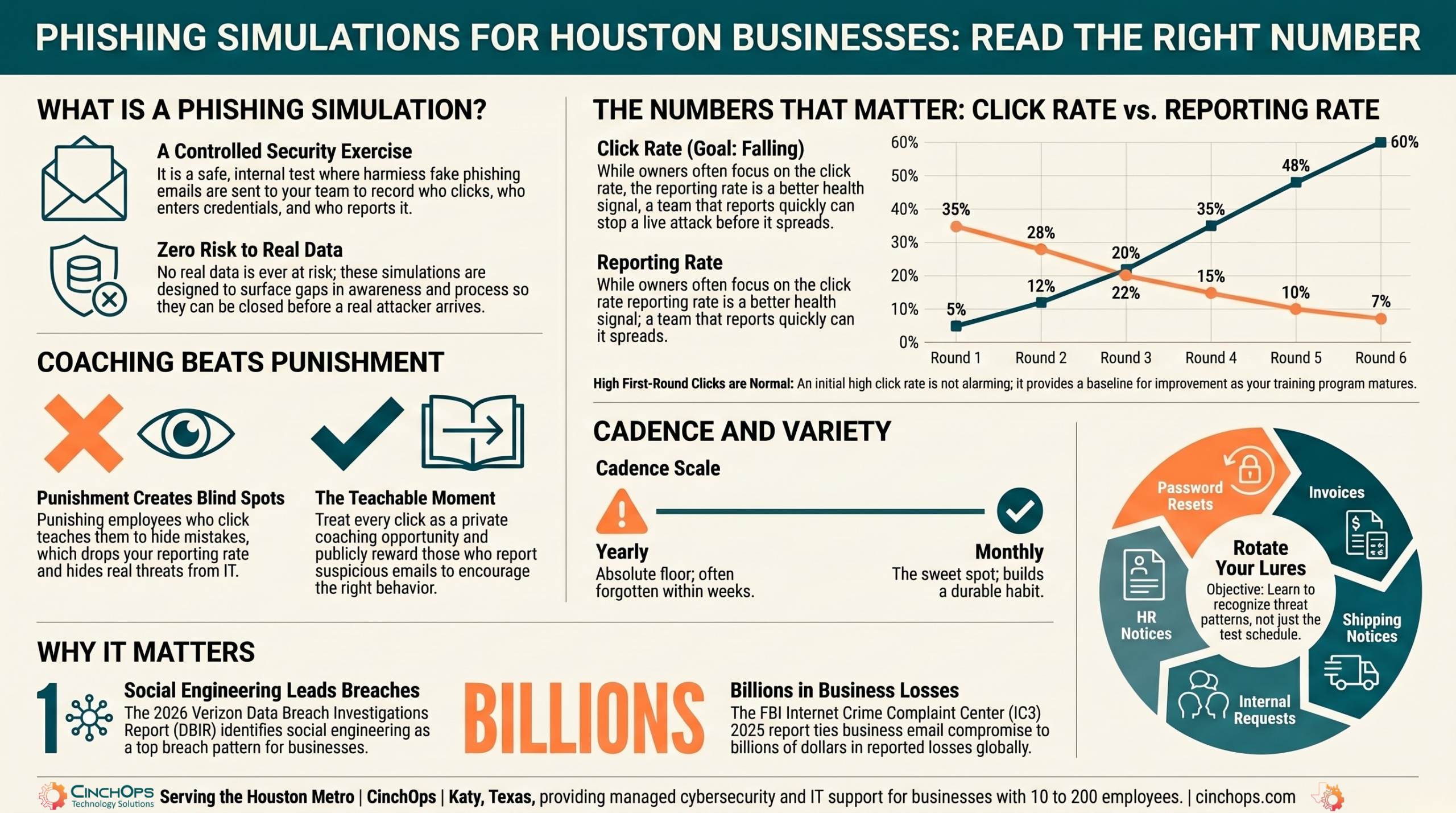
A phishing simulation for a small business is a controlled test, not a trap. It sends a realistic but harmless fake phishing email to your Houston team and measures who clicks the link, who enters credentials, and who reports it to IT.
The first time a business owner sees the report, the reaction is almost always the same: a wince, then the urge to find out "who failed." I get it. But that instinct is exactly what makes the next simulation worse. A phishing simulation is a measurement of your training and your processes, not a referendum on your people. The same employee who clicks a convincing invoice scam on a Tuesday is the one who spots the next one because the simulation taught them what to look for.
Phishing is still where most breaches start. The 2026 Verizon Data Breach Investigations Report puts the human element behind a large share of breaches year after year, and social engineering remains one of the top patterns. A simulation is how you find out where you actually stand before a real attacker does.
What Is a Phishing Simulation?
Start with the definition, because the word scares people more than the thing does.
A phishing simulation is a planned, internal exercise where your IT provider sends a fake phishing email to employees and records how they respond. No real data is at risk. The goal is to surface gaps in awareness and process so you can close them.
The email looks like the real thing on purpose. It might pose as a Microsoft 365 password reset, a shared invoice, a shipping notice, or a message from the owner asking for a quick favor. When someone clicks, they land on a safe internal page that tells them it was a test and shows them the warning signs they missed. Nothing is downloaded, nothing is stolen, and nobody outside the company sees the result.
- The send: a realistic lure goes to some or all of your staff, often timed to a normal-looking moment in the workday.
- The tracking: the system logs who opened it, who clicked, who entered credentials on the fake page, and who reported it.
- The teachable moment: anyone who clicks gets immediate, specific feedback instead of a scolding email weeks later.
For a Katy CPA firm or a Sugar Land engineering office, this is the cheapest security exercise you can run. A real phishing email that lands a wire-fraud request costs money and trust. A simulated one costs an afternoon and teaches the same lesson with no damage.
What the Click Rate and Reporting Rate Actually Tell You
Two numbers come out of every simulation. Most owners stare at the wrong one.
The click rate is the percentage of staff who clicked the fake link. The reporting rate is the percentage who flagged the email to IT. The reporting rate is the better health signal, because it measures whether people know what to do when something feels off.
A high click rate on a first-ever simulation is normal and not alarming on its own. Industry baselines for untrained teams routinely sit high before any program starts, then fall as training lands. What you want to watch is the gap between clicking and reporting. A team that clicks a little but reports a lot has the right instinct: when in doubt, raise a hand. A team that neither clicks nor reports is not safe, it is silent, and silence hides the next real attack.
This matters because the cost of one miss is not abstract. The FBI Internet Crime Complaint Center, in its 2025 report, tied business email compromise to billions in reported losses. Most of those start with a single convincing email and a single click. The simulation is rehearsal for that exact moment.
- Click rate: a snapshot of exposure today. High on round one means you have room to improve, not that your team is reckless.
- Reporting rate: the number that proves the culture is working. Reporting is the behavior that stops a live attack.
- Repeat clickers: a small group that clicks every time needs targeted, one-on-one coaching, not a company-wide email.
- Time to report: how fast the first report comes in tells you whether your team would catch a real campaign before it spreads.
Not sure what a healthy click rate looks like for a team your size?
We can run a baseline phishing simulation, read the results with you, and set targets that fit your business. No blame, just a clear starting point.
Talk to CinchOpsThe fastest way to ruin a security program is to embarrass the first person who clicks. Do that once and nobody reports anything again. They just quietly hope it goes away. I would rather have a team that clicks and tells me than a team that is too scared to admit it.
What to Do With a Bad Result: Training Cadence, Not Punishment
A rough first round is a planning problem, not a discipline problem.
When a phishing simulation comes back ugly, the fix is timing and repetition, not consequences. People learn security by doing the test, getting immediate feedback, and seeing the pattern again a few weeks later while it is fresh.
Punishment teaches one thing well: hide your mistakes. The moment an employee fears a write-up for clicking, they stop reporting their own slips, and your visibility goes dark right when you need it. In 35 years around IT, I have never seen a "name and shame" approach raise a reporting rate. It always lowers it. The teams that improve are the ones that treat a click as a coaching moment and move on.
Here is what a sane response to a bad result looks like for a Cypress or The Woodlands business:
- Debrief without names. Share the result as a team number. "We clicked at this rate, here is the trick that got us" beats singling anyone out.
- Make training short and frequent. A few minutes every month beats a 2-hour session once a year that nobody remembers by March.
- Coach repeat clickers privately. The handful who click every round get a quiet, supportive sit-down, not a group email.
- Reward reporting out loud. Publicly thank the people who flag suspicious mail. That is the behavior you want to multiply.
- Re-test in weeks, not months. A follow-up while the lesson is fresh is what turns a one-time scare into a habit.
Microsoft's own security guidance for small businesses points the same direction: pair simulated phishing with ongoing, bite-sized training rather than a single annual event. The cadence is the product. One test is a photo. A program is the movie.
A trained team is your last line, not your only one
Even a sharp team will miss one eventually. Layered defenses catch what people do not. CinchOps backs awareness training with managed cybersecurity for Houston businesses, so a single click does not become a breach.
Explore CinchOps cybersecurity services →How Often Should a Houston Business Run Them?
Often enough to build a habit, varied enough that nobody games it.
Most small businesses get the best results running a phishing simulation about once a month, with the lure type and timing varied each round. Quarterly is the floor. Anything less than that is a checkbox, not a program.
Run them too rarely and the lesson fades between rounds. Run them on a predictable schedule and people learn the calendar instead of the threat, so they brace for "phishing test week" and relax the rest of the year. The aim is steady, slightly unpredictable practice that keeps awareness at a low simmer all year. Monthly hits that mark for most teams in Houston and Katy without feeling like harassment.
| Cadence | What it gives you | The catch |
|---|---|---|
| Once a year | A compliance checkbox | Lesson is forgotten within weeks. Near useless. |
| Quarterly | A real trend line | Workable floor, but habits fade between rounds. |
| Monthly | A durable reporting habit | The sweet spot. Keep lures and timing varied. |
| Weekly | Maximum frequency | Often too much. Risks fatigue and resentment. |
How CinchOps Can Help Your Team Pass the Test
CinchOps is a managed IT services provider based in Katy, Texas, serving small and mid-sized businesses across the Houston metro area. CinchOps specializes in cybersecurity, network security, managed IT support, VoIP, and SD-WAN for businesses with 10 to 200 employees.
We run phishing simulations as part of a program, not a one-off scare. That means baseline testing, short monthly training, varied lures, and a results review that tells you what to do next without putting anyone on the spot.
- With cybersecurity services, we pair phishing simulations with awareness training and the technical defenses that catch what slips through.
- Through managed IT support, we keep email security, filtering, and account protections current so fewer real lures ever reach an inbox.
- For business continuity and disaster recovery, we make sure one bad click does not turn into a shutdown.
- Across industries like law firms, CPA firms, and construction, we tune the program to the scams your people actually face.
- From Houston to Katy and Sugar Land, we support businesses across the metro.
A bad phishing result is not a reason to doubt your team. It is a sign the training has not happened yet, and that is fixable. Treat the test as practice, reward the people who report, and run it often enough to build a habit. If you want a phishing program that makes your team sharper instead of resentful, talk to CinchOps.
Frequently Asked Questions
What is a phishing simulation for a small business?
A phishing simulation for a small business is a controlled test where your IT provider sends a harmless fake phishing email to your team and tracks who clicks and who reports it. No real data is at risk. It surfaces gaps in awareness so you can fix them before a real attacker finds them.
What is a good click rate on a phishing simulation?
On a first-ever test, a high click rate is normal and not alarming. The number that matters more is the reporting rate: the share of staff who flag the email to IT. A healthy team improves both over time, with reporting rising as awareness training takes hold across several rounds.
Should employees be punished for failing a phishing test?
No. Punishing clickers teaches people to hide mistakes, which kills your reporting rate right when you need visibility most. Treat a click as a coaching moment with immediate, specific feedback. Reward the people who report suspicious mail. That builds the culture that actually stops a real attack.
How often should a small business run phishing simulations?
Most small businesses get the best results running a phishing simulation about once a month, with quarterly as the floor. Vary the lure type and timing so people learn the threat, not the calendar. Frequent, short practice builds a lasting reporting habit far better than one annual event.
Do phishing simulations actually reduce risk?
Yes, when paired with ongoing training rather than run alone. Phishing is where most breaches start, and the 2026 Verizon DBIR keeps social engineering among the top patterns. A simulation rehearses the moment a real lure arrives, and a team that reports fast can stop a live campaign before it spreads.
Discover More
Resource
Sources


