


IT Support for Remote Teams: Give Your 100% Remote Company a Network
IT Support For Remote Teams, Explained – Building A Company Network Without A Building
One secure network, real Microsoft 365 backup, and watched cloud accounts for Houston teams that never share an office.
IT support for remote teams starts with a fact most owners haven't said out loud: a 100% remote company doesn't have a company network. It has one network per employee - the home router, the apartment Wi-Fi, the coffee shop hotspot - and not one of them answers to you.
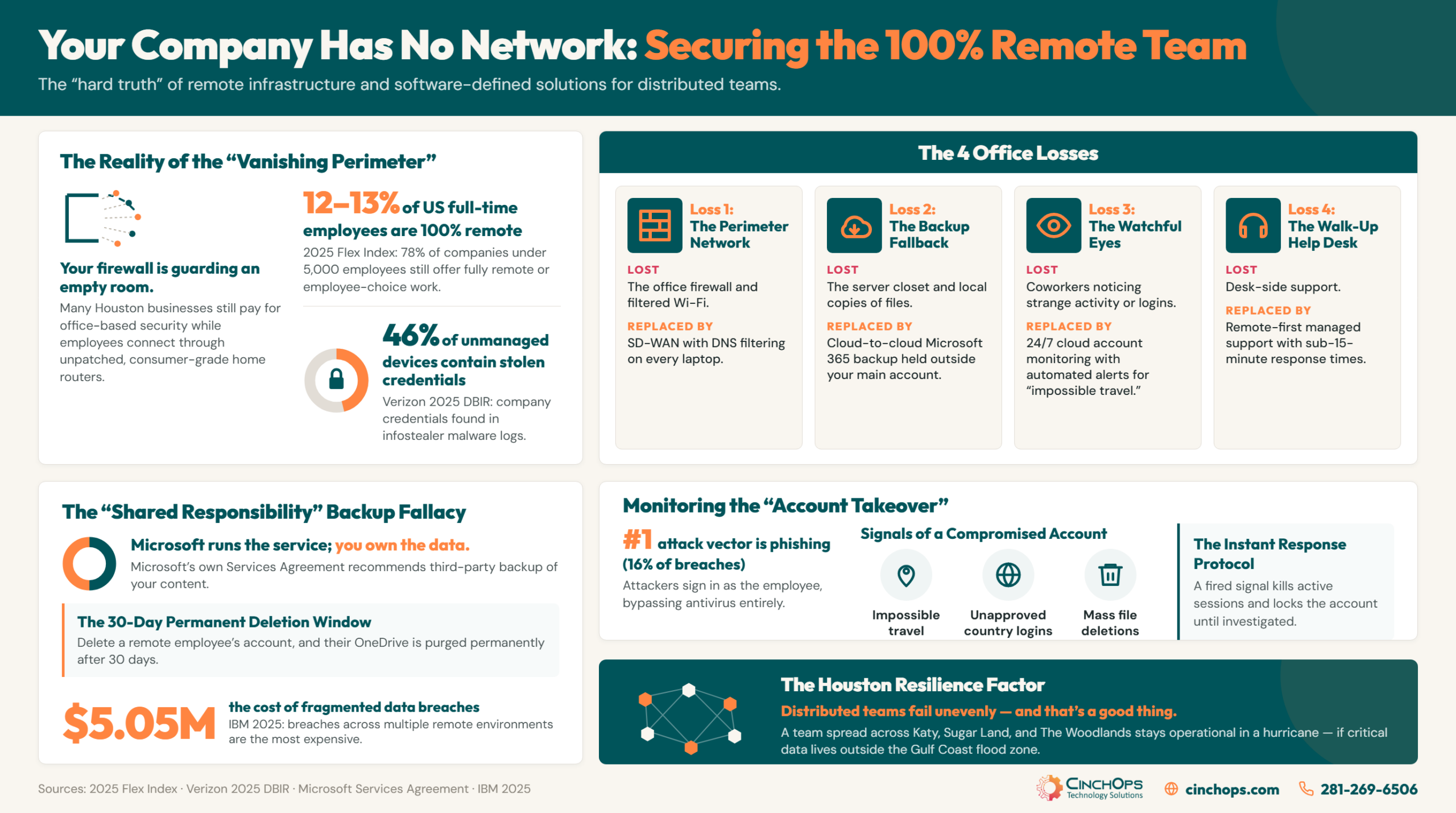
This isn't a fringe arrangement anymore. Flex Index's 2025 data puts 12 to 13% of US full-time employees fully remote, and 78% of companies under 5,000 employees still offer fully remote or employee-choice work. Full-remote didn't die with the return-to-office headlines. It moved into small business - exactly the 10-to-200-employee range that rarely has anyone on staff thinking about security architecture.
CinchOps builds and manages secure remote-work infrastructure - software-defined networking, DNS filtering, Microsoft 365 backup, and cloud account monitoring - specifically for small and mid-sized businesses in Houston with 10 to 200 employees, backed by a help desk that responds in under 15 minutes.
A 100% Remote Company Doesn't Have One Network. It Has One Per Employee
The perimeter didn't shrink when the office closed. It disappeared.
A fully remote company has no network perimeter. Every employee works behind a consumer router the business doesn't own, can't patch, and can't see. The security stack built for an office - the firewall, the filtered Wi-Fi, the switch closet - protects a location the company no longer occupies.
Think about what the old office network quietly did for you. It filtered every web request through one firewall. It kept traffic between coworkers inside the building. It gave you one place to look when something felt wrong. A remote company gets none of that by default, because there is no "inside" anymore.
The hardware that replaced your firewall is in rough shape. The FBI issued a public service announcement in May 2025 warning that criminals are hijacking end-of-life home routers - models old enough that they no longer receive security patches - and folding them into criminal proxy networks. Infection requires no password. Some of those routers sit between an employee and a company payroll system right now.
The devices behind those routers aren't much better. The 2025 Verizon Data Breach Investigations Report found company credentials on 46% of unmanaged devices that appeared in infostealer malware logs, against 30% of corporate-managed devices. Unmanaged is the default state of a remote company that never made a deliberate equipment decision.
We see the same pattern over and over with Houston businesses that went remote in 2020 and never revisited the setup: the firewall from the old office is still under warranty, still licensed, and still guarding an empty room.
CinchOps frames the problem as 4 distinct losses. Lose the office and you lose the network, the backup fallback, the watchful eyes, and the walk-up help desk. Each loss has a specific, buildable replacement - and the first 3 are what the rest of this article covers.
A Software-Defined Network Puts Every Remote Employee Back Inside One Perimeter
You can't ship the office firewall to 25 houses. You can put its job in software.
SD-WAN for a remote team means the company network exists in software instead of in a building. Every laptop joins the same secure network over an encrypted tunnel, traffic between employees stays inside it, and security policy follows the worker to any house, hotel, or job site in the Houston area or beyond.
The practical effect is that the 4 things the office network did for free come back, without the office:
- One network, everywhere. Every employee is on the same secure network whether they're in Katy or Colorado - file shares, printers, and internal tools behave like everyone is in one building.
- DNS filtering that travels. Malicious and look-alike sites are blocked at the DNS layer on the laptop itself, so protection doesn't depend on which Wi-Fi someone joined.
- Encrypted traffic between people. Communication between remote employees runs through encrypted tunnels, not raw across 25 residential connections.
- One console. Policy, visibility, and alerts live in one place instead of nowhere.
The old answer was a VPN concentrator racked in the office. A 100% remote company has no office to rack it in, and the VPN model is aging badly on its own terms: Zscaler's 2025 VPN Risk Report found 56% of organizations experienced a VPN-related breach, and 65% plan to replace their VPN within the year. A VPN encrypts a connection. It does not filter what employees click, segment what a stolen credential can reach, or notice anything. Encryption without visibility is a locked door with no camera.
This is the layer CinchOps builds with SD-WAN - the same technology that connects multi-site construction and energy operations across Houston works just as well when every "site" is a living room.
When the office went away, most businesses quietly lost their network and never noticed. Today their people sit on 25 different home routers with 25 different ideas about security. Putting everyone back on one network you can actually see is the highest-leverage fix I know.
Microsoft Runs the Service. Backing Up Your Data Is Still Your Job
For a remote team, OneDrive is the file server. There is no closet copy.
Microsoft 365 operates on a shared-responsibility model: Microsoft keeps the service running, and the customer is responsible for the data inside it. Microsoft's own Services Agreement recommends that customers "regularly backup Your Content and Data" - retention settings are a courtesy window, not a backup.
The defaults are less forgiving than most owners assume. Microsoft's documentation states that when a user account is deleted, that person's OneDrive content is retained for 30 days by default before it's gone. In an office-based company, that stung. In a remote company it can be fatal, because OneDrive, SharePoint, and Teams aren't a convenience layer anymore - they are the file server. There's no NAS in a closet holding a second copy, and no local machine you can image, because the laptop is in another county.
Two scenarios do most of the damage. A remote employee resigns, HR deletes the account during offboarding, and 30 days later 6 years of client files evaporate. Or ransomware encrypts one synced laptop and the sync client faithfully pushes encrypted garbage to the cloud copy - which is the only copy. IBM's 2025 Cost of a Data Breach Report found breaches involving data spread across multiple environments were the most expensive kind, averaging $5.05 million - and "spread across multiple environments" is simply a description of how a remote company stores everything.
The replacement for the lost server closet is cloud-to-cloud backup: an independent, versioned copy of Microsoft 365 mail, files, and Teams data held outside your tenant, with point-in-time restore. CinchOps includes it in its cloud services stack, with geo-redundant backups stored outside the Gulf Coast flood zone as part of its business continuity and disaster recovery service.
The Breach That Hits a Remote Team Happens Inside an Account, Not on a Laptop
Antivirus watches the device. Nobody is watching the cloud login.
Account takeover is the attack built for remote teams: phish one Microsoft 365 credential and the attacker signs in from anywhere - exactly like your employees do, which is why nothing looks wrong. IBM's 2025 Cost of a Data Breach Report ranks phishing as the #1 initial attack vector, at 16% of breaches.
The scale is hard to overstate with adjectives, so here are the numbers. Microsoft's 2025 Digital Defense Report measures more than 600 million identity attacks per day against its cloud, 97% of them password attacks, and finds that multi-factor authentication blocks over 99% of identity-based attempts. Meanwhile a 2025 industry study monitoring 43,000 small businesses found only about 35% of end-user SaaS accounts had MFA enabled at all. The defense that stops nearly everything is the one most SMB accounts still don't have.
MFA alone isn't the finish line either - session-token phishing walks around weaker MFA setups by stealing the logged-in session instead of the password. Your endpoint protection can't see any of this, because none of it happens on an endpoint. It happens inside the cloud account.
That's what SaaS alerting platforms exist to watch. The signals are well defined - Microsoft formally documents "impossible travel" (sign-ins from 2 locations faster than a human could travel between them) as an identity risk category. A monitored tenant flags impossible travel, logins from unapproved countries, newly created mail-forwarding rules, and sudden mass file deletions or downloads, around the clock. When one fires, the response is immediate: kill the active sessions, lock the account, then figure out what happened. For a distributed team, this monitoring layer is the replacement for the coworker who used to notice something odd. It's the watchful eyes, rebuilt as part of a managed cybersecurity stack.
Hurricane Season Treats a Remote Team Differently Than an Office
Distributed can be a continuity advantage in Houston - if you build it that way on purpose.
A remote team in the Houston area fails unevenly in a storm, and that's the point. When Hurricane Beryl knocked out power across the metro in July 2024, some neighborhoods sat dark for days while others never flickered. An office fails all at once. A team spread across Katy, Cypress, Sugar Land, and The Woodlands does not.
That resilience only exists if the business is architected for it. The test is simple: if any one employee's house going dark takes down something the whole company needs - the QuickBooks host in a spare bedroom, the only copy of the project files, the one person who can reset passwords - you don't have a distributed company. You have an office with worse power backup. Cloud-first applications, the software-defined network from earlier in this article, and backups held outside the region are what turn a scattered team into a continuity plan.
Plan for the individual outages too, because home offices run on residential power and residential internet: one path, no generator, no service-level agreement. Decide in advance who covers when a teammate goes dark, which roles get a cellular backup hotspot, and how work reroutes. In 35+ years of doing this around the Gulf Coast, the businesses that come through storm season clean are never the ones with the most hardware. They're the ones that decided all of this in May instead of during the storm surge.
Storm-Proof the Remote Setup Before It's Tested
CinchOps builds business continuity and disaster recovery plans for distributed Houston teams - geo-redundant backups outside the Gulf Coast flood zone, tested restores, and a written plan for who does what when a neighborhood goes dark.
Get a continuity plan that assumes the storm →How CinchOps Can Help: An IT Company That Supports Remote Workers in Houston
CinchOps is a managed IT services provider based in Katy, Texas, serving small and mid-sized businesses across the Houston metro area. CinchOps specializes in cybersecurity, network security, managed IT support, VoIP, and SD-WAN for businesses with 10 to 200 employees.
For a 100% remote company, CinchOps functions as the IT department that was never hired: the network layer, the backup layer, the monitoring layer, and the help desk, delivered at a flat monthly rate per user - so the bill tracks headcount, with no long-term contracts, no hidden fees, and no cancellation penalties.
- Through managed IT support, remote employees get a real help desk that responds in under 15 minutes - no office required on either end.
- Through SD-WAN, the whole team joins one secure software-defined network with DNS filtering and encrypted traffic built in.
- Through managed cybersecurity, every cloud account is monitored 24/7 for takeover signals - impossible travel, forwarding rules, mass deletions.
- Through cloud services, Microsoft 365 mail, files, and Teams data get independent cloud-to-cloud backup outside your tenant.
- Through VoIP, the business phone system follows the team - one company number, answered from anywhere.
- And for teams anchored to the region, CinchOps provides IT support across the Houston metro area - including the remote-heavy professional firms we work with most: CPA firms, law firms, and engineering firms.
Going remote didn't eliminate your IT footprint. It scattered it across every employee's house, and scattered problems still need one accountable owner. If your company went 100% remote and security has been running on hope since, talk to CinchOps - the first conversation is free, and so is the assessment below.
Frequently Asked Questions
What does IT support for a remote team cost in Houston?
CinchOps prices remote-team support the same way as office support: a flat monthly rate per user, so the bill tracks headcount rather than surprises. There are no long-term contracts, hidden fees, or cancellation penalties. A 100% remote company pays for the laptops and accounts under management, not for square footage it doesn't have.
Does a fully remote company need SD-WAN?
A fully remote company needs what SD-WAN provides: one secure software-defined network that every employee joins from home, with DNS filtering and encrypted traffic built in. Whatever the label on the box - SD-WAN, zero trust access, secure edge - the function is the same: restoring a company perimeter that no longer has a building.
Does Microsoft back up our OneDrive and Teams data?
No. Microsoft keeps the service running and retains deleted data briefly - a deleted user's OneDrive is kept only 30 days by default - and its own Services Agreement recommends customers regularly back up their content. A remote team should add third-party cloud-to-cloud backup that keeps an independent, versioned copy outside the Microsoft 365 tenant.
Is a VPN enough to secure remote workers?
No. A VPN encrypts the connection but does nothing about phished credentials, malicious websites, or account takeover - and Zscaler's 2025 VPN Risk Report found 56% of organizations suffered a VPN-related breach. Remote security needs DNS filtering, multi-factor authentication, endpoint protection, and 24/7 monitoring of cloud accounts layered on top of encrypted access.
How would we know if a remote employee's Microsoft 365 account was compromised?
Watch for the signals endpoint tools can't see: sign-ins from 2 places faster than travel allows, logins from unapproved countries, newly created mail-forwarding rules, and sudden mass file deletions or downloads. SaaS monitoring watches for these around the clock; the response is to kill active sessions and lock the account before data leaves.
Discover More
Resource
Sources
- IBM - Cost of a Data Breach Report 2025
- Verizon - 2025 Data Breach Investigations Report
- Microsoft - Digital Defense Report 2025
- FBI IC3 - Public Service Announcement, May 7, 2025: Criminal Proxy Services Exploiting End-of-Life Routers
- Microsoft - Services Agreement, Section 6b (Service Availability)
- Microsoft Learn - OneDrive Retention and Deletion
- SaaS Application Security Insights (SASI) Report 2025
- Zscaler ThreatLabz - 2025 VPN Risk Report
- Flex Index - US Workplace Flexibility Data, 2025


