


Multi-Factor Authentication: The Houston SMB Owner’s Shield Against Cyber Threats
More Than a Password: The Small Business Guide to MFA Security
A plain-English guide to what MFA is, which second factor to pick, the gaps attackers still walk through, and how to roll it out without breaking your team's day.
MFA small business security starts with one stolen password. The attacker has it already, bought for a few dollars from a breach dump, and the only thing standing between them and your email is a second factor.
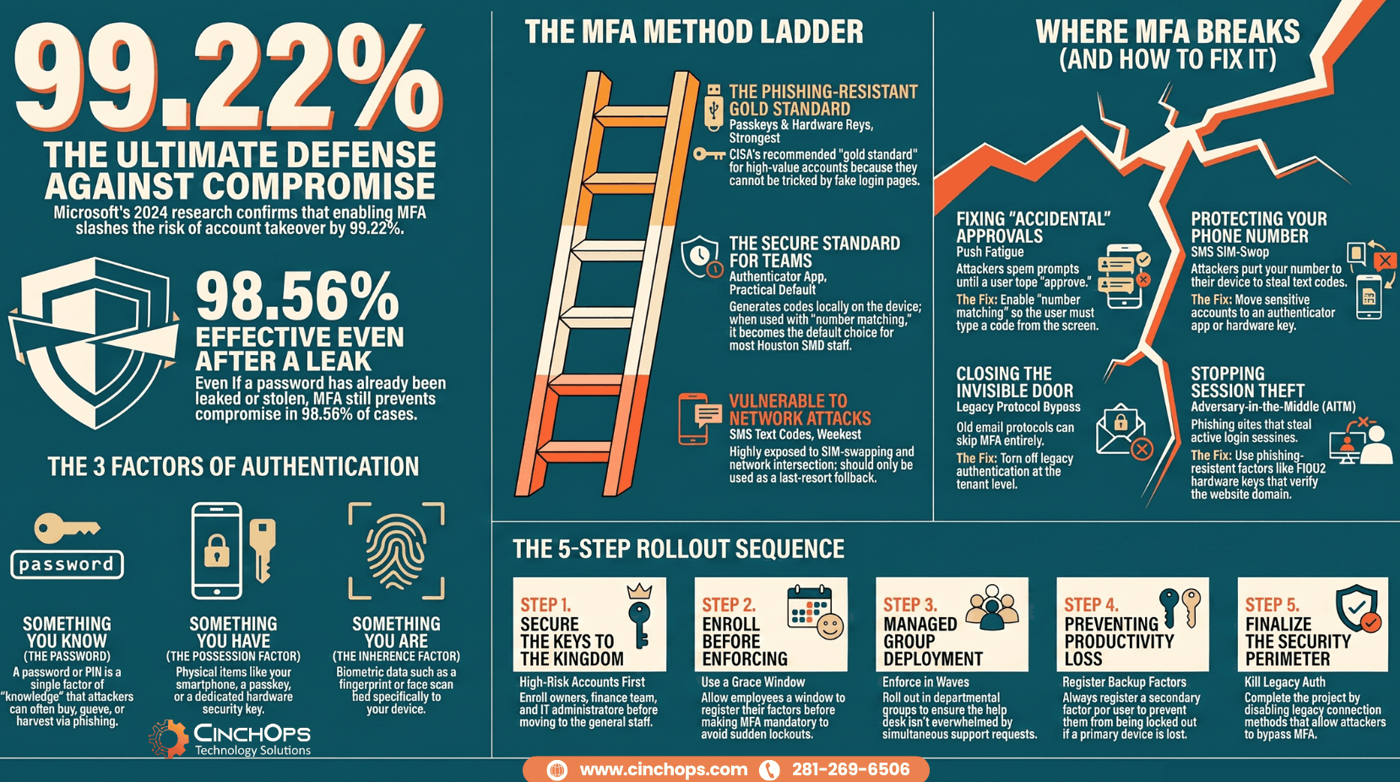
That second factor is the whole point of multi-factor authentication. Microsoft's 2024 research puts the risk reduction at 99.22%, and 98.56% even when the password has already leaked. For a 25-person company in Houston, that is the difference between a normal Tuesday and a wire-fraud investigation. The frustrating part is that turning it on is mostly free, and most businesses still have not finished the job. They start, they hit a snag, and the rollout stalls.
This guide is the version I wish more owners got before they bought a security product they did not need. What MFA actually is, which method to pick, where it still fails in the real world, and how to switch it on across a team without the help desk catching fire.
What Is MFA and Why Does It Matter?
Start here if "MFA" still sounds like jargon.
MFA, or multi-factor authentication, means proving who you are with 2 or more separate things: something you know (a password), something you have (a phone or a key), or something you are (a fingerprint). A password alone is one factor, and one factor is no longer enough.
The reason it matters comes down to a number Microsoft has now measured twice. Its 2024 research found that enabling MFA cut account-compromise risk by 99.22%, and by 98.56% even when the password had already leaked. That updates the widely quoted 99.9% line from the 2019 blog post. The exact figure moves and it is not a guarantee, but the direction is settled. A cyber criminal can have your exact password and still get nowhere, because they cannot also produce the approval on your phone. The stolen credential, the thing the entire underground economy is built on selling, becomes close to worthless against an account with MFA turned on.
Passwords fail constantly. People reuse them, phishing emails harvest them, and breach databases leak them by the billion. A law firm in Sugar Land or a construction outfit in Cypress is not too small to be a target. Attackers do not pick by size. They pick by what is unlocked, and an account with just a password is unlocked.
- Factor 1, knowledge: the password, the one thing attackers can already buy or guess.
- Factor 2, possession: a phone, an authenticator app, or a physical security key in your hand.
- Factor 3, inherence: a fingerprint or face scan tied to a specific device.
Which MFA Method Should a Small Business Use?
Not all second factors are equal. The gap between them is wide.
For most small businesses, an authenticator app is the practical default and a hardware security key is the gold standard. SMS text codes are the weakest common option and should be a fallback, not your main method.
Here is the order, from weakest to strongest. SMS codes are better than nothing, but they ride on the phone network, which attackers can hijack. Authenticator apps like Microsoft Authenticator generate or approve codes on the device itself, with nothing traveling over a network a stranger can intercept. Passkeys and hardware security keys are the top tier: FIDO2 credentials that live on the device itself or on a small physical key you tap or plug in. CISA names FIDO2 and WebAuthn the gold standard, because they validate against the real website domain and cannot be relayed by a fake login page.
- SMS text codes: easy to set up, familiar to staff, but vulnerable to SIM-swap and interception. Use only where nothing better is offered.
- Authenticator apps: free, fast, and far stronger than SMS. The right default for nearly every Houston SMB.
- Passkeys (FIDO2 and WebAuthn): phishing-resistant and already built into most modern phones and laptops. Move important accounts to passkeys wherever the app supports them.
- Hardware security keys: the strongest option, and the one CISA recommends for high-value accounts like finance, email admin, and the owner's logins.
The word that matters most here is phishing-resistant. A code typed into a fake Microsoft login page still gets stolen in real time. A hardware key will not authenticate to the wrong domain at all, so the fake page gets nothing. That is why CISA draws the line where it does, and why your CFO's email deserves a key, not a text message.
| Method | Strength | Best for | The catch |
|---|---|---|---|
| SMS text code | Weakest | Last-resort fallback only | SIM-swap and network interception. |
| Authenticator app | Strong | Most staff, most accounts | Push fatigue if approvals are careless. |
| Number-matching push | Stronger | Teams already on an app | Requires the app and a quick setting change. |
| Passkey (FIDO2) | Strongest | Any account that supports it | Support is still uneven on older apps. |
| Hardware security key | Strongest | Finance, admins, owners | Costs money and a spare key per person. |
Where Does MFA Actually Break?
MFA is not magic. Attackers have 3 reliable ways around a sloppy setup.
MFA breaks in 3 predictable places: push-approval fatigue, SMS SIM-swap, and legacy protocols that skip MFA entirely. Each one is a known attacker move, and each one has a fix you can apply this week.
The first is MFA fatigue, also called push bombing. An attacker who already has your password fires off approval prompt after approval prompt to your phone, late at night, until a tired employee taps "approve" just to make it stop. The fix is number matching, where the app shows a code on the login screen that the user must type into the prompt. You cannot approve a push you did not start.
The second is SMS SIM-swap. A cyber criminal calls your mobile carrier, impersonates you, and ports your number to their own phone. Now your text codes land on their device. This is the single biggest reason SMS sits at the bottom of the ladder, and it is why finance and admin accounts should never rely on text codes.
The third is the quiet one: legacy protocol bypass. Older email connection methods, the kind some accounting and line-of-business apps still use, were built before MFA existed and can skip it completely. An attacker who finds one of those open doors walks straight past your shiny new MFA. In 35 years around this work, this is the gap I see overlooked most often, because it is invisible from the user's seat.
- Push fatigue / push bombing: fixed by number matching, so a prompt cannot be approved by accident.
- SMS SIM-swap: fixed by moving off text codes to an app or hardware key for anything sensitive.
- Legacy protocol bypass: fixed by turning off legacy authentication at the tenant level, which most businesses have never done.
Those 3 are setup problems you control. There is a fourth that beats even a clean setup: adversary-in-the-middle phishing, or AiTM. The attacker sits between you and the real login page, lets you authenticate normally, then steals the resulting session and skips the MFA prompt entirely. Microsoft reported a sharp rise in these through 2024. SMS codes and plain push approvals do not stop AiTM. Phishing-resistant factors do, because a passkey or hardware key will not authenticate to a lookalike domain in the first place.
People think turning MFA on is the finish line. It is the starting line. The breaches I see now are not "they had no MFA." They are "MFA was on, but a legacy protocol let the attacker skip it, or someone approved a push at 2am." The setup is where the real work is.
How Do You Roll Out MFA Without a Staff Revolt?
The technology is the easy part. The people are where rollouts die.
You roll out MFA without a revolt by starting with the highest-risk accounts, communicating early, enrolling in waves, and setting up the method before you enforce it. A surprise lockout on a Monday morning is what turns a team against security.
Not sure which accounts still have no MFA at all?
Most businesses are missing it on more logins than they think, especially admin and finance accounts. A quick audit finds the gaps before an attacker does.
Talk to CinchOpsThe order matters. Start with the accounts an attacker wants most: the owner, anyone in finance, and email administrators. Get them on an app or a hardware key first. Then move outward in groups, not all at once, so the help desk can handle questions a few people at a time instead of the whole company on day one.
- Phase by risk. Owners, finance, and admins go first, then the rest of the team in waves.
- Enroll before you enforce. Let people register their method during a grace window, then flip enforcement on.
- Communicate in plain language. Short, specific, with a screen recording. No security jargon.
- Set a backup factor. A second method per user prevents the lockout that sinks the whole effort.
- Turn off legacy auth in the same project. Closing that door is part of a finished rollout, not an afterthought.
Underneath the sequencing sits the checklist itself. Work down it in order.
- Turn MFA on for every account that touches business or client data. Email and the identity platform first, then banking, cloud storage, and remote access. Partial coverage is not done.
- Prefer phishing-resistant factors over SMS. Passkeys and security keys validate against the real domain, so a fake login page gets nothing.
- Drop SMS text codes wherever you can. CISA warns they can be intercepted through weaknesses in the phone network. Keep SMS as a last-resort fallback only.
- Give administrator accounts the strongest option. A hardware key or passkey, never a text code, and keep day-to-day work on separate non-admin accounts.
- Use number matching, not plain push approvals. That one setting is what defeats push fatigue.
- Register a backup factor and store recovery codes safely. A lost phone is the excuse people use to switch MFA back off.
- Train the team on what a real prompt looks like. A prompt should only ever arrive right after they log in. Anything out of the blue gets denied and reported.
Done this way, a full MFA rollout for a 40-person Katy business is manageable, not a fight. The companies that struggle are the ones that flipped a switch with no warning and spent the next month firefighting. Plan it, and it is calm.
MFA is one layer, not the whole wall
Strong MFA stops most account takeovers, but it does not patch a server, filter a phishing email, or back up your data. CinchOps puts MFA inside a complete defense with managed cybersecurity for Houston businesses.
Explore CinchOps cybersecurity services →How CinchOps Can Help You Get MFA Right
CinchOps is a managed IT services provider based in Katy, Texas, serving small and mid-sized businesses across the Houston metro area. CinchOps specializes in cybersecurity, network security, managed IT support, VoIP, and SD-WAN for businesses with 10 to 200 employees.
Turning MFA on is simple. Turning it on across every account that matters, closing the legacy gaps, and getting your team through it without chaos is the part that takes experience. That is where we come in.
- Through managed cybersecurity, we deploy phishing-resistant MFA, number matching, and legacy-auth shutoff across your accounts.
- With managed IT support, we handle enrollment, backup factors, and the help-desk questions so your rollout stays calm.
- For business continuity and disaster recovery, we make sure a locked or compromised account never takes the business offline.
- Across industries like law firms, CPA firms, and construction, we match the MFA plan to how the business actually works.
- From Houston to Katy and The Woodlands, we support businesses across the metro.
If your team has MFA half-finished, with text codes here, gaps there, and legacy auth still open, you have the riskiest version: the feeling of protection without the substance. Microsoft's numbers only hold when the setup is done right. Get it done right once, and account takeover stops being the thing that keeps you up at night. If you want a straight read on where your MFA stands today, talk to CinchOps.
Frequently Asked Questions
What is MFA for a small business?
MFA, or multi-factor authentication, makes users prove identity with 2 or more factors: a password plus something they have, like an authenticator app or a hardware key. For a small business, it means a stolen password alone cannot get into an account. Microsoft's 2024 research measured a 99.22% reduction in account-compromise risk.
Which MFA method should a small business use?
An authenticator app is the practical default for most staff, and a hardware security key is the strongest option for finance, admin, and owner accounts. SMS text codes are the weakest common method and should be a fallback only. CISA's phishing-resistant MFA guidance points businesses toward hardware keys for high-value logins.
Why is SMS-based MFA considered weak?
SMS codes ride on the phone network, which attackers can hijack through a SIM-swap, where they port your number to their own device. They can also intercept texts in transit. The code itself can still be phished into a fake login page. For sensitive accounts, an authenticator app or hardware key is far safer.
What is MFA fatigue or push bombing?
MFA fatigue, also called push bombing, is when an attacker who already has your password sends repeated approval prompts to your phone until a tired user taps approve to stop them. The fix is number matching, where you must type a code shown on the login screen into the prompt, so accidental approvals cannot happen.
What is phishing-resistant MFA?
Phishing-resistant MFA uses methods that cannot be relayed by a fake login page. CISA names FIDO2 and WebAuthn, meaning security keys and passkeys, as the gold standard, because they validate against the real website domain. That is what defeats adversary-in-the-middle attacks which trick users into approving a login on a lookalike site.
Does my Houston small business already have MFA available?
Very likely yes. Microsoft 365 and Google Workspace, which most Houston SMBs already use, include MFA in the plans you already pay for. The protection is often just switched off. Turning it on across every account, then strengthening the admin logins, is usually free or close to it.
How do you roll out MFA without frustrating staff?
Start with the highest-risk accounts like owners, finance, and admins, then enroll the rest in waves. Communicate early in plain language, let people register their method during a grace window before enforcement, and always set a backup factor. A surprise lockout is what turns a team against security, so plan it.
Discover More
Resource
Sources
- Microsoft Security - One Simple Action to Prevent 99.9% of Account Attacks (MFA)
- Microsoft Research - How Effective Is Multifactor Authentication at Deterring Cyberattacks? (2024)
- FIDO Alliance - Passkeys (FIDO2 / WebAuthn) overview
- CISA - Implementing Phishing-Resistant MFA (fact sheet)
- Microsoft Learn - Authentication methods in Microsoft Entra ID
- Microsoft Learn - Number matching for push notifications
- CISA - More Than a Password (MFA guidance)


