


What If an Employee Falls for a Phishing Email? The First Hour Decides What It Costs (2026 Guide)
The First Hour Decides What The Click Costs – Speed Beats Blame Every Single Time
A step-by-step first-hour response plan for Houston businesses, from locking the account to getting wired money back.
When an employee falls for a phishing email, the damage isn't decided by the click. It's decided by what your business does in the next 60 minutes.
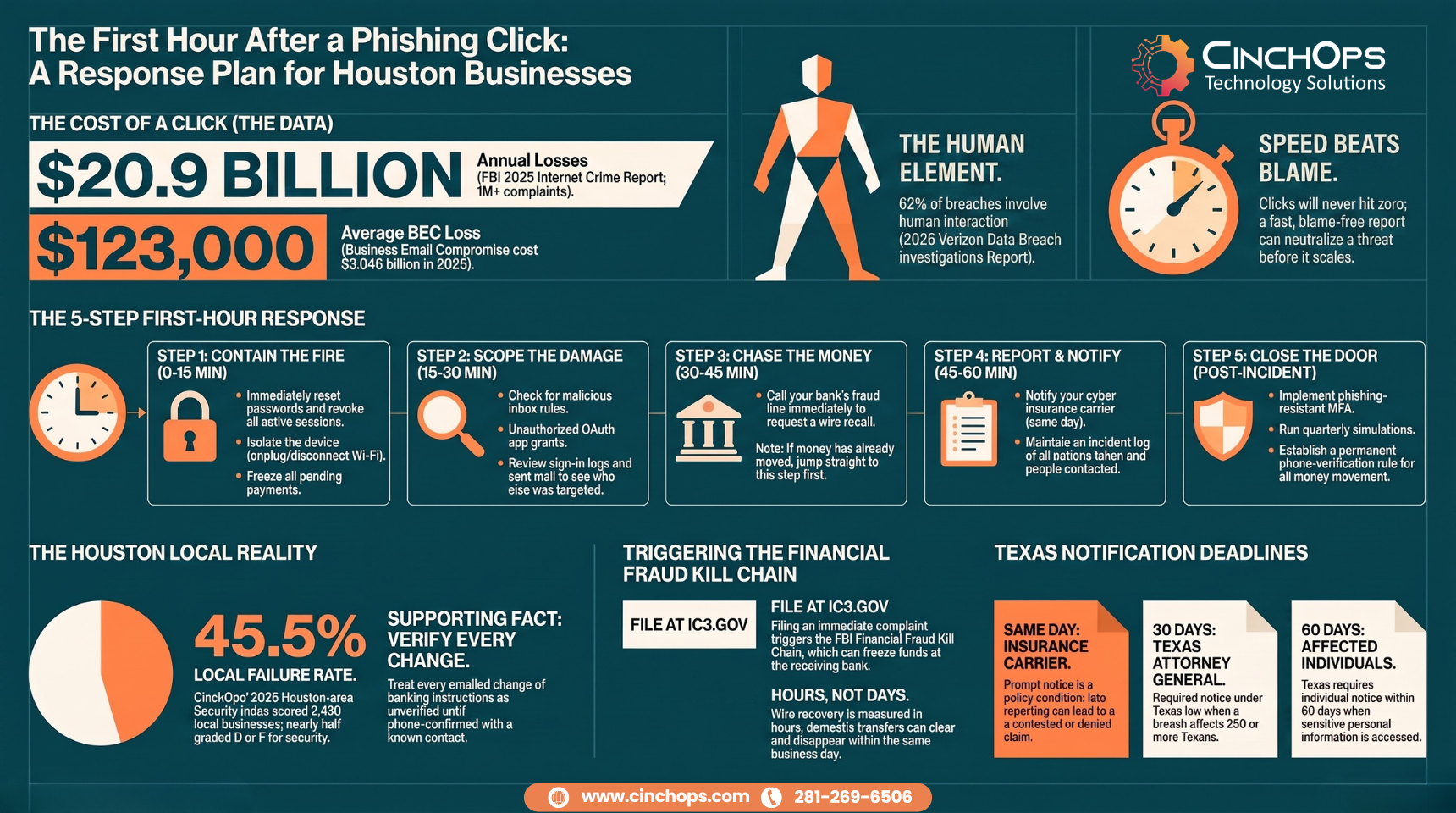
Here's how it usually goes. Someone in accounting gets an email that looks like it came from the owner - right name, plausible request, a little urgency. They enter their Microsoft 365 password on a fake login page, or they approve a wire to a "new vendor account." Twenty minutes later something feels off, and now they're standing at your door, embarrassed, asking what to do. The FBI's 2025 Internet Crime Report counted 191,561 phishing complaints and put business email compromise losses at $3 billion for the year. Averaged out, that's roughly $123,000 per reported BEC incident - and most victims are businesses your size, not Fortune 500s.
CinchOps runs phishing incident response and email security specifically for small businesses in Houston and Katy, with a help desk that answers in under 15 minutes and a flat monthly rate per user. This guide provides a framework for the order of operations we walk clients through when the call comes in.
Step 1: Contain the Damage in the First 15 Minutes
Containment means cutting off the attacker's access before they use what they just took.
Containment is the act of locking the compromised account and device before the attacker can use them - and it matters more than anything else you do today.
First, thank the employee for speaking up. Seriously. The 2026 Verizon Data Breach Investigations Report found the human element involved in 62% of breaches - people will keep clicking. What separates a bad day from a disaster is whether they report it in minutes or hide it for a week. Punish the report and you train your whole company to stay quiet.
Then move, in this order:
- Reset the password on the affected account immediately - and on any other account that shared it.
- Revoke active sessions. In Microsoft 365, a password reset alone does not kick the attacker out of a session already in progress. Sign the user out of everything.
- Pull the device off the network if the employee opened an attachment or ran a "fix" the email suggested. Unplug the cable, drop the Wi-Fi. Don't power it off - that destroys evidence your responders may need.
- Freeze pending payments. If the employee touched anything financial, stop every outgoing transfer in the queue until each one is verified by phone.
What the employee actually did determines which of those matters most. Typed a password on a fake page? The account is the fire. Opened an attachment? The machine is. Approved a wire? Skip ahead to Step 3 right now and come back - the money clock is the shortest one.
Step 2: Work Out What the Attacker Actually Got
A password reset means nothing if the attacker already planted a back door in the mailbox.
Scoping a phishing compromise means checking what the attacker did inside the account before you locked it - inbox rules, OAuth grants, sign-in history, and sent mail are the 4 places to look.
Attackers who steal a Microsoft 365 password rarely just read email. In the minutes after a successful phish, the common moves are creating inbox rules that auto-forward or auto-delete messages (so the victim never sees the bank's confirmation emails), granting a malicious app OAuth access that survives a password change, and mining the mailbox for invoices and vendor threads to hijack later. That last one is how a single stolen login at one company becomes a fraudulent wire at another 3 weeks down the road.
- Inbox rules: delete anything the user didn't create, especially forward-to-external and move-to-RSS-folder rules.
- OAuth app grants: revoke unfamiliar third-party apps with mailbox permissions. A password reset does not remove these.
- Sign-in logs: pull the login history and note foreign IPs and odd hours - your insurer and the FBI will both want it.
- Sent and deleted mail: look for messages the attacker sent as your employee. Every recipient of those is a potential next victim you need to warn.
If the click installed malware instead of stealing a password, assume ransomware is the goal until proven otherwise and get professional eyes on the machine. This is where tested, geo-redundant backups stored outside the Gulf Coast flood zone stop being an IT nicety and start being the reason your business still exists next quarter - the same offsite copies that protect Houston businesses from hurricane season protect them from encryption.
Step 3: Chase the Money Before the Window Closes
Wire recalls are possible - but only when you move within hours, not days.
If any money moved, call your bank's fraud department first and file at ic3.gov second - both in the first hour. Recovery odds drop with every hour the transfer sits.
Business email compromise is where phishing gets expensive. The FBI's 2025 Internet Crime Report logged 24,768 BEC complaints totaling $3.046 billion in losses - and cybercrime losses overall hit $20.9 billion across more than 1 million complaints, both records. The single best tool a small business has against a fraudulent wire is the FBI's Financial Fraud Kill Chain, triggered by filing a complaint at ic3.gov. It can freeze funds at the receiving bank, but it only works while the money is still sitting there. Domestic transfers can clear out in hours.
- Call your bank's fraud line and request a recall or SWIFT recall on the exact transaction. Have the amount, date, and receiving account ready.
- File the IC3 complaint immediately - not after the internal meeting, not tomorrow. Include every wire detail.
- Phone-verify every vendor payment queued for the next 30 days using a number you already had on file, never one from a recent email.
- Warn the counterparty if the fraud involved a customer's or vendor's payment - their account may be the one that's compromised.
That last point cuts both ways, and here's the uncomfortable local math: CinchOps' 2026 Houston-area Security Index scored 4,393 businesses across the legal, CPA, manufacturing, construction, and engineering sectors, and 49.6% graded a D or F. Nearly half the companies in your vendor list and client base are running weak defenses. In Houston, treating every emailed change of banking instructions as hostile until phone-verified isn't paranoia - it's the base rate.
Step 4: Report the Incident and Notify the Right People
Texas law, your insurance policy, and your clients each have their own clock.
After containment, a Houston business has 3 notification tracks to check: its cyber insurance carrier, Texas breach notification law, and any affected clients or vendors.
Call your cyber insurance carrier the same day. Most policies require prompt notice, and late reporting is one of the common reasons claims get contested. The carrier will often bring its own forensics and legal panel - that's a feature, use it.
Texas has real deadlines. Under the Texas Identity Theft Enforcement and Protection Act, if sensitive personal information was accessed, affected individuals must be notified within 60 days, and breaches affecting 250 or more Texans must be reported to the Texas Attorney General within 30 days - the AG publishes the list publicly. A phishing incident that only stole a password with no personal data exposed may not trigger it, but that call is for your attorney, made early, with the incident log you started in Step 2. Write everything down as it happens: times, actions, who was called. Memory is terrible evidence.
One more report that costs nothing: forward the phishing email itself to the Anti-Phishing Working Group at reportphishing@apwg.org and report the sender in your email platform. It burns the attacker's infrastructure for the next target.
Step 5: Close the Door It Came Through
The week after the incident is your one window when everyone actually cares about security. Spend it well.
Post-incident hardening means fixing the specific gap that let this phish succeed - then testing whether the fix holds - not buying a new tool because a vendor called at the right time.
In 35+ years doing this, the pattern we see with Houston businesses is consistent: the phish that lands is rarely exotic. It works because MFA wasn't on that one account, or the wire process had no out-of-band verification step, or nobody had ever practiced reporting. And attackers keep getting better at the front end - Cofense has documented precision-validated phishing kits that check a victim's email address against a pre-harvested target list and show the fake login page only to verified, high-value targets, which is exactly why "the URL looked fine to me" keeps being true.
- Turn on phishing-resistant MFA everywhere, starting with email and banking. Push-approval MFA beats nothing; hardware keys and passkeys beat push fatigue.
- Put a phone-verification rule on money movement: no new payee and no banking change without a callback to a known number. Print it, post it, no exceptions - including the owner.
- Run phishing simulations quarterly and grade the company on reporting speed, not click rate. The 2026 Verizon DBIR pegs the median click rate on email simulations at just 1.4% - clicks will never hit zero, but a fast report neutralizes one.
- Make reporting blame-free and 1-click. The employee who owns up in 5 minutes just saved you 6 figures. Say so publicly.
Dealing With a Phishing Incident Right Now?
Don't work through this checklist alone. CinchOps answers in under 15 minutes and walks Houston businesses through containment, recovery, and reporting.
Talk to CinchOpsAs much as you train people not to click, the odds say somebody eventually will. What you can ensure is what happens in the 10 minutes after it - and that's the part that decides whether it's a bad morning or a bad year.
Get an Incident Response Plan Before You Need One
Every step in this guide runs faster when it's written down, assigned, and practiced before the click happens. CinchOps builds and tests phishing response plans as part of its managed cybersecurity service for Houston small businesses.
Explore CinchOps Cybersecurity →How CinchOps Can Help When an Employee Falls for a Phishing Email
CinchOps is a managed IT services provider based in Katy, Texas, serving small and mid-sized businesses across the Houston metro area. CinchOps specializes in cybersecurity, network security, managed IT support, VoIP, and SD-WAN for businesses with 10 to 200 employees.
- Through managed cybersecurity, CinchOps handles the containment steps in this guide - session revocation, inbox-rule hunts, OAuth cleanup - with a help desk that answers in under 15 minutes.
- Through managed IT support, email filtering, phishing-resistant MFA, and quarterly simulations are set up and maintained for a flat monthly rate per user, with no contracts, no hidden fees, and no cancellation penalties.
- Through business continuity and disaster recovery, backups stay geo-redundant and outside the Gulf Coast flood zone, so a phish that turns into ransomware doesn't turn into data loss.
- CinchOps serves businesses across Houston, Katy, and Sugar Land, including CPA firms, law firms, and construction companies - the verticals where wire fraud hits hardest.
Someone at your company is going to click a phishing email. That's not pessimism, it's the 62% human-element number talking. The question worth answering this week is whether the first hour after that click is a practiced routine or an improvised scramble. If you'd rather it be a routine, talk to CinchOps.
Frequently Asked Questions
How do I recover from a phishing attack on my business email?
Reset the compromised password, revoke all active sessions, then remove attacker persistence: malicious inbox rules, forwarding rules, and OAuth app grants. Review sign-in logs and sent mail, warn anyone the attacker emailed, notify your cyber insurer, and enable phishing-resistant MFA before returning the account to normal use.
Can we get money back after a fraudulent wire transfer?
Sometimes - if you move fast. Call your bank's fraud department to request a wire recall, then file a complaint at ic3.gov, which can trigger the FBI's Financial Fraud Kill Chain to freeze funds at the receiving bank. Recovery odds fall sharply once the money leaves the first account, so act within hours.
Do we have to report a phishing breach in Texas?
It depends on what was exposed. Texas law requires notifying affected individuals within 60 days when sensitive personal information is breached, and reporting to the Texas Attorney General within 30 days when 250 or more Texans are affected. A stolen password alone may not qualify - have an attorney make that call early.
What does phishing incident response cost in Houston?
Standalone emergency response is billed hourly and gets expensive fast. CinchOps includes phishing response, email security, MFA management, and simulations in its managed IT service for a flat monthly rate per user, so a 20-person Houston business pays a predictable amount whether or not an incident happens that month.
How do we stop employees from falling for phishing emails?
You reduce it; you don't eliminate it. The 2026 Verizon DBIR found a 1.4% median click rate even in email simulations. Layer email filtering, phishing-resistant MFA, phone verification for payment changes, and quarterly simulations - then grade employees on how fast they report, because one fast report defuses a click.
Discover More
Resource
Sources


