


Email Security for Houston Businesses: What the 2026 Scan Shows
What The Houston Area Security Index Reveals About Email Security
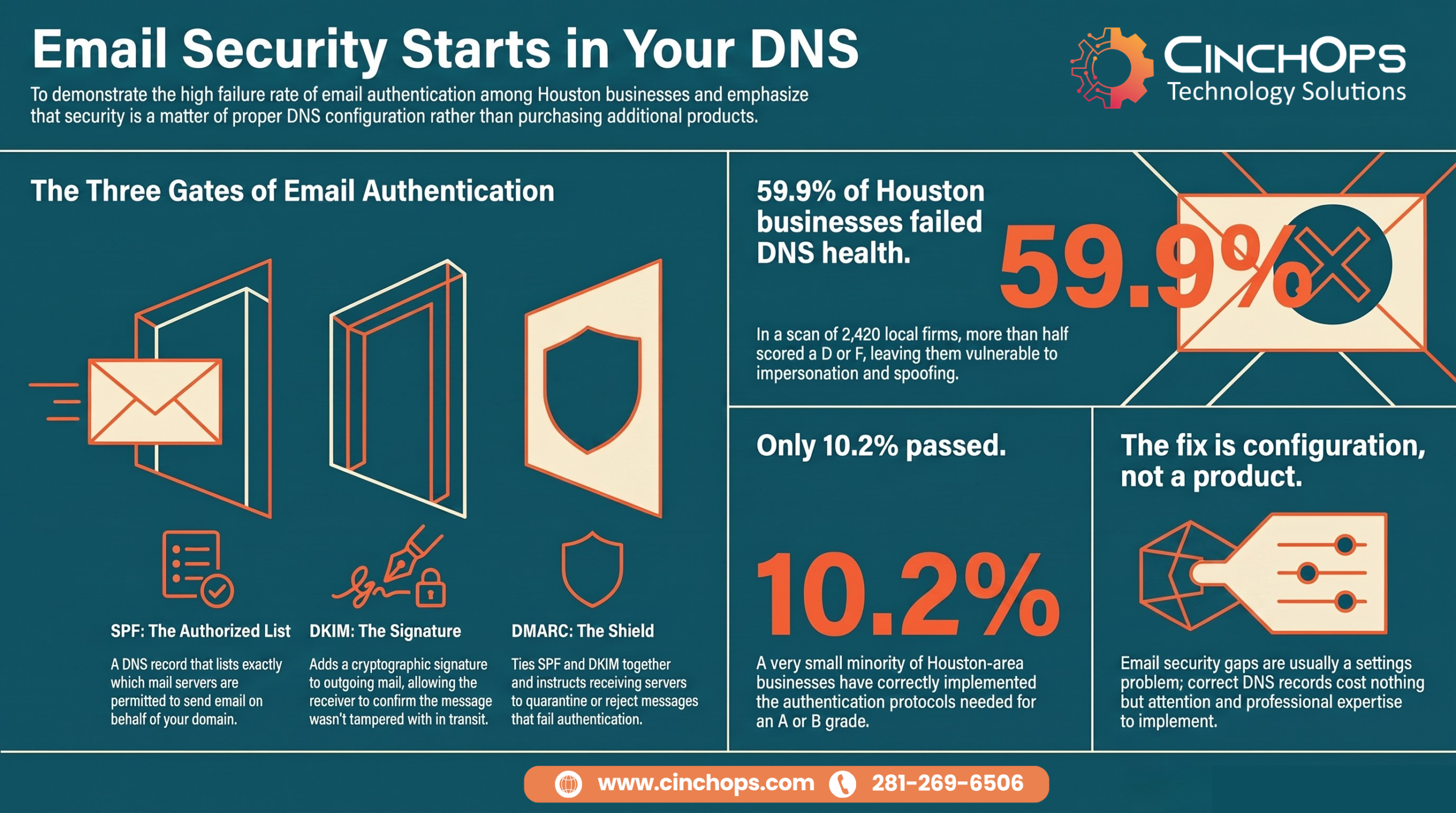
When CinchOps scanned 2,420 Houston-area businesses, 59.9% scored a D or F on DNS health, the records that make email authentication work.
Email security is the set of controls that verify who sent a message and stop attackers from impersonating your domain. A spam filter is one small piece of it, and it is the piece most Houston businesses mistake for the whole thing.
Here is the uncomfortable part. The controls that actually authenticate email do not live in your inbox. They live in your DNS records, and almost nobody checks them. CinchOps configures email authentication (SPF, DKIM, and DMARC) for small and mid-sized businesses across the Houston area, where 59.9% of the 2,420 companies in the first release of our Houston Area Security Index scored a D or F on the DNS records those protections depend on. That number is not a survey. It is a direct external scan of real local businesses.
Email Security Is Not a Spam Filter. So What Is It?
The term gets used loosely, so pin it down before you spend a dollar on it.
Email security means proving three things about every message: that the sender is who they claim to be, that the content was not altered in transit, and that only the intended recipient can read it.
A spam filter scores messages against known-bad patterns. Useful, but it is pattern matching, and modern attackers test their emails against the common filters before they hit send. The controls that hold up are the ones that verify identity at the protocol level:
- SPF (Sender Policy Framework) is a DNS record listing which mail servers may send email for your domain. Set correctly, an attacker cannot send from your domain off an unauthorized server.
- DKIM (DomainKeys Identified Mail) adds a cryptographic signature to outgoing mail so the receiving server can confirm the message was not tampered with.
- DMARC ties SPF and DKIM together and tells receiving servers what to do when a message fails. It only protects you when it is set to p=quarantine or p=reject. Set to p=none, it watches and reports but blocks nothing.
- Multi-factor authentication stops a stolen password from becoming a stolen mailbox. See our guide to MFA methods and gaps.
SPF, DKIM, and DMARC are all DNS records. That is why DNS health is the single best proxy for whether a business has real email security or just a filter and a hope.
What Does the Houston Scan Show About Email Security?
We stopped guessing and measured it from the outside, the same way an attacker would.
The first release of the CinchOps Houston Area Security Index scanned 2,420 businesses across law, accounting, and manufacturing, and 59.9% scored a D or F on DNS health. Only 10.2% passed. The index has since grown to 4,393 businesses across five industries, and 60.4% of them score a D or F on DNS health.
DNS health is where email authentication is graded, so that failure rate is, in plain terms, an email-security failure rate. It is not about spending more. A correct SPF record and a DMARC policy set to reject cost nothing but attention. The businesses failing here are not underfunded. They are unwatched.
Law firms are the worst of the three, with 68.7% failing DNS health. That should bother anyone who has watched a real estate or legal wire get redirected. When a firm cannot prove its own domain sent a message, a convincing fake instruction to change payment details sails straight through. We see this pattern constantly with Houston firms, and the fix is boring, cheap, and almost never done.
Which Email Threats Are Hitting Houston Businesses in 2026?
The technique changed. The target did not.
Phishing is still the dominant email threat, but it is now personalized, well written, and built to pass content filters. Volume-based spam gave way to precision-targeted deception.
Attackers pull names, vendors, and reporting lines from public sources and craft a message that references a real relationship. The ones we see land on Houston businesses fall into a short list:
- Business email compromise (BEC) impersonates a vendor or an executive to redirect a payment. The FBI's Internet Crime Complaint Center has ranked BEC among the costliest categories of cybercrime for years.
- Display-name spoofing shows your CEO's name while the actual sending address is fake. DMARC set to reject is what stops the domain-spoofing version cold.
- Spear phishing targets one finance or executive employee with a message tuned to their role.
- Malware and ransomware delivery arrives as an attachment or a link that runs on open. Email is still the most common first step into a network.
One specific gap worth naming: auto-forwarding quietly breaks SPF validation, so a firm that forwards mail between systems can undo its own protection without knowing. If you want the defensive playbook, start with how to prevent phishing attacks and the S.E.C.U.R.E. method.
The Email Security Myths That Get Houston Businesses Breached
Each of these feels like protection. None of it is.
The businesses that get hit hardest are rarely the ones with no security. They are the ones with just enough to feel safe and not enough to stop a determined attacker.
| What owners believe | What the scan and the tickets show |
|---|---|
| "Microsoft 365 has a spam filter, so email is handled." | The default filter never authenticates your domain. Spoofing walks past it. That is a DNS job, and 59.9% of scanned businesses fail it. |
| "We set up DMARC, we are covered." | Most DMARC records we find are set to p=none, which reports but blocks nothing. It is a false sense of security in one setting. |
| "A strong password protects the mailbox." | Passwords get phished. Without MFA, one convincing email hands over the whole account. Shared mailboxes without MFA are the widest door. |
| "We would notice an attack." | Most email compromises run quietly for weeks. The first sign is usually a customer asking why they got a strange invoice. |
None of these fixes is expensive. Setting DMARC to reject, turning on MFA everywhere, and rewriting forwarding rules are configuration, not capital. That is the frustrating truth behind the scan: the email-security gap in the Houston area is a settings problem, not a budget problem.
I have watched businesses spend real money on security tools and leave the front door of their email wide open because nobody checked three DNS records. DMARC set to none is not protection. It is a note that says please rob me politely.
Find Out Where Your Email Actually Stands
Your free assessment reads your domain from the outside, the same way an attacker does, and shows exactly where your cybersecurity and DNS records fall short, including SPF, DKIM, and DMARC.
See CinchOps cybersecurity services →How CinchOps Can Help With Email Security in the Houston Area
CinchOps is a managed IT services provider based in Katy, Texas, serving small and mid-sized businesses across the Houston metro area. CinchOps specializes in cybersecurity, network security, managed IT support, VoIP, and SD-WAN for businesses with 10 to 200 employees.
- Through managed cybersecurity, we configure SPF, DKIM, and DMARC correctly, move DMARC from p=none to a policy that actually blocks, and monitor for the spoofing attempts that follow.
- With managed IT support, help desk requests are answered in under 15 minutes, so a suspicious email gets a real answer before someone clicks it.
- We serve businesses across Houston, Katy, and Sugar Land, with special attention to law firms, CPA firms, and manufacturers, the three industries in the first release of our scan.
- Pricing is a flat monthly rate per user with no long-term contracts, no hidden fees, and no cancellation penalties.
If your firm is in that 59.9%, the fix is not a product you buy. It is a handful of DNS records set correctly and watched. That is exactly the kind of quiet, unglamorous work that keeps a business off an attacker's easy list. If you are not sure where your email authentication stands, talk to CinchOps and we will read it from the outside for you.
Frequently Asked Questions
What is email security for a business?
Email security is the set of controls that verify a sender's identity and stop attackers from impersonating your domain or reading your mail. It combines DNS records (SPF, DKIM, DMARC), multi-factor authentication, encryption, and staff training. A spam filter is one small part, not the whole thing.
What is the difference between SPF, DKIM, and DMARC?
SPF lists which servers may send mail for your domain. DKIM signs outgoing mail so it cannot be altered undetected. DMARC ties the two together and tells receiving servers to quarantine or reject messages that fail. All three are DNS records, and all three must be set correctly to stop domain spoofing.
My Houston business email was hacked - who can help?
A managed IT provider can help you contain it: reset credentials, force multi-factor authentication, review forwarding rules and mailbox permissions, check for fraudulent payment changes, and notify affected parties. CinchOps handles email compromise for Houston-area businesses and then closes the SPF, DKIM, and DMARC gaps that let it happen.
Does multi-factor authentication stop email phishing?
MFA does not stop a phishing email from arriving, but it stops a stolen password from becoming a stolen mailbox, which blocks the most common outcome. Pair it with DMARC set to reject and staff training. Together they close the gap no single control covers on its own.
What does email security cost for a Houston business?
Fixing email authentication (SPF, DKIM, DMARC) is configuration, not a product, so the cost is the labor to do it right. CinchOps covers it inside managed IT and cybersecurity at a flat monthly rate per user, with no long-term contract, no hidden fees, and no cancellation penalty. A free external assessment shows your gaps first.
Discover More
Resource
Sources
- CinchOps Houston Area Security Index - external scan of 2,420 Houston-area businesses in its first release (4,393 today); DNS health graded A to F.
- FBI Internet Crime Complaint Center (IC3) - annual reporting on business email compromise losses.
- CISA - guidance on phishing and business email compromise.
- DMARC.org - reference on SPF, DKIM, and DMARC email authentication.

