


Network Segmentation for Law Firms and CPA Firms: 2026 Data
What Can Reach Your Client Files Right Now? – Separating Cameras, Printers And Phones From Client Data
Forescout mapped 47,700 real network segments. Here is what its worst-scoring industry means for Houston law and accounting offices.
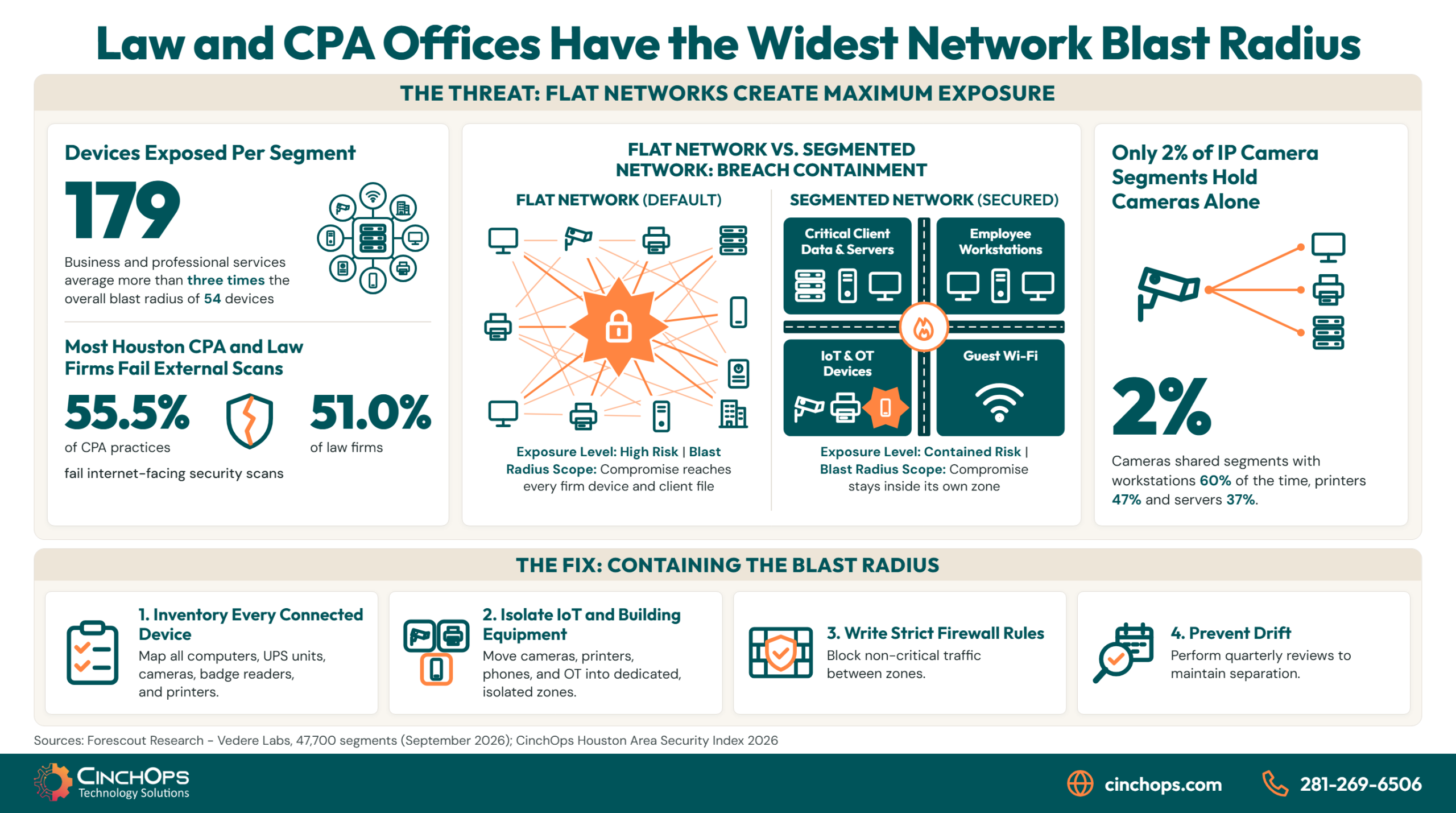
Network segmentation for law firms and CPA practices sounds like an enterprise project, and most 10-to-50-person offices in Houston treat it that way. Forescout's September 2026 analysis of 47,700 real network segments points the other direction: business and professional services (accounting, law and consulting) carried the largest average blast radius of any industry it measured, at 179 devices per segment.
Network segmentation means splitting one office network into separate zones, so a device in one zone cannot freely talk to devices in another. Blast radius is Forescout's term for what an attacker can reach after compromising a single device: every other device on the same segment. Across all 209 organizations in the dataset the average was 54. Professional services came in at more than three times that, ahead of healthcare at 116 and oil and gas at 72.
Those organizations are large. The dataset covers more than 2.5 million devices across 209 organizations, which averages out to roughly 12,000 devices each. A 25-person firm in Katy or Sugar Land will never see a segment with 179 devices on it. The number that matters for a small office is simpler: if the whole office runs on one flat network, the blast radius is every device the firm owns, the managing partner's laptop and the client file server included.
CinchOps builds network segmentation for law firms and CPA practices across the Houston area, moving cameras, printers, phones and building equipment into their own zones so one compromised device reaches only its own zone, with 24/7 threat monitoring on the boundaries between them.
Is a Small Law Firm or CPA Practice Too Small to Need Network Segmentation?
The myth: segmentation is for companies with data centers. The fact: professional services offices carried the largest blast radius in Forescout's 47,700-segment study.
No. Forescout's 2026 study of 47,700 network segments ranked business and professional services, meaning accounting, law and consulting firms, first for blast radius at 179 devices per segment. A small firm with one flat office network has the same problem in miniature: every device can reach every other device, so one compromised machine exposes all of them.
Forescout does not say why professional services ranks first. Our read, from 35+ years of walking into these offices, is that the network was set up once, when the firm moved into its suite, and every device since then went onto the same switch because that is where the open port was. A law office adds a conference-room TV, a badge reader and a camera over the front door. A CPA practice adds scanners and seasonal workstations for tax season. None of it gets its own zone, because nothing has broken yet.
CinchOps' own Houston Area Security Index shows the same firms from the outside. It grades 4,393 Houston-area businesses on what an attacker can see from the public internet. CPA practices finished last of five industries at a 1.32 GPA with 55.5% failing, and 51.0% of law firms failed. Those are external scores and say nothing about the inside of a network. Read next to Forescout's numbers, the two studies describe one compounding risk: the industries most likely to leave a door open from the outside are also the ones where a single open door reaches the most devices inside.
Can an IP Camera or Printer Really Put Client Files at Risk?
The myth: cameras, printers and phones are appliances. The fact: Forescout found IP cameras sharing segments with workstations and servers far more often than sitting alone.
Yes. In Forescout's 2026 data, 2,266 network segments contained IP cameras and only 51 of them (2%) held cameras alone. Workstations shared the segment 60% of the time, printers 47% and servers 37%. A compromised camera on the same segment as a file server gives an attacker a working path to client data.
Forescout reports that the Akira ransomware group used a poorly segmented IP camera to get around endpoint detection and response (EDR) in early 2025. The mechanism is simple. EDR software runs on laptops and servers, and it cannot be installed on a camera. An attacker who controls the camera launches the next stage from a device nothing is watching, then reaches the workstations on the same segment. Forescout also says it tracked more than 300 cases in 2026 of hacktivist groups taking over exposed IP cameras.
Onboarding audits in small Houston offices keep turning up the same layout: a camera system installed by the building's security contractor, plugged into the firm's main switch next to the document server, with no one at the firm sure who manages it. The camera works, so nobody looks at it again.
Is a Separate Guest Wi-Fi Network Enough Segmentation?
The myth: the guest network is the segmentation. The fact: the riskiest mixing happens among devices the firm owns.
No. A guest Wi-Fi network keeps visitors' phones away from office systems, which is worth doing, but it does nothing about the devices the firm owns. Forescout found that segments holding operational equipment such as UPS units, power distribution units and building automation controllers were OT-only just 13% of the time; the rest shared space with IT or IoT devices.
Houston adds a reason these devices keep multiplying. Since Hurricane Beryl knocked out power across the Houston area in July 2024, we keep finding small offices that added network-managed battery backups, generator monitoring and cellular failover so someone could check power status from home. Each of those is an OT or IoT device, and in most of the offices we see, each one landed on the same flat network as the workstations because that was the fastest place to plug it in. Hurricane preparation quietly widened the blast radius.
A quick walk through the office usually finds these devices on the main network:
- Battery backup (UPS) management cards and generator monitors in the server closet
- Security cameras and the video recorder that stores their footage
- Badge readers, door controllers and the building thermostat
- Conference-room TVs, video bars and wireless presentation boxes
- Multifunction printers and scanners, which also store copies of scanned documents
- VoIP desk phones and the phone system controller
Does Segmenting the Network Mean Replacing the Whole Thing?
The myth: segmentation is a rip-and-replace project. The fact: Forescout's own advice is to work in steps, starting with the riskiest mixes.
No. Forescout's recommendations state that organizations do not need to redesign their entire network overnight. For a law firm or CPA practice, segmentation usually means using the VLAN and firewall features already built into business-grade switches and firewalls, then moving cameras, printers, phones and building equipment into their own zones one group at a time.
Buying a new firewall before knowing what is plugged in produces a clean design around the wrong devices. Forescout lists seven recommendations. Trimmed to what a 10-to-200-person office can act on, they come out as five steps:
- Inventory every connected device, including the ones nobody thinks of as computers. A segmentation plan built from memory misses the badge reader and the UPS card.
- Find the mixed segments first. Any zone where cameras, printers, phones or building gear share space with workstations or the file server goes to the top of the list.
- Move cameras and building equipment out first. They cannot run endpoint protection and rarely get firmware updates, so they get their own zone with no route to client data.
- Write the rules between zones. A printer zone needs to receive print jobs and has no reason to open connections to the document server. Forescout calls this restricting east-west traffic.
- Check for drift on a schedule. Forescout found each device sat in 1.5 segments on average, which is how clean designs erode as new devices get plugged into whatever port is closest. A quarterly review catches it.
Most small offices can do all five without new cabling. Consumer-grade routers and unmanaged switches are the exception. If the office network runs on that gear, segmentation starts with replacing it, and that replacement is overdue for other reasons anyway.
SD-WAN carries segmentation across more than one office. A firm with a Katy office and a Sugar Land office, or a main office plus a satellite suite, faces a harder version of the same problem: each location has its own cameras, printers and phones, and each location's rules tend to drift apart. An SD-WAN edge device at each site runs the firewall and the zones itself, and the zone rules are written once and applied to every location, so the camera zone in one office follows the same rules as the camera zone in the other. The same device fails the office over to a second internet connection when the primary drops, which is the connectivity half of the post-Beryl preparation that added all those battery and generator monitors in the first place. CinchOps SD-WAN handles that multi-office case.
What Shares a Segment With Your File Server?
CinchOps will map what is connected in your office and show which devices can reach client data today.
Talk to CinchOpsA law firm will spend a month choosing a document management system and then put it on the same network as a camera nobody remembers buying. The camera has no antivirus, no updates and no owner. Give it a zone of its own and the worst it can do is go dark. Leave it next to the file server and it becomes a way in.
Segmentation Works Best When Someone Watches the Boundaries
Rules between zones close the easy path. Watching the traffic that tries to cross them is what catches an attacker who finds another way. CinchOps pairs network security design with 24/7 threat monitoring, and help desk requests are answered in under 15 minutes when a new rule trips up a printer.
See CinchOps cybersecurity services →How CinchOps Can Help Law Firms and CPA Practices Segment Their Networks
CinchOps is a managed IT services provider based in Katy, Texas, serving small and mid-sized businesses across the Houston metro area. CinchOps specializes in cybersecurity, network security, managed IT support, VoIP, and SD-WAN for businesses with 10 to 200 employees.
- Through cybersecurity services, CinchOps inventories every connected device, designs zones for cameras, printers, phones and building equipment, and monitors the boundaries 24/7.
- Through SD-WAN, CinchOps enforces the same zones and rules at every office a firm runs, with automatic failover to a second internet connection, so segmentation stays consistent as the firm adds locations.
- Managed IT support keeps new devices landing in the right zone, so the design does not drift back into one flat network.
- For law firms, segmentation keeps client matter files on a zone that conference-room and front-desk devices cannot reach.
- For CPA firms running CCH Axcess, UltraTax or Lacerte, the scanners and seasonal workstations added for tax season get a place of their own instead of joining the partner network.
- For oil and gas and engineering firms, IT/OT segmentation separates field and building systems from the corporate network at the boundary.
- CinchOps supports offices across Houston, Katy and Sugar Land at a flat monthly rate per user, with Zero-Zero-Zero terms: no long-term contracts, no hidden fees, no cancellation penalties.
Forescout's numbers describe large networks, but the lesson lands hardest on small offices, because a small office usually has exactly one segment. If a camera, a printer and the file server share a switch in your office today, that is the first thing worth fixing, and it rarely takes new hardware. Talk to CinchOps about mapping what can reach your client files.
Frequently Asked Questions
What is network segmentation for a law firm or CPA practice?
Network segmentation divides one office network into separate zones with rules between them. For a law firm or CPA practice, that usually means workstations and the document server in one zone, and printers, phones, cameras and building equipment in others, so a compromised camera or printer cannot reach client files directly.
What is a blast radius in network security?
Blast radius is the set of devices an attacker can reach after compromising one device. Forescout measured it as every other device in the same network segment and found an average of 54, with accounting, law and consulting firms highest at 179. On a flat small-office network, the blast radius is every device.
What does cybersecurity cost a Houston law firm per month?
CinchOps prices managed IT and cybersecurity at a flat monthly rate per user, from $100 to $250 per user per month depending on the service tier, with no long-term contract, no hidden fees and no cancellation penalty. A segmentation project should be scoped against the switches and firewall the firm already owns before anyone quotes new hardware.
Do we need new equipment to segment a small office network?
Usually not. Most business-grade firewalls and managed switches already support VLANs and rules between them. Offices running consumer routers or unmanaged switches are the exception, because that gear cannot enforce separate zones. An inventory of the current network answers the question before anything gets purchased, and it doubles as the first step of the segmentation plan.
How often should network segmentation be reviewed?
At least quarterly, and after any office move, new camera system or device rollout. Forescout found each device sat in 1.5 segments on average, which shows how designs drift as devices get added. A review compares what is connected against the zone plan and moves anything that landed in the wrong place.
Discover More
Resource
Sources


