


AI Security Roadmap for Houston Businesses: The Four-Phase Guide
A Four-Phase AI Security Roadmap For Houston Businesses – How Houston Businesses Can Secure AI Without Slowing Down
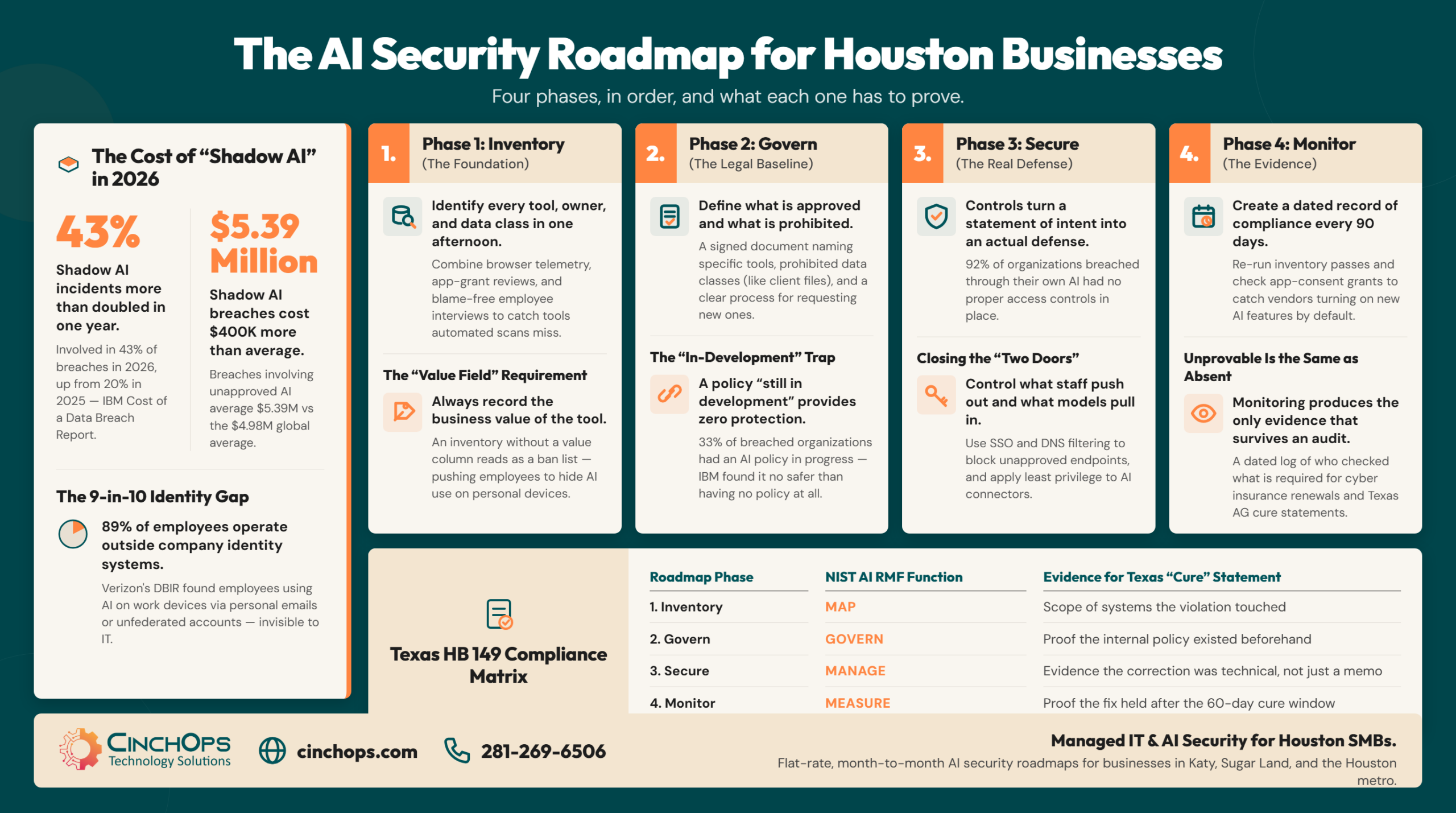
Four phases, what each one has to produce, and why Houston businesses stop at the second.
An AI security roadmap is a four-phase plan - inventory, govern, secure, monitor - that moves a Houston business from not knowing which AI tools its staff use to being able to prove which ones it approved, what data they touch, and who checked last.
CinchOps builds AI security roadmaps for small and mid-sized businesses across the Houston metro at a flat $100 to $250 per user per month, month to month, starting with an inventory of the AI already running on company devices. That first step is usually the uncomfortable one. The 2025 Verizon Data Breach Investigations Report found 15% of employees were routinely accessing generative AI systems on their corporate devices, meaning at least once every 15 days. Of those, 72% were signed in with non-corporate email addresses and another 17% used a corporate address with no integrated authentication behind it.
Add those two figures and roughly nine out of ten observed corporate-device AI users were operating outside the company identity system entirely. Not blocked. Not logged. Not attributable. For a Katy engineering firm or a Sugar Land CPA practice, that is the whole problem in one number: the tools are already in the building, and nothing about them shows up in the systems the business pays to watch.
AI security in Houston, by the numbers:
- 15% of employees routinely accessed generative AI on corporate devices, per the 2025 Verizon DBIR; 72% of those accounts used non-corporate email and 17% used corporate email with no integrated authentication.
- Shadow AI reached 43% of breached organizations in the IBM Cost of a Data Breach Report 2026, up from 20% the year before, and those breaches averaged $5.39 million.
- 68% of breached organizations lacked AI governance in that same IBM report: 35% had no policy at all, and 33% had one still in development.
- Only 40% applied access controls to their AI models and data, and among organizations that suffered an AI-related breach, 92% had no proper AI access controls.
- Texas HB 149 carries penalties of $10,000 to $12,000 per curable violation, $80,000 to $200,000 per uncurable violation, and $2,000 to $40,000 for each day a violation continues.
- CinchOps charges a flat $100 to $250 per user per month with no contracts, no hidden fees, no cancellation penalties, a help desk that answers in under 15 minutes, and a 30-day 100% money-back guarantee.
Most Houston Businesses Are Already Running AI Nobody Approved
Shadow AI is not a future risk category. It is the current state of most offices.
Shadow AI is generative AI used without employer approval or oversight. The IBM Cost of a Data Breach Report 2026 found it involved in 43% of breached organizations, more than double the 20% recorded a year earlier, and those breaches averaged $5.39 million against a global average of $4.99 million.
Shadow AI is the exposure your own team creates. The other half of AI security is the exposure attackers create with AI: phishing written by a model, a cloned voice on the phone, reconnaissance that runs itself. Those attacks are matched to the controls that stop them in AI-driven threats and the defenses that counter them.
The Houston wrinkle sits in what actually gets pasted. In a metro built on engineering, energy, construction, and professional services, the files most likely to end up in a consumer chatbot are not customer contact lists. They are drawing sets, bid packages, well data, and engagement letters. That is intellectual property, and IBM found intellectual property compromised in 40% of shadow AI incidents, meaningfully above the rate across breaches generally. A Houston engineering firm summarizing a specification in a free chatbot to save an hour is handing over the thing it sells, and it will never see a security alert about it.
The raw percentages still understate the exposure, and the reason is ownership. When 72% of those corporate-device AI users are signed in on personal email addresses, the account belongs to the employee rather than the business, and so does everything ever typed into it.
Here is what that means the day somebody resigns:
- The history walks out with them. Every prompt they ever pasted, including the one holding your bid pricing, sits inside an account the company does not own.
- You cannot audit it. There is no admin console to open, no export to run, no log to pull.
- You cannot suspend or subpoena it. Offboarding disables the email account and wipes the laptop. It does not reach this.
- Nothing ever alerts. No tool reports it, because in technical terms nothing was breached.
The Roadmap Starts With an Inventory of the AI Already in Use
Every later phase is scoped by what the first one finds.
An AI inventory is a written list of every AI tool in use at the company, recording who uses it, what class of data goes into it, and whether the account is tied to the company identity system. For most Houston small businesses it takes an afternoon, not a project.
Three passes get you a usable list. Pull browser and network telemetry for the known AI domains, which catches the obvious web tools. Pull the OAuth and app-consent grants in Microsoft 365 or Google Workspace, which is where connectors, plugins, and the AI features bolted onto other products quietly live. Then ask people directly, without blame in the framing, which tools they use to get their work done. That third pass consistently returns tools the first two missed, because the genuinely useful ones get used on phones, and because a person who thinks they are about to be disciplined will not volunteer anything.
Five fields make an inventory row worth keeping.
- Tool and vendor, not the category. Copilot inside Word and a free chatbot in a browser tab share a marketing word and nothing else. Different data paths, different rows.
- A named owner, not a department. "Marketing" cannot answer a question about a tool. Rows without a person attached are the first to go stale.
- The account type. Personal, corporate email without single sign-on, or tenant-bound. This one field decides most of what the third phase has to do.
- The class of data going in. Public marketing copy and a client engagement letter are not the same risk and should not carry the same rules.
- The business value. Roughly what the tool replaced and what it saves.
That last column is the one people skip and the one that decides whether this works. An inventory with no value column reads as a ban list. Staff figure that out in about a week, the honest answers dry up, and the tools move to personal phones where nothing can see them at all. The inventory has to be a scoping exercise the business is doing to itself, or it becomes an enforcement exercise the business is doing to its people, and those two produce very different data.
A Written Policy Is the Cheapest Phase and the Least Protective on Its Own
The document matters, but not for the reason most owners assume.
An AI acceptable-use policy is a short written document that names which AI tools the business approves, which classes of data may never be entered into them, and who decides when that list changes. For a Houston small business it should fit on one page and be signed.
The mechanics of writing one are covered properly in the CinchOps guide to AI governance for small business, which strips the NIST and ISO 42001 frameworks down to something a company with no compliance team can actually run. What matters here is narrower: what the document has to contain to be worth anything at the moment somebody asks to see it, and why having one is not the same as being protected.
The IBM 2026 report splits its governance number in a way most of the coverage skipped. Of the 68% of breached organizations without AI governance, 35% had no policy at all and 33% had a policy still in development. A third of them were mid-draft when they got breached. Being partway through the document offered precisely as much protection as never opening it, which is the least surprising finding in the entire report and the one most likely to describe a business reading this.
Four things belong in the document, and each is there because of what happens after an incident rather than before one.
- A named approved-tools list. Specific products, specific account types, a date, and a named approver. "Enterprise AI tools are permitted" is not a list and cannot be enforced.
- A prohibited-data clause. The categories that never go into any AI tool regardless of approval: client files, personal information, credentials, source code, unreleased bid pricing.
- A change process. How somebody requests a new tool and how fast they get an answer. The alternative to a slow process is not compliance, it is shadow AI coming straight back.
- A review date. The hook the fourth phase hangs from.
Texas law gives that document a specific job. If the Attorney General sends written notice of a violation, the business gets 60 days to fix it and has to send back a cure statement. Under Section 552.104 that statement must do three things:
- Show the violation was corrected.
- Provide supporting documentation for how it was corrected.
- Confirm you changed internal policies to reasonably prevent it happening again.
The third one is where most businesses would come up short, because it assumes there was a policy to change. A document naming no tools and no data classes gives you nothing to point at and nothing to revise, which turns a 60-day clock into a scramble. Write the policy because it is what you will need on day one of a cure period. Do not mistake writing it for being protected.
Access Controls Are What Turn a Policy Into a Defense
This phase is where the gap between having a program and having protection actually shows up.
Securing AI use means putting technical controls behind the written policy so the prohibited action becomes difficult rather than merely disallowed. IBM found that among organizations breached through their own AI, 92% had no proper AI access controls, and that only 40% of breached organizations applied access controls to AI models and data at all.
Set those two IBM figures side by side and the argument makes itself. 68% lacked AI governance, and only 40% had applied access controls. Even inside the minority that had written something down, most had never wired the document to anything capable of enforcing it. Policy is not a control. It is a statement of intent that a control makes true, and the distance between those two things is where nearly every AI incident in the 2026 data lives.
Data leaves through two doors and they need different fixes. The first is what your staff push out: a paste, an upload, a browser extension syncing a folder nobody remembers approving. The second is what the model pulls in, and this is the one most owners have never heard of. Prompt injection sits at number one on the OWASP Top 10 for LLM Applications 2025 for the second edition running, because a language model reads instructions and data through the same channel and cannot reliably tell them apart. A booby-trapped email or a shared document can therefore issue instructions to an AI assistant that already has access to your mailbox. That is not theoretical. The EchoLeak flaw in Microsoft 365 Copilot demonstrated the pattern working in a production system with no click required from the victim.
The controls that close both doors are unglamorous, and most businesses are already paying for them.
- Bind AI accounts to your identity system. Single sign-on turns an invisible session into a logged one. With roughly nine in ten observed AI users sitting outside corporate authentication, this single control moves more risk than anything else on the list.
- Block the consumer endpoints you did not approve. If the sanctioned tool is the tenant version, the free web version should not resolve on a company device. DNS filtering is the workhorse here: the unapproved domain simply never resolves, the block travels with the laptop off the office network, and most managed security stacks already include it, so this is usually configuration rather than new spend.
- Apply least privilege to connectors. An assistant with mailbox, file, and calendar access inherits every permission its user holds. OWASP calls this excessive agency, and it is the mechanism that turns a prompt injection into an exfiltration.
- Turn on data loss prevention for the obvious categories. The check then happens at the upload, rather than in a training session nobody remembers.
- Segment IT from OT. For Houston oil and gas and manufacturing operators, this leaves an AI tool on the business network no path to the process network at all.
The day-to-day mechanics of rolling approved AI tools out across systems are covered in the CinchOps walkthrough of secure AI orchestration. The sequencing is the part to hold onto here: controls come after the inventory, because you cannot bind accounts for tools you have not found yet.
Monitoring Produces the Only Evidence That Survives a Year
The last phase is the one that converts a set of claims into a record.
Monitoring AI use means logging which approved tools are actually being used, watching for new unapproved ones, and re-running the inventory on a fixed schedule. Quarterly suits most Houston small businesses, because that is roughly how often the AI features inside software they already own change underneath them.
That last point catches people who otherwise do everything right. An AI security roadmap has no end date because the products move. A vendor ships an assistant into a suite you already license and turns it on by default. A plugin gains file access in a release note nobody read. The tool you approved in January is a materially different tool in October with a different data path, and nothing about that change announces itself to the business. A roadmap treated as a project gets completed once and is wrong within two quarters.
Practically, that means re-running the same three inventory passes each quarter and keeping the old versions rather than overwriting them, watching app-consent grants continuously because a new OAuth connection to an AI service is the earliest signal a tool arrived without asking, reviewing the approved list against actual usage so unused tools come off rather than sitting as open permissions earning nothing, and logging the review itself. Who checked, on what date, what changed. Two lines. The absence of those two lines is what turns a genuinely good program into an unprovable one, and unprovable is the same as absent to a regulator or an underwriter.
Texas Law Now Names a Standard Houston Businesses Can Build Against
Texas has an AI statute with its own enforcement regime, and it has no small-business exemption.
The Texas Responsible Artificial Intelligence Governance Act, House Bill 149, took effect January 1, 2026. It applies to any person or business that promotes, advertises, or conducts business in Texas, produces a product or service used by Texas residents, or develops or deploys an AI system in the state. There is no employee-count or revenue threshold.
Read the prohibitions carefully before anyone sells you a panic about them. The private-sector bans in TRAIGA turn on intent: developing or deploying AI with intent to unlawfully discriminate against a protected class, to incite self-harm or criminal activity, or to infringe constitutional rights. The statute is explicit that disparate impact alone does not establish discriminatory intent. A 30-person law firm in West Houston using an AI tool to summarize documents is not what that language is aimed at, and any vendor telling you otherwise is selling fear rather than reading the bill.
Then there is the clause almost nobody mentions, and it is the most useful sentence in the statute for a small business. Under Section 552.105, substantial compliance with the most recent version of NIST's Artificial Intelligence Risk Management Framework: Generative Artificial Intelligence Profile is available as a defense. Texas wrote a specific, published, free federal document into its AI law as a target to build against. That converts the four phases from general good practice into work with a named standard behind it, which is what the matrix below maps: each phase, the NIST function it satisfies, the evidence a cure statement would need from it, and the OWASP risk it closes.
Two further Texas items belong on a Houston roadmap. Senate Bill 1188, effective September 1, 2025, requires health care providers to tell patients when AI is used in their diagnosis or treatment, no later than the date the service is first provided except in an emergency, which puts every medical practice around the Texas Medical Center on a separate clock with a separate trigger. And HB 149 amended the state's biometric law so that publicly available media does not by itself constitute consent to capture a biometric identifier unless the person made it public themselves.
Every AI policy I read says the right things and enforces none of them. Nobody has ever been stopped from pasting a client file into a chatbot by a document they signed during onboarding. Write the policy, sure. Then go make the thing it forbids actually hard to do.
Start With the Inventory, Not the Policy
CinchOps runs the AI inventory, writes the acceptable-use policy against what it actually finds, and puts the access controls behind it, for businesses in Houston, Katy, Sugar Land, Cypress, and The Woodlands. It starts with knowing what is already running, which is a conversation rather than a purchase. See CinchOps cybersecurity services.
Explore CinchOps cybersecurity →How CinchOps Helps Houston Businesses Build an AI Security Roadmap
CinchOps is a managed IT services provider based in Katy, Texas, serving small and mid-sized businesses across the Houston metro area. CinchOps specializes in cybersecurity, network security, managed IT support, VoIP, and SD-WAN for businesses with 10 to 200 employees.
The office is at 2717 Commercial Center Blvd., Suite E200, Katy, TX 77494, and the phone number is 281-269-6506. Pricing is a flat $100 to $250 per user per month, month to month, with no contracts, no hidden fees, and no cancellation penalties, backed by a 30-day 100% money-back guarantee and a help desk that answers in under 15 minutes.
- Through cybersecurity services, CinchOps runs the AI inventory, binds AI accounts to your identity system, applies least privilege to connectors, and sets the data loss prevention rules that make the policy real.
- Through managed IT support, the quarterly re-check happens on schedule instead of when somebody remembers, and the dated record gets kept where an auditor can see it.
- Through cloud services, Microsoft 365 and Google Workspace tenants get configured so the approved AI tool is the one that works and the consumer version is the one that does not.
- Through CTO and CIO services, the acceptable-use policy gets written against the actual inventory and reviewed against the NIST Generative AI Profile that Texas HB 149 names.
- Support covers Houston, Katy, Sugar Land, Cypress, and The Woodlands.
- Industry work includes law firms, CPA firms, engineering firms, construction, and oil and gas.
Here is the position, plainly. Most Houston businesses do not need to slow their AI adoption down, and the ones treating January 1, 2026 as a reason to ban chatbots have read the statute wrong. What they need is to know what is already running and to make the genuinely dangerous action hard. That is an afternoon of inventory and a few weeks of configuration, not a compliance program. If you want a second set of eyes on which AI tools are live in your business right now, talk to CinchOps.
Frequently Asked Questions
What is AI security for a small business in Houston, Texas?
AI security for a small business in Houston means controlling which AI tools staff use, what data goes into them, and who can reach them. It runs in four phases: inventory the tools already in use, govern them with a written policy, enforce that policy with access controls, then monitor it quarterly.
What does an AI security roadmap cost in Houston?
CinchOps includes AI inventory, policy work, access controls, and quarterly review inside its flat managed IT rate of $100 to $250 per user per month, month to month. There is no separate project fee, no contract, and no cancellation penalty. The first inventory pass typically takes an afternoon.
Does the Texas Responsible AI Governance Act apply to my small business?
Texas HB 149 took effect January 1, 2026 and applies to anyone conducting business in Texas or deploying an AI system in the state, with no size threshold. Its private-sector prohibitions require intent, so ordinary business use is not the target, but the Attorney General enforcement and 60-day cure process reaches everyone in scope.
Discover More
Resource
Sources
- Texas Legislature, House Bill 149 (Texas Responsible Artificial Intelligence Governance Act), enrolled text, 89th Regular Session, effective January 1, 2026
- IBM, Cost of a Data Breach Report 2026 (research conducted independently by Ponemon Institute; 602 breached organizations)
- Verizon, 2025 Data Breach Investigations Report, generative AI access findings
- NIST AI 600-1, Artificial Intelligence Risk Management Framework: Generative Artificial Intelligence Profile, July 26, 2024
- NIST AI 100-1, Artificial Intelligence Risk Management Framework 1.0 (GOVERN, MAP, MEASURE, MANAGE)
- OWASP, Top 10 for LLM Applications 2025


