


Managed IT Onboarding: What We Actually Find in the First 30 Days
What Good IT Onboarding Actually Looks Like – Week One Quick Wins That Cut Real Risk
A look at the recurring problems and the quick wins on a new Houston business network, from the people who do this every month.
Managed IT onboarding is the first 30 days a new provider spends mapping, documenting, and securing a network it has never touched. For a Houston business switching from break-fix or from a retiring in-house admin, this is the window where the real condition of the environment finally gets seen.
The pattern is remarkably consistent. The same handful of gaps turns up on new network after new network. Not because the previous setup was careless, but because no one was watching the whole picture, and small problems compound quietly over years.
So this is what the first month really looks like: what gets inventoried, what we almost always find broken, and which fixes land in the first week. None of it is exotic. The value is in doing it on purpose instead of waiting for something to break at 4pm on a Friday.
What Does Managed IT Onboarding Actually Cover?
Discovery, documentation, security baseline, and a prioritized fix list.
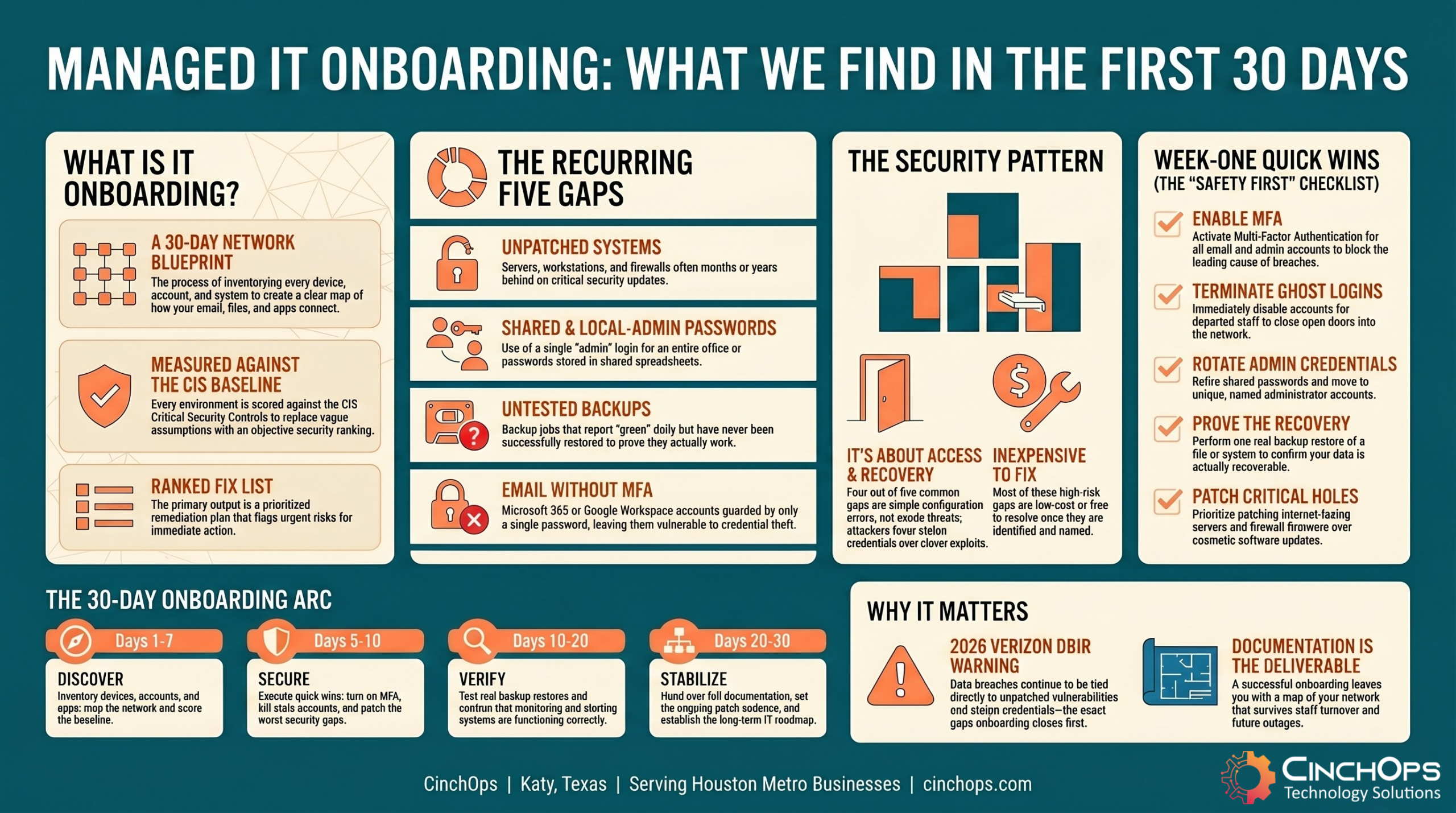
Managed IT onboarding is the structured process of inventorying every device, account, and system on a network, documenting how it all connects, and measuring it against a security baseline. The output is a clear picture of the environment and a ranked list of what to fix first.
The first job is an honest inventory. Every server, workstation, firewall, switch, and cloud tenant gets found and recorded. Then accounts: who has access to what, which logins are still active, and which ones belong to people who left. We map how email, files, line-of-business apps, and backups actually fit together, because the diagram in someone's head is rarely the diagram on the wire.
Against that inventory we run a baseline. The CIS Critical Security Controls give a practical order of operations for basic hygiene: know your assets, control admin access, patch, configure securely, and back up. Onboarding scores the network against that and turns the gaps into a plan.
- Asset and account inventory: every device, user, and service, including the ones no one remembered.
- Network and data mapping: how email, files, apps, and backups connect, documented so it survives staff turnover.
- Security baseline: the environment measured against CIS hygiene controls, not a vague gut feel.
- Prioritized remediation plan: the gaps ranked by risk, with the urgent ones flagged for week one.
What Do We Almost Always Find?
Five gaps show up on nearly every new network, regardless of size or industry.
On a new managed IT network, the same five problems recur: unpatched systems, shared or local-admin passwords, backups that were never tested, stale or orphaned admin accounts, and email running without MFA. None are rare, and each one is a direct path to an outage or a breach.
These are not edge cases. They are the default state of a network that has been running without anyone responsible for the whole of it. In 35 years around small business IT, I have stopped being surprised by any of them. What still surprises owners is how cheap most of these are to fix once someone names them.
- Unpatched systems: servers and workstations months behind on updates, plus the firewall firmware no one has touched since install. The 2026 Verizon DBIR continues to tie a large share of breaches to vulnerabilities that had a patch available and unapplied.
- Shared and local-admin passwords: one "admin" login the whole office uses, the same local administrator password on every machine, and credentials sitting in a shared spreadsheet.
- Backups that were never tested: a backup job that runs nightly and reports green, but has never once been restored. A backup you have not tested is a hope, not a recovery plan.
- Stale or orphaned admin accounts: active logins for people who left a year ago, and old service accounts with admin rights that nobody can explain.
- No MFA on email: Microsoft 365 or Google Workspace protected by a password alone. The Verizon DBIR keeps flagging stolen credentials as a top way in, and MFA is the single cheapest block against it.
Notice the theme. Four of the five are about access and recovery, not fancy threats. Attackers do not need a clever exploit when a shared admin password and an inbox with no second factor are sitting right there. The boring gaps are the ones that get businesses hurt.
The first 30 days on a new network are never boring, and they are never a mystery either. We find the same five things, fix the dangerous ones inside a week, and the owner usually says the same thing: nobody ever told me. That is the whole point of onboarding.
What Are the Week-One Quick Wins?
The fixes that cut the most risk in the least time, done in the first seven days.
The week-one quick wins are the changes that remove the most risk for the least effort: enabling MFA on email, disabling departed-staff accounts, retiring shared admin logins, and confirming at least one backup can actually be restored. Most take hours, not weeks, and they change the security picture immediately.
Onboarding is not a 30-day wait for safety. The dangerous stuff gets handled first. When we onboard a firm in Katy or The Woodlands, the goal for the first week is simple: close the doors a thief would walk through tonight. The slower work of patching cycles and architecture comes after the bleeding stops.
- Turn on MFA for email and admin accounts. This is the highest-value hour in the whole onboarding. It blocks the credential-theft path the Verizon DBIR keeps naming as a leading cause of breaches.
- Disable accounts for anyone who left. Every orphaned login is an open door. Disabling them is free and takes minutes.
- Retire shared and reused admin passwords. Give each admin a named account, rotate the local administrator password per machine, and move credentials out of the spreadsheet.
- Run one real backup restore. Not a green checkmark. An actual file or system pulled back from backup to prove recovery works.
- Patch the worst-known holes. The exposed firewall firmware and the internet-facing server that is years behind get prioritized over cosmetic updates.
The order matters. Identity and recovery come before everything else, because those are the gaps attackers use and the ones that turn a small incident into a closed business. Get those four done in week one and a network that felt fragile on day one is meaningfully safer by Friday.
Quick wins are the start, not the finish
Turning on MFA and killing stale accounts buys you breathing room. Keeping a network secure month after month takes ongoing patching, monitoring, and response. CinchOps runs that for Houston businesses with managed cybersecurity services.
Explore CinchOps cybersecurity services →What Does Good Onboarding Look Like, and How Long Should It Take?
Roughly 30 days, structured, documented, and measured against a real baseline.
Good managed IT onboarding takes about 30 days for a typical small business: a structured audit in week one, the urgent security fixes alongside it, backup and monitoring verification within the first week, and a documented environment plus a roadmap by day 30 (typically sooner). The test is whether the provider can hand you a clear map of your own network.
The difference between good and bad onboarding is not speed, it is rigor. A weak onboarding plugs in a monitoring agent, calls it done, and learns your network the hard way during your next outage. A strong one measures the environment against the CIS Controls, writes it all down, and leaves you with documentation that survives the next staff change.
- Week one: full discovery, security baseline, the urgent fixes from the quick-wins list, a tested backup restore, working monitoring and alerting, and the patch cadence set.
- Day 30: complete documentation, a prioritized remediation roadmap, and a known schedule for reviews.
- Ongoing: the plan moves from reactive cleanup to steady, measured maintenance.
A bigger or messier environment can run longer, and an oil and gas operation with OT systems will take more care than a 15-person CPA practice. But for most Houston SMBs, if a provider cannot show you a documented picture of your network and a ranked fix list inside a month, the onboarding was not thorough enough. Take a position on this one: documentation you can read is the deliverable, not a dashboard you cannot.
Not sure what is actually running on your network?
A first-30-days audit tells you exactly which of these five gaps you have, ranked by risk, before any of them become a bad Friday.
Talk to CinchOpsHow CinchOps Can Help With Your First 30 Days
CinchOps is a managed IT services provider based in Katy, Texas, serving small and mid-sized businesses across the Houston metro area. CinchOps specializes in cybersecurity, network security, managed IT support, VoIP, and SD-WAN for businesses with 10 to 200 employees.
Onboarding is where we earn the relationship. The first 30 days are run as a structured audit and a fast set of safety fixes, not a sales tour, and you end it holding a documented map of your own network.
- Through managed IT support, we inventory, document, and maintain the systems your business runs on.
- With cybersecurity services, we close the access gaps, turn on MFA, and keep watching after week one.
- For business continuity and disaster recovery, we test the backups that nobody had restored.
- Across industries like law firms, CPA firms, and construction, we tailor the onboarding to how the business actually operates.
- From Houston to Katy and Sugar Land, we onboard businesses across the metro.
If you are switching providers or bringing in a managed IT partner for the first time, the onboarding is the part that tells you whether you hired well. A good one finds the five gaps, fixes the dangerous ones in week one, and hands you the documentation to prove it. If you want a straight answer about what is actually running on your network, talk to CinchOps.
Frequently Asked Questions
What is managed IT onboarding?
Managed IT onboarding is the first 30 days a new provider spends inventorying every device and account on your network, documenting how it connects, and measuring it against a security baseline. The result is a clear map of your environment and a ranked list of what to fix first, starting with the most dangerous gaps.
What do managed IT providers find most often in the first 30 days?
Five gaps recur on almost every new network: unpatched systems, shared or local-admin passwords, backups that were never tested, stale or orphaned admin accounts, and email with no MFA. Most are about access and recovery, not exotic threats, and most are inexpensive to fix once they are named.
What are the week-one quick wins in IT onboarding?
The highest-value week-one fixes are turning on MFA for email and admin accounts, disabling logins for departed staff, retiring shared admin passwords, and confirming one backup can actually be restored. These remove the most risk for the least effort and usually take hours, not weeks, to complete.
How long should managed IT onboarding take?
For a typical Houston small business, good onboarding takes about 30 days: a structured audit and urgent fixes in week one, backup and monitoring verification within the first week, and full documentation plus a roadmap by day 30 (typically sooner). Larger or messier environments can take longer, but a month is a fair benchmark.
Why does an untested backup matter during onboarding?
A backup job can run nightly and report success while being impossible to restore. Until a provider pulls real data back from it, you have a hope, not a recovery plan. That is why running one genuine restore is a standard part of CinchOps onboarding, not an afterthought left for the next outage.
Discover More
Resource
Sources


