


OWASP Top 10 for LLM Applications 2026: What Houston Businesses Own
AI Security For Small Business In Houston, Texas – Ten Questions To Ask Before An AI Tool Gets Your Email And Files
The new list was written for software developers. Here is what it means for a Houston business that just switched on Copilot or ChatGPT.
The OWASP Top 10 for LLM Applications 2026 is a ranked list of the ten most common ways AI tools like ChatGPT and Microsoft Copilot go wrong. LLM stands for large language model, the engine inside those tools. The 2026 edition is the first one checked against real incidents instead of expert opinion alone.
Somebody on your team just connected an AI assistant to the company mailbox, or a vendor is pitching an "AI agent" that can update your CRM and answer customers. Then the cyber insurance renewal or a client questionnaire asks what AI controls you have. The OWASP list is where most security people start, but every entry is written for the programmers who build these tools. Most Houston businesses with 10 to 200 employees don't build them. They buy them, switch them on, and grant them access.
That difference decides who fixes what. CinchOps helps Houston small and mid-sized businesses secure AI tools like Microsoft 365 Copilot and ChatGPT by checking what each tool can open, what it can do without asking, and how much it can spend, against the ten OWASP 2026 risks, under a flat monthly rate per user of $100 to $250. This post splits the ten risks into the ones your vendor owns, the ones you own, and the ones you share, then turns each into one question you can ask this week.
What Changed in the OWASP Top 10 for LLM Applications 2026, in Plain English?
The 2026 edition reordered the list more than any past version, and the biggest move landed on AI tools that take actions.
The 2026 list, published in August 2026, was ranked two ways: a vote by hundreds of security professionals, which set three-quarters of the order, and a review of 7,714 real AI incidents, which set the rest. The biggest move for a business owner: AI tools that can act on their own, sending email, changing records or spending money, jumped from sixth to third.
Here is what the numbers on the new list mean if you run a 25-person office, not a software company:
- 7,714 real incidents, 6,639 with enough detail to sort. These are AI failures that actually happened and were written up in public databases. The list now reflects what went wrong in the field, not only what experts worried about.
- Experts 75%, evidence 25%. The professionals still set most of the order. The incident record moved a risk up or down a notch where the two disagreed.
- "Excessive Agency" climbed from sixth to third. Plain meaning: the more you let an AI tool do without asking you first, the more it can do wrong. That is the setting small businesses switch on most casually.
- "Unbounded Consumption" climbed from tenth to sixth. Plain meaning: runaway AI bills. Most AI services charge per use, so a stolen account key or a stuck automation keeps the meter running until someone notices.
- "Improper Output Handling" fell from fifth to tenth. This one mostly bites companies that write their own software. It matters less if you buy your AI tools off the shelf.
Prompt injection kept the number one spot. Prompt injection means hiding instructions for the AI inside something it reads, such as an email, a PDF or a web page, so it does what the attacker wants instead of what you asked. Counted by public incidents alone it would have dropped out of the top ten, but OWASP says that is because security teams fight it so hard, not because it is rare.
Misinformation went the other way. The experts ranked it near the bottom, but the real incidents put it near the top, so it moved from ninth to seventh. In plain terms, the AI gives a confident wrong answer and somebody, or some automation, acts on it. OWASP's project leads single this one out, and it is the risk a CPA practice or law firm should read twice.
One entry was renamed. System Prompt Leakage is now Hidden Context Exposure, which covers anything typed into an AI tool's behind-the-scenes instructions. If someone on your team built a custom GPT and pasted a password into its setup, that is this risk.
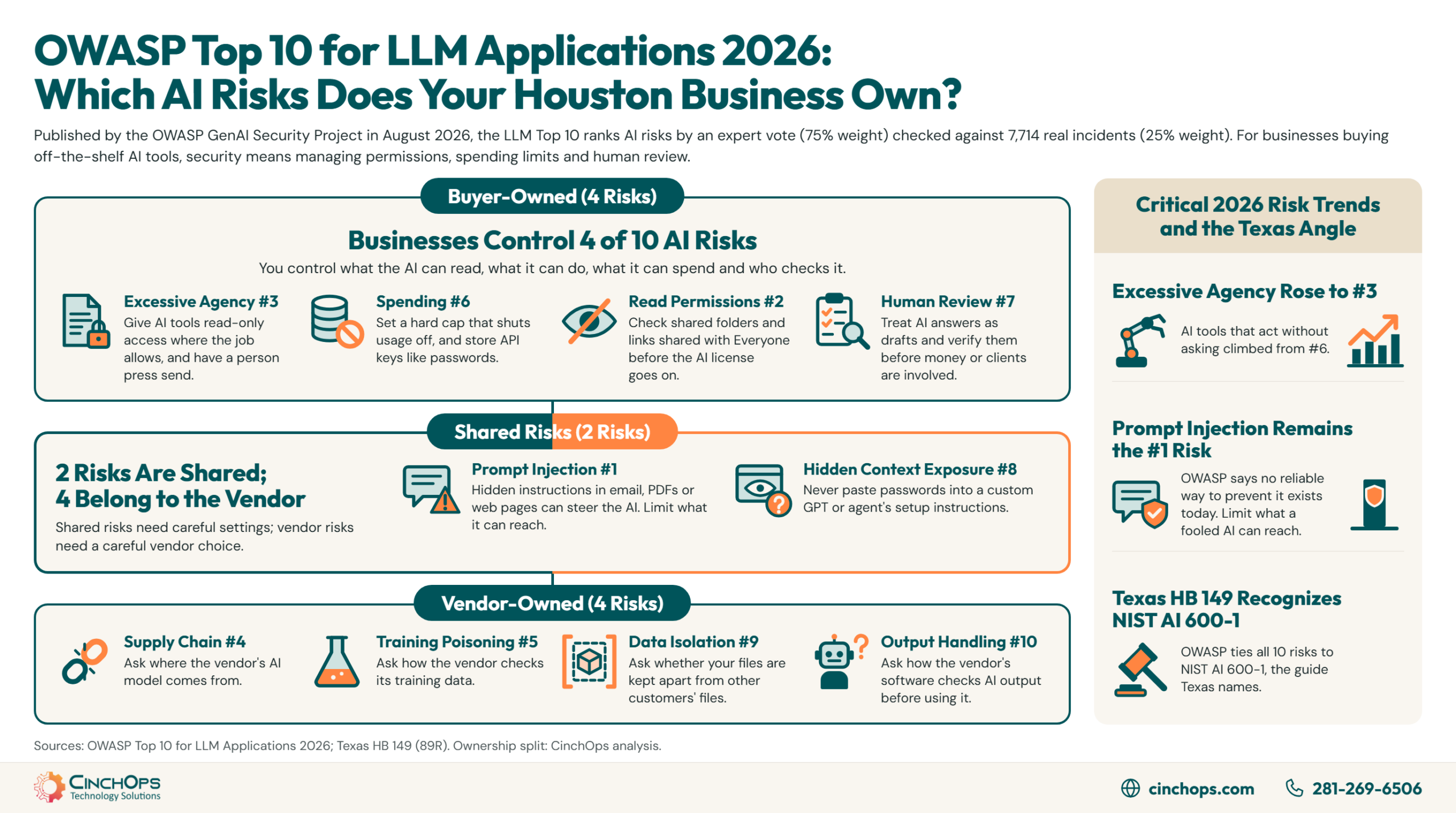
Which AI Risks Can a Small Business Actually Control?
A CinchOps split of the ten OWASP 2026 entries by who can realistically fix each one when the AI tool is bought, not built.
A Houston business that buys AI tools controls four of the ten OWASP 2026 risks outright: what the AI can read, what it can do without asking, how much it can spend, and whether a person checks its answers. Two more are shared with the vendor. The last four belong to the vendor, and your only lever is choosing a good one.
This split is CinchOps' reading of the 2026 entries, not an OWASP classification. OWASP writes every mitigation for the team building the system. When the tool is Microsoft 365 Copilot, a ChatGPT Team account or the AI built into your CRM, you can't change how the AI was built or trained. You can change what it is allowed to open, which apps it is connected to, and what needs your approval.
You own what the AI can read. OWASP's name for this is Sensitive Information Disclosure, and it names old, overly broad file sharing as one of the two main causes. An AI assistant can open anything the person using it can open, so the salary spreadsheet shared with "Everyone" three years ago is now one question away. OWASP's fix is to clean up the files, not the AI. The same entry notes that more than 4,500 chatbot conversations people had shared by link turned up in Google search results in 2025. In 35+ years doing this, I have rarely seen a file share that was cleaned up before something forced the issue. An AI assistant that reads everything a user can read is that forcing event.
You own what the AI can do without asking. OWASP calls this Excessive Agency. Its own example is an email assistant set up to summarize incoming mail that was also given permission to send mail. One booby-trapped email tells the assistant to search the inbox and forward the sensitive messages to the attacker, and it does. OWASP's fix is simple: permission to read mail but not send it, and a person pressing send on anything that leaves.
You share prompt injection with the vendor. OWASP's 2026 entry says no reliable way to prevent it exists today, because an AI can't reliably tell an instruction from you apart from text it happens to be reading. The vendor blocks what it can. You decide whether one assistant gets all three of these at once: your private files, outside email or web pages, and the ability to send things out. OWASP, citing researcher Simon Willison, calls that combination the "lethal trifecta."
- Yours: what it can read (LLM02), what it can do without asking (LLM03), how much it can spend (LLM06), and who checks its answers (LLM07).
- Shared: hidden instructions in what it reads (LLM01), and what your staff type into its setup instructions (LLM08).
- Vendor's, you choose carefully: where the AI came from (LLM04), whether its training data was tampered with (LLM05), whether your documents are kept apart from other customers' (LLM09), and how its output is handled inside the vendor's software (LLM10).
If a developer built a custom chatbot for your website, LLM09 and LLM10 move into the "yours" row. Those two follow whoever wrote the code.
Ten Questions to Ask Before an AI Tool Gets Your Email and Files
One question per OWASP 2026 entry, written for the owner or office manager signing off on an AI tool.
The OWASP 2026 buyer's checklist is ten questions, one per risk, that a Houston business owner can put to a vendor or an IT provider before an AI tool gets access to email, files or payments. If anyone answers "we don't know" to the four questions you own, pause the rollout until they do.
The four questions you own are the ones worth an afternoon this month. Each has a concrete setting behind it:
- Which files can it read? Copilot and similar assistants can search anything the person using them can open. Check who can see your shared folders, links shared with "Everyone," and old project files before the license goes on, not after.
- Can it send, delete or pay without approval? When you connect an AI tool to email, calendars or accounting, give it read-only access wherever the job allows, and require a person to press send on anything leaving the building. OWASP's first four fixes for this risk all come down to giving the AI fewer tools and fewer permissions.
- Is there a hard spending cap on every API key? OWASP has a name for running up someone else's AI bill: Denial of Wallet. Its advice is a hard limit that shuts usage off at the cap, because an alert email can arrive after the damage. The account keys your AI apps use (API keys) should be stored like passwords.
- Who checks answers before money or legal moves? OWASP's fix is check before you act: treat the AI's answer as a draft, and verify it before it moves money, goes to a client or triggers anything automatic. For a CPA practice or law firm, that is the same review a junior staffer's draft already gets.
The shared and vendor questions go into the vendor review. Ask for them in writing. A vendor that can't tell you whether your documents are kept separate from other customers' has already answered the LLM09 question.
AI Security for Small Business in Houston, Texas Comes With a State Law Angle
Why the OWASP 2026 appendix matters to a Texas business under the Texas Responsible Artificial Intelligence Governance Act.
The Texas AI law that took effect January 1, 2026 protects businesses that follow a recognized AI risk guide, and it names one in particular: NIST AI 600-1, the federal government's guide to generative AI risk. The OWASP 2026 list ties every one of its ten risks to that same guide, so working the OWASP checklist also builds the paper trail Texas recognizes.
The law is the Texas Responsible Artificial Intelligence Governance Act (HB 149). What it prohibits is narrow, mostly intentional misuse, and only the Texas attorney general can enforce it, so most Houston businesses will never hear from it. If an inquiry does come, the attorney general can ask how you monitor your AI tools and what safeguards you have in place. The law also says a business can't be held liable if it followed NIST AI 600-1 or another recognized AI risk guide, or found the problem through its own testing.
That makes the OWASP checklist more than a vendor-review exercise for a Texas company. A written record of which OWASP questions you asked, and what you changed, is the kind of documentation that answers the monitoring question. It is not a compliance certificate, and nothing in HB 149 requires OWASP by name.
The local urgency is modest but rising. CinchOps' analysis of the U.S. Census Bureau Business Trends and Outlook Survey found Houston-area business AI use averaged 20.6% across 2026, 18th of the 25 largest metros, with 24.9% expecting to use AI within six months. Put simply, about one in five Houston businesses uses AI today and roughly one in four plans to within six months. Houston is adopting later than Dallas, which means most Houston firms can still set permissions before the tools arrive instead of cleaning up after.
OWASP is telling developers the model will get fooled, so build for that day. A business owner should hear the same thing. You can't make Copilot immune to a bad email. You can make sure a fooled Copilot can't read the payroll folder or send anything out on its own.
Get an AI permissions review before the next rollout
CinchOps checks the four OWASP 2026 risks a Houston business owns: file sharing that AI tools inherit, connector scopes, API spending caps and human approval steps. The review is part of CinchOps cybersecurity services, backed by 24/7 threat monitoring.
Book an AI security reviewHow CinchOps Can Help Houston Businesses Use AI Without Handing It the Keys
CinchOps is a managed IT services provider based in Katy, Texas, serving small and mid-sized businesses across the Houston metro area. CinchOps specializes in cybersecurity, network security, managed IT support, VoIP, and SD-WAN for businesses with 10 to 200 employees.
- Through cybersecurity services, CinchOps reviews the file sharing, connector permissions and approval steps that decide what an AI assistant can reach, mapped to the OWASP 2026 entries.
- With managed IT support, help desk requests are answered in under 15 minutes, so "the assistant just did something odd" gets a real answer the same morning.
- vCIO services turn the ten-question checklist into a written AI use policy and vendor review record.
- CinchOps serves Houston, Katy, Sugar Land and The Woodlands.
- Industry work includes law firms, CPA firms and engineering firms, where an AI tool reading the wrong folder is a client confidentiality problem.
The OWASP list will keep changing every year, and the model inside your tools will keep getting fooled in new ways. The part you control stays the same: what the tool can open, what it can do without a person, and how much it can spend. Settle those three before the next AI license goes live, and if you want a second set of eyes on it, talk to CinchOps.
Frequently Asked Questions
What is the OWASP Top 10 for LLM Applications 2026?
The OWASP Top 10 for LLM Applications 2026 is the OWASP GenAI Security Project's ranked list of the ten most serious security risks in applications built on large language models. Published in August 2026, it ranks risks by a vote of security professionals, weighted 75%, checked against 6,639 real AI incidents, weighted 25%.
What changed between the 2025 and 2026 OWASP LLM lists?
Excessive Agency moved from sixth to third, Unbounded Consumption rose from tenth to sixth, Misinformation rose from ninth to seventh, and Improper Output Handling fell from fifth to tenth. System Prompt Leakage was renamed Hidden Context Exposure. Prompt Injection and Sensitive Information Disclosure held the top two spots.
Does the OWASP LLM list apply to a business that only uses Copilot or ChatGPT?
Yes, in part. A business that buys AI tools can't change how the AI was built, but it controls four of the ten 2026 risks: which files the AI can read, what it can do without asking, how much it can spend, and whether a person checks its answers before anyone acts on them.
Can prompt injection be fully prevented?
No. The OWASP 2026 entry says no reliable way to prevent prompt injection exists today, because an AI can't reliably tell your instructions apart from text it is reading. OWASP's advice is to assume the AI will be tricked eventually and limit what it can open and do, so a successful trick causes little damage.
Does Texas law require a business to follow the OWASP LLM Top 10?
No. The Texas Responsible Artificial Intelligence Governance Act (HB 149) does not name OWASP. It does protect a business that follows NIST AI 600-1, the federal generative AI risk guide, or another recognized framework. The OWASP 2026 list ties all ten of its risks to NIST AI 600-1, which makes a completed OWASP checklist useful documentation.
What does AI security for a small business cost in Houston?
CinchOps prices managed IT and cybersecurity at a flat monthly rate per user, from $100 to $250 per user per month depending on the plan, with no long-term contracts, no hidden fees and no cancellation penalties. An AI permissions review is handled inside that security work rather than billed as a separate AI project.
Discover More
Resource
Sources
- OWASP GenAI Security Project, OWASP Top 10 for LLM Applications 2026, v1.0 (August 2026)
- Help Net Security, "OWASP 2026 LLM Top 10: The model will be fooled" (August 6, 2026)
- Aembit, "The OWASP Top 10 for LLM Applications (2026): What Changed and Why It Matters"
- NIST AI 600-1, Artificial Intelligence Risk Management Framework: Generative Artificial Intelligence Profile (July 2024)
- Texas Legislature, HB 149 (89R), Texas Responsible Artificial Intelligence Governance Act, enrolled text
- CinchOps, Houston Small Business AI Adoption: The 2026 Census Report (analysis of U.S. Census Bureau BTOS data)


