


Phishing Click Rate Is Not Enough: Data for Houston Firms
How To Read A Phishing Test Report: Click, Leak And Report Rates – How Test Difficulty Affects Phishing Click Rates Over 12 Months
What a 123,692-employee study means for the phishing report on a Houston business owner's desk.
A lower phishing click rate feels like good news. On its own, it does not tell a Houston business owner whether employees are actually harder to fool.
Here is a moment we see often in vCIO reviews. The quarterly phishing test report comes in, fewer people clicked than last year, and everyone relaxes. What the report usually leaves out is how hard the tests were, how many people typed their password into the fake login page, and how many people reported the email instead of just deleting it. Those details decide what a real attack would cost.
Pistachio's Phishing Behaviour Report 2026 looked at a full year of phishing tests at 648 organizations, covering 123,692 employees. Its main finding is that the click rate is only part of the story. The four steps below turn that research into a review any business in Houston, Katy or Sugar Land can run on its own phishing report in an afternoon.
Step 1: Pull Three Numbers From Your Phishing Report, Not One
Every phishing test measures three different things, and each one points to a different risk.
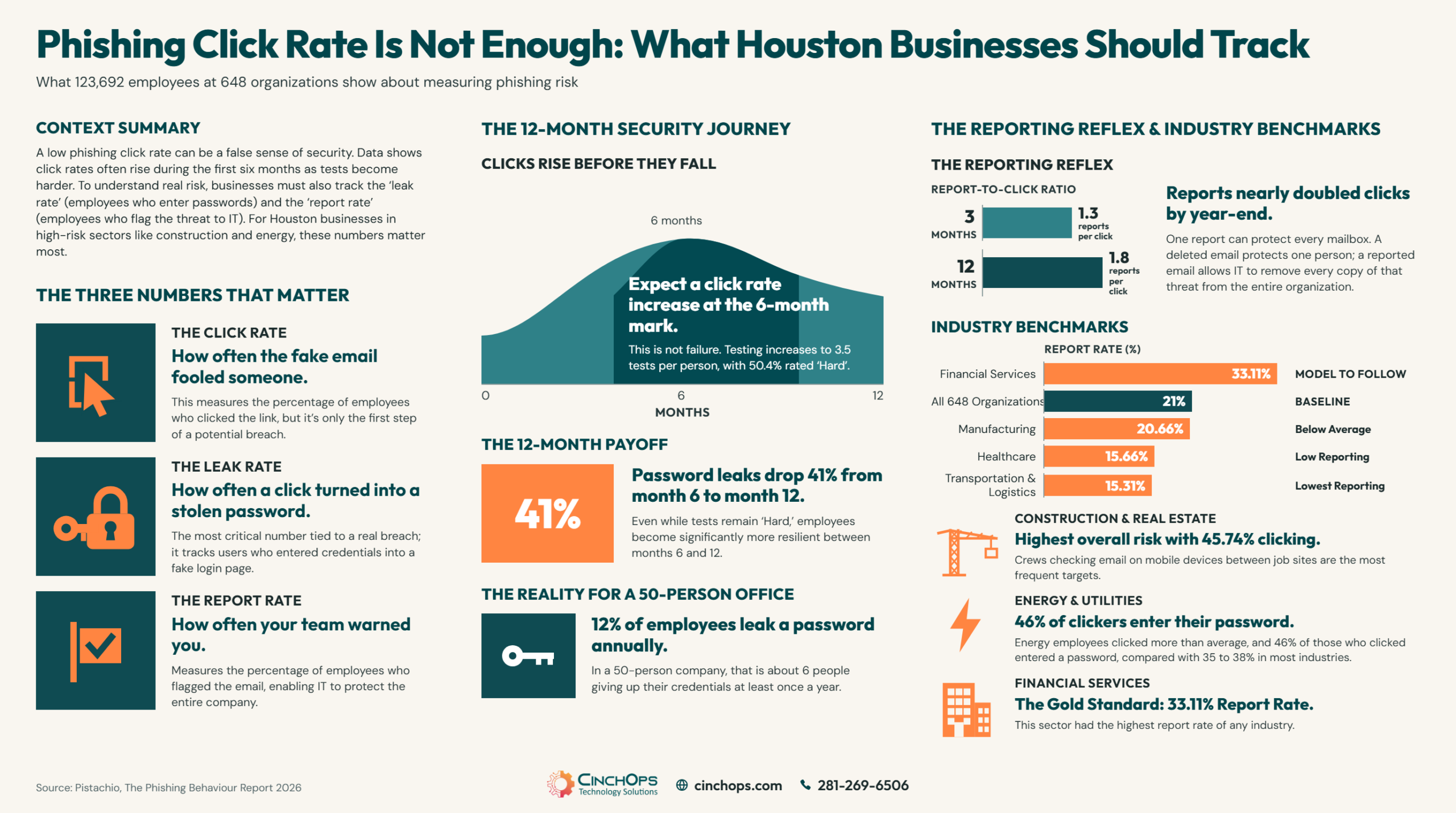
A phishing test report should show three rates. The click rate is the share of employees who clicked the fake link. The leak rate is the share who went further and typed their username and password into the fake page. The report rate is the share who flagged the email as suspicious.
Each number answers a different question for a business owner:
- Click rate: how often did the fake email fool someone into clicking?
- Leak rate: how often did a click turn into a stolen password? Pistachio calls this the number most closely tied to a real breach.
- Report rate: how often did your team warn you, so you could act?
Here is why one number is not enough. The first time Pistachio tested these employees, 4.14% clicked, 1.57% entered their password and 7.68% reported the email. More people reported than clicked, which sounds encouraging.
Now put that in terms of your own office. A 1.57% leak rate works out to roughly 1 person in a 50-person company giving up a password on the very first convincing email. Over a full year it adds up. Across all 648 organizations, 12% of employees entered their password on a fake page at least once, which is about 6 people in a 50-person company. One stolen Microsoft 365 password is enough to start a breach.
If your report only shows the click rate, ask your provider for the leak rate and the report rate. Most phishing test platforms already track both.
Step 2: Check the Difficulty Mix Before You Celebrate a Falling Click Rate
A lower click rate only counts if the tests stayed just as hard.
A falling phishing click rate means very little unless you know how hard the tests were. If employees keep seeing the same easy fake emails, they learn to spot those emails, not real attacks. If the tests stay hard and clicks still fall, the team is improving.
Pistachio rates each test email from 1 to 10 and groups them as Easy, Medium or Hard. Its results show a pattern that surprises many business owners: clicks go up during the first six months of a program before they come down.
That rise does not mean employees are getting worse. Around the six-month mark, employees get the most tests of the year, 3.5 per person compared with 2.6 at three months, and half of those tests are rated Hard. More and harder tests catch more people at least once.
The payoff comes in the second half of the year. Between month 6 and month 12, about half the tests were still rated Hard, yet clicks dropped 27% and password leaks dropped 41%. The tests did not get easier, and the results still improved.
Independent research points the same way. A University of Chicago and UC San Diego study published in 2025 tested more than 19,500 employees at UC San Diego Health over 8 months. Employees who had recently finished their annual security training were not meaningfully less likely to fall for phishing, and short training shown right after a failed test reduced clicking by only 2%.
Three questions to ask about your own report:
- What share of this year's tests were rated Hard? If nobody knows, the click rate cannot be judged.
- How does month 6 compare with month 12? That comparison says more than month 1 against month 12.
- Did clicks rise when the tests got harder? That is useful information, not a failure.
Step 3: Track Your Report-to-Click Ratio Every Quarter
This one number shows whether employees are warning you or just ignoring suspicious email.
The report-to-click ratio compares how many employees reported a phishing test with how many clicked it. A ratio of 2 means two reports for every click. In Pistachio's 2026 data the ratio climbed from 1.3 at three months to 1.8 at twelve months, so by the end of the year reports nearly doubled clicks.
The ratio is useful because it is not thrown off by how many tests people received. Clicks and reports come from the same employees answering the same emails, so the comparison stays fair from one quarter to the next.
- Work out the ratio every quarter. If it is going up, your team is getting more alert.
- If it stays flat, people are avoiding clicks but not speaking up. Make reporting easier and thank the people who do it.
- Try the report button yourself. Pistachio recommends one-click reporting and a reply to the employee within 24 hours, and warns that when reporting takes more than 5 minutes, people stop doing it.
Step 4: Benchmark Against the Houston Industries You Actually Run
Some industries click more, some give up more passwords, and some barely report at all.
Phishing risk looks very different from one industry to the next. Across all 648 organizations in Pistachio's 2026 data, 31% of employees clicked at least one fake email during the year, 12% entered a password and 21% reported one. Those averages are the yardstick for the industry figures below.
The industries that struggle most in the Pistachio data are the same ones that drive the Houston economy: construction, energy, healthcare, manufacturing and logistics. Compare your business with your own industry, not with a national average.
- Construction and real estate: worst on every measure. 45.74% of employees clicked and 18.83% entered a password at least once. Crews checking email on phones between job sites are easy targets.
- Energy and utilities: the bigger problem is what happens after the click. About 46% of energy employees who clicked went on to enter a password, compared with 35 to 38% in most industries. For oil and gas companies, one stolen login can lead toward the systems that run operations.
- Healthcare: few clicks, but only 15.66% reported a suspicious email. Pistachio's warning is that few clicks plus few reports usually means people are not recognizing phishing, not that they are safe. That matters for clinics and practices around the Texas Medical Center.
- Manufacturing: also few clicks, with reporting just below average at 20.66%.
- Transportation and logistics: more clicks and leaks than average, and the lowest reporting of any industry at 15.31%.
- Financial services: the model to follow. Fewer clicks and leaks than average, and the highest reporting at 33.11%.
IT staff are not immune either. Over the year, 28.53% of IT employees clicked at least once. In 35+ years doing this, I have seen plenty of sharp engineers click a well-timed fake invoice. Knowing what phishing looks like does not help much at 4:45 on a Friday afternoon.
Two things to keep in mind when reading these numbers. Pistachio sells phishing test software, and it says its findings show patterns, not proof of cause and effect. The industry figures also count anyone who clicked at least once in a full year, so they will run higher than the click rate from a single test in your own report. Use them to see where you stand, then track your own three numbers.
Does Your Phishing Report Show Only One Number?
Send CinchOps your last phishing test report and we will walk you through what the click, leak and report numbers say about your team.
Talk to CinchOpsA phishing report that only shows the click rate is a report card with one grade on it. I want to know who typed a password, who flagged a message as a phishing attempt and who picked up the phone to tell us, because those three people decide whether Monday is a normal day or an incident.
Stop a Stolen Password From Becoming a Breach
Phishing tests lower how often employees give up passwords, but they never get it to zero. CinchOps backs up employee awareness with cybersecurity controls that limit what a stolen Microsoft 365 login can reach, so one bad click does not turn into a breach.
See how CinchOps handles cybersecurity →How CinchOps Can Help Houston Businesses Measure Phishing Risk
CinchOps is a managed IT services provider based in Katy, Texas, serving small and mid-sized businesses across the Houston metro area. CinchOps specializes in cybersecurity, network security, managed IT support, VoIP, and SD-WAN for businesses with 10 to 200 employees.
For Houston construction, energy and professional services companies, CinchOps answers help desk requests in under 15 minutes and charges a flat monthly rate per user, with no long-term contracts, no hidden fees and no cancellation penalties.
- Through cybersecurity services, CinchOps looks at click, leak and report rates together and backs them with controls that contain a stolen password.
- With managed IT support, a reported email goes to a named engineer who knows your network, not a ticket queue.
- For construction companies, CinchOps focuses on the field staff and mobile devices behind the highest click and leak rates in the Pistachio data.
- For oil and gas and energy and utilities companies, CinchOps separates office IT from OT and SCADA networks, so a phished office login does not open a path to operational systems.
- Businesses across the metro get local support through managed IT in Houston and managed IT in Katy.
A lower click rate is a good start, not a finish line. Before deciding your team is safe, ask for the leak rate, the report rate and how hard the tests were. If you would like a second opinion on what those numbers mean for your business, talk to CinchOps.
Frequently Asked Questions
Is a falling phishing click rate a good sign?
Only if the tests did not get easier. Pistachio's 2026 Phishing Behaviour Report found click rates rise for the first six months, when about half the tests are rated Hard, and then fall. A lower rate on the same easy, repeated test emails usually means employees learned those emails, not how to spot real attacks.
Why did our phishing click rate go up after six months?
A rise around six months usually reflects harder testing, not backsliding. In Pistachio's 2026 data, employees got 3.5 tests each at that stage, and 50.4% were rated Hard, the highest share of the year. More and harder tests catch more people at least once. Judge the results at month twelve.
What is a leak rate in a phishing simulation?
The leak rate is the share of employees who clicked a fake link and then typed their username and password into the fake login page. Pistachio treats it as the number most tied to a real breach. Across its 2026 data, roughly 35 to 40% of clickers entered a password, and energy companies ran near 46%.
What is a good phishing report rate?
Across 648 organizations in Pistachio's 2026 data, an average of 21% of employees reported at least one suspicious email during the year, and financial services led at 33.11%. A better measure is reports per click. That ratio rose from 1.3 at three months to 1.8 at twelve months, so reports nearly doubled clicks.
What does phishing protection and security awareness cost in Houston?
CinchOps prices managed IT and cybersecurity at a flat monthly rate per user, $100 to $250 per user per month, with no long-term contracts, no hidden fees and no cancellation penalties. For a Houston business, weigh that against what happens when one employee types a Microsoft 365 password into a fake login page.
Discover More
Resource
Sources
- Pistachio, The Phishing Behaviour Report 2026 (PDF) - 648 organizations, 123,692 users, June 1, 2025 to May 31, 2026
- Help Net Security, "Companies may be measuring phishing resilience the wrong way" (September 11, 2026)
- SecurityWeek, "Phishing Research Challenges Conventional Security Awareness Testing" (September 11, 2026)
- Ho et al., "Understanding the Efficacy of Phishing Training in Practice," IEEE Symposium on Security and Privacy 2025
- UC San Diego via TechXplore, "Cybersecurity training programs don't prevent employees from falling for phishing scams" (September 2025)

