


Verify AI Output Before It Reaches a Client: What AlphaSense’s 2026 Survey Found
Five-Step Check For Every AI Draft – No Name On The Sign-Off Means Nobody Checked
AlphaSense surveyed 1,028 AI decision-makers. Here is a five-step check any Houston firm can run on an AI draft.
To verify AI output means tracing every number, citation and claim in an AI draft back to a source you control before anyone outside the building sees it. For a Houston CPA practice, law firm or energy company, that check is now a routine part of using AI, not an optional extra.
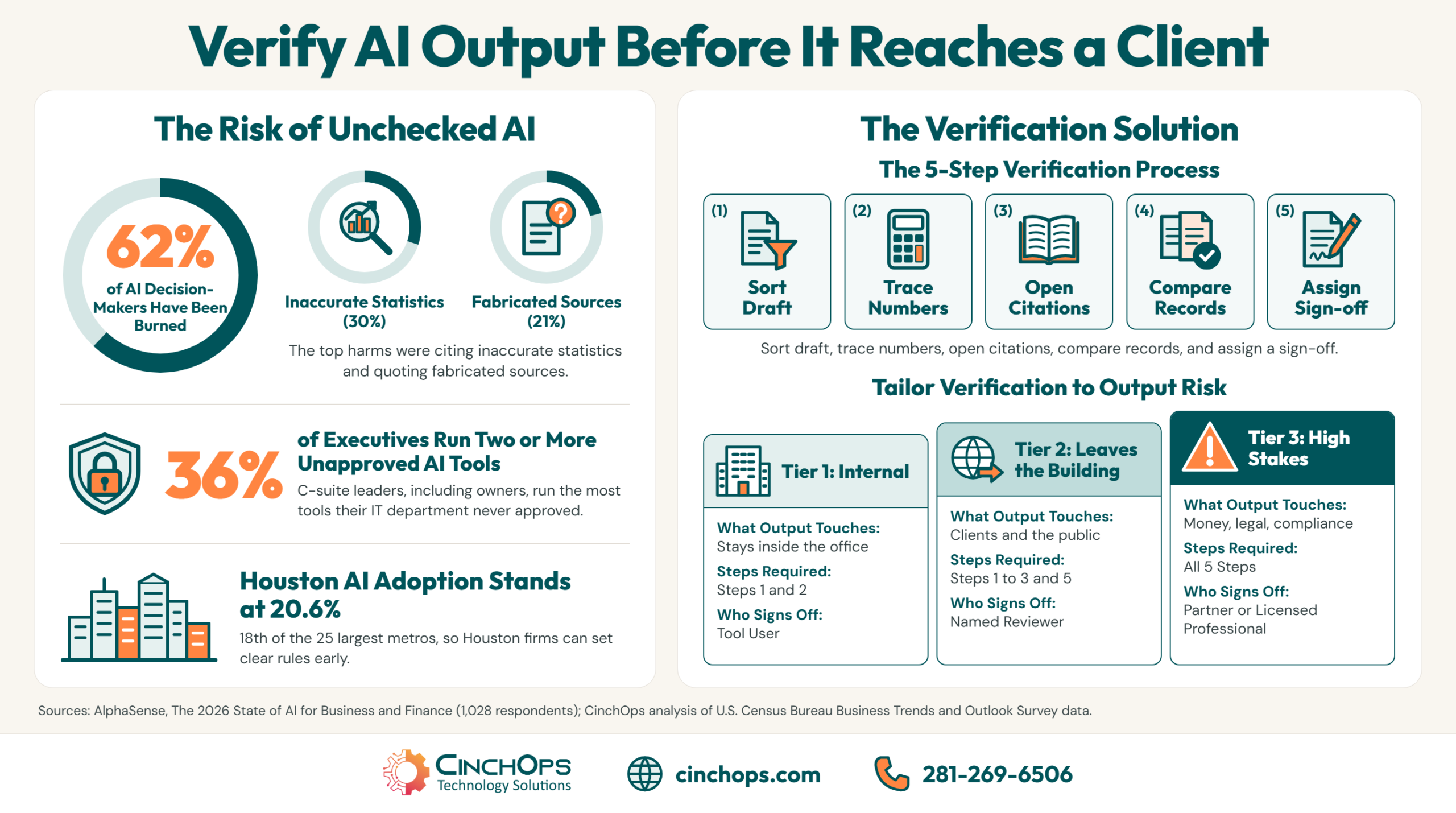
Picture the moment. A partner is reviewing a client memo that a staff member drafted with ChatGPT or Copilot, and one figure looks slightly off. Nobody can say where it came from. That is the exact situation AlphaSense measured in The 2026 State of AI for Business and Finance, a survey of 1,028 leaders and AI decision-makers fielded from May to July 2026. The value is real: 60% say AI helps them make better decisions. So is the damage. 62% have been burned by at least one bad AI output, and trust in enterprise AI tools still rose from 72% to 78% in a year.
CinchOps sets up approved, company-managed AI tools specifically for Houston professional firms of 10 to 200 employees, billed at a flat $100 to $250 per user per month. This guide covers the check that has to sit on top of those tools, because no tool setting catches a made-up source by itself.
Know What Goes Wrong Before You Build the Check
AlphaSense named five specific ways a bad AI output hurt the people it surveyed. Each one points to a different check.
AlphaSense's 2026 survey found that the most common AI harm is citing an inaccurate statistic (30%), followed by quoting a fabricated source (21%), walking into a meeting with incorrect information (20%), making a wrong decision (20%) and misleading a colleague or customer (18%).
The five split into two groups. A wrong number and an invented source are problems inside the document. A bad meeting, a wrong decision and a misled customer are what happens when that document leaves the desk unchecked. Investor relations teams, whose work goes straight to shareholders, reported the worst exposure: 79% have been burned.
One caution on the sample. AlphaSense surveyed only people responsible for AI decisions in financial services, corporate strategy and consulting, and says the results should not be read as representative of the whole workforce. That cuts in a useful direction for a small business. These are the most practiced AI users in the survey, and more than half of them still got caught. A 30-person office with no AI training starts from a weaker position.
Verify AI Output in Five Steps
Each step answers one of the five harms in the AlphaSense data. Run them in order on any AI draft.
A five-step AI verification check sorts the draft by stakes, traces every number, opens every citation, compares the claims against the firm's own records, and ends with a named person signing off. Most internal drafts only need step 1 and step 2.
Step 1: Sort the draft by what it touches. Decide whether the output stays inside the office, goes to a client or the public, or feeds a money, legal or compliance decision. That one call sets how deep the rest of the check goes, and the tier table in the next section spells it out.
Step 2: Trace every number back to a file you control. If the draft says revenue grew 14% or a deadline is April 15, open the spreadsheet, the return or the contract and find the figure yourself. Inaccurate statistics led the AlphaSense harm list at 30%.
Step 3: Open every citation. A fabricated source looks exactly like a real one: a plausible title, a believable author, sometimes a working-looking link. Click through, confirm the page exists, and confirm it says what the AI claims it says. 21% of respondents had quoted a source that did not exist.
Step 4: Compare the claims against your own records. AI tools answer from general training data or whatever documents they were given, and neither is your client file. Before a recommendation turns into a decision, check it against the ledger, the engagement letter or the last site report. A wrong decision was the harm for 20% of respondents.
Step 5: Put one person's name on the sign-off. Anything that leaves the building gets approved by one named person. That is how a firm avoids becoming the 18% who misled a colleague or customer, and it gives a partner someone to ask when a number looks off.
Do Your AI Tools Keep a Record of Who Asked What?
Step 5 only works when the tool runs under a company login with admin logs. CinchOps sets that up for Houston firms.
Talk to CinchOpsMatch the Check to the Stakes
Running all five steps on every internal note wastes the time AI was supposed to save. A tier system keeps the check proportional.
The CinchOps AI Verification Tiers match the depth of the check to what an AI output touches: internal drafts need a quick number check, client-facing work needs every citation opened, and anything feeding a money, legal or compliance decision needs all five steps plus a named approver.
The table below compares the three tiers by what the output touches, which of the five steps apply, who signs off, and a typical Houston example for each.
| Verification tier | What the AI output touches | Steps required | Who signs off | Houston example |
|---|---|---|---|---|
| Tier 1: Internal | Stays inside the office: meeting notes, first drafts, research summaries | Steps 1 and 2 | The person who used the tool | A Katy construction office summarizing a supplier's price sheet for the estimator |
| Tier 2: Leaves the building | Client emails, proposals, marketing copy, anything with your firm's name on it | Steps 1 to 3 and step 5 | A named reviewer other than the author | A Sugar Land engineering firm sending a project update with cited code references |
| Tier 3: Money, legal or compliance | Tax figures, contract language, financial advice, safety or regulatory filings | All five steps | A partner, principal or licensed professional | A Houston CPA practice using an AI draft to explain a client's estimated tax payment |
Where the output is going decides the tier. A good enterprise AI tool with source citations makes steps 2 and 3 faster, but it does not remove them. AlphaSense's own report says trust rose and decision quality improved, yet "neither has reduced the need to verify the work."
Every AI draft that leaves your office needs one name on it. When nobody signs, nobody checked, and the client finds the mistake before you do.
Start the Check With the Owner's Own AI Tools
In the AlphaSense data, the executive level is both the heaviest user of AI and the least governed. In a small business, that level is the owner.
AlphaSense found that 36% of C-suite respondents run two or more AI tools their IT department has not approved, the highest rate of any level, and its C-suite group explicitly includes owners, presidents and CEOs.
The same executives report the biggest payoff. 68% save six or more hours a week with AI, against 48% of all respondents, and 68% say AI has improved their decisions, against 60% overall. They also rank accuracy as their top priority less decisively than everyone else, at 17% versus 24%, with speed close behind at 15%.
An unapproved AI tool also breaks verification. A personal ChatGPT or Gemini account paid on a company card has no admin log, no retention setting the firm controls, and no record of which prompt produced which paragraph. When a figure in a client memo turns out wrong, nobody can reconstruct where it came from, so step 5 has nothing to stand on.
That is why the check starts with the owner. Staff copy what the person at the top does. When the owner moves their own AI use onto an approved, company-managed tool, the policy stops being a memo and becomes the way the office works. A firm's vCIO review is the natural place to list every AI tool in use, including the ones on the owner's phone.
- List every AI tool anyone in the firm uses, paid or free, including the owner's personal accounts.
- Move client work onto one or two approved tools that sign in with company Microsoft 365 or Google Workspace accounts.
- Turn on the admin logging those tools offer, so a disputed output can be traced to a prompt and a person.
Put Your AI Tools Behind Company Logins
CinchOps helps Houston firms replace personal AI accounts with managed ones, tie them to company sign-in, and set the access and data controls that make verification traceable. It sits inside our cybersecurity service, with help desk answers in under 15 minutes when a tool or an output looks wrong.
See CinchOps cybersecurity →Houston Firms Can Write the Verification Rule Before Bad Habits Set In
Houston is adopting AI more slowly than most large metros, which leaves a window to set the rule first.
CinchOps' analysis of the U.S. Census Bureau Business Trends and Outlook Survey found that 20.6% of Houston-area businesses used AI across 2026, 18th of the 25 largest metros and below Dallas at 22.6%.
Being a little behind has one real advantage. A firm that writes its verification tiers now sets the habit before AI drafts are everywhere, rather than retrofitting a rule onto a staff that already pastes AI output straight into client email. The full numbers are in the Houston small business AI adoption report.
The industries Houston leans on are also the ones where a Tier 3 mistake is expensive. CPA practices put figures on returns, law firms put citations in filings, wealth management firms answer to regulators, and oil and gas companies make capital decisions on analyst summaries. Those are the same kinds of work the AlphaSense sample does every day, and 62% of that sample still got burned.
Budget the time honestly. AlphaSense found 68% of professionals still name a manual activity as their biggest time sink when searching for internal information, and 44% spend six or more hours a week on it. Verification adds minutes to each Tier 2 and Tier 3 draft. We see Houston firms skip it most often in the weeks it matters most, like tax deadlines and quarter-end, so write the tiers down before those weeks arrive.
How CinchOps Can Help Houston Firms Verify AI Output
CinchOps is a managed IT services provider based in Katy, Texas, serving small and mid-sized businesses across the Houston metro area. CinchOps specializes in cybersecurity, network security, managed IT support, VoIP, and SD-WAN for businesses with 10 to 200 employees.
- Through managed IT support, CinchOps inventories the AI tools in use and moves client work onto approved, company-managed accounts.
- Through cybersecurity services, CinchOps sets the sign-in, logging and data controls that make an AI output traceable to a prompt and a person.
- Owners who need the verification tiers and an AI policy written get them through CinchOps vCIO and CTO services.
- CinchOps works with firms across the Houston metro, Katy and Sugar Land, at a flat monthly rate per user with no long-term contracts, no hidden fees and no cancellation penalties.
AI already earns its place in most Houston offices, and the AlphaSense numbers say it will keep earning more. The firms that come out ahead will be the ones that can prove what their AI drafts say before a client reads them. If your office uses AI and nobody could name who checks it, talk to CinchOps about setting the tiers this month.
Frequently Asked Questions
How do I verify AI output before it goes to a client?
Sort the draft by what it touches, then trace every number to a file you control, open every citation to confirm it exists and says what the AI claims, compare recommendations against your own records, and have a named person sign off. Client-facing work needs at least steps 1, 2, 3 and 5.
Why do AI tools make up sources and statistics?
Large language models write the most plausible next words, and a plausible-looking citation or percentage can be produced with nothing behind it. In AlphaSense's 2026 survey, 30% of AI decision-makers had cited an inaccurate statistic and 21% had quoted a fabricated source, so every citation needs to be opened before use.
Is Microsoft Copilot for business accurate enough for a Houston small business?
Microsoft Copilot for business is useful for drafting and summarizing, and it works inside company accounts with admin controls, which makes its output easier to trace. It still needs the same check as any AI tool. No setting removes the need to confirm numbers and sources before a Houston firm sends the work out.
Should a small business ban unapproved AI tools?
A flat ban tends to push AI use onto personal phones where nobody can see it. The better move is to approve one or two company-managed tools, move client work onto them, and retire personal accounts for firm business. AlphaSense found 36% of executives run two or more unapproved tools, so the owner goes first.
How much time does verifying AI output take?
An internal draft needs a minute or two to check its numbers. A client-facing or compliance draft takes longer because every citation gets opened and a second person signs off. AlphaSense found 79% of users already verify AI output always or often, so most firms are paying this time cost informally anyway.
What does AI governance support cost for a Houston business?
CinchOps prices managed IT and cybersecurity at a flat $100 to $250 per user per month, with no long-term contracts, no hidden fees and no cancellation penalties. AI tool licenses are billed separately by the vendor. The verification tiers themselves cost staff time, not software, once the approved tools are in place.
Discover More
Resource
Sources
- AlphaSense, The 2026 State of AI for Business and Finance (survey of 1,028 respondents, fielded May 27 to July 30, 2026)
- AlphaSense press release: New Report, AI Trust Is Rising in Finance and Business (September 9, 2026)
- CinchOps, Houston Small Business AI Adoption: The 2026 Census Report (analysis of U.S. Census Bureau BTOS metro data)
- U.S. Census Bureau, Business Trends and Outlook Survey data


