


Are Browser Extensions Safe for Business? The Myths, Checked
Browser Extension Risks And Controls For Small Offices – Four Browser Extension Myths Houston Businesses Still Believe
What a Web Store listing leaves out, and the browser policy that closes the gap for Houston businesses.
Are browser extensions safe for business? Some are, and they are the ones somebody at your company chose on purpose, checked for permissions and wrote down. An extension runs inside the browser where your staff sign in to email, banking and client portals, so it can see what they see unless a policy says otherwise.
The question usually arrives on an ordinary weekday. An employee at a Houston law firm or CPA practice wants a PDF converter, an AI writing helper or a coupon tool, and the owner wants a yes or no by lunch. LayerX's Enterprise Browser Extension Security Report 2025 found that 99% of enterprise users have at least one extension installed, so extensions are already on your machines. The open question is who approved them.
CinchOps manages browser extension allowlists through managed IT support specifically for Houston-area law firms, CPA practices and engineering offices, backed by 24/7 threat monitoring and a help desk that answers requests in under 15 minutes.
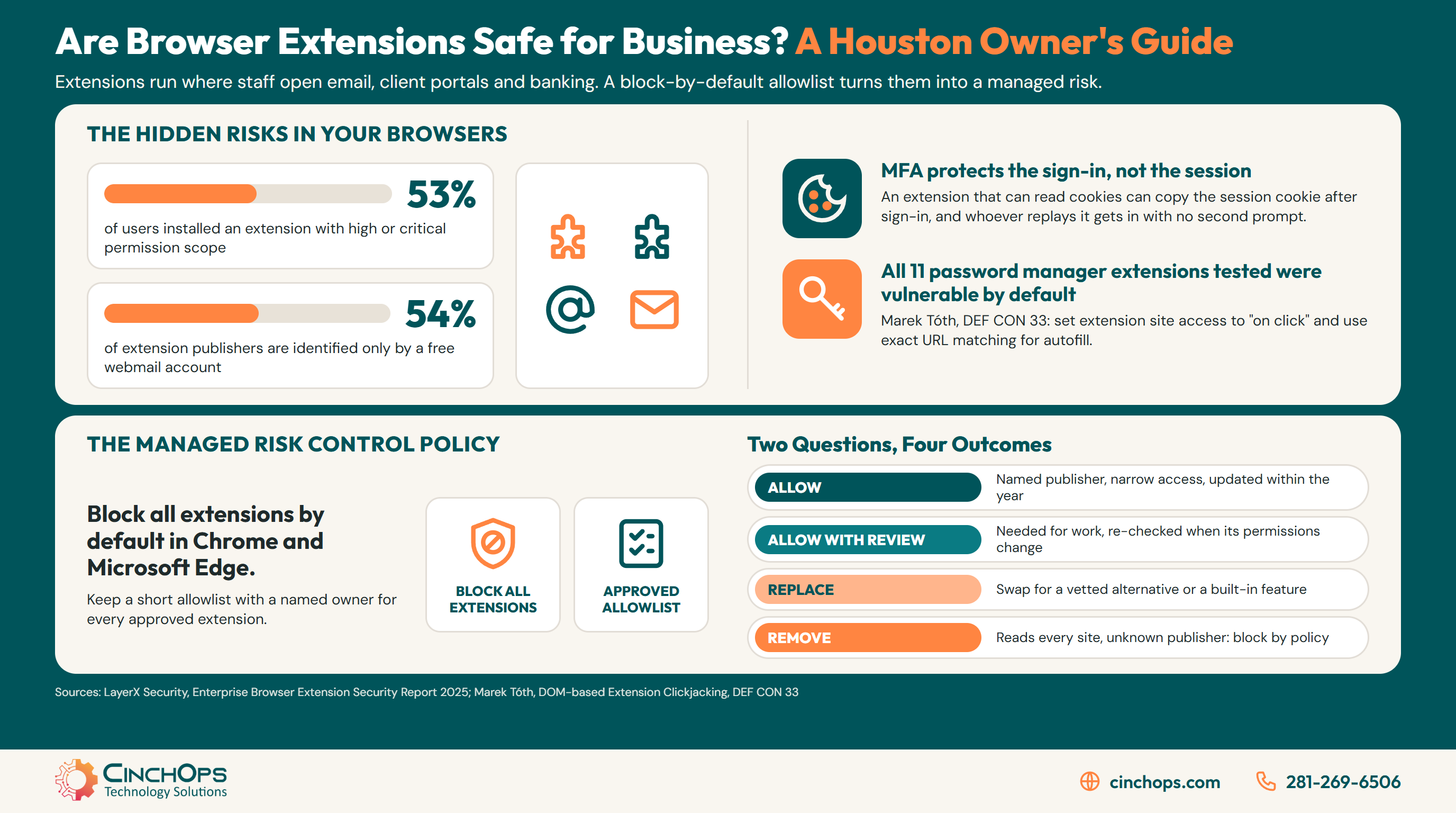
Four beliefs come up again and again in the onboarding audits we run for businesses from Katy to The Woodlands. Each one sounds reasonable. Each one is also how an unvetted extension ends up holding a signed-in session. The fix is mostly configuration: Chrome and Microsoft Edge both let an administrator block every extension by default with a blocklist value of *, allow a short list by extension ID, block extensions that request certain permissions, and limit which sites an extension can interact with. The picture below is the difference that one policy makes.
Is a Browser Extension Safe Because It Is in the Chrome Web Store?
The myth: Google reviewed it, thousands of people use it, so it must be fine.
A Chrome Web Store listing means the extension passed review when it was submitted, and its publisher can push new code at any time afterward. Updates install automatically, so a trusted extension can turn hostile overnight if the developer's account is taken over, and nothing on the employee's screen changes.
The clearest case is Cyberhaven, a data security company. According to LayerX's analysis of the campaign, a Cyberhaven employee was phished on December 24, 2024 with an email dressed up to look like it came from Google, and approved a malicious OAuth app instead of handing over a password. A poisoned version of the Cyberhaven extension went out through the store in the early hours of December 25 and was pulled in the early hours of December 26. LayerX says the code went after cookies and authentication tokens for Facebook, and that the extension had over 400,000 users.
Cyberhaven was one of more than 25 extensions LayerX tied to the same campaign, with a combined install base of over 2.3 million users. A security product, delivered through the official store, did the stealing. Store review is where your own review starts, and the publisher's account security is something you inherit the day you click install.
For a Houston business, the practical rule follows directly. An extension that IT placed on an allowlist can still go bad, but it sits on one list and can be pulled from every managed machine at once. An extension an employee added on their own gets found during the cleanup, if it gets found at all.
Does Your Business Already Know Which Browser Extensions Are Installed?
The myth: We are a small office, and IT would notice if something odd showed up.
Most small businesses cannot produce a list of the browser extensions on their computers. Google's own Chrome admin documentation says that in the default allowed mode, users can install apps and extensions from the Chrome Web Store, so no administrator is involved unless a policy changes that default.
LayerX's Enterprise Browser Extension Security Report 2025, built from its enterprise customers' browsers plus public store data, shows how far that default reaches:
- Nearly every user, 99%, has at least one extension installed.
- Just over half of users, 53%, have installed an extension with a high or critical permission scope, the kind that can reach sensitive data.
- More than half of extension publishers, 54%, are identified only by a free webmail account such as Gmail.
- About half of extensions, 51%, have not been updated in over a year.
- A quarter of enterprise extensions, 26%, were sideloaded rather than picked from a store page.
In 35+ years doing this, one pattern has held: a business cannot remove what it never wrote down. In the onboarding audits we run for Houston businesses, the extension list is almost never recorded anywhere, and the first export tends to surface tools nobody remembers adding. The 2026 Comcast Business Cybersecurity Threat Report logged 5.8 million browser session hijacking and extension events, 95.1% of them malicious browser extensions, while noting that its raw totals measure visibility rather than confirmed attacks.
An inventory is the cheapest control on this page. Export the extensions from every managed Chrome and Edge profile, put an owner and a business reason next to each one, and anything without both becomes a candidate for removal.
Is a Password Manager Extension the One Add-On You Can Skip Checking?
The myth: The password manager is a security tool, so its extension is the safe one.
A password manager extension is still worth running, and its settings still need checking. Security researcher Marek Tóth tested 11 password manager extensions and found all of them vulnerable to DOM-based extension clickjacking in their default configuration, where a disguised page element tricks one click into filling saved data.
Tóth presented the research at DEF CON 33 on August 9, 2025. The attack hides the password manager's own autofill menu beneath something harmless on a page the attacker controls, so a single click fills a login, card number or one-time code into that page. He put the exposure at tens of millions of users. His fix-status update dated January 14, 2026 lists most vendors as fixed, with 1Password and LastPass still shown as vulnerable at that date.
His recommended settings cost almost nothing to apply across a whole office. In Chromium browsers, set the extension's site access to on click. Limit autofill to exact URL matches, which narrows subdomain exposure. Where the product allows it, turn off the inline autofill menu and copy and paste instead.
For a Houston CPA practice working toward the March 15 and April 15 filing deadlines, the extra click costs a second or two per login. Pushing these settings by policy, so no preparer has to remember them in the middle of tax season, is the part an IT provider should own.
Does MFA Protect an Account If a Browser Extension Goes Bad?
The myth: We turned on MFA everywhere, so a stolen password or a sketchy add-on cannot get anyone in.
MFA protects the sign-in, and the session cookie the browser receives afterward is what keeps the user signed in. An extension with permission to read cookies can copy that cookie, and whoever replays it is treated as the user who already passed MFA, with no second prompt.
The Cyberhaven payload described by LayerX went after cookies and authentication tokens for Facebook business accounts, which is session theft in practice. The password was never the target. MFA did its job at the front door, and the copied cookie walked in behind it.
Session theft also changes the legal math for a Texas business. If a stolen session reaches client records that pair names with Social Security, driver's license or financial account numbers, Texas Business and Commerce Code Section 521.053 requires notice to affected individuals no later than the 60th day after the business determines a breach occurred, and notice to the Texas Attorney General within 30 days when at least 250 Texans are involved. The Texas breach reporting checklist walks through both clocks. Phishing-resistant sign-in helps at the front door; keeping cookie-reading extensions off company browsers is what closes this particular path.
Every extension on a company browser is a piece of software sitting next to your logins. If nobody can tell me who approved it, then nobody knows whether it's safe, and that answer isn't good enough for a business holding client data.
Find Out What Your Browsers Are Running
CinchOps can pull the extension list from every managed Chrome and Edge profile, flag anything with broad permissions or an unknown publisher, and turn the result into a block-by-default policy with a short allowlist. It starts with a conversation about CinchOps cybersecurity services.
See how CinchOps handles browser securityHow Can CinchOps Help Houston Businesses Keep Browser Extensions Safe?
CinchOps is a managed IT services provider based in Katy, Texas, serving small and mid-sized businesses across the Houston metro area. CinchOps specializes in cybersecurity, network security, managed IT support, VoIP, and SD-WAN for businesses with 10 to 200 employees.
The extension review CinchOps runs sorts every extension on two questions: how much the extension can reach, and how clearly its publisher can be identified. Narrow access from a named publisher that has updated within the year gets allowed. Broad access the business needs for daily work gets allowed with review and is re-checked whenever its permissions change. A low-access tool from an unknown publisher gets replaced with a vetted alternative or a built-in feature. Anything that reads every site and comes from an unknown publisher gets removed and blocked by policy.
- Through managed IT support, CinchOps pushes the Chrome and Edge extension policy to managed machines and keeps the inventory current, and a request to approve a new tool reaches a help desk that responds in under 15 minutes.
- Through cybersecurity services, 24/7 threat monitoring watches for unusual sign-ins and session activity, including outside office hours.
- Businesses in Houston, Katy and Sugar Land get the same policy on every managed machine, whether staff work in the office or from home.
- Law firms, CPA firms and engineering firms get an allowlist built around the portals and line-of-business tools they actually sign in to every day.
- Pricing is a flat monthly rate per user, $100 to $250 per user per month, on Zero-Zero-Zero terms: no long-term contracts, no hidden fees, no cancellation penalties.
Are browser extensions safe for business? The ones on an allowlist with a named owner are a reasonable, managed risk, and everything else is a guess. If nobody at your company can say today which extensions your staff are running, start there, and talk to CinchOps about pulling that list.
Frequently Asked Questions
Should a small business block all browser extensions?
Blocking everything by default is the right starting point, paired with a short allowlist for the tools staff need. Chrome and Microsoft Edge both support a blocklist value of * that stops all installs, plus an allowlist by extension ID. The approved list is usually short: the password manager and add-ons tied to line-of-business software.
How can I tell if a browser extension is safe to approve?
Check the permissions it requests, who publishes it, and when it was last updated. LayerX's Enterprise Browser Extension Security Report 2025 found 54% of extension publishers are identified only by a free webmail account and 51% of extensions have not been updated in over a year. Broad access from an anonymous publisher should be rejected.
Are password manager extensions still safe to use?
Yes, with tuned settings. A password manager still beats reused passwords, but Marek Tóth's DEF CON 33 research found all 11 password manager extensions he tested vulnerable to clickjacking in default settings. Set extension site access to on click, limit autofill to exact URL matches, turn off inline autofill menus where possible, and keep the extension updated.
What should we do if a browser extension on our computers was compromised?
Remove the extension from every machine by policy, then sign users out of every web app the browser touched so copied session cookies stop working, and change passwords and API tokens. Review sign-in logs for unfamiliar locations. If client records with sensitive personal information were reachable, Texas breach notice deadlines may apply.
Do browser extension rules apply to employees' personal browsers?
Chrome and Edge extension policies apply to the browsers and profiles a business manages, so a personal profile on a home laptop sits outside them. The practical fix is requiring that company email, banking and client portals open only in the managed work profile, where the allowlist and blocked permissions apply.
What does browser extension management cost in Houston?
At CinchOps, browser extension policy and inventory are handled as part of managed IT support, priced at a flat monthly rate of $100 to $250 per user per month. Terms are Zero-Zero-Zero: no long-term contracts, no hidden fees and no cancellation penalties. The tier depends on user count and the security services the plan covers.
Discover More
Resource
Sources
- LayerX Security, Enterprise Browser Extension Security Report 2025, as reported by Help Net Security (April 16, 2025)
- The Hacker News, "Majority of Browser Extensions Can Access Sensitive Enterprise Data, New Report Finds" (April 2025)
- LayerX Security, attack campaign targeting browser extensions, including Cyberhaven (last updated December 30, 2024)
- Marek Tóth, "DOM-based Extension Clickjacking: Your Password Manager Data at Risk" (DEF CON 33; fix status January 14, 2026)
- Google Chrome Enterprise Help, "Set Chrome app and extension policies (Windows)"
- Microsoft Learn, Microsoft Edge policy ExtensionInstallAllowlist
- Comcast Business, 2026 Comcast Business Cybersecurity Threat Report
- Texas Business and Commerce Code, Chapter 521, Section 521.053
- IRS Publication 509 (2026), Tax Calendars


