


Still on Windows 10 in 2026? The Free Extension Does Not Cover Your Business PCs
What The 2027 Windows 10 Extension Covers And What It Excludes – ESU Is A Bridge, Not A Destination
What the extension actually covers, what commercial ESU costs per device, and how Houston companies should decide.
In late June 2026, Microsoft extended free Windows 10 extended security updates by a year, out to October 12, 2027. It did this quietly, through a documentation change and an editor's note rather than an announcement. The tech press covered it as a reprieve for everyone. It is not one for your business.
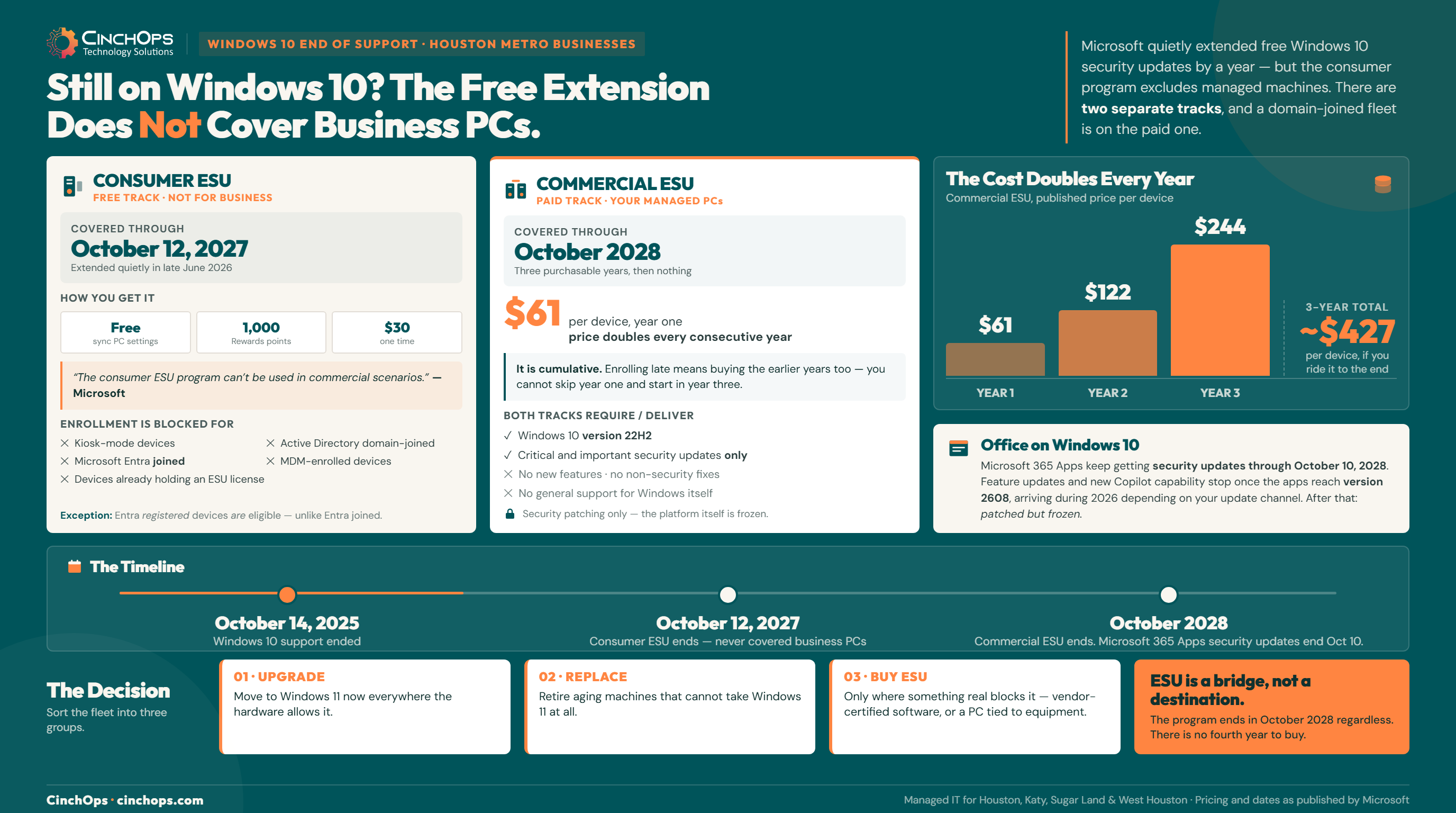
Microsoft's own consumer ESU page states the limit in plain words: "The consumer ESU program can't be used in commercial scenarios." Enrollment is not offered for devices in kiosk mode, devices joined to an Active Directory domain or Microsoft Entra, or devices enrolled in a mobile device management platform. That describes nearly every managed PC in a Houston office. The free year is real, and the machines you run at work are carved out of it.
So the practical question for a business is not whether Windows 10 got a reprieve. It is which of 3 tracks each of your machines is actually on, and what that costs. CinchOps manages Windows upgrades and end-of-support migrations for small businesses across Houston and Katy, at a flat monthly rate per user, with a help desk that answers in under 15 minutes.
Did Microsoft Just Give Windows 10 Another Free Year?
Yes, for home users. The exclusion list is what matters for everyone else.
Consumer ESU is free through October 12, 2027, but a business PC that is domain-joined, Entra-joined, or MDM-enrolled cannot enroll in it. Those devices need commercial ESU, which is paid and priced per device.
Here is the same question answered for both tracks side by side. Check which column your machines sit in before you plan anything else.
| Consumer ESU | Commercial ESU | |
|---|---|---|
| Runs through | October 12, 2027 | October 2028 (3 years from EOL) |
| Cost | Free with PC settings sync, or 1,000 Microsoft Rewards points, or $30 once | $61 per device for year 1, doubling each consecutive year (roughly $122, then $244) |
| Who can enroll | Windows 10 22H2 Home, Pro, Pro Education, or Workstations, signed in with a Microsoft account that is an administrator | Windows 10 22H2 Enterprise, Education, or Pro in commercial use, licensed through Volume Licensing or a Cloud Solution Provider |
| Blocked for | Kiosk-mode devices, devices joined to an Active Directory domain or Microsoft Entra, MDM-enrolled devices, devices that already hold an ESU license | Long Term Servicing releases (LTSB/LTSC), which have their own separate lifecycle |
| Notable exception | Entra registered devices are allowed, unlike Entra joined | Not applicable |
| What you get | Critical and important security updates only. No new features, no non-security fixes, no design change requests, and no general support for Windows itself. | |
The joined versus registered distinction catches people out, so it is worth stating clearly. A device that is Entra registered is typically a personal machine with work access attached, and it qualifies for the free program. A device that is Entra joined or domain joined is a company-managed machine, and it does not. If you do not know which state your PCs are in, that is the first thing to find out, because it decides your entire budget.
What Does Commercial ESU Actually Cost per Device?
The price doubles every year, and joining late does not save you anything.
Microsoft publishes commercial ESU at $61 per device for year 1 and states that the price doubles every consecutive year, for a maximum of 3 years. That works out to roughly $122 in year 2 and $244 in year 3, or about $427 per device to stay on Windows 10 through October 2028.
Two rules make this more expensive than the sticker price suggests. First, the cost doubles annually, so the longest holdouts pay the most per year at exactly the point their hardware is oldest. Second, the program is cumulative. Microsoft's own words: "If you decide to purchase the program in Year Two, you have to pay for Year One too, as ESUs are cumulative." Waiting does not defer the bill, it compresses it.
Three things can move that number, and all 3 are worth asking your licensing partner about before you budget. Devices managed through Microsoft Intune or Windows Autopatch have been reported at a discounted year 1 rate, though Microsoft's current ESU FAQ does not list it. Windows 10 virtual machines running in Windows 365, Azure Virtual Desktop, and several other Azure services get ESU at no additional cost. Education customers pay a small fraction of the commercial rate. And ESU covers Enterprise, Education, and Pro in commercial use, but not the Long Term Servicing releases, which run on their own lifecycle entirely.
Run that against a real headcount. A Houston firm with 25 machines still on Windows 10 is looking at roughly $1,525 for the first year, $3,050 for the second, and $6,100 for the third. Just over $10,000 across the 3 years, and at the end of it you own nothing: no new hardware, no new features, no support, and a fleet that is 3 years older than when you started.
Not Sure Which PCs Are Affected?
CinchOps inventories your fleet, flags what is domain-joined, and builds the upgrade plan around your budget instead of Microsoft's calendar.
Talk to CinchOpsWhat Happens to Office and Microsoft 365 on Windows 10?
Security updates last until 2028. New features stop much sooner.
Microsoft 365 Apps on Windows 10 receive security updates through October 10, 2028, but feature updates stop when the apps reach version 2608, which arrives during 2026 depending on your update channel.
This is the detail most coverage skips, and it is the one that quietly degrades a business. Your Office apps keep getting patched, so nothing breaks and nobody complains. What stops is forward motion. Once your channel hits version 2608, the apps freeze at that feature level, including new Copilot capability, while everyone on Windows 11 keeps moving.
- Current Channel: feature updates end with version 2608, announced for August 2026.
- Monthly Enterprise Channel: feature updates end with version 2608 in October 2026.
- Semi-Annual Enterprise Channel: this channel no longer exists on its own. Microsoft merged it into Monthly Enterprise Channel starting with the version 2606 release in July 2026, so those devices now follow the Monthly Enterprise timeline rather than the later date originally published.
- Every channel: security updates continue to October 10, 2028.
One caution on those channel dates. Microsoft published them in 2025 and has since removed the table from its documentation, and the semi-annual channel it referenced has been folded into the monthly one. The October 2028 security cutoff is still stated plainly by Microsoft. The feature-freeze timing is best treated as approximate, and confirmed against your own tenant's update channel rather than a blog post, this one included.
So a business that plans to sit on Windows 10 until the last possible day should understand what it is buying: a patched but frozen desktop. That may be entirely acceptable for a machine running one line-of-business application in a back office. It is a poor fit for the people doing client work every day.
Is It Cheaper to Pay for ESU or Replace the Machine?
Sort the fleet into 3 groups instead of making one decision for everything.
The right answer is rarely the same for every PC. Sort machines by whether the hardware can take Windows 11, whether the workload is tied to something that blocks the upgrade, and how long the device has left.
In 35+ years doing this, the pattern we see with Houston businesses is that the upgrade stalls on a handful of machines, not the whole fleet, and then those few holdouts hold the entire budget hostage. Sorting fixes that. Three groups:
- Upgrade now. The hardware meets the Windows 11 requirements and nothing on it blocks the move. There is no argument for paying ESU on these. Upgrade and stop paying.
- Replace. The hardware cannot take Windows 11 and the machine is already several years old. Paying $427 per device over 3 years to keep an aging PC patched, with no support and no features, competes badly with a replacement you actually own.
- Buy ESU deliberately. Something real blocks the upgrade: a vendor-certified application, a machine tied to equipment, a system inside a compliance boundary you cannot disturb mid-year. ESU is the right tool here. Buy it on purpose, for named machines, with a date attached and a plan for what happens when the software problem gets solved.
That third group is where Houston differs from a generic office market. Energy, manufacturing, and engineering firms across the metro run workstations bolted to equipment and to vendor software certified against a specific operating system, and the vendor, not the business, controls the timeline. Those machines are also the ones most likely to be domain-joined, so they are excluded from the free consumer track and land squarely on the paid one. Our IT versus OT breakdown covers why those systems move on a different clock.
Be clear about what ESU is for that third group, though: a bridge, not a destination. The program ends in October 2028 no matter what your vendor does, and there is no fourth year to buy. So the machine is only half the problem. The other half is the software sitting on it, and that conversation belongs on the calendar now rather than in 2028.
Ask the vendor a direct question and get the answer in writing: what is your supported timeline for Windows 11, and what is the date? A vendor with a published roadmap turns your problem into a scheduling exercise, and you buy ESU to cover the gap between now and their release. A vendor who cannot answer, or who has gone quiet on the subject, has told you something more useful: you are not planning a hardware refresh, you are evaluating a platform migration. That is a different project measured in data conversion, retraining, and rebuilt workflows, and it needs years of runway rather than a purchase order.
Whichever group a machine lands in, the decision has a deadline attached, and the price of deciding late is written into the program. A business that starts evaluating replacement software in 2028 is making that choice under pressure, with an unsupported operating system underneath it. There is no version of this where waiting is cheaper.
Every business I talk to heard "Windows 10 got another free year" and relaxed. Then we inventory the fleet and find out none of their machines qualify. The extension was real. It just was not for them.
An Unpatched PC Is the Cheapest Way Into Your Network
Running Windows 10 past support without ESU means known vulnerabilities stay open permanently. CinchOps handles patching, upgrade planning, and the security layer around machines that genuinely cannot move yet, as part of managed cybersecurity.
Explore CinchOps Cybersecurity →How CinchOps Can Help With Your Windows 10 Migration
CinchOps is a managed IT services provider based in Katy, Texas, serving small and mid-sized businesses across the Houston metro area. CinchOps specializes in cybersecurity, network security, managed IT support, VoIP, and SD-WAN for businesses with 10 to 200 employees.
- Through managed IT support, CinchOps inventories every endpoint, identifies which are domain-joined and therefore excluded from consumer ESU, and sorts the fleet into upgrade, replace, and buy-ESU groups.
- Through CTO and CIO services, the migration gets a budget and a schedule instead of a surprise invoice, and someone tracks your software vendors' Windows 11 timelines so a platform migration never arrives as a surprise.
- Through managed cybersecurity, machines that genuinely cannot move yet get compensating controls around them rather than being left exposed, at a flat monthly rate per user with no contracts, no hidden fees, and no cancellation penalties.
- CinchOps supports businesses across Houston, Katy, and Sugar Land, including manufacturers, oil and gas companies, and CPA firms, where vendor-certified software often sets the upgrade timeline.
If you are still running Windows 10 on machines your team uses every day, the free extension in the headlines almost certainly does not apply to you, and the paid clock is already running. An inventory takes an afternoon and tells you exactly which machines are on which track. When you want that done properly, talk to CinchOps.
Frequently Asked Questions
Can my business use the free Windows 10 ESU extension through 2027?
Almost certainly not. Microsoft states the consumer ESU program cannot be used in commercial scenarios, and blocks enrollment for devices joined to an Active Directory domain or Microsoft Entra, devices enrolled in MDM, and kiosk devices. Entra registered devices are the one exception. Managed business PCs need commercial ESU.
What does Windows 10 ESU cost for a business in Houston?
Microsoft lists commercial ESU at $61 per device for year 1 and doubles it each consecutive year, so roughly $122 then $244, about $427 per device through October 2028. The program is cumulative, meaning enrolling late requires buying the earlier years too. CinchOps includes migration planning in its managed IT service at a flat monthly rate per user.
Will Microsoft 365 and Office keep working on Windows 10?
Yes, with limits. Microsoft 365 Apps on Windows 10 receive security updates through October 10, 2028. Feature updates and new Copilot capability stop once the apps reach version 2608, which Microsoft announced for August 2026 on Current Channel and October 2026 on Monthly Enterprise Channel. After that the apps are patched but frozen at that feature level.
Discover More
Sources
- Microsoft - Windows 10 Consumer Extended Security Updates (ESU) program
- Microsoft Learn - Extended Security Updates (ESU) program for Windows 10
- Microsoft Learn - Windows 10 end of support and Microsoft 365 Apps
- Microsoft Learn - Unified update channels for Microsoft 365 Apps (Semi-Annual merged into Monthly Enterprise, July 2026)
- Microsoft Learn - Purchase Windows 10 Extended Security Updates in Partner Center
- BleepingComputer - Microsoft quietly extends free Windows 10 ESU support to October 2027
- Microsoft - End of support for Windows 10


