


Are QR Codes Safe to Scan? A 2026 Test for Houston Offices
Protecting Company Phones From QR Code Phishing – What Is Quishing And How Does It Reach Your Staff
A scan-or-skip test for Houston offices, built from FBI, FTC and Microsoft warnings.
Are QR codes safe to scan? Most of the time, yes, because most codes open a menu, a parking app or a product page. The risk sits in a narrow band: codes you did not expect that end on a login screen, a payment form or an app download. That band is where quishing, short for QR code phishing, lives.
The question usually reaches IT in one specific way. An email lands in a Houston office telling staff to scan a code to re-enroll multi-factor authentication, sign a payroll document or hear a voicemail, and somebody forwards it to the help desk asking whether it is safe. We see this pattern in suspicious-email tickets from Houston businesses, and the honest answer depends on two things the code will never tell you: who put it there, and what the page behind it wants you to do.
CinchOps runs email filtering, phishing training and an under-15-minute help desk specifically for Houston businesses with 10 to 200 employees, so the person holding a suspicious QR email gets a real answer before the phone camera opens. This post gives that answer a structure any employee can use without calling anyone.
A QR Code Is a Web Link You Cannot Read Before You Scan It
A QR code is a square pattern that stores a short string of text, almost always a web address, which a phone camera decodes and offers to open.
QR code phishing works because the web address is locked inside a picture. A person cannot hover over it to check where it goes, and an email filter has to decode an image before it can even look up the link, a step most filters were not built to run on every image in every message.
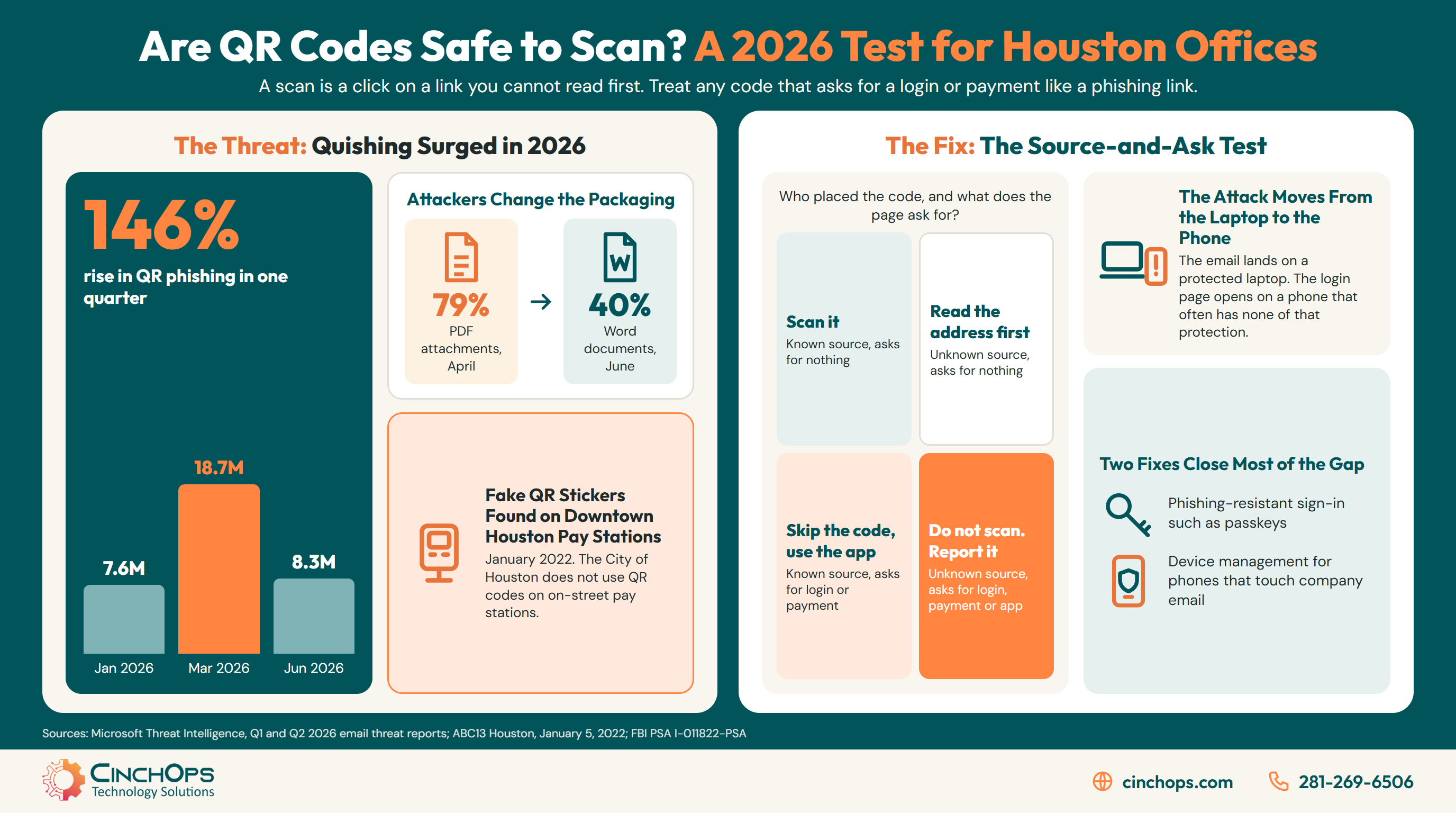
Microsoft's own 2026 numbers show the volume is not fading. In its Q1 2026 email threat report, published April 30, 2026, Microsoft Threat Intelligence counted QR code phishing rising from 7.6 million attacks in January to 18.7 million in March, a 146% increase over the quarter and the highest monthly volume in at least a year. Its Q2 2026 report, published July 23, 2026, shows the count falling for three straight months to 8.3 million in June, back to levels last seen in mid-2025. The underlying gap is the one Microsoft described in November 2024: extensive image content analysis "was not commonly done for every image in every message," and QR phishing emails often carry minimal to no text, which leaves detection models with very little to judge.
Read the swings carefully. Attackers did not quit between March and June; they changed the packaging. PDF attachments carried 70% of QR code attacks in March and peaked at 79% in April, then Word documents climbed to 40% of QR code payloads by June as operators rotated formats, a swap Microsoft says has recurred throughout the past year. Even the June low of 8.3 million attacks is a month's worth of mail one filter caught, and a filter only protects the mail it sees. A code printed on a flyer, tucked into a package or stuck to a parking sign never passes through an email filter at all.
That is why the question "are QR codes safe to scan" cannot be answered by technology alone. The filter handles part of the inbox. A person has to handle everything else, and that person needs a rule simple enough to apply in the three seconds between pointing the camera and tapping the link.
Whether a QR Code Is Safe Depends on Who Placed It and What It Asks For
The Source-and-Ask test is a two-question screen CinchOps uses to sort any QR code into one of four actions before anyone taps the link it opens.
Two questions decide the risk of a QR code. Can you confirm who put it there? Does the page behind it ask for nothing, or for a login, a payment or an app install? The answers place every code in one of four boxes, and each box has its own right move.
A code from a source you can confirm that asks for nothing is the everyday case: the menu on the table where you are sitting, the setup code inside a product box you bought, the code your own office posted by the conference room. Scan it. A code from a source you cannot confirm that still asks for nothing, such as a flyer on a break-room board or a banner at a trade show, is fine to scan as long as you read the address in the phone's preview before opening it.
The two bottom boxes are where money and passwords move. When a code from a source you trust asks you to log in or pay, like a vendor invoice with a pay-by-QR box or a benefits notice from HR, skip the code and go to the site or app you already use. The FBI gave the same advice in its January 18, 2022 public service announcement (I-011822-PSA): manually enter a known and trusted address to complete a payment rather than paying through a scanned link. When the source is unknown and the page wants a login, a payment or an install, do not scan at all. Report it.
The test skips the thing most QR advice focuses on, which is how the code looks. A tampered code looks exactly like a real one. The same FBI announcement says criminals tamper with both digital and physical codes and suggests checking for a sticker placed over the original. That check works on a parking meter. It does nothing for a code inside a PDF attachment, which is why the Source-and-Ask test asks about the source and the request instead of the pattern of squares.
Does Your Email Filter Read the Images?
CinchOps can review what your Microsoft 365 filtering does with QR codes and which staff phones sit outside your protection.
Talk to CinchOpsQuishing Moves the Attack From a Protected Laptop to an Unprotected Phone
A QR code in an email forces the reader to switch devices, so the fake login page opens on a phone that usually sits outside the company's filtering and endpoint protection.
The quiet trick in an emailed QR code is the device switch. The message arrives on a managed work laptop, but the link opens on a phone, and in many small businesses that phone is a personal device carrying none of the company's protection.
On the laptop, a malicious link has to get past several layers before it costs anything: the email filter, a web or DNS filter that blocks known bad domains, endpoint protection, and a password manager that refuses to fill a saved password into a look-alike domain. Point a phone camera at the same email and most of those layers drop out of the path. The page loads in the phone's browser on cellular data, and the employee types a password from memory onto a screen too small to show the full address.
Houston's industry mix makes the switch worse. Construction superintendents, oil and gas field crews and engineering inspectors run much of their day from a phone, so a QR code is a normal part of their workflow: equipment manuals, site sign-ins, delivery confirmations. In 35+ years doing this, I have watched the phone go from the device that got the least attention to the one doing the most logins, and protection has not kept pace with that shift in most small offices.
Houston Has Already Found Fake QR Codes on City Parking Pay Stations
In January 2022, City of Houston parking officers found fraudulent QR code stickers on downtown on-street pay stations, the same month Austin police reported fake stickers on city parking meters.
Physical QR tampering has already happened on Houston streets. ABC13 reported on January 5, 2022 that officers found fraudulent codes on pay stations at five downtown locations, on blocks of McKinney, Polk and Bell, while they inspected the city's more than 900 pay stations.
The city's statement is the most useful line in the whole episode: "The City of Houston does not use QR codes on any on-street parking pay stations." ParkHouston accepts four means of payment, coins, bills, a card at the pay station or the ParkHouston app, and asked anyone who paid through a QR code to dispute the charge with their card company. Austin police reported the same kind of sticker on city parking meters that month, according to Malwarebytes on January 13, 2022. A driver who knew Houston's rule needed no security training to spot the scam. The code had no business being on the meter.
Every Houston business can publish the same kind of rule for itself, and few do. If your company never sends invoices with a pay-by-QR code, never asks staff to re-enroll MFA by scanning, and never mails QR codes to clients, say so in writing, to employees and to customers. A known negative turns a hard judgment call into an easy one, exactly the way ParkHouston's statement did for drivers downtown, in Katy and everywhere else the scam could spread.
The federal warnings have kept widening the list of places a bad code can show up. The FTC's December 6, 2023 consumer alert named parking meters, unexpected texts and emails, and lures about missed deliveries, account problems and "suspicious activity" that requires a password change. The FBI's July 31, 2025 announcement (I-073125-PSA) added unsolicited packages with no sender information and a QR code inside, a variation of the brushing scam. A written rule covers all of them at once.
Four Checks Make a QR Code Safe Enough to Open
A safe QR scan is one where the person reads the address, checks the code for tampering, refuses to log in or pay from the link, and reports anything off right away.
Four checks, taken from the FBI's 2022 announcement and the FTC's 2023 alert, turn the Source-and-Ask test into habits. None needs software, and all four fit in the few seconds before a tap.
- Read the address in the preview. Phone cameras show the decoded link before opening it. The FTC says to look for misspellings or swapped letters that imitate a real address.
- Look for a sticker over the original. On meters, signs, doors and counters, the FBI recommends confirming the code has not been covered with a new one.
- Never log in, pay or install from the scan. Type the address you know, or get the app from the phone's app store. The FBI also warns against downloading a separate QR scanner app, since most phones have one built into the camera.
- Report it, even after a mistake. A password typed into a fake page is a fixable problem in the first hour and an expensive one by the end of the week.
The fourth check is the one owners underrate. Employees who think they will be blamed wait, and waiting is what turns one stolen password into a forwarded inbox and a fake invoice to your customers. The first-hour steps for that moment are laid out in what to do when an employee falls for a phishing email. If money moved through a tampered code, the FBI asks victims to report it to a local field office and to the Internet Crime Complaint Center at ic3.gov.
If your company never asks anyone to scan a code to log in or pay, write that down and tell every employee and customer. The scam falls apart the moment people know the code has no business being there.
Put a QR Code Rule in Writing Before the Next Fake MFA Email
CinchOps pairs phishing protection and training with a plain written policy on when your business does and does not use QR codes, so employees have a rule to check instead of a guess to make.
See phishing protection for Houston businesses →How CinchOps Can Help Houston Businesses Handle QR Code Phishing
CinchOps is a managed IT services provider based in Katy, Texas, serving small and mid-sized businesses across the Houston metro area. CinchOps specializes in cybersecurity, network security, managed IT support, VoIP, and SD-WAN for businesses with 10 to 200 employees.
QR code phishing sits where email security, phone management and employee habits overlap, so no single product closes it. CinchOps works on all three at once, with 24/7 threat monitoring behind the scenes and a help desk that answers in under 15 minutes during office hours, Monday through Friday, 8 to 6, when someone needs to ask whether a code is safe.
- Through cybersecurity services, CinchOps reviews whether your Microsoft 365 filtering inspects images and sets up phishing-resistant sign-in for the accounts that matter most.
- With security awareness training, staff practice the Source-and-Ask test until the bottom-right box needs no thought.
- Under managed IT support, the phones that touch company email get enrolled and updated like any other device.
- Field-heavy firms in construction, oil and gas and engineering get phone protection built around how their crews actually work.
- CinchOps serves businesses across Houston and Katy, with pricing at a flat monthly rate per user, $100 to $250 per user per month.
A QR code is only as safe as the page it opens and the person deciding whether to trust it. Give that person a written rule, a protected phone and a help desk that picks up, and most quishing attempts end at the preview screen. If you want to know where your own gaps are, talk to CinchOps.
Frequently Asked Questions
Are QR codes safe to scan with an iPhone or Android camera?
Scanning with the built-in camera only decodes the link and shows a preview; the risk comes from opening that link and acting on the page. The FBI advises against installing separate QR scanner apps, because most phones already have one in the camera and extra apps add malware risk.
Can scanning a QR code hack my phone?
In most cases the damage happens after the tap, when someone types a password, pays or installs an app. The FBI's 2022 warning notes malicious codes may lead to embedded malware, so keep the phone's operating system updated, as the FTC advises, and never install an app from a scanned link.
What should an employee do after scanning a suspicious QR code at work?
Close the page without entering anything and report it to IT. If a password was typed in, change it right away from a trusted device and tell the help desk within the first hour so sessions can be revoked. If money moved, the FBI asks victims to report it at ic3.gov.
How can I tell if a QR code on a sign or package was tampered with?
Look for a sticker placed over the original code, which the FBI flags, and ask whether the business uses QR codes there at all. Houston's on-street pay stations do not use them. Treat any code inside a package you did not order, especially one with no sender, as a scam.
What does QR code phishing protection cost for a Houston business?
Most Houston businesses get it as part of managed security rather than as a separate product. CinchOps includes email filtering, training and help desk support at a flat monthly rate of $100 to $250 per user, with Zero-Zero-Zero terms: no long-term contracts, no hidden fees and no cancellation penalties.
Discover More
Resource
Sources
- FBI Internet Crime Complaint Center, "Cybercriminals Tampering with QR Codes to Steal Victim Funds," PSA I-011822-PSA, January 18, 2022
- FBI Internet Crime Complaint Center, "Unsolicited Packages Containing QR Codes Used to Initiate Fraud Schemes," PSA I-073125-PSA, July 31, 2025
- Federal Trade Commission, "Scammers hide harmful links in QR codes to steal your information," consumer alert, December 6, 2023
- Microsoft Threat Intelligence, Q1 2026 email threat trends and insights, Microsoft Security Blog, April 30, 2026
- Microsoft Threat Intelligence, Q2 2026 email threat trends and insights, Microsoft Security Blog, July 23, 2026
- Microsoft Security Blog, "How Microsoft Defender for Office 365 innovated to address QR code phishing attacks," November 4, 2024
- ABC13 Houston, "Fraudulent QR codes posted on on-street parking pay stations," January 5, 2022
- Malwarebytes, "Phishers on the prowl with fake parking meter QR codes," January 13, 2022


