


IT Change Management: Could One Router Ground Your Houston Business?
Turn Up One Pipe, Flood Everything Behind It – Capacity Planning For Houston Business Networks
Could One Router Ground Your Houston Business?
One routine router swap at a remote FAA site stopped US departures for hours. Here is what Houston firms should check before any change.
IT change management is the practice of reviewing every change to a network or system before it happens: what it touches, what could break, who watches it go live and how to undo it. The FAA ground stop on November 13, 2026 is a public example of what one unreviewed change can reach.
According to the U.S. Department of Transportation, contractor L3Harris was doing routine maintenance at a remote FAA location, moving telecom lines from copper to fiber, when a router started flooding other routers with more than 1,000 connection attempts every four to five seconds. Communication with aircraft and radar feeds became unstable. Reuters reports the overload hit 17 of the FAA's 22 en route centers, and the FAA stopped departures nationwide because it could not identify a root cause. Air traffic controllers brought 3,500 aircraft down safely. FlightAware data cited by CBS News counted 9,159 flights canceled and 7,190 delayed that Friday.
Transportation Secretary Sean Duffy called the job "pretty straightforward work" at a small site that "shouldn't have that kind of impact." That gap between how small a change looks and how far it reaches is the whole lesson for a Houston business. CinchOps reviews network changes specifically for Houston and Katy businesses with 10 to 200 employees, with 24/7 threat monitoring watching the network while a change goes live.
What Do the 2009 and 2026 FAA Network Outages Have in Common?
Both started with router work during a transition from old network technology to new, on the same contractor-owned network.
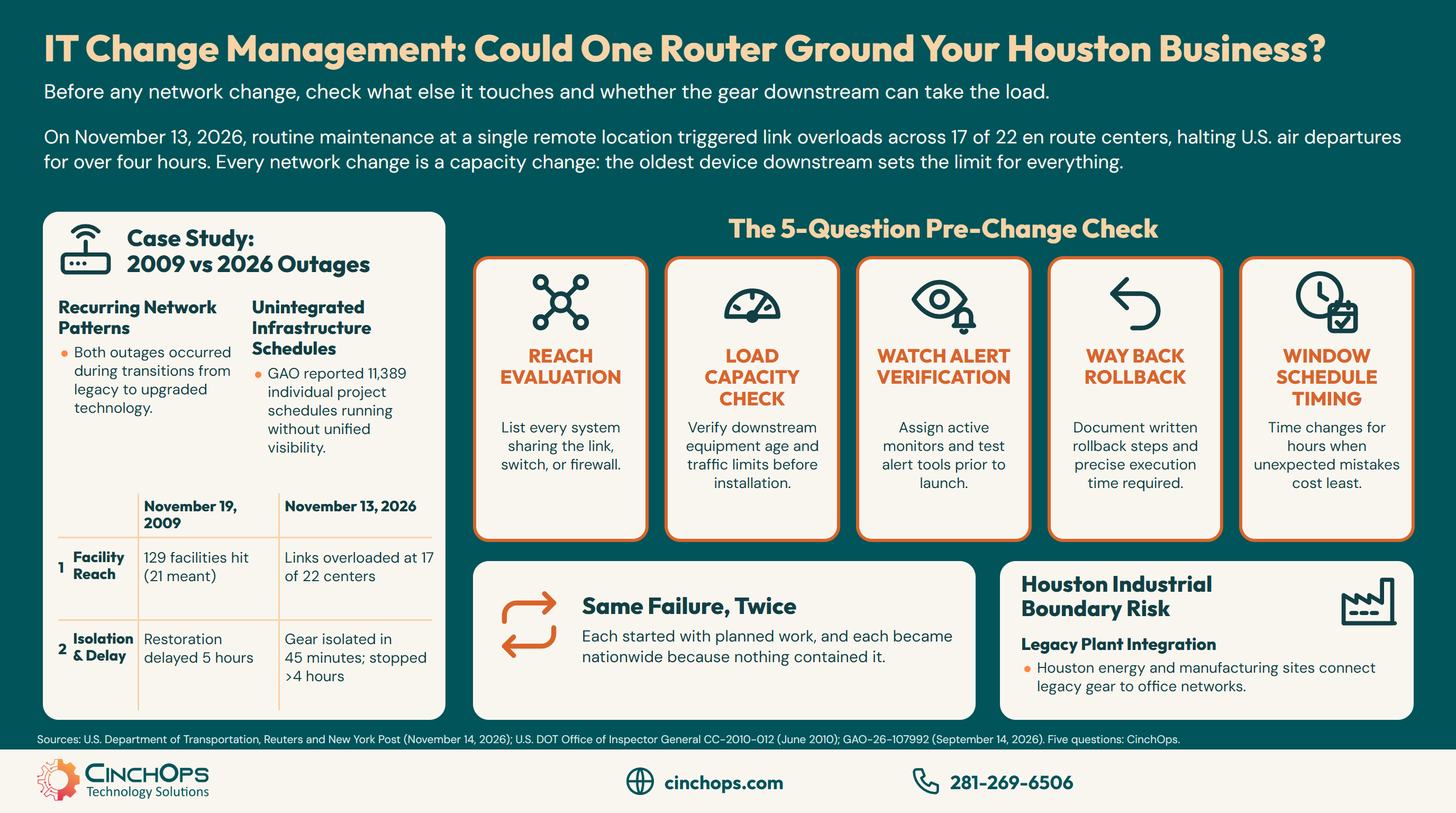
The table below compares the two FAA telecom outages, using the 2010 DOT Inspector General review for 2009 and official statements from November 2026.
| What happened | November 19, 2009 | November 13, 2026 |
|---|---|---|
| The change | Temporary routers bridging the old and new networks during a transition | Copper-to-fiber work and a router swap at a remote site |
| The mistake | A Harris engineer configured one bridge router incorrectly | Not yet confirmed; the FAA Administrator called it a defective piece of equipment |
| How far it reached | 129 facilities instead of the 21 that should have been affected | Links overloaded at 17 of 22 en route centers |
| Why recovery was slow | An automatic alert tool did not work, so technicians could not find the source; restoration was delayed 5 hours | The faulty gear was isolated within 45 minutes; flights stayed stopped for more than four hours |
| Who knew | The FAA was unaware the network had been configured in error | The FAA could not identify a root cause while it happened |
The 2009 and 2026 FAA outages share one pattern: a change meant for a small part of the network spread across most of it, during a move from old technology to new. In 2009 a router error meant to affect 21 facilities hit 129, according to the DOT Inspector General.
The Inspector General letter adds two details that matter to any network owner. The bad configuration "broke down the separation between the old and new networks," and the alert tool that should have pointed technicians to the problem had itself been misconfigured. Seventeen years later, FAA Administrator Bryan Bedford said the faulty equipment was isolated within 45 minutes, yet the stop ran for hours because the instability first had to be explained.
Based on what officials have said so far, neither outage was caused by old equipment simply wearing out. Each started with planned work, and each became nationwide because nothing contained it. That is the part a business can control.
Why Can a Small Change in One Place Break Systems Downstream?
A network is shared, so new load at one point lands on every device that sits behind it.
Capacity planning means confirming that every device behind a change can absorb the traffic the change adds. When one part of a network is upgraded or replaced, the switches, routers and links downstream carry the new load too, and the oldest of them sets the limit for everything.
The FAA numbers show the mismatch. Duffy told Reuters the routers being replaced are about 25 years old and were supposed to be replaced in 2006, and Bedford said the FAA spends $1 billion a year keeping its 1980s network running. The Government Accountability Office reported in September 2026 that some FAA copper cables date from the 1960s and that, as of May 2026, the FAA had replaced 2,560 of 5,170 old copper wires. New fiber and new routers are being joined to that older equipment one site at a time. Homeland Security Secretary Markwayne Mullin described the result to CNN: "That new equipment, new technology just was overwhelming the older system."
The fix Duffy wants is a larger version of the same kind of change. He told ABC's "This Week" he wants Congress to fund a new air traffic control telecom network that could be finished by late 2028 or early 2029, and said the $12.5 billion Congress approved last year cannot be used for that work. Reps. Rick Larsen and André Carson replied that only $1 billion of that $12.5 billion has been spent. Whoever pays for it, a new network gets cut over one site at a time, which is the step that failed on November 13.
Houston has its own version of this risk. Oil and gas, utility and manufacturing firms across the region run plant-floor and field equipment that is decades old, now connected to new office networks and cloud tools. The boundary between those two networks is exactly where the 2009 FAA failure lived. CinchOps segments IT from OT and SCADA networks at that boundary so a change on the office side cannot flood the plant floor, and the reverse.
What Should a Houston Business Check Before Any Network Change?
Five questions, answered in writing before work starts, cover most of what failed at the FAA.
Before any network change, a Houston business should answer five questions in writing: what else shares the device or link, whether the gear behind it can take the load, who watches alerts as it goes live, how to undo it and how fast, and when a mistake would hurt the least.
- Reach. List every system that shares the link, switch or firewall being changed. The FAA's 2009 error hit six times the facilities it was meant to.
- Load. Check the age and limits of the devices downstream, not only the new one. A new firewall or internet line can push more traffic than an old switch behind it can handle.
- Watch. Name the person who sees alerts during the change, and test that the alerts work first. The 2009 alert tool failed when it mattered. Keep watching after go-live day, too: Duffy said a system in Amarillo, Texas, replaced about three weeks earlier, also began to "flood our system."
- Way back. Write the rollback step and how long it takes. Isolating the source is what brought the FAA back online, and Duffy said the issue was resolved once the ability to broadcast was turned off on all 69 routers in the national airspace. Know in advance which setting you would switch off everywhere at once. Plan for the recovery too: CNN reports another 6,200 flights were canceled the next day because crews and planes were not where they needed to be.
- Window. Schedule the work for the hour a mistake costs least. Duffy said the FAA will reevaluate when this kind of work is done after the Friday afternoon failure.
None of these questions needs new software. They need someone who looks at the whole network and the business running on it, not only the box being replaced.
Putting the change off is not the safe choice either. Duffy said the FAA runs "1980s technology, 1990s software" on radar it can no longer get parts for, and that "by doing nothing, you inject way more risk into the system." The answer is to review the change, not to avoid it.
Every network change is a capacity change. Before you turn up one part of the pipe, find out whether everything downstream can carry the same load, and how you will back the change out if it cannot.
Planning an upgrade, a move or a new system?
CinchOps reviews the plan before the work starts, with 24/7 threat monitoring watching the network while it goes live.
See CinchOps vCIO services →How CinchOps Can Help With IT Change Management
CinchOps is a managed IT services provider based in Katy, Texas, serving small and mid-sized businesses across the Houston metro area. CinchOps specializes in cybersecurity, network security, managed IT support, VoIP, and SD-WAN for businesses with 10 to 200 employees.
CinchOps founder Shane Stevens has 35+ years of IT leadership in director, VP and CTO roles at Cisco, ABB and other enterprise technology firms. That background is what a change review needs: someone who reads the whole network and the operations behind it before anyone touches a cable.
- With vCIO services, CinchOps reviews upgrade, move and migration plans against the five questions before work begins.
- Through cybersecurity services, 24/7 threat monitoring watches the network while a change goes live.
- Through managed IT support, help desk requests are answered in under 15 minutes by a named engineer who knows the network.
- With SD-WAN, a site keeps a second way online across redundant providers such as 5G data and Starlink when a primary line change goes wrong.
- CinchOps supports businesses in Katy, Sugar Land and across Houston, including oil and gas, energy and utilities and manufacturing firms where old plant equipment meets new networks.
The FAA's next upgrade will get more scrutiny than its last one. Give yours that scrutiny before it starts, not after something stops. If a firewall swap, an office move or a new system is on your calendar, talk to CinchOps about reviewing the plan first.
Frequently Asked Questions
What caused the FAA ground stop on November 13, 2026?
Officials say contractor L3Harris was moving lines from copper to fiber at a remote FAA site when a router flooded other routers with more than 1,000 connection attempts every four to five seconds. Links at 17 of 22 en route centers became unstable. The router was at a site in El Dorado, Arkansas, and is being tested at an L3Harris lab in Florida. FAA Administrator Bryan Bedford called it a defective piece of equipment, while Transportation Secretary Sean Duffy said the root cause is not yet confirmed. Officials report no sign of a cyberattack.
What is IT change management for a small business?
IT change management is reviewing each change to a network or system before it happens: what it touches, whether the equipment behind it can take the load, who watches it go live and how to undo it. For a small business it can be one written page per change, not a formal committee.
Has the FAA network failed this way before?
Yes. On November 19, 2009, a Harris engineer misconfigured a temporary router between the old and new FAA networks. The DOT Inspector General found it hit 129 facilities instead of the 21 that should have been affected, and a broken alert tool delayed restoration by 5 hours.
Can a firewall or internet upgrade really take down a small office?
Yes, when the equipment behind it cannot handle the change. A new internet line or firewall can push more traffic than an older switch can carry, and a misconfigured device can flood the network. Checking downstream equipment and having a written rollback step prevents most of these failures.
When should a business schedule network changes?
Schedule changes for the hour a mistake would cost the least, usually outside business hours and never before a deadline or a busy weekend. The FAA work ran on a Friday afternoon, and Transportation Secretary Sean Duffy said the timing of that kind of work will be reevaluated.
What does IT change management support cost in Houston?
Managed IT in Houston commonly runs $100 to $250 per user per month. The published CinchOps rate is $100 to $250 per user per month, flat and month-to-month, with no long-term contracts, hidden fees or cancellation penalties. Change reviews are part of that managed service.
Discover More
Resource
Sources
- U.S. Department of Transportation, "ICYMI: U.S. Transportation Secretary Sean P. Duffy Provides Update on Restoration of Airspace Following Nationwide Ground Stop" (November 14, 2026)
- Reuters, David Shepardson, "US aviation shutdown blamed on L3 Harris installed router" (November 14, 2026)
- New York Post, Katherine Donlevy and Geoff Earle, "Cause of FAA ground stop revealed after thousands of US fliers stranded" (November 14, 2026)
- CBS News, "A timeline of Trump administration's response to FAA ground stop" (November 2026)
- Business Insider, Shubhangi Goel, "DOT demands $50 billion to prevent another huge FAA fiasco" (November 13, 2026)
- CNN, Chris Isidore, report on the FAA's aging air traffic control technology (November 15, 2026)
- ABC News via ABC13, Quinn Scanlan, "Transportation Secretary Duffy says ATC routers' ability to broadcast data turned off, being investigated" (November 15, 2026)
- U.S. DOT Office of Inspector General, CC-2010-012, review of the November 19, 2009 FAA Telecommunications Infrastructure outage (June 2010)
- U.S. Government Accountability Office, GAO-26-107992, "Air Traffic Control Systems: Ambitious New Modernization Effort Needs Cost and Schedule Planning" (September 14, 2026)

