


QuickBooks Database Server Manager: Why Multi-User Is Slow
QuickBooks Isn’t Slow, Your Setup Is – Stop Paying To Speed Up The Wrong Thing
Why the same company file opens in seconds at one Houston desk and crawls at every other one.
QuickBooks Database Server Manager is the Windows service that hands your company file to every other computer on the network. Intuit is direct about where it belongs: it runs on the machine that holds the file. In most offices where multi-user crawls, it is not running there at all, and some workstation was set up to serve the file instead.
The symptom you already noticed: the file opens instantly on the computer it lives on, and takes 40 seconds from anywhere else. On its own, that gap only proves the file lives somewhere else on the network. It is still the right place to start. CinchOps rebuilds QuickBooks Desktop multi-user hosting for construction, CPA, and oil and gas firms across Houston, Katy, Sugar Land and Cypress at a flat monthly rate per user, with help desk response under 15 minutes, and the repair usually comes down to one machine running one service that was never installed there.
Intuit's own documentation is unambiguous. Database Server Manager "shares your company files with other computers over your network," and Intuit says "you must install and run this tool on the server computer" - the one holding the company file - "so other users can access your data." Most slow offices in Katy and west Houston skipped that step entirely and do not know it.
What Does QuickBooks Database Server Manager Actually Do?
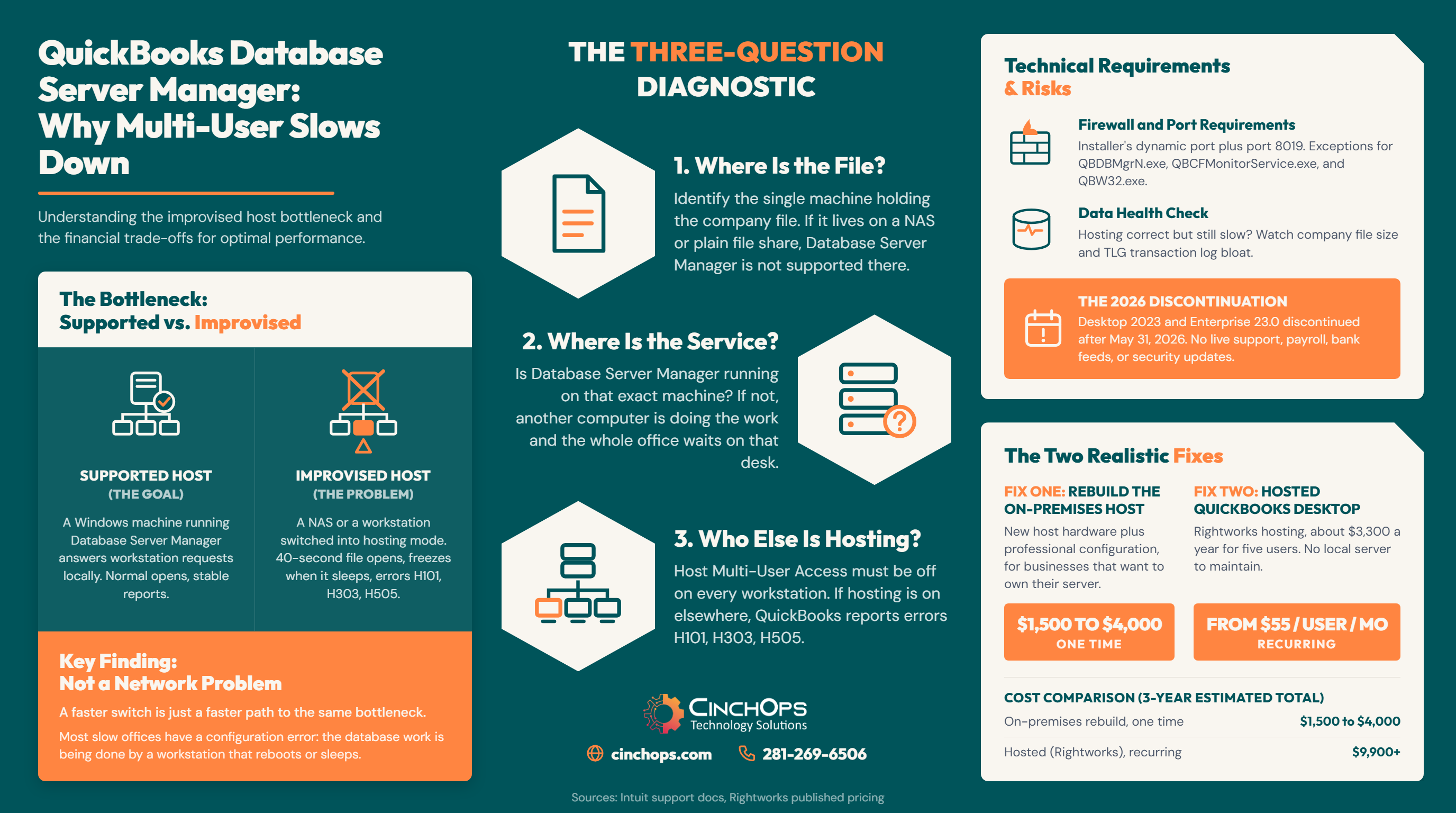
The comparison below is the whole article in one table. Everything after it is detail.
QuickBooks Desktop in multi-user mode is a client/server database, and Database Server Manager is the server half. It runs as the Windows service QuickBooksDBXX, opens the company file locally, and answers requests from workstations over TCP. Intuit documents how the workstations find it: QuickBooks reads the small .ND file sitting beside the company file, which carries the server IP address and port.
| What you are comparing | A supported host (what Intuit documents) | An improvised host (what slow offices actually have) |
|---|---|---|
| What holds the company file | A Windows machine running QuickBooks Database Server Manager | A NAS, a plain file share, or somebody's desktop under a desk |
| What runs the database | QBDBMgrN.exe and the QuickBooksDBXX service, on that same machine | A workstation someone switched into hosting mode instead |
| Hosting setting | Host Multi-User Access on the host only, off everywhere else | On in two or three places, so QuickBooks argues with itself |
| Intuit's position | Documented and supported | "The QuickBooks Database Server Manager doesn't support devices like Network Attached Storage (NAS)." |
| What you see all day | Normal open times, reports that finish, multi-user that stays up | Slow opens, slow reports, freezes when the host desktop sleeps, errors H101, H303 and H505 |
Read the right-hand column again. Not one of those rows is about your switch, your cabling, or your internet circuit. That is the point. A business that adds a faster switch to a setup described by the right-hand column has bought a faster path to the same bottleneck.
There is a second cost to the improvised version that nobody prices in. The machine doing the database work is a workstation, which means it sleeps, it reboots for Windows updates on its own schedule, and somebody shuts it off on Friday. Every one of those events looks to the rest of the office like QuickBooks broke again.
Which Computer Should Be Running Database Server Manager?
Three questions settle it. You can answer all three in about 10 minutes without buying anything.
Hosting in QuickBooks Desktop means one specific machine runs the database service for the company file. Intuit states it plainly: "Your server (the computer that hosts your company files) should be the only computer set to host multi-user mode," and "the Host Multi-User Access option should be turned off on your workstations."
When more than one machine is hosting, QuickBooks tells you so with errors H101, H303 and H505. Intuit's own wording for those codes is that "one or more of your workstations is set to be the server for QuickBooks." Most offices never see the error because the misconfiguration is stable enough to limp along. It just runs slow forever instead.
Two details trip people up on question 2. First, Database Server Manager has to be installed for every year version of QuickBooks in use, and Intuit says to install the oldest first. Second, it scans folders, not drive letters, and Intuit's guidance on the Monitored Drives tab is explicit: "You can't monitor mapped drives." A shop that points everything at a mapped drive has built the exact setup the tool cannot watch.
In 35+ years doing this, the single most common finding on a "QuickBooks is slow" ticket is not a bad switch. It is a company file living on a NAS that somebody bought specifically to be reliable, being served by the bookkeeper's desktop. There is nothing wrong with the NAS. It was built to store files, not to run a database engine, and Intuit has never supported it for that job.
People blame the network, replace switches and cabling, before they check which machine is actually serving the QuickBooks files. Three questions get you there: where the file lives, whether Database Server Manager runs on that same box, and who else has hosting turned on. If the file itself is clean, then you look at the wire.
When Is the Network Really the Problem?
Sometimes it is. Here is how to tell, and what actually causes it in a Houston office.
The network is the real cause when the hosting architecture is already correct and the path between a workstation and the host is degraded. Intuit gives you the test for free: ping the host by name from the workstation, and in Intuit's words, "if there's packet loss or a very slow reply, stop. Reach out to an IT professional for help with your network."
Assuming the three-question test came back clean, these are the causes worth checking, roughly in the order they show up:
- Wi-Fi anywhere in the path. A workstation on Wi-Fi talking to a wired host will be inconsistent by design. Retries and roaming are invisible to the user and very visible to a database session.
- An old switch port or a duplex mismatch. A single 100 Mbps or half-duplex port left over from a prior build will slow one desk and nobody else, which is why it survives for years.
- Antivirus scanning the company file in real time. The QBW, ND and TLG files get touched constantly. Real-time scanning on that folder taxes every transaction.
- Firewall ports and program exceptions. QuickBooks Desktop 2019 and later assign a specific dynamic port at install rather than using a fixed range, and the Port Monitor tab in Database Server Manager shows the assigned number. That port alone is not enough: Intuit also requires port 8019 for QBCFMonitorService, plus program exceptions for QBDBMgrN.exe, QBCFMonitorService.exe and QBW32.exe, inbound and outbound, on the host and on every workstation.
- Remote users pulling the file across a VPN. This one is not a tuning problem. QuickBooks Desktop multi-user over a site-to-site or client VPN is the wrong shape entirely. The remote user should get a session on the host, not the database across the tunnel.
Notice the ordering. Four of the five cost nothing to check and nothing to fix. The fifth is a design change, and it is the one that keeps coming back at businesses with a Sugar Land office and a Cypress yard trying to share one file.
A workstation acting as your accounting server is also a single point of failure
Gulf Coast businesses lose power for days, not hours. If your company file lives on a desktop that nobody backs up as a server, a multi-day outage or a wet office takes your books with it. CinchOps runs geo-redundant backups outside the Gulf Coast flood zone as part of business continuity and disaster recovery, so the accounting file is not depending on one machine in one building.
See how CinchOps protects business continuity →What Are the Two Realistic Fixes, and What Do They Cost?
Two that actually solve this problem. The third option people always raise is a different decision entirely.
Fix one puts the company file on a machine built to host it, and one Intuit supports for the job. Fix two takes the local network out of the path entirely by moving QuickBooks Desktop into a hosted environment. Which one is right depends less on budget than on whether anyone in the building is going to own a server.
Fix one: give the file a real host. One Windows machine that stays on, holds the QBW file, runs QuickBooks Database Server Manager for every year version in use, has the scan folders configured, has the QBDataServiceUserXX permissions set on those folders, and has the assigned port open. Wired gigabit to every desk that touches it. Our planning range for this in the Houston metro is roughly $1,500 to $4,000 one time when new host hardware is needed, and labor only when a suitable machine already exists. That is a CinchOps planning band, not a quote, and the spread is almost entirely about hardware.
Fix two: take the LAN out of the path. Hosted QuickBooks Desktop puts the application and the file in a data center and gives each user a session. Rightworks, an Intuit Solution Provider, publishes three tiers, and every one is listed as a "Starts at" price rather than a flat rate: QuickBooks Hosting from $55 per user per month, Cloud Hosting from $85, and Cloud Hosting Pro from $110. Your QuickBooks license is separate, and a real quote depends on user count and which applications you need.
What about moving to QuickBooks Online? It comes up every time, and it is deliberately not in this article. QuickBooks Online is not a fix for a hosting problem. It is a different product, with different job costing, inventory and reporting, and the decision turns on whether your workflows survive the move rather than on how fast your file opens. That is its own post and we will write it. In the meantime, do not let a migration debate keep a broken setup in place for another year.
Run the arithmetic before you pick. 5 users at the $55 entry tier is $275 a month, which is $3,300 a year, and that recurs. Treat it as a floor rather than a quote, since every tier is a "starts at" price. The on-premises rebuild is a one-time number in the same neighborhood. Year one is close to a wash. Year three is not, and that is where most people get the decision wrong in both directions.
One more thing changes the math for the long run, and it is more urgent than most people realize. Intuit stopped selling new subscriptions of QuickBooks Desktop Pro Plus, Premier Plus, Mac Plus and Desktop Enhanced Payroll to new U.S. subscribers after Sept. 30, 2024, and said that "for customers wishing to purchase QuickBooks Desktop software after Sept. 30, 2024, QuickBooks Enterprise will be our Desktop accounting solution."
Existing subscribers can keep renewing, but individual versions still age out on a rolling schedule. QuickBooks Desktop 2023, including Enterprise Solutions 23.0, was discontinued after May 31, 2026. Intuit is specific about what that means: no live technical support, no Desktop Payroll, no Desktop Payments, no online bank feeds, and no critical security updates.
The software still opens your file. It just stops being connected to anything.
That matters here because the Houston firms most committed to Desktop are the ones with job costing and inventory they cannot give up: construction, oil and gas service companies, and CPA practices. Those businesses are going to be running a Desktop company file for years, which makes the quality of the host a long-term decision rather than a patch.
How CinchOps Can Help Houston Businesses Get QuickBooks Hosting Right
CinchOps is a managed IT services provider based in Katy, Texas, serving small and mid-sized businesses across the Houston metro area. CinchOps specializes in cybersecurity, network security, managed IT support, VoIP, and SD-WAN for businesses with 10 to 200 employees.
- Through managed IT support, we audit the QuickBooks host, install and scan Database Server Manager correctly for every year version in use, and set the folder permissions and firewall rules that Intuit's documentation calls for.
- For construction companies, we treat QuickBooks the same way we treat Procore, PlanGrid, Bluebeam and HCSS: a line-of-business application with a performance profile, not just another file on a share.
- For CPA firms running CCH Axcess, UltraTax, Lacerte, Drake or ProSeries alongside QuickBooks, we size the host for the busiest week of the year rather than the average one.
- For oil and gas service companies, the same host usually carries WellView, OpenWells or Enertia, and the fix has to account for all of it at once.
- Across Houston, Katy, Sugar Land and Cypress, we bill a flat monthly rate per user with no contracts, no hidden fees and no cancellation penalties, so a QuickBooks rebuild is not a separate negotiation.
- Where hosted QuickBooks is the better answer, we help you move to it and then get out of the way, including the cloud services and identity work that has to happen alongside it.
If your team has been living with a 40 second file open for two years, that is not a QuickBooks limitation and it is not something you should be paying a switch vendor to solve. It is a 10 minute diagnosis followed by one of two decisions, and the decision is about who owns the server, not about bandwidth. Bring us the three answers from the host test and we will tell you which fix you actually need, or talk to CinchOps and we will run it for you.
Frequently Asked Questions
What is QuickBooks Database Server Manager and do I need it?
It is the Windows service that lets more than one computer work in a company file at once. Intuit says you must install and run it on the server computer, meaning the machine that holds the file. If you use multi-user mode, you need it. Single-user on one PC does not.
Can I store my QuickBooks company file on a NAS?
Intuit's help documentation says no: "The QuickBooks Database Server Manager doesn't support devices like Network Attached Storage (NAS)." A NAS can hold a backup, but it cannot run the database service. Offices that put the file there end up switching a workstation into hosting mode to serve it, which puts a desktop in the server role and slows everyone down.
What are QuickBooks errors H101, H303 and H505 telling me?
They mean more than one machine is set to host. Intuit states that with these codes, "one or more of your workstations is set to be the server for QuickBooks," and that hosting should be turned off on every workstation. Fix it by selecting Stop Hosting Multi-User Access on each workstation, then confirming hosting is on at the real host.
Does moving to hosted QuickBooks fix the speed problem?
Usually, because it removes your local network from the path entirely. Each user gets a session in a data center where the application and the file sit on the same infrastructure. It does not fix a company file that is simply too large or damaged, and it adds a recurring per-user cost you will carry every month from then on.
What does it cost to set up QuickBooks Database Server Manager properly in Houston?
CinchOps bills managed IT at a flat monthly rate per user, so diagnosis and ongoing support are already covered. The fix is either a one-time host rebuild, which we budget at roughly $1,500 to $4,000 when new hardware is needed, or hosted QuickBooks, where Rightworks lists plans starting at $55 per user per month.
Discover More
Resource
Sources
- Intuit - Using the QuickBooks Database Server Manager to share your company files
- Intuit - Use QuickBooks Database Server Manager (scan folders, monitored drives)
- Intuit - How to fix Error H202 and H505 (includes H101, H303, H505 and the NAS limitation)
- Intuit - Set up firewall and security settings for QuickBooks Desktop
- Intuit - Error H202: when hosting company file on a non-Windows Server
- Intuit - Resolve network issues with QuickBooks File Doctor test results (hosting modes, the .ND file, port 8019)
- Intuit - QuickBooks Desktop 2023 service discontinuation policy
- Intuit - QuickBooks Desktop to stop selling to new U.S. subscribers
- Rightworks - Cloud plans for businesses (published per-user pricing)

