


Single Points of Failure in a Houston Office: Which One Stops You?
Small Business IT Redundancy For Houston Offices – The Five Single Points Of Failure In A Small Office
Which One Stops You?
Part 7 of Building the Resilient Business, a CinchOps series on IT resilience for small and mid-sized Houston companies.
A single point of failure in small business IT is one component whose failure stops the whole business because nothing else can do its job. Most 10-200 person Houston offices have five of them: the internet line, the power feeding the network, the phone system, one on-site server and one admin login.
None of the five is exotic. They exist because a growing business buys one of each, it works, and nobody revisits the setup until the day one of them stops. A storm takes out the cable line, the network closet loses power, or the one person with the admin password leaves.
Small failures spread far. Microsoft said the faulty CrowdStrike update on July 19, 2024 affected 8.5 million Windows devices, less than one percent of all Windows machines, and still grounded flights and closed businesses. A single point of failure does not need to be large to stop a company that depends on it.
This post is Part 7 of Building the Resilient Business, a CinchOps series on IT resilience. Part 1, What Is IT Resilience? named operations as one of the six parts, and the 20-question resilience check scores it. Each later post goes deep on one part, and this one compares the five failures and the backup for each.
CinchOps builds SD-WAN with redundant service providers, such as 5G data and Starlink alongside the primary line, specifically for Houston-area businesses with 10 to 200 employees, with backups kept outside the Gulf Coast flood zone.
What Are the Five Single Points of Failure in a Small Office?
One table, five failures, the backup for each.
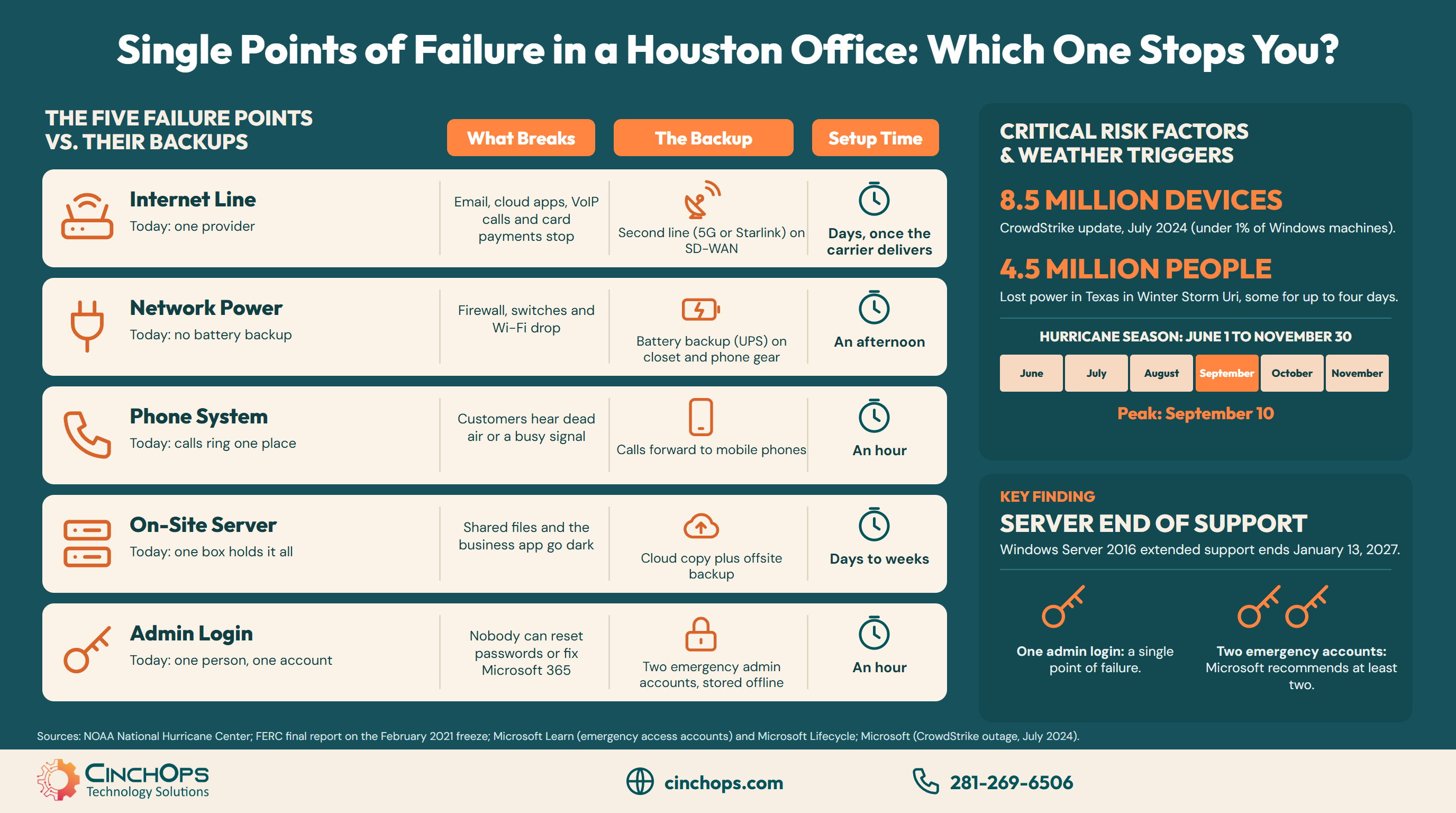
The five single points of failure in a typical small Houston office are the internet line, the power feeding the network, the phone system, one on-site server and one admin login. Each one stops the business on its own, and each one has a backup a small business can put in place in an hour to a few days.
The table compares the five failures by what breaks, the backup that fixes it and the usual time to set that backup up.
| Single point of failure | What breaks when it fails | The backup | Typical time to set up |
|---|---|---|---|
| Internet line | Email, cloud apps, VoIP calls and card payments stop | Second line from a different kind of provider (5G or Starlink) on SD-WAN | Days, once the carrier delivers |
| Power to the network | Firewall, switches and Wi-Fi drop even if laptops have battery | Battery backup (UPS) on the network closet and phone gear | An afternoon |
| Phone system | Customers hear dead air or a busy signal | Calls forward to mobile phones when the office line drops | An hour to set and test |
| One on-site server | Shared files and the line-of-business app go dark | Cloud copy of the files plus an offsite backup | Days to weeks, depending on the app |
| One admin login | Nobody can reset passwords or fix Microsoft 365 | Two emergency admin accounts, stored offline | An hour |
Start with the failure that would cost the most hours. For most offices that is the internet line, since email, the cloud apps and the VoIP phones all ride on it.
Which Single Points of Failure Does Houston Weather Expose?
Storms test the internet line and the power first.
Houston weather tests the internet line and the power feed more than any other single point of failure. The Atlantic hurricane season runs from June 1 to November 30, with its peak on September 10, according to NOAA, and winter storms can cut power across Texas as well.
Winter Storm Uri in February 2021 is the reminder that summer is not the only risk. The Federal Energy Regulatory Commission reported that more than 4.5 million people in Texas lost power, some for as long as four days.
Two backups cover most of it. A battery backup (UPS) on the network closet keeps the firewall, switches and phone gear running through short outages and lets them shut down cleanly in long ones. A second internet line from a different kind of provider, such as 5G or Starlink, joined to the main line through SD-WAN, keeps the office online when a storm cuts the cable. The SD-WAN explainer covers how the two lines share the load.
A hosted phone system adds a third: set calls to forward to mobile phones when the office line drops, and test the rule before hurricane season.
What About the Server and the Admin Login?
The two failures that do not need a storm.
An on-site server and a single admin login fail without any weather at all. One server often holds the shared files and the line-of-business app, and one admin account often belongs to one person, so a dead disk or a departing employee can stop the business on an ordinary Tuesday.
Age makes the server risk worse. Microsoft ends extended support for Windows Server 2016 on January 13, 2027, so a 2016 server still running the office will stop getting security updates. Moving the shared files to the cloud and keeping an offsite backup removes the single box from the critical path.
The admin login is the cheapest fix of the five. Microsoft recommends maintaining at least two emergency access accounts so an organization is never locked out of its own Microsoft 365 tenant. Store those credentials offline where the owner can reach them, and protect every admin login with MFA. The guide to an unresponsive IT provider covers what happens when the only person with access stops answering.
Every small office has one thing that stops the whole business when it fails. Find it before hurricane season does, and give it a second path.
Keep the office online when the main line drops
CinchOps SD-WAN joins the primary line with a second provider, such as 5G data or Starlink, so email, cloud apps and phones keep working through an outage.
See SD-WAN servicesHow CinchOps Helps Houston Offices Remove Single Points of Failure
CinchOps is a managed IT services provider based in Katy, Texas, serving small and mid-sized businesses across the Houston metro area. CinchOps specializes in cybersecurity, network security, managed IT support, VoIP, and SD-WAN for businesses with 10 to 200 employees.
- Internet: SD-WAN across redundant service providers, such as 5G data and Starlink, alongside the primary line.
- Phones: VoIP with call forwarding to mobile phones when the office line drops.
- Server and data: Microsoft 365 backup and backup and disaster recovery with copies kept outside the Gulf Coast flood zone.
- Planning: CTO/CIO services help the owner rank the five failures and decide which to fix first.
- Local coverage: CinchOps works with businesses in Houston, Katy and Cypress, including construction firms, engineering firms and oil and gas companies.
Hurricane season will come back every June, and the five single points of failure will still be there unless someone removes them. Walk the office this week, list what you have only one of, and talk to CinchOps about the second path for each.
Frequently Asked Questions
What is a single point of failure in small business IT?
A single point of failure is one component whose failure stops the whole business because nothing else can do its job. In a 10-200 person Houston office the usual five are the internet line, the power feeding the network, the phone system, one on-site server and one admin login.
Does a small office need backup internet?
If the business stops when the internet drops, yes. A second line from a different kind of provider, such as 5G or Starlink, joined to the main line through SD-WAN, keeps cloud apps, email and VoIP phones working when the primary provider has an outage or a storm cuts the cable.
What happens to VoIP phones when the office loses power or internet?
Desk phones stop ringing because they depend on the office network. A hosted VoIP system can forward calls to mobile phones or another location when the office line drops, so customers still reach someone. Set the forwarding rule and test it before hurricane season, not during an outage.
What does fixing single points of failure cost for a Houston small business?
Most fixes are small: a battery backup for network gear, call forwarding rules and two emergency admin accounts cost little. CinchOps prices managed IT at a flat $100 to $250 per user per month, and a second internet line is billed by the carrier on top of that.
How do I find the single points of failure in my office?
Walk the office with one question: if this one thing stopped right now, what else would stop? Check the internet line, the network closet power, the phones, the server and who holds the admin password. Anything with no second path is a single point of failure.
Discover More
Resource
Sources
- NOAA National Hurricane Center, "Tropical Cyclone Climatology"
- FERC, "Final Report on February 2021 Freeze Underscores Winterization Recommendations," November 16, 2021
- Microsoft Learn, "Manage emergency access accounts in Microsoft Entra ID"
- Microsoft Lifecycle, "Windows Server 2016"
- Microsoft, "Helping our customers through the CrowdStrike outage," July 20, 2024


