


7 Ways Outdated IT Is Costing Money for Houston Small Businesses (2026)
Fix The Common Problems Before They Become The Expensive Ones – Retire Outdated IT On Your Own Terms
Seven dated, checkable costs that old computers, old servers and old habits are adding to Houston business budgets this year.
Outdated IT is costing Houston small businesses money in ways that never show up as a line item called "old technology." The charges arrive one at a time, usually after the money is gone: a renewal that went up, a security extension nobody budgeted, an insurance claim that comes back denied, or a wire transfer the bank can't pull back. This list puts all seven costs in one place for owners and office managers in Houston, Katy and Sugar Land, each with the number behind it and a check you can run without an IT degree. CinchOps, a managed IT provider in Katy, wrote the list; CinchOps is not one of the seven items, and every fix can be done by your own staff or any IT provider you choose.
How We Chose These 7 Costs
Four criteria decided what made the list and what was left off.
An outdated IT cost made this list only if it carries a real date or dollar figure from a primary source, applies to a Houston business with 10 to 200 employees, can be checked by an owner or office manager this week, and has a fix that doesn't depend on buying from any one vendor.
- A primary source. Every number comes from Microsoft, the FBI, Verizon, an insurer's court filing, the Texas Legislature or the CinchOps Houston Area Patch Index. No estimates, no vendor marketing figures.
- Fits a small business. Costs that only hit large enterprises were dropped.
- Checkable this week. Each item names a specific thing to look at, such as a license list, a server version or an insurance application.
- Fixable by anyone. If the only fix was a product we sell, the item didn't qualify.
Costs that failed a test were left off. Slow computers waste staff time, for example, but no primary source puts a reliable number on it for a business this size, so it isn't one of the seven.
The 7 Ways Outdated IT Is Costing Houston Small Businesses Money
Grouped from hardware and licensing costs to security, insurance and legal costs.
Outdated IT is any computer, server, software license, security setting or written policy that has fallen behind its vendor's support dates or your insurer's and the law's expectations, and each one below has a date or dollar figure attached.
1. Windows 10 PCs past end of support
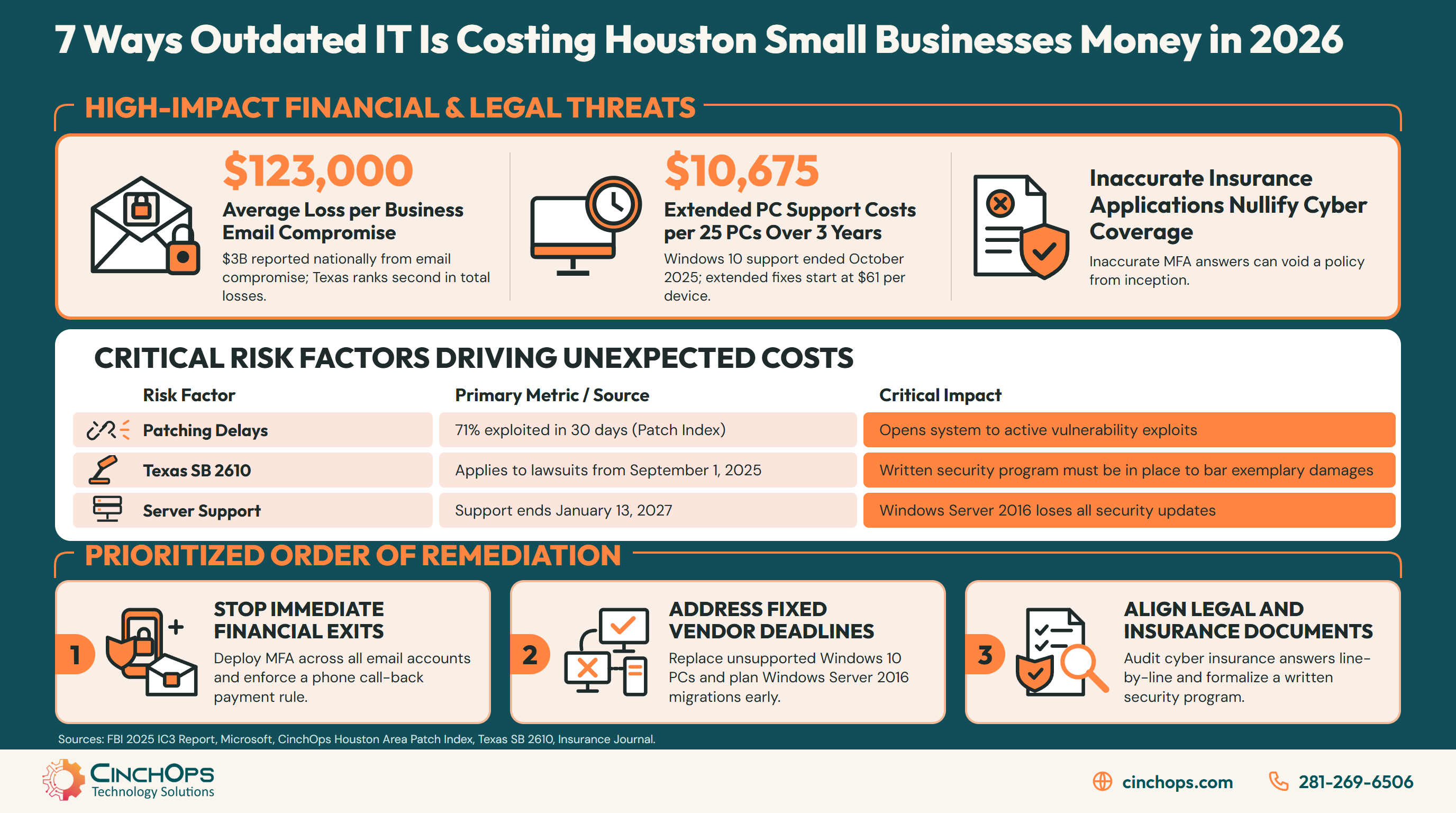
Windows 10 support ended on October 14, 2025, and Microsoft's Extended Security Updates for business PCs cost $61 per device in year one, with the price doubling each year for a maximum of three years. The program is cumulative, so a business that joins in year two pays for year one as well. Over all three years that adds up to $427 per PC, which means a 25-PC office would spend $10,675 just to keep getting security fixes on machines it still has to replace. A PC without TPM 2.0 and Secure Boot capable firmware can't take the free Windows 11 upgrade at all.
Check this week: count the Windows 10 machines still in use and mark which ones fail the Windows 11 hardware requirements.
2. A Windows Server 2016 machine in the office
Microsoft ends extended support for Windows Server 2016 on January 13, 2027, leaving any office server still running it without security fixes in less than three months. For a CPA practice running UltraTax or Lacerte from that server, a migration pushed into tax season is the most expensive version of this project. A single server in a Houston office is also a flood and storm risk sitting on one floor of one building. The NOAA National Hurricane Center puts the peak of Atlantic hurricane season at September 10, so the window that avoids both tax season and storm season is short.
Check this week: ask whoever manages the server for its Windows version and where its backups are stored.
3. Microsoft 365 plans nobody has reviewed since July
Microsoft raised Business Basic from $6 to $7 and Business Standard from $12.50 to $14 per user per month on July 1, 2026, while Business Premium stayed at $22. Existing customers keep their current pricing until renewal, so many offices will first feel the increase on their next renewal invoice. For 25 users on Business Standard, the increase works out to $450 a year. The gap between Business Standard and Business Premium narrowed from $9.50 to $8 per user, which changes the math for any office that passed on Premium in the past. Licenses still assigned to people who left the company keep billing until someone removes them.
Check this week: export the license list from the Microsoft 365 admin center, match it against payroll, and write down your renewal date.
4. Patching every quarter, or whenever someone gets to it
The CinchOps Houston Area Patch Index found that, across 375 confirmed cases, 71% of exploited flaws were under confirmed attack within 30 days of the fix becoming available, and 95% within a year. Microsoft accounted for more of those cases than any other vendor, at 138. A business that patches quarterly leaves most of those flaws open well past the window when attackers use them. The Verizon 2026 Data Breach Investigations Report found that 31% of breaches start with a software vulnerability, ahead of stolen passwords.
Check this week: ask for the date of the last update on every PC, the server and the firewall.
5. Email with no MFA and no call-back rule for payments
The FBI's 2025 Internet Crime Report counted 24,768 business email compromise complaints with $3,046,598,558 in losses, about $123,000 per complaint. The same report ranked Texas second in the nation for total reported losses across all crime types, at $1,825,636,181. Business email compromise usually starts with one stolen password on a mailbox that has no multi-factor sign-in. The attacker reads along, then sends a real-looking invoice with new bank details. Any business that pays subcontractors or vendors by wire, such as a construction company, is exposed because a large payment to a new account can look routine.
Check this week: confirm every mailbox requires a second sign-in step, and set a written rule that any change to payment details gets a phone call to a number you already have on file.
6. A cyber insurance application your setup can't back up
In Travelers v. International Control Services, the insurer alleged the company had used MFA only on its firewall after attesting otherwise, and on August 26, 2022 the parties agreed the policy was null and void from its inception. The ransomware attack that hit the company in May 2022 was left without coverage. Insurance broker Lockton has noted that cyber applications have become longer and more complex, and that inaccurate answers can be costly. An answer that was true when an older system was set up may not be true today.
Check this week: reread your last cyber insurance application line by line with whoever runs your IT, and correct anything that is no longer accurate before renewal.
7. No written security program to point to after a breach
Texas SB 2610 bars exemplary damages in a data breach lawsuit against a Texas business with fewer than 250 employees, but only if the business can show its cybersecurity program was in place at the time of the breach. The law applies to lawsuits that arose on or after September 1, 2025. A business running on old, undocumented systems has nothing written to show a court, so it gives up a protection the Legislature made available to companies its size.
Check this week: find out whether your business has a written security program, who owns it, and when it was last updated.
How to Choose Which Outdated IT Cost to Fix First in Houston
A simple order for a business that can't fix everything this quarter.
Fix outdated IT in this order: first anything that lets money leave in a single day, then anything with a fixed deadline, then anything that affects insurance or legal protection, and last anything that only raises a renewal price.
Wire fraud comes first because a stolen payment is often gone before anyone notices, and the fix (multi-factor sign-in plus a call-back rule) costs almost nothing. Fixed deadlines come next because a vendor's support date doesn't move. Insurance and legal paperwork follow, because those costs land only after an incident. License cleanup can wait for the renewal date.
The table below sorts each of the seven outdated IT costs by what triggers it, how to check for it, and the first fix to make.
| Outdated IT cost | What triggers the cost | How to check this week | First fix |
|---|---|---|---|
| Email without MFA | A stolen password and a fake invoice | Mailbox sign-in settings | Turn on MFA; add a payment call-back rule |
| Windows Server 2016 | Support end date | Server version and backup location | Schedule the migration now |
| Windows 10 PCs | Paid extension or unpatched PCs | PC count and hardware check | Replace the PCs that can't upgrade |
| Slow patching | Flaws attacked soon after the fix ships | Last update date per device | Patch on a written monthly schedule |
| Cyber insurance answers | A claim checked against the application | Last application, line by line | Correct answers before renewal |
| No written security program | A breach lawsuit | Whether a dated program exists | Write it down and assign an owner |
| Unreviewed Microsoft 365 plans | Renewal at the new price | License list against payroll | Remove unused licenses; compare plans |
Revisit this order every quarter. A deadline that was months away moves into the fix-now box faster than most budgets expect.
How Much Does Managed IT Cost for a Houston Small Business?
What to compare when you get quotes, with one published price list as a reference point.
A managed IT quote for a Houston small business should be compared on three numbers: the monthly rate per user, the one-time cost of replacement hardware, and the license bill paid to Microsoft or a reseller.
For reference, the published CinchOps rate is $100 to $250 per user per month, flat, with no long-term contract, no hidden fees and no cancellation penalties, and backup and recovery sit in the top tier. Replacement PCs and servers are priced by quote, so ask every provider, CinchOps included, to put these in writing:
- The monthly rate per user and exactly which of the seven costs it covers.
- A one-time quote for replacement PCs, a replacement server and the migration work.
- The license bill: who sells you Microsoft 365, which plan, and the renewal date.
A quote that leaves out any of the three numbers isn't comparable to one that includes them, whoever it comes from.
The expensive problems in a small business almost always start as ordinary ones: the PC nobody replaced, the server nobody patched, the inbox without a second sign-in. Fix the common problems on purpose and on a schedule, and you close most of the openings that turn into real bills.
Not sure which of the seven applies to you?
A legacy system assessment lists every PC, server and license by support date, so the order of fixes is set by facts instead of guesses.
See what the assessment coversHow CinchOps Can Help Houston Businesses Retire Outdated IT
CinchOps is a managed IT services provider based in Katy, Texas, serving small and mid-sized businesses across the Houston metro area. CinchOps specializes in cybersecurity, network security, managed IT support, VoIP, and SD-WAN for businesses with 10 to 200 employees.
CinchOps runs managed IT specifically for Houston-area businesses, with help desk requests answered in under 15 minutes by a named engineer who knows the client's network.
- Through managed IT support, PCs, servers and Microsoft 365 licenses are tracked against their support and renewal dates.
- Patch management runs on a written schedule.
- Cybersecurity includes 24/7 threat monitoring and response.
- Business continuity and disaster recovery keeps backups outside the Gulf Coast flood zone.
- Industry setups for CPA firms, law firms and construction companies across the Houston area.
Every cost on this list gets cheaper the earlier it is handled, and the first step is simply knowing which of the seven apply to your office. If you'd like a second set of eyes on that list, talk to CinchOps.
Frequently Asked Questions
What should a small Houston business do about Windows 10 end of support?
Count every Windows 10 PC, check which ones meet the Windows 11 hardware requirements, and upgrade those first. Put the PCs that can't upgrade on a replacement schedule, and treat Microsoft's paid security extension as a short bridge for the few machines you can't replace right away, not as a long-term plan.
How do I check whether a PC can run Windows 11?
Run Microsoft's PC Health Check app on the machine, or ask your IT provider for a hardware report covering every PC at once. The report should list each machine's processor, memory and security chip status, so you can see which PCs upgrade for free and which need replacing.
Will my Microsoft 365 bill go up even if I don't change anything?
Yes, for most small businesses on Business Basic or Business Standard, because the new price applies once your current term renews. The weeks before your renewal date are the cheapest time to remove licenses nobody uses, confirm each person is on the right plan, and decide whether a different plan fits the business better.
Is it cheaper to keep repairing old computers or replace them?
Add up what each old PC will cost over the next three years, including repairs, staff time lost to slowdowns and any paid security coverage, then compare that total with a written replacement quote. A PC that can't run Windows 11 has a short remaining life no matter how much is spent keeping it running.
Do I need to replace all of my outdated IT at once?
No. A staged plan works: fix the items that can cost money in a single day first, then schedule hardware replacement around vendor deadlines and cash flow. Put the plan in writing with dates, because a dated plan shows an insurer, an auditor or a court that the work was already underway.
Discover More
Resource
Sources
- Microsoft Learn - Extended Security Updates (ESU) program for Windows 10
- Microsoft Learn - Windows 11 requirements
- Microsoft Lifecycle - Windows Server 2016
- Microsoft Licensing - Microsoft 365 Pricing and Packaging Updates (effective July 1, 2026)
- NOAA National Hurricane Center - Tropical Cyclone Climatology
- CinchOps - Houston Area Patch Index (updated October 13, 2026)
- Verizon - 2026 Data Breach Investigations Report
- FBI Internet Crime Complaint Center - 2025 IC3 Annual Report
- Insurance Journal - Travelers v. International Control Services filing (July 12, 2022)
- Insurance Journal - Policy declared null and void (August 30, 2022)
- Lockton - Travelers v. ICS underscores need to respond carefully to cyber insurance applications
- Texas Legislature - SB 2610 enrolled text (89th Legislature)
