


What Is IT Resilience? A Six-Part Guide for Houston Businesses
Security, Operations, Data, People, Vendors And Cost – Why IT Resilience Matters More For Small Businesses
A Six-Part Guide for Houston Businesses
Part 1 of Building the Resilient Business, a CinchOps series on IT resilience for small and mid-sized Houston companies.
IT resilience is a business's ability to keep working through a disruption, whether that is a ransomware attack, a vendor outage, a storm or a key employee leaving, and to recover quickly afterward. For a 10-200 person company in Houston, it decides whether a bad day stays a bad day or turns into a bad quarter.
This post opens Building the Resilient Business, a CinchOps series on IT resilience. Each later post takes one part of the picture and goes deep. This one defines the whole thing and gives owners a way to score where they stand.
The NIST glossary defines resilience as the ability to prepare for and adapt to changing conditions and withstand and recover rapidly from disruptions. That definition fits a small business as well as a federal agency. Scale is what changes: a 40-person firm has no spare IT team, no second office and often one person who knows where everything is.
CinchOps builds IT resilience specifically for businesses with 10 to 200 employees in the Houston area, with immutable offsite backups stored outside the Gulf Coast flood zone and a help desk that answers in under 15 minutes.
What Are the Six Parts of IT Resilience?
A comparison of the six parts, what each one protects, and the question that tests it.
IT resilience has six parts for a small or mid-sized business: security, operations, data, people, vendors and cost. Each part protects something different, and a business can be strong in one and exposed in another, which is why scoring them separately matters.
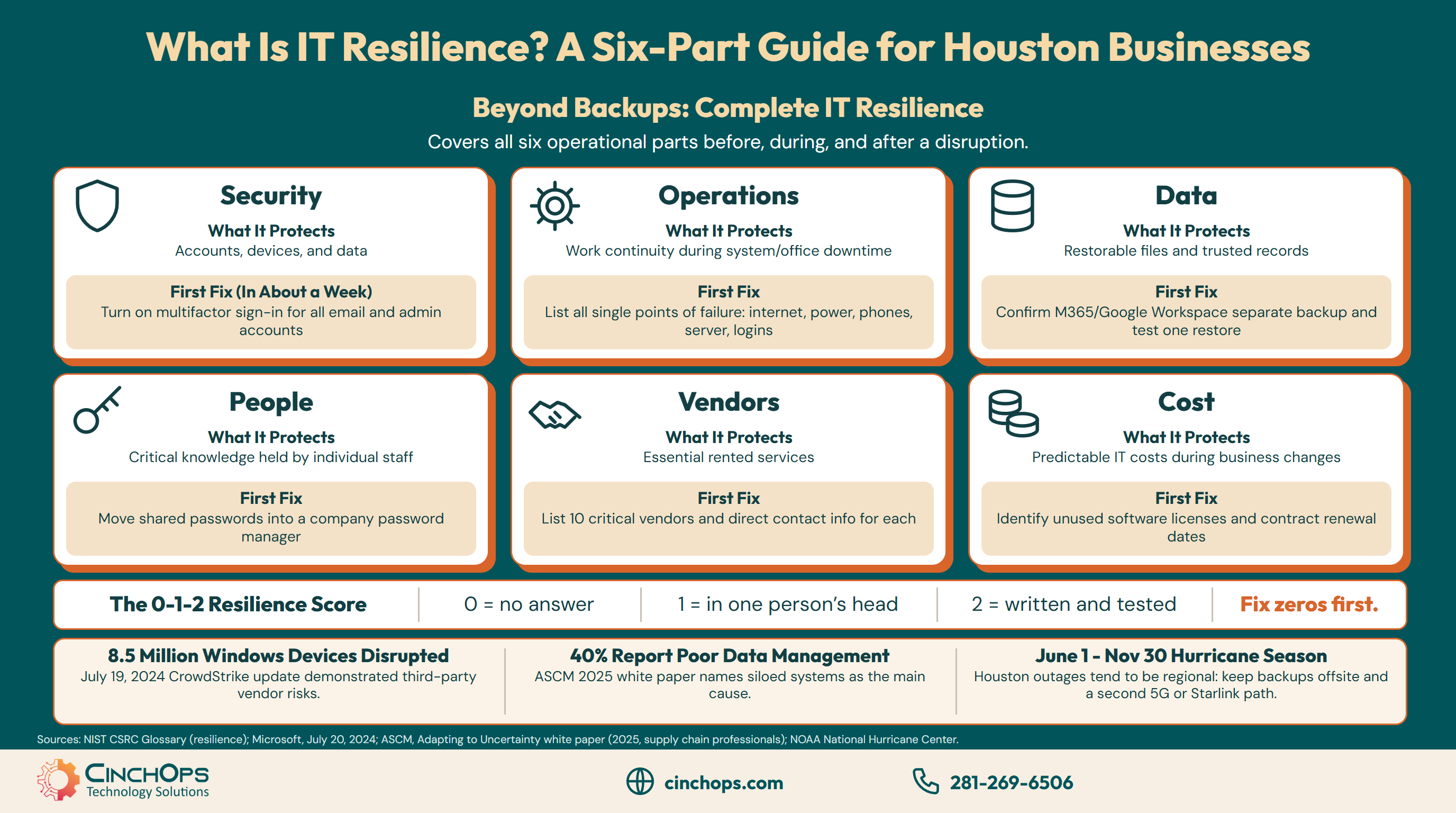
The table compares the six parts of IT resilience by what each protects, the question that tests it and a first fix a Houston business can finish in about a week.
| Part of IT resilience | What it protects | The test question | A first fix in about a week |
|---|---|---|---|
| Security | Accounts, devices and data from attackers | If an account is taken over today, how fast do we notice and lock it? | Turn on multifactor sign-in for every email and admin account |
| Operations | The ability to keep working when a system or the office goes down | What single failure stops the whole office? | List every single point of failure: internet, power, phones, server and admin login |
| Data | Files and records you can restore and trust | Could we restore last Tuesday's files, and do we trust what is in our systems? | Confirm Microsoft 365 or Google Workspace data is backed up separately, then test one restore |
| People | Knowledge that lives in one person's head | What breaks if our IT person or office manager leaves tomorrow? | Move shared passwords into a company password manager |
| Vendors | Services you rent from someone else | Which vendor outage would stop us, and what is the workaround? | List the ten vendors you cannot work without and who to call at each |
| Cost | Predictable IT costs while the business grows or shrinks | Can we add or cut ten users without a surprise bill? | Find unused software licenses and the renewal dates on the big contracts |
Most small businesses score unevenly. Security tends to get attention because cyber insurers ask about it at every renewal, while people and vendor risk rarely make anyone's list until a resignation or an outage forces the question.
Every later post in this series takes one row of that table and turns the first fix into a full plan, starting with the questions an owner can answer in one meeting.
Why Does IT Resilience Matter More for a Small Business?
Three disruptions small Houston businesses plan for least, each with a named source.
IT resilience matters more for a small business because a small business has fewer spares: one office, one internet line and one person who knows the systems. A disruption a large company absorbs with a second team can stop a 30-person firm outright, so the plan has to exist before the event.
Many disruptions start outside the building. On July 19, 2024, a faulty CrowdStrike update knocked Windows computers offline around the world, and Microsoft said it affected 8.5 million Windows devices, or less than one percent of all Windows machines. The businesses hit had done nothing wrong. Their exposure came from a vendor they trusted, which is why vendor risk is one of the six parts.
Messy data is the quieter problem. The Association for Supply Chain Management's 2025 white paper on visibility and traceability found that 40% of the professionals it surveyed report poor data-management practices, and it names siloed systems that do not talk to each other as the main cause. That survey covers manufacturers and supply chain teams rather than 25-person offices, but the pattern carries over: when the same customer record lives in three apps, nobody knows which copy to trust during a recovery.
Houston adds a local reality. The Atlantic hurricane season runs from June 1 to November 30, according to the National Hurricane Center, and a Gulf Coast storm rarely takes out a single building. Power, roads, cell service and the office tend to go down together across the region, so a plan that assumes staff can drive in, or that treats the office internet line as the backup, fails on the day it is needed. Resilience in Houston means backups stored outside the region and a second internet path, such as 5G data or Starlink, that does not share the same local lines.
How Is IT Resilience Different From Backup and Business Continuity?
Where backup, business continuity and IT resilience overlap and where each one stops.
Backup protects copies of your data. Business continuity is the plan for keeping critical work going during an outage. IT resilience is wider than both: it covers the security, people, vendor and cost decisions that decide whether an outage happens, how bad it gets and how quickly the business recovers.
A business can have perfect backups and still lose a week, because backups do not answer who holds the admin password, which vendor to call or where staff work when the office is closed. Business continuity covers part of that gap. IT resilience covers the rest, including the work done months before anything breaks.
The CinchOps post on business resilience vs business continuity covers that difference for the whole company. The Building the Resilient Business series stays on the IT side of it.
Where Should a Small Business Start With IT Resilience?
A simple scoring method for the six parts and the order to fix them.
A small business should start IT resilience by scoring each of the six parts from 0 to 2 and fixing the lowest score first. A zero means nobody can answer the test question, a one means the answer lives in one person's head, and a two means the answer is written down and has been tested.
The scoring fits in one meeting with the owner, the office manager and whoever handles IT. Be strict. An answer that only one person knows scores a one even if that person is excellent, because people leave, take vacations and get sick.
Order matters once the scores are in. Fix any zero in security or data first, since those are the parts attackers and accidents hit most directly. Work through operations and people next, and leave vendors and cost for a planned review, because those changes usually wait on a contract renewal. Twelve points is the maximum, and the realistic goal for the first year is no zeros at all.
Every business already has a resilience plan. The only question is whether someone wrote it down before the bad day or makes it up during it.
Find your weakest part before an outage does
CinchOps business continuity and disaster recovery work starts with the six-part score and ends with a written plan your team has actually tested.
See business continuity and disaster recoveryHow CinchOps Can Help Houston Businesses Build IT Resilience
CinchOps is a managed IT services provider based in Katy, Texas, serving small and mid-sized businesses across the Houston metro area. CinchOps specializes in cybersecurity, network security, managed IT support, VoIP, and SD-WAN for businesses with 10 to 200 employees.
- Security: cybersecurity services add 24/7 threat monitoring and multifactor sign-in across email and admin accounts.
- Operations: SD-WAN runs across redundant service providers, such as 5G data and Starlink, alongside the primary line.
- Data: backup and disaster recovery keeps immutable, offsite copies of laptops, servers, Microsoft 365 and Google Workspace outside the Gulf Coast flood zone.
- People: managed IT support gives every client a named engineer who knows the network, written-down procedures and a help desk that answers in under 15 minutes.
- Vendors and cost: CTO/CIO services cover vendor and contract reviews, while managed IT is billed at a flat monthly rate per user.
- Local coverage: CinchOps works with businesses in Houston and Katy, including construction companies, manufacturers and law firms.
Resilience work is cheapest when nothing is on fire. Score the six parts this month, fix the worst one before the next hurricane season opens on June 1, and talk to CinchOps if you want a second set of eyes on the score.
Frequently Asked Questions
What is IT resilience in simple terms?
IT resilience is how well a business keeps working when something goes wrong with its technology, people or vendors, and how fast it gets back to normal. For a 10-200 person Houston company it covers six parts: security, operations, data, people, vendors and cost. Each part can be scored and improved on its own.
Is IT resilience the same as cybersecurity?
IT resilience includes cybersecurity, but cybersecurity is only one of its six parts. A business with strong security can still stop working when a vendor fails, a key employee leaves or a storm closes the office. IT resilience adds operations, data, people, vendor and cost planning so the business recovers from all of those.
How often should a small business review its IT resilience?
A small business should score its IT resilience at least once a year and again after any big change: a new office, a key person leaving, a major vendor switch or a new compliance requirement. Houston businesses have a natural deadline, since the Atlantic hurricane season starts every year on June 1.
What does IT resilience cost in Houston?
Most IT resilience work for a 10-200 person Houston business sits inside managed IT rather than a separate project. CinchOps prices that work at a flat $100 to $250 per user per month, with immutable backup and recovery included in the top-tier plan, under Zero-Zero-Zero terms: no long-term contracts, no hidden fees and no cancellation penalties.
Can a small business be resilient without an internal IT team?
Yes. Most 10-200 person businesses have no full-time IT staff, which makes written procedures and an outside partner more important. A managed IT provider can hold the documentation, monitor systems, run the backups and answer the help desk, so the plan does not depend on one employee who happens to know the systems.
Discover More
Resource
Sources
- NIST Computer Security Resource Center, Glossary: resilience
- Microsoft, David Weston, "Helping our customers through the CrowdStrike outage," July 20, 2024
- ASCM, "Adapting to Uncertainty: Visibility and Traceability Strategies to Build Resilience," 2025
- NOAA National Hurricane Center, Tropical Cyclone Climatology


