


My IT Provider Stopped Responding: 5 Things a Houston Business Should Do First (2026)
Help For Houston Businesses With An Unresponsive IT Provider – Response-Time And Exit Terms In A Houston Managed IT Contract
5 things a 10 to 50 employee Houston business should do and document when a ticket is open and nobody is answering.
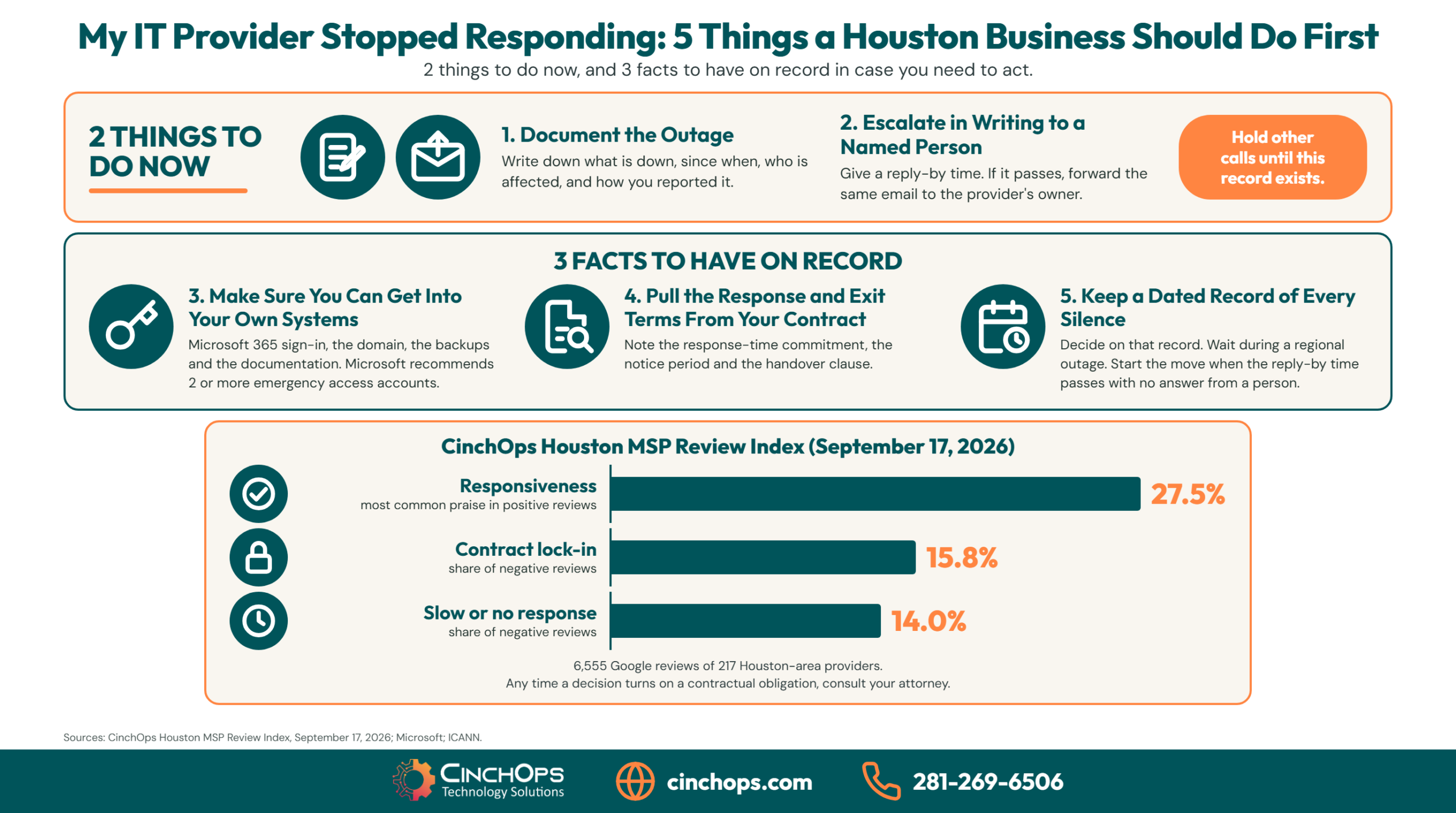
When an IT provider is not responding, a Houston business should do 2 things right away: document the outage and escalate in writing to a named person. While it waits, it should put 3 facts on record: who holds the administrator logins, what the contract says about response and exit, and how often this has happened.
The search that brings people here is usually typed word for word: "My IT provider is not responding Houston." There is an open ticket, the office is stuck or limping, and the last reply was an automatic acknowledgment. 2 calls went to voicemail. Somebody at the front desk wants to know whether to start phoning other IT companies.
Hold that call until the record exists. A new provider cannot help quickly if you cannot hand over the keys, and the steps that protect the business are the same whether the current provider calls back in 20 minutes or never does. Slow or no response is a known failure in this market. It shows up in 14.0% of the 114 themed negative reviews in the CinchOps Houston MSP Review Index, which covers 6,555 Google reviews of 217 Houston-area providers as of September 17, 2026.
CinchOps provides managed IT support specifically for 10 to 200 employee businesses in Houston, with help desk requests answered in under 15 minutes during office hours, Monday through Friday, 8 to 6.
How Was This List of 5 Things Built?
3 sources, 2 kinds of item, and what was left off.
Each of the 5 things comes from one of 3 places: the CinchOps Houston MSP Review Index, published guidance from CISA, Microsoft and ICANN on who controls an IT environment, and what CinchOps finds in onboarding audits of Houston businesses changing providers. The first 2 are actions, and the other 3 are facts to have on paper.
The Review Index is the dataset. As of the September 17, 2026 snapshot it holds 6,555 Google reviews of 217 Houston-area managed IT providers, with 5,189 positive and 114 negative reviews sorted by theme. Responsiveness is the most common reason a Houston business praises its IT provider, at 27.5% of positive reviews. Slow or no response appears in 14.0% of the negative ones, and contract lock-in in 15.8%.
Put those 3 figures side by side. The trait Houston businesses praise most in an IT provider is the one whose absence sends them looking for a replacement, and the contract is where many of them then get stuck. Thing 4 is on the list because of that 15.8%.
What was left off, and why. Legal remedies are out of scope: whether a provider has breached its agreement is a question for the contract and, when money is at stake, for an attorney. Technical troubleshooting is left out as well, because an owner with no administrator access cannot do it safely. Everything on this list can be done by a non-technical owner or office manager working alone.
What Do Owners Assume When an IT Provider Stops Responding, and What Is True?
5 assumptions, each paired with the thing to do instead.
Most owners treat a silent IT provider as a customer service problem and wait. The larger exposure is control: who holds the Microsoft 365 administrator login, the domain registration, the backups and the documentation. Each of the 5 things replaces a common assumption with something to do or to write down.
Take the assumptions one at a time. An automatic reply means a system logged the ticket, and nobody has confirmed in writing that a person knows the office is down. A dated email to a named person gets an answer that repeat calls to the support line do not. The business should hold its own administrator logins, whatever the provider also holds. The contract is where the exit is written, so read it before you resent it. The owner sets the deadline, and the provider does not get to set it by staying quiet.
The table below lists the 5 things, when each one applies, and what a Houston business should have in hand when it is finished.
| Thing to do or document | When | What you have when it is done |
|---|---|---|
| 1. Document the outage | Now | A dated record of what stopped working, when, and who is affected |
| 2. Escalate in writing to a named person | Now, and once more if the reply-by time passes | One email with a reply-by time, sent to a person and copied to the support address |
| 3. Make sure you can get into your own systems without your provider | While you wait | A yes or no for Microsoft 365, the domain, the backups and the documentation |
| 4. Pull the response and exit terms from your contract | While you wait | The response-time clause, the notice period and the handover clause, noted |
| 5. Keep a dated record of every silence | After the reply-by time | A log you can decide on: stay on stated conditions, or start the move |
What Should You Do While the Outage Is Happening?
Things 1 and 2: the only 2 actions, and both produce a record.
While an IT provider is not responding, a business should write down exactly what is down and since when, then send one written escalation to a named person with a reply-by time. If that time passes, the same email goes one level higher. Both steps create the record every later decision depends on.
1. Document the outage: what is down, since when, and who is affected
A written record of 4 facts (what stopped working, when it stopped, who is affected and how it was reported) is the document every later conversation with an IT provider depends on. Memory goes vague quickly, and "it has been down all morning" carries no weight in a contract conversation. A line such as "email down for 14 of 22 staff since 8:40 a.m. Tuesday, ticket opened 8:52, automatic reply only" does.
- Note the time the problem started, the time you first reported it, and how you reported it: portal, email or phone.
- List what is affected: email, internet, the file server, phones, or a line-of-business system such as QuickBooks or Procore.
- Count the people who cannot work, and note any deadline at risk today.
- Save the ticket number and a screenshot of any automatic reply.
This is also the triage a non-technical person can do. Check whether the problem is one computer, one room or the whole office, and whether a phone on the office Wi-Fi can reach the internet. Write the answers down. Leave the equipment alone while you wait. Resetting a firewall or a server to factory settings can destroy the evidence a technician needs.
2. Escalate in writing to a named person, and once more if the reply-by time passes
One written escalation sent to a named person with a reply-by time does more than 5 further calls to a main support line. A 2022 joint advisory from CISA, the NSA and the FBI says contracts with IT providers "should detail how and when MSPs notify the customer of an incident affecting the customer's environment." The same logic runs in the other direction. When the customer needs the provider, the request belongs in writing, dated, and addressed to a person.
- Address it to your account manager by name, and copy the general support address.
- State the business impact from thing 1 in 2 sentences.
- Ask for a reply from a person by a specific time today, and say what you will do if none comes.
- Send it from an account that still works. If company email is the outage, use a personal address and say so.
- If the reply-by time passes, forward the same email to the provider's owner.
Keep the tone flat. The email may be read later by someone deciding who behaved reasonably.
What Should You Already Know, and Confirm While You Wait?
Things 3 and 4: what you control and what you signed, written down.
A business should already know who holds its administrator logins and what its IT contract says about response times, notice and handover. A silent provider is the moment to confirm both and write the answers down. A business that cannot answer either question has found a bigger problem than the open ticket.
3. Make sure you can get into your own systems without your provider
Microsoft recommends creating 2 or more emergency access accounts so an organization is never locked out of its own Microsoft 365 tenant. A business whose only Global Administrator login belongs to its IT provider has none. In onboarding audits of Houston businesses changing providers, we regularly find exactly that: the outgoing provider holds the only administrator account, and nobody at the business has ever signed in as one.
Check 4 things, and write yes or no beside each:
- Microsoft 365 or Google Workspace. Can someone on your staff sign in with the Global Administrator role? Microsoft also lets a customer remove a partner's delegated administration privileges from the tenant in the Microsoft 365 admin center, which matters later if you part ways.
- The domain name. Who is listed as the registrant? ICANN's Transfer Policy requires a registrar to give the registered name holder the transfer authorization code within 5 calendar days of a request. That right belongs to whoever is named as the holder, so make sure the name on the registration is your business.
- The backups. Where is the second copy, whose account is it in, and can you sign in to it? The CISA advisory tells customers to make sure their contracts include backup services that meet their recovery requirements.
- The documentation. Do you hold a current network diagram, a device list, the license keys, and the administrator passwords for the firewall and the Wi-Fi?
Change nothing yet. Leave the passwords as they are, and do not lock the provider out while a ticket is open. Today's job is to know the answer. A no on any of the 4 lines is the first thing to request in writing, and the first thing a new provider will ask you for.
4. Pull the response-time and exit terms out of your contract
Contract lock-in appears in 15.8% of the 114 themed negative reviews of Houston IT providers in the CinchOps Houston MSP Review Index, slightly ahead of slow or no response at 14.0%. An owner should know these terms before the day they are needed. If you do not, pull the agreement out before the next phone call. In 35+ years doing this, the owners who got the cleanest exits knew their notice period before they raised their voice. Find 3 clauses and mark them.
- The response-time commitment: how fast the provider promised a first reply from a person, during which hours, and for which severity. If the agreement has no number, note that too.
- The term and notice clause: the end date, whether it renews automatically, and how many days of written notice it takes to end it.
- The handover clause: what the provider must return when the agreement ends, and whether there is a fee. The CISA advisory adds a job for the customer's side: "Customers should be sure to disable MSP accounts that are no longer managing infrastructure."
Compare the response-time number with the record from thing 1. If the promised time has passed, say so in a short follow-up to the escalation email and quote the clause. Whether that amounts to a breach is a legal question, so speak with an attorney before withholding payment or declaring the agreement over. For the clauses a good agreement carries, see what should be in a managed IT contract.
"The complaint I hear most from owners who call us is the same one: 'I can't get anyone to call me back.' It is rarely the technology that makes them leave. It is the silence. That is why we answer the help desk in under 15 minutes and put a named engineer on every account."
When Should You Wait for Your IT Provider, and When Should You Switch?
Thing 5: the record you keep, the decision point you set, and when waiting is right.
A business should wait for its IT provider when the silence has an outside cause, such as a regional storm outage, and a person has acknowledged the ticket with an expected time. It should start a move when a written escalation passes its reply-by time, or when the provider will not confirm who holds the administrator logins.
5. Keep a dated record of every silence, and decide on that record
A dated log of every unanswered ticket over the last 12 months turns 1 bad day into evidence of a pattern, or shows that there is no pattern. Add today's entry from things 1 and 2. The reply-by time in your escalation is the decision point: when it passes with no answer from a person, you decide with the log in front of you.
Houston has a real exception. After Hurricane Beryl made landfall on July 8, 2024, about 2.2 million CenterPoint customers lost power, roughly 90% of the utility's customers, according to the Public Utility Commission of Texas. In a week like that, every IT provider in the region is working a queue it has never seen, and its own office may be dark. The Atlantic hurricane season runs from June 1 to November 30. A slow reply during a regional outage says little about a provider. A provider that sent no storm plan beforehand and no status update during the outage has told you a good deal.
Wait when:
- A regional power or internet outage is affecting the provider too, and it has said so.
- A person has acknowledged the ticket and given an expected time, and that time has not passed.
- The problem is one device or one user, and work can continue.
Start the move when:
- The reply-by time in your written escalation passes with no answer from a person.
- The same silence has already happened earlier this year.
- The provider will not confirm who holds the administrator logins, or asks for a fee to release them.
- The agreement has no response-time commitment at all.
Starting the move is different from walking out. It means opening a conversation with a second provider while the first is still under contract, giving written notice on the terms you marked in thing 4, and asking for the handover in writing. The order of that work is covered in switching managed IT providers in Houston.
A quiet provider is also a security gap
Patches, alerts and failed backups do not pause while tickets go unanswered. See how CinchOps cybersecurity services keep threat monitoring running 24/7 for Houston businesses.
See what is covered →What Does It Cost to Switch IT Providers in Houston?
The monthly rate, and the 2 costs that sit in your current contract.
Switching IT providers in Houston costs the new provider's monthly rate plus whatever the old agreement charges to leave. Managed IT in Houston typically runs $100 to $250 per user per month. The published CinchOps rate is a flat $100 to $250 per user per month, with no long-term contract and no cancellation penalty.
At the published CinchOps rate, a 10-person office budgets $1,000 to $2,500 a month, a 25-person office $2,500 to $6,250, and a 50-person office $5,000 to $12,500. The figure moves with the service level, and backup and recovery are included in the top-tier plan.
The 2 costs that vary sit in the agreement you already signed: an early-termination charge if you leave before the term ends, and any fee the outgoing provider charges to hand over documentation and credentials. Neither has a market average worth quoting. Read both from your own contract in thing 4, and ask the incoming provider to plan its start date around your notice period.
CinchOps terms are Zero-Zero-Zero: no long-term contracts, no hidden fees and no cancellation penalties, with a 30-day satisfaction guarantee. Ask every provider you speak with, CinchOps included, for its onboarding charge in writing before you sign. The full breakdown of what sits inside a per-user rate is in the Houston managed IT pricing guide.
How Can CinchOps Help When Your IT Provider Is Not Responding?
CinchOps is a managed IT services provider based in Katy, Texas, serving small and mid-sized businesses across the Houston metro area. CinchOps specializes in cybersecurity, network security, managed IT support, VoIP, and SD-WAN for businesses with 10 to 200 employees.
For a business with an open ticket and no answer, CinchOps provides managed IT support specifically for 10 to 200 employee businesses in Houston, with help desk requests answered in under 15 minutes by a named engineer who knows the network.
How CinchOps measures against these 5 things - judge for yourself:
- Thing 1 - The outage record. Ask us for the ticket trail on a real incident and read the timestamps yourself.
- Thing 2 - A named person. Each client has a named engineer who knows its network, and help desk requests are answered in under 15 minutes. The help desk is staffed Monday through Friday, 8 to 6, and threat monitoring runs 24/7.
- Thing 3 - Your own access. No published claim to point to here. Before you sign, ask us to show you where your Global Administrator account, domain registration and backup account will live, and who at your business will hold them.
- Thing 4 - The contract. Zero-Zero-Zero: no long-term contracts, no hidden fees, no cancellation penalties, and a 30-day satisfaction guarantee.
- Thing 5 - The decision. CinchOps the company is about 2 years old, led by a founder with 35+ years in IT, so ask for our oldest active client and call them.
Read the Google reviews, the critical ones included, and compare them against the Houston MSP Review Index.
A move to CinchOps runs in 5 steps: audit, inventory, access review, secure and manage. The access review finds every administrator login, including the ones the outgoing provider still holds. The secure step closes the riskiest gaps first, and the manage step takes over support, monitoring and patching. For a typical Houston small business, onboarding takes about 30 days. What that month turns up is described in what we find in the first 30 days.
- Through managed IT support, tickets get a reply from a person in under 15 minutes during office hours.
- Through cybersecurity services, threat monitoring runs 24/7 while the help desk keeps its Monday through Friday hours.
- Through business continuity and disaster recovery, top-tier plans carry immutable, offsite, verified backups kept outside the Gulf Coast flood zone.
- CinchOps serves Houston, Katy, Sugar Land and Cypress, and works with CPA firms, law firms and construction companies.
A provider that has stopped answering has already told you how it handles a bad day. Document the outage, escalate once in writing, and get the 3 facts on paper. With that record in hand you will know whether this was a slow week or a provider to replace. If the office is down right now and you want a second opinion, talk to CinchOps.
Frequently Asked Questions
My whole office is down and I can't reach my IT provider. What do I do first?
Write down what is down and since when, then send one written escalation to a named person with a reply-by time. Check whether the cause is the building's power or internet before assuming it is your own systems. If nobody answers by your deadline, call a second provider with that record in hand.
How long is too long to wait for an IT provider to respond?
The agreement sets the standard, so check its response-time clause first. As a working rule, an office-wide outage with no reply from a person inside 1 business hour deserves a written escalation, and an escalation that passes its reply-by time deserves a decision. CinchOps answers help desk requests in under 15 minutes.
Can my IT provider hold my data or passwords hostage?
A provider can only withhold what the business does not also hold. The contract's handover clause governs what must be returned and when. For a domain, ICANN's Transfer Policy requires a registrar to give the registered name holder the transfer code within 5 calendar days. For a dispute over data, speak with an attorney.
What does a normal IT support response-time agreement look like?
A response-time commitment states how fast a person will answer, during which hours, and for which severity, with a separate target for fixing the problem. An agreement with no number gives a business nothing to hold a provider to. CinchOps publishes its help desk response as under 15 minutes, Monday through Friday, 8 to 6.
Can I switch IT providers in the middle of a contract?
Usually yes, on the terms the contract sets. Look for the end date, any automatic renewal, the written notice period and any early-termination charge. A second provider can assess the environment and plan the handover while the first is still under contract. CinchOps agreements carry no long-term contract and no cancellation penalty.
What does it cost to switch IT providers in Houston?
Managed IT in Houston typically runs $100 to $250 per user per month, and the published CinchOps rate is a flat $100 to $250 per user per month. Add whatever your current agreement charges for early termination or handover. At the CinchOps rate, a 25-person office budgets $2,500 to $6,250 a month.
What should my old IT provider hand back when we leave?
Ask in writing for 4 things: the Global Administrator login for Microsoft 365 or Google Workspace, control of the domain registration, access to the backups with a recent copy, and current documentation: the network diagram, device list, license keys, and firewall and Wi-Fi passwords. Then have the old provider's accounts disabled.
Discover More
Resource
Sources
- CinchOps, Houston MSP Review Index 2026 - September 17, 2026 snapshot: 6,555 Google reviews of 217 providers; theme shares of 5,189 positive and 114 negative reviews.
- CISA, NSA, FBI and partner agencies, Cybersecurity Advisory AA22-131A - incident notification terms, backup services in contracts, and disabling MSP accounts that no longer manage infrastructure.
- Microsoft Learn, Manage emergency access accounts in Microsoft Entra ID - create 2 or more emergency access accounts.
- Microsoft Learn, Partner Center: customers revoke admin privileges - a customer can remove a partner's delegated administration privileges.
- ICANN, Transfer Policy - section 5.2, transfer authorization code within 5 calendar days of the registered name holder's request.
- Public Utility Commission of Texas, Project No. 56822 - Hurricane Beryl, July 8, 2024: 2.2 million CenterPoint customers, roughly 90% of the utility's customers.
- NOAA National Hurricane Center, Tropical Cyclone Climatology - the Atlantic hurricane season runs from June 1 to November 30.


