How to Offboard a Remote Employee in Houston: Day 0-30 Checklist
Offboarding Remote Workers For Katy And Houston Small Businesses – Who Owns Each Step Of Remote Employee Offboarding
A day 0, day 1 and day 30 checklist for Houston businesses with staff who never come into an office.
Knowing how to offboard a remote employee starts with one fact: nobody is there in person when they leave. No one collects a badge, takes back the laptop or watches the person sign out for the last time.
In an office, much of offboarding happens without anyone planning it. The desk gets cleared, the computer stays behind and the office Wi-Fi drops the person's phone. A remote company in Houston, Katy or The Woodlands gets none of that. The employee who just left still has a signed-in laptop at home, a phone connected to Microsoft 365, and a password manager full of logins, some of them for tools IT may not know exist.
Two deadlines make this harder than it looks. In Microsoft 365, blocking a former employee's sign-in does not start the 30-day OneDrive countdown; only deleting the account does, so the files can sit untouched for months. In Texas, an employee who is let go must get a final paycheck within six days, whether or not the laptop has come back. CinchOps runs remote employee offboarding specifically for Houston small businesses with fully remote staff, using a day 0, day 1 and day 30 checklist that disables sign-in and revokes sessions so cloud access ends inside Microsoft's default one-hour token window.
What has to happen on day 0, before the exit call ends?
Day 0 is about access: block new sign-ins, end the sessions already open, and close the logins that live outside Microsoft 365.
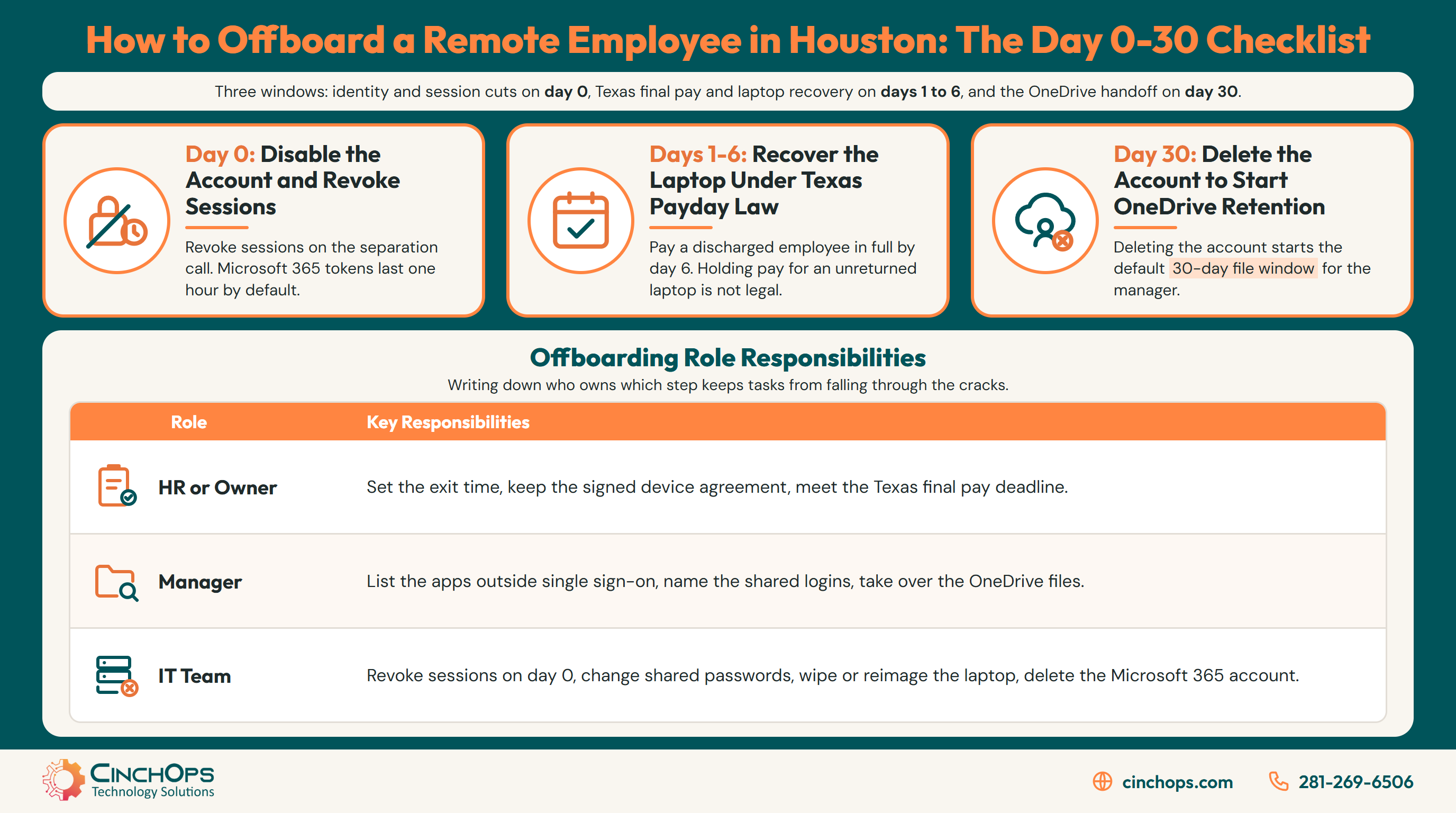
On day 0, disable the employee's account and revoke their sessions during or right after the separation call. Disabling the account alone does not sign out a phone or laptop that is already signed in. Microsoft says access tokens last up to one hour by default, so revoking sessions limits how long access lasts rather than cutting it off instantly.
Microsoft's own guidance for employee termination lays out the order: clear "Account enabled" on the user, then select Revoke sessions, then disable the person's registered devices. After that, the person cannot get new access to anything connected to Microsoft Entra ID. Apps that already hold a token keep working until it expires. Apps that run their own logins keep working until the app ends the session on its own, and that is where most remote offboarding leaks happen.
Most small firms have no written order for these steps, so they happen whenever someone remembers. Two of the eight carry most of the risk for a remote team:
- Apps outside single sign-on. Think of the project tool a manager signed up for with a company card, the bank portal or a vendor's ordering site. Disabling the Microsoft 365 account does not touch any of them. Build the list from expense reports and from the person's manager, not from memory.
- Shared passwords. Remote teams share logins over chat more often than office teams, because nobody can lean over a desk and ask. Change every password the person could have seen on day 0, starting with anything that can move money.
- Mail forwarding and file ownership come next. They can wait an hour; shutting off access cannot.
We see this gap in onboarding audits across Houston businesses: the Microsoft 365 account was disabled right away, but the former employee's login to a payroll or vendor portal still worked months later, because nobody had written that portal down.
Day 1 through day 6 is about the laptop and the final paycheck
Getting a company laptop back from a remote employee in Texas runs into the Texas Payday Law, so the paperwork has to be in place before anyone leaves.
In Texas, you cannot hold back a final paycheck because a laptop has not been returned. The Texas Workforce Commission says holding final pay past the deadline over unreturned company property is not legal. Under Texas Labor Code 61.018, you can deduct from wages only with a court order, legal authority or the employee's written permission for a lawful purpose.
The deadlines are short. Under Texas Labor Code 61.014, an employee who is let go must be paid in full within six days, and an employee who quits must be paid by the next regular payday. That leaves a Houston employer less than a week to get a laptop back from someone in Cypress, Sugar Land or another state, with no paycheck to bargain with unless a signed device agreement is already on file.
Since the paycheck cannot be held, you need a way to get the laptop back that is set up in advance. Three steps cover it:
- Sign the device terms at hire. A one-page device agreement that names the laptop and its value, and gives written permission to deduct, is what lets you recover the cost under the Texas Payday Law. A line in the employee handbook is weaker than a signed, specific form. Have your employment attorney write it.
- Ship the return box on day 1. Send a padded box with a prepaid label and a written return-by date. If you wait for the employee to find a box, the laptop is often still out in week three.
- Wipe only when you have decided the laptop is not coming back. Microsoft notes that wiped data cannot be recovered, so copy any files the business needs first.
Houston adds one more problem. Microsoft says a remote wipe only runs when the device connects to the internet, so a laptop that is offline keeps whatever is stored on it. When Hurricane Beryl hit on July 8, 2024, the Public Utility Commission of Texas counted 2.2 million CenterPoint customers who lost service. A wipe sent to a laptop in a dark house in Fort Bend County just waits. That is why the day 0 account steps matter more than the device steps: a revoked account protects cloud data even while the laptop is offline.
What happens to a departed remote employee's OneDrive after 30 days?
For a remote company, OneDrive is the file server, so the deleted-user retention window decides whether a former employee's work is kept.
By default, Microsoft 365 keeps a deleted user's OneDrive for 30 days and automatically gives the user's manager access to it. Microsoft Learn says this countdown starts only when the account is deleted from Microsoft Entra ID. Blocking sign-in or removing the license does not start it.
That changes how the checklist should run. Many small businesses block the account on day 0 and then leave it alone for months, with or without a license. Microsoft says an unlicensed OneDrive is archived automatically on its 93rd day without a license. A company that blocks an account and removes the license but never deletes it can end up with the files archived instead of handed to a manager.
Day 30 is the step that slips. Put a calendar reminder on the separation date, and treat account deletion as a decision someone signs, not a cleanup chore.
The table below puts the full remote employee offboarding checklist in one place, so HR, the manager and IT can each see what they own on day 0, days 1 to 6 and day 30.
| Offboarding window | Identity and access | Laptop and phone | Files and mail | Who signs off |
|---|---|---|---|---|
| Day 0 (separation call) | Disable account, revoke sessions, remove MFA methods and admin roles, remove from apps outside single sign-on, rotate shared passwords | Disable registered devices; queue a wipe only if the device will not come back | Forward mail to the manager; confirm who owns the OneDrive | IT, with HR confirming the exit time |
| Day 1 to day 6 (Texas final pay) | Review sign-in logs for the disabled account and any shared logins | Ship the prepaid return box; apply the signed device agreement if the laptop does not arrive | Manager copies the files the business needs before any wipe | HR for final pay, IT for the device |
| Day 30 (close-out) | Delete the account so the OneDrive retention clock starts; release the license | Confirm the laptop was returned and reimaged, or wiped and written off | Confirm the manager has the OneDrive; extend retention first if records must be kept longer | The business owner |
Every remote offboarding we clean up has the same hole. Somebody disabled the email and called it done. The account is the easy part. The logins nobody wrote down and the laptop nobody asked for are where the business actually loses something.
Someone Just Gave Notice and the Laptop Is at Their House?
CinchOps handles the day 0 cutoff and settles the OneDrive handoff for Houston companies with remote staff through its employee onboarding and offboarding service. Help desk requests are answered in under 15 minutes.
Start an offboarding with CinchOps →How CinchOps Can Help With Remote Employee Offboarding
CinchOps is a managed IT services provider based in Katy, Texas, serving small and mid-sized businesses across the Houston metro area. CinchOps specializes in cybersecurity, network security, managed IT support, VoIP, and SD-WAN for businesses with 10 to 200 employees.
For an IT company that supports remote workers in Houston, offboarding is a shared job. The owner or HR sets the exit time and handles final pay, the manager knows which apps and files the person used, and IT shuts off access. Writing down who owns each step solves most of the problem.
- Through the employee onboarding and offboarding service, CinchOps runs the day 0 cutoff and documents the file handoff.
- Through remote IT support and managed IT support, remote staff get help desk answers in under 15 minutes, priced at a flat monthly rate per user.
- CinchOps cybersecurity services include 24/7 threat monitoring, which watches for sign-ins on accounts that should be dead.
- With business continuity and disaster recovery, Microsoft 365 data gets immutable, offsite backup copies instead of relying on a 30-day retention window.
- CinchOps supports remote teams for CPA firms, law firms and engineering firms across Houston, Katy and The Woodlands.
The worst time to write an offboarding checklist is the afternoon someone resigns on a video call. Write it now, add the device agreement to your hiring paperwork, and the next departure becomes a routine ticket. If you want help setting that up for a team that works from home, talk to CinchOps.
Frequently Asked Questions
How fast should we cut off a remote employee's access?
Disable the account and revoke sessions during or right after the separation call. Microsoft says its access tokens last one hour by default, so revocation sets a ceiling on remaining access rather than ending it instantly. Apps outside single sign-on and shared passwords need separate action the same day.
Can a Texas employer hold the final paycheck until the laptop comes back?
No. The Texas Workforce Commission says holding final pay past the deadline for unreturned company property is not legal. A discharged employee is owed full pay by the sixth day. A deduction for the laptop requires the employee's written authorization for a lawful purpose, so get that signed at hire.
What happens to a departed employee's OneDrive in Microsoft 365?
When the account is deleted, Microsoft keeps the OneDrive for 30 days by default and gives the manager access. Blocking sign-in or removing the license does not start that clock. After the window, the OneDrive sits in the site recycle bin for 93 days, restorable only through PowerShell.
Can we wipe a laptop the employee has not returned?
Yes, if the device is enrolled in management, but Microsoft notes the wipe only runs once the laptop connects to the internet, and wiped data cannot be recovered. Copy any business files first. Until the wipe lands, the revoked account is what protects cloud data, so do the identity steps first.
What does remote employee offboarding cost in Houston?
Offboarding is usually part of a managed IT plan rather than a separate fee. CinchOps prices managed IT at a flat $100 to $250 per user per month under Zero-Zero-Zero terms: no long-term contracts, no hidden fees and no cancellation penalties. Ask any provider which offboarding steps the plan includes.
Discover More
Resource
Sources
- Microsoft Learn, "Revoke user access in an emergency in Microsoft Entra ID" (updated June 19, 2026)
- Microsoft Learn, "OneDrive retention and deletion" (updated June 2, 2026)
- Microsoft Learn, "Shared responsibility in the cloud"
- Texas Workforce Commission, Texas Payday Law, Texas Labor Code Chapter 61 (Sections 61.014 and 61.018)
- Texas Workforce Commission, Texas Guidebook for Employers, "Final Pay"
- Public Utility Commission of Texas, Project No. 56822, Investigation of Emergency Preparedness and Response by Utilities in Houston (November 2024)