


What Is an MCP Server? The API for AI, Explained for SMBs
MCP Servers, AI Assistants And Your Line-Of-Business Software – The Model Context Protocol Explained For Small Business
A plain-English guide for Houston business owners deciding which apps an AI assistant should be allowed to reach.
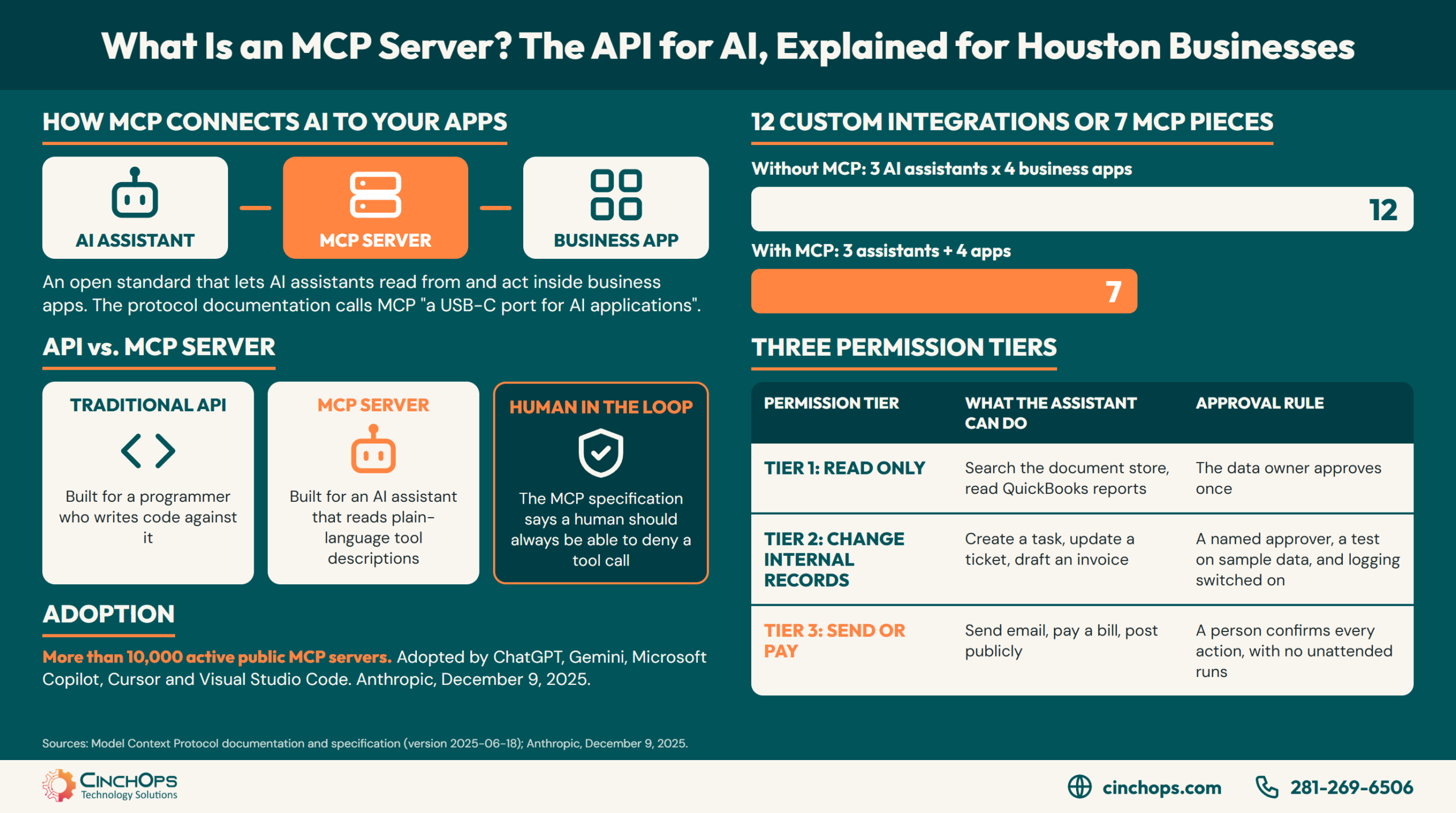
Business owners asking "what is an MCP server" have usually just had a software vendor or an AI assistant offer them one. An MCP server is a small piece of software that lets an AI assistant use one of your business applications through a shared standard called the Model Context Protocol. The short way to remember it: an MCP server is the API for AI.
The plumbing has three parts. The AI assistant runs one MCP client for each connection. Each MCP client talks to one MCP server. Each MCP server reaches one business system, such as QuickBooks, a document store or a ticket queue, usually through the API that system already had.
Anthropic introduced the Model Context Protocol on November 25, 2024, as an open standard. The problem it named was plain. Before MCP, every new data source an AI system needed to reach required its own custom-built connection. The protocol's documentation describes MCP as "a USB-C port for AI applications": one plug shape, many devices.
Adoption moved fast. By December 9, 2025, Anthropic counted more than 10,000 active public MCP servers and reported that ChatGPT, Gemini, Microsoft Copilot, Cursor and Visual Studio Code had adopted the protocol. That same day Anthropic donated MCP to the Agentic AI Foundation, a Linux Foundation fund co-founded by Anthropic, Block and OpenAI.
CinchOps sets up, secures and governs MCP server connections specifically for small and mid-sized businesses in Houston with 10 to 200 employees, and sorts every connection into one of 3 permission tiers before it goes live.
How Is an MCP Server Different From an API?
Both connect software to software. The difference is who reads the instructions.
The table below compares a traditional API with an MCP server on the 6 points a Houston business owner needs before approving either one.
| What is compared | Traditional API | MCP server |
|---|---|---|
| Built for | A programmer who writes code against it | An AI assistant that reads a plain-language description of each tool |
| How it gets connected | Custom code for each pairing of two apps | One standard connection any MCP-compatible assistant can use |
| Who decides the next step | The code, the same way on every run | The AI model, based on the request in front of it |
| What it exposes | Endpoints and data fields | Named tools, data sources and reusable prompts |
| Who can set it up | A developer | An administrator when the vendor ships a server, a developer when none exists |
| Main risk | A bug in the code | An assistant acting on bad instructions with real permissions |
An API is a doorway built for programmers. An MCP server is the same doorway with a sign on it that an AI assistant can read, which is why "the API for AI" is a fair shorthand for a Houston business owner weighing one.
The shorthand skips one detail. Most MCP servers sit on top of an API the vendor already had. The MCP server adds a plain-language description of each action, so the model can pick the right one without a developer wiring the two products together.
The saving shows up as arithmetic. A business using 3 AI assistants and 4 business apps would need 12 custom integrations to connect every pair. With MCP, each assistant speaks the protocol once and each app publishes one server, which comes to 7 pieces to build and maintain. Add a fifth app and the custom count rises to 15 while the MCP count rises to 8.
The trade is control. Code does the same thing on every run. A model chooses, so the permission behind each MCP connection carries more weight than an API key that only a script ever touched.
What Can a Houston Business Do With an MCP Server?
The useful cases share one shape: a question or task that used to need several logins.
An MCP server lets a Houston business ask an AI assistant questions that span its own systems and have the assistant carry out the routine steps. The assistant reads the accounting file, the document store or the ticket queue directly, so staff stop copying data between windows.
The servers already exist for common tools. Anthropic's launch included pre-built MCP servers for Google Drive, Slack and GitHub. Microsoft made MCP generally available in Copilot Studio on May 29, 2025. Intuit publishes a QuickBooks Online MCP server on GitHub that covers create, read, update and delete operations across 29 entity types plus 11 financial reports.
- CPA practice: ask which clients have unpaid invoices older than 60 days and get the answer from QuickBooks without exporting a report.
- Construction firm: pull open RFIs and the latest drawing revision into one status summary before the Monday meeting.
- Law firm: find every engagement letter in the document system that lacks a signed copy.
- Energy services company: draft the weekly field report from tickets and timesheets.
- Any office: run the new-hire checklist, with accounts requested, calendar invites sent and tasks assigned from one instruction.
So a Katy contractor or a Sugar Land CPA practice should check one thing before planning around a connection: whether the MCP server for that app comes from the vendor, comes from a third party, or does not exist. That answer decides whether the project is a settings change or a build.
Which MCP Connections Are Safe to Turn On First?
An MCP server acts with whatever access it was given. Sort connections by what they can change.
An MCP connection is safe to turn on when its permissions match the damage a wrong action could do. CinchOps recommends sorting each connection into one of 3 permission tiers: read only, change internal records, and send or pay. Each tier gets its own approval rule before a Houston business switches it on.
The table below lists the 3 permission tiers for MCP connections, an example of each, and the approval rule to set before the connection goes live.
| Permission tier | What the assistant can do | Example | Approval rule before it goes live |
|---|---|---|---|
| Tier 1: Read only | Look up and summarize | Search the document store, read QuickBooks reports | The owner of the data approves once, and access is limited to the folders or company file needed |
| Tier 2: Change internal records | Create or edit inside your own systems | Create a task, update a ticket, draft an invoice | A named approver, a test on sample data, and logging switched on |
| Tier 3: Send or pay | Act outside the company | Send email, pay a bill, post publicly | A person confirms every action, with no unattended runs |
The MCP specification points the same direction. Its tools section says a human should always be in the loop with the ability to deny a tool call. It also says client applications should show tool inputs to the user before calling the server and should log tool usage for audit.
A community-built MCP server deserves the same vetting as any software that asks for company credentials. Find out who wrote it, who maintains it and where the access token is stored before anyone signs in.
MCP servers let us wire a client's accounting, documents and tickets into one assistant. Our job is making sure that assistant does the work the owner would sign off on, and nothing else.
Planning to Connect an AI Assistant to Company Data?
CinchOps reviews each MCP connection, assigns its permission tier and switches on logging through its AI security and risk management service before the connection goes live.
See AI security and risk managementHow CinchOps Can Help With MCP Servers and AI Automation
CinchOps is a managed IT services provider based in Katy, Texas, serving small and mid-sized businesses across the Houston metro area. CinchOps specializes in cybersecurity, network security, managed IT support, VoIP, and SD-WAN for businesses with 10 to 200 employees.
CinchOps uses MCP connections in its own operations, and handles 4 jobs around MCP for clients: connecting, governing and securing, architecting, and automating.
- Through AI workflow automation, CinchOps connects assistants such as Claude, ChatGPT and Copilot to the apps a business already runs and builds AI-enabled workflows on top of those connections.
- Through AI policy and governance and AI security, every MCP connection gets a permission tier, a named approver and logging.
- Through AI development and agentic AI work, CinchOps architects and builds the integration when the vendor has not published an MCP server.
- Underneath sits managed IT support at a flat monthly rate per user, with help desk requests answered in under 15 minutes and Zero-Zero-Zero terms: no long-term contracts, no hidden fees, no cancellation penalties.
- CinchOps works across Houston, Katy and Sugar Land with CPA firms, construction firms and law firms.
The protocol is the easy part. Deciding which systems an assistant may touch, and who answers for what it does there, is the work that protects the business. Start with one read-only connection to one system, then talk to CinchOps about what comes next.
Frequently Asked Questions
What is an MCP server in simple terms?
An MCP server is a connector that lets an AI assistant use one specific application or data source through the Model Context Protocol, an open standard Anthropic introduced on November 25, 2024. The server describes its available actions in plain language, and the assistant chooses among them to answer a request.
Is an MCP server the same as an API?
No. An API is an interface written for programmers, and each connection between two apps needs custom code. An MCP server usually sits on top of that API and describes each action so an AI assistant can use it directly. That is why people call an MCP server the API for AI.
Which AI assistants work with MCP servers?
Anthropic reported on December 9, 2025 that ChatGPT, Gemini, Microsoft Copilot, Cursor and Visual Studio Code had adopted MCP alongside Claude. Microsoft made MCP generally available in Copilot Studio on May 29, 2025. One server built to the standard can serve any of those assistants.
Are MCP servers safe for a small business?
An MCP server is as safe as the permissions behind it. Read-only access to one folder carries little risk. Access that can send email or pay bills needs a person confirming every action. The MCP specification itself says a human should be able to deny any tool call.
What does an MCP server cost in Houston?
The Model Context Protocol is an open-source standard, so the protocol itself carries no license fee. The cost is the setup, security review and upkeep. CinchOps prices managed IT at a flat $100 to $250 per user per month and scopes MCP integration and automation work after reviewing the systems involved.
Does a business need a developer to use an MCP server?
Not always. When a software vendor publishes its own MCP server, an administrator can usually connect it through settings and a sign-in. When no vendor server exists, or the only one available is a community project, a developer has to build or vet the connection before it touches company data.
Discover More
Resource
Sources
- Model Context Protocol documentation - "What is the Model Context Protocol (MCP)?"
- Anthropic - "Introducing the Model Context Protocol," November 25, 2024
- Anthropic - donation of MCP to the Agentic AI Foundation, December 9, 2025
- Model Context Protocol specification - Tools, version 2025-06-18
- Microsoft Copilot Blog - MCP generally available in Copilot Studio, May 29, 2025
- Intuit on GitHub - QuickBooks Online MCP Server
- Johann Rehberger, Embrace The Red - cross-agent privilege escalation, September 24, 2025


