


How to Implement AI in a Small Business: A Houston Rollout Plan
What 1,000 Owners Taught Anthropic, Applied In Houston – Hands-On AI Implementation And Training From CinchOps
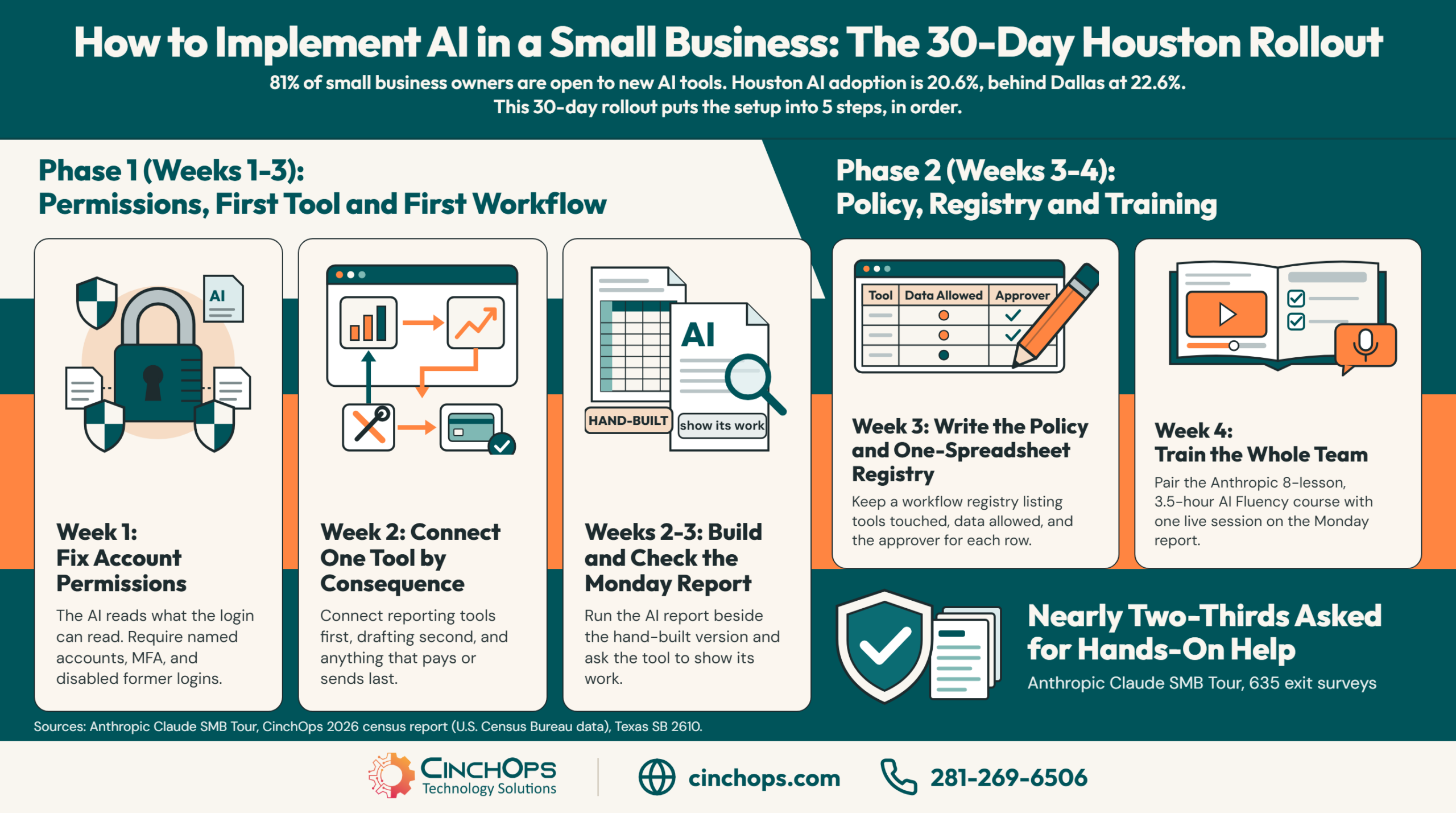
A 5-step rollout order for Houston offices, built from Anthropic's 1,000-owner tour and the setup and training work CinchOps does with clients.
How to implement AI in a small business comes down to order: which account the AI signs in as, which tool it touches first, and who on staff learns it. The subscription is the easy part. A Houston owner can pay for Claude on a Tuesday and still have nothing running three weeks later.
Anthropic saw the same stall at scale. Its Claude SMB Tour ran free, half-day workshops in 10 cities and drew more than 1,000 owners and operators and 80% of registrants ran companies with 5 to 50 employees. Before launch, 81% of the small business owners Anthropic surveyed said they were open to new AI tools, and their top pain point was employees being unsure how or when to use them. Across 635 exit surveys, nearly two-thirds of attendees asked for hands-on help implementing AI after the workshop.
That hands-on help is work CinchOps does. CinchOps provides AI implementation and staff training specifically for small and mid-sized businesses in the Houston metro area with 10 to 200 employees, setting up tools like Claude for Small Business alongside managed IT billed at a flat $100 to $250 per user per month. CinchOps uses AI in its own operations, and the order below is the one CinchOps recommends to clients.
Houston has ground to make up. The CinchOps 2026 census report, built on U.S. Census Bureau Business Trends and Outlook Survey data, put Houston-area AI adoption at 20.6%, behind Dallas at 22.6%. The only Texas stop on the first leg of Anthropic's tour was Dallas.
Fix Account Permissions Before You Connect Anything
Step 1 of a small business AI rollout: the AI inherits the access of the account that connects it.
An AI assistant connected to business software sees whatever the connecting account can see. Anthropic's install guide for the Claude for Small Business plugin says it directly: "Claude reads what your account in each tool can read." So the first job in a Houston office is cleaning up who can see what in QuickBooks, Microsoft 365 and the CRM.
Anthropic's small business page answers "Do I need IT to set this up?" with a no, because connectors are one click. That is accurate for the install. The permissions behind the click are IT work. CinchOps onboarding audits regularly turn up a shared admin login for the accounting system, a former employee whose mailbox still works, and an owner account that three people use. Connect an AI assistant through any of those and it reads at that level.
In 35+ years doing this, the tools changed every few years and the permissions problem never did. Four checks before any connector goes live:
- Every person signs in with their own named account in each tool. No shared logins.
- Multi-factor authentication is on for Microsoft 365 or Google Workspace, the accounting system and the CRM.
- Accounts for people who left are disabled, and the bookkeeper's access matches the bookkeeper's job.
- A business with more than one user is on the Claude Team plan. Anthropic's page states "Pro for one person, Team for a business with more than one," and specifies that "by default, we don't train on your business data on Team and Enterprise plans."
Texas gives small companies a reason to write this down. Texas SB 2610, in effect since September 1, 2025, bars exemplary damages in a breach lawsuit against a business with fewer than 250 employees that maintained a conforming cybersecurity program. For a company with 20 to 99 employees the standard is CIS Controls Implementation Group 1. An AI tool with a path into the books and payroll belongs inside that program, which is where CinchOps cybersecurity work starts.
Connect One Tool, and Make It a Reporting Tool
Step 2: pick the first connector by how little damage a mistake could do.
The first connection in a small business AI rollout should be a tool the AI reads from, such as the accounting system for reports, and the tools that send money or email should wait. Anthropic's tour data supports the choice: outside of marketing, reporting was the single most common use case owners asked for.
Anthropic lists Intuit QuickBooks, HubSpot, Shopify, Stripe, Gusto, Canva "and 25 more" as connectors for Claude for Small Business. A 30-person construction firm in Katy or a CPA practice in Sugar Land does not need 31 of them in week 2. One is enough to learn how the approvals work.
Those approvals are the safety net. The install guide states "You approve before anything sends, posts, or pays," and the small business page adds that payroll is set up for the owner to submit and bills wait for approval before they are paid. Leave those defaults on. The guide also warns that "some features depend on your plan in a connected tool," so check the QuickBooks or HubSpot tier before promising the staff a feature.
Build One Workflow With Someone Sitting Next to You
Step 3: one real job, built with help, checked by hand.
The first AI workflow in a small business should be one recurring job the owner already does by hand, built in a single guided session. Across Anthropic's 635 exit surveys the most-cited highlight was the guided build session, and the most common request was more of it.
The Monday report is the usual candidate. Anthropic describes owners asking Claude to "pull the numbers from three systems into the Monday report," and the plugin ships a command for it: /monday-brief, described as one page covering cash, sales, pipeline, the calendar and the one thing that most needs the owner. Build that one. Run it next to the hand-built version for two or three weeks.
Then check the output like a new hire's work. Tony Severino, a Chicago painting contractor who has run his firm since 1984, caught Claude using a floor-area multiplier instead of real wall measurements on an early bid and now asks Claude to "show me your work." Rick Smith of Broadcast Blinds prompts Claude to flag when it is assuming versus knowing. Both habits are free. The CinchOps guide on how to verify AI output covers the full check.
CinchOps runs this session with clients for a practical reason. Anthropic's tour found that once an owner built a first workflow with help nearby, that owner kept building.
Write the AI Policy After the First Workflow Works
Step 4: a one-page policy and a workflow registry, written from experience instead of guesswork.
A small business AI policy is a short written rule set covering what data staff may give an AI tool, which actions need a human approval, and who owns each workflow. Write it after one workflow is running, because a policy drafted before anyone has used the tool describes a product nobody in the office understands yet.
Anthropic's pre-launch survey of 503 small business decision-makers found data security was the most-cited barrier to AI adoption. The owners who got past it wrote things down. HireEffect, a 20-person back-office firm in Dallas that handles clients' payroll data, built PII redaction and a registry of every Claude workflow before rolling it out to staff. A New Jersey branding agency automated its proposal-to-contract flow and kept a human "send" on every prospecting email.
The registry can be a spreadsheet. One row per workflow: what it does, which account runs it, which tools it touches, who approves what goes out, and when someone last checked it. A law firm in The Woodlands or an engineering firm in Cypress handling client files should add a column for the data it is allowed to read. CinchOps AI policy and governance work produces that page and that registry.
Train the Whole Team, Not Just the Owner
Step 5: staff training comes last because by then there is something real to teach.
Small business AI training works when every employee learns on a workflow the company already runs. Anthropic's AI Fluency for Small Businesses course is 8 lessons and about 3.5 hours with 1 quiz, built with PayPal, Prospect Butcher Company and MAKS TIPM Rebuilders around a 4D Framework: Delegation, Description, Discernment and Diligence.
The course is the classroom half. The other half is in-house. After Anthropic's Birmingham workshop, Carrie Rollwagen, an SVP at the 35-person web firm Infomedia, built a two-hour internal Claude training that has filled four times. At KBSO Consulting, a 40-person engineering firm in Indianapolis, new hires review every Claude-generated summary by design, as on-the-job training.
A Houston office can copy both moves. Give each employee the course, then one live session where they run the company's own Monday report and one task from their own desk. Anthropic's tour reached the same conclusion about who teaches best: another small business owner using AI on the same kind of problem.
Want the First Workflow Built With You?
CinchOps sets up the accounts, connects the first tool and builds the first report alongside your team.
Talk to CinchOpsThe install is a few clicks. The work is deciding which account the AI signs in as and what that account can already see. Get that right, build one report, and the rest of the office will ask for their turn.
Find Out If Your Accounts Are Ready for AI
A CinchOps AI readiness assessment checks logins, permissions and data exposure across Microsoft 365, accounting and CRM before any AI tool is connected.
See the AI readiness assessment →How CinchOps Can Help Houston Businesses Implement AI
CinchOps is a managed IT services provider based in Katy, Texas, serving small and mid-sized businesses across the Houston metro area. CinchOps specializes in cybersecurity, network security, managed IT support, VoIP, and SD-WAN for businesses with 10 to 200 employees.
CinchOps uses AI in its own operations and works with clients to implement tools like Claude for Small Business and train their staff to use them. The work sits on top of the same account, security and help desk foundation CinchOps already manages.
- An AI readiness assessment covers step 1: named accounts, MFA and permissions cleanup before the first connector.
- AI workflow automation covers steps 2 and 3: the first tool connected and the first report built with the owner in the room.
- AI policy and governance covers step 4, and AI training and user adoption covers step 5.
- Managed IT support runs underneath at a flat $100 to $250 per user per month, with help desk requests answered in under 15 minutes and no long-term contracts, hidden fees or cancellation penalties.
- CinchOps serves businesses across Houston, Katy and Sugar Land, including construction firms, CPA practices and law firms.
A Houston owner who already bought the subscription is one clean set of permissions and one working report away from a team that uses it. Do the five steps in order and skip none of them. If the first step is the one holding things up, talk to CinchOps.
Frequently Asked Questions
How do you implement AI in a small business without an IT department?
Implement AI in a small business in five ordered steps: fix account permissions, connect one reporting tool, build one workflow with guidance, write a one-page policy with a workflow registry, then train the staff. A managed IT provider such as CinchOps in Katy, Texas handles the permissions and setup for Houston offices with no IT staff.
What can Claude see when I connect it to QuickBooks?
Claude sees what the connecting account is allowed to see. Anthropic's install guide states that Claude reads what your account in each tool can read and cannot see data you do not already have access to. A shared or over-permissioned QuickBooks login therefore gives the AI the same wide view.
Which Claude plan does a small business with several employees need?
Anthropic recommends Pro for one person and Team for a business with more than one. Anthropic's pricing page lists Team for 2 to 150 people at $25 per standard seat per month billed monthly, or $20 billed annually, and states business data is not used for training by default on Team and Enterprise plans.
What does AI implementation cost for a small business in Houston?
The software cost is the subscription: Anthropic lists the Claude Team plan at $25 per standard seat per month billed monthly, as of October 2026. The published CinchOps rate for managed IT in Houston is a flat $100 to $250 per user per month with no long-term contract. Anthropic bills the Claude subscription separately.
How long does it take to train employees to use AI?
Plan on about a month from first login to a trained team. Anthropic's AI Fluency for Small Businesses course runs 8 lessons and roughly 3.5 hours. CinchOps recommends pairing the course with one live session where each employee runs a workflow the company already uses, such as the Monday report.
Discover More
Resource
Sources
- Anthropic: What 1,000 small business owners taught us about AI - Lina Ochman, Head of U.S. SMB, September 10, 2026
- Anthropic: Claude for Small Business - connectors, approvals, plan guidance and data handling
- Anthropic Academy: How to install the Claude for Small Business plugin - install steps, skills and permission notes
- Anthropic Academy: AI Fluency for Small Businesses - 8 lessons, 3.5 hours, 4D Framework
- Anthropic: Claude pricing - Team plan seat pricing, read October 3, 2026
- Texas Legislature: SB 2610 enrolled text (89th Regular Session) - cybersecurity safe harbor for businesses with fewer than 250 employees
- CinchOps: Houston Small Business AI Adoption, The 2026 Census Report - U.S. Census Bureau Business Trends and Outlook Survey metro data


