


Claude Meetings Is Here. What Should Houston Teams Check First?
A Four-Step Claude Meetings Rollout For Houston Offices – What Claude Meetings Does In A Google Meet Call
What Should Houston Teams Check First?
Anthropic announced Claude Meetings on November 10, 2026, and it is rolling out in beta on Claude Team and Enterprise plans for Google Meet. On Team plans it is on by default, so the first "Add Claude" click in your Houston office may come before anyone sets the rules.
Claude Meetings is an Anthropic feature that adds Claude to a video call as a visible participant: it follows the conversation, answers questions, builds documents and whiteboards during the call, and writes the notes and action items afterward. If your Houston business pays for a Claude Team plan and runs on Google Meet, the button is already there.
Anthropic's product post, published November 12, 2026, says the feature is starting to roll out in beta on Team and Enterprise plans. Google Meet is the only platform at launch, and Anthropic says support for other video conferencing platforms is coming soon. TechCrunch reported the announcement on November 10, alongside Claude Whiteboards and Claude Sheets.
The likely first moment for an office manager in Katy or Sugar Land is small. A coworker sees "Add Claude" next to tomorrow's call and clicks it. Each stage of that call has a setting behind it, and most of those settings belong to the account owner.
CinchOps sets up AI assistants like Claude specifically for Houston businesses with 10 to 200 employees, with a first AI workflow in production in under a month and managed IT at a flat $100 to $250 per user per month.
Eight Checks Before Anyone Clicks Add Claude
The settings and decisions a Houston office should settle before Claude joins its first Google Meet call.
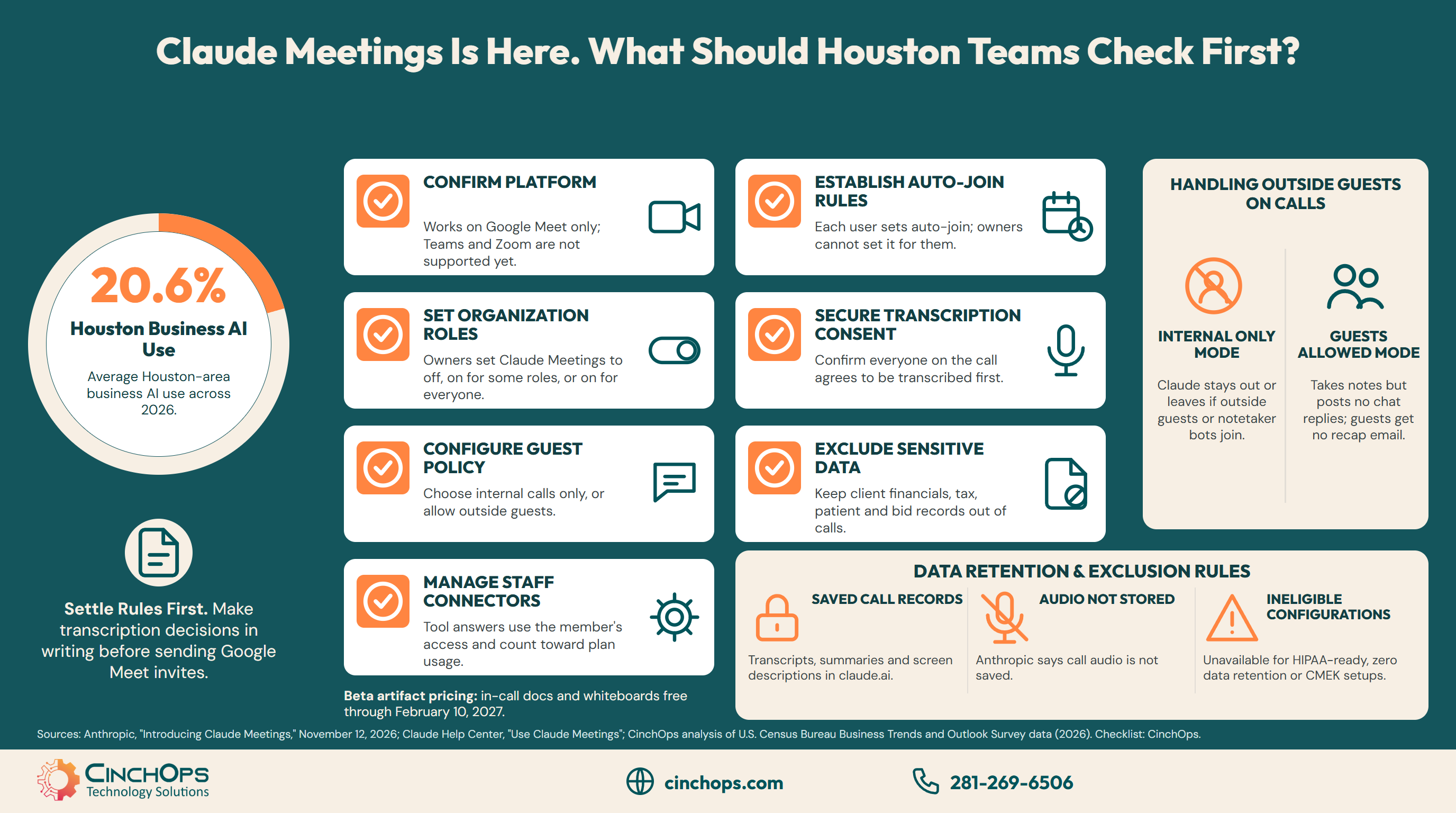
Before Claude joins a Houston office's meetings, the account owner should settle eight things: the video platform, which roles may use Claude Meetings, whether it may join calls with outside guests, whether it may use staff connectors, who controls auto-join, transcription consent, which data stays out, and who reviews the notes.
Most of the switches live in one place. Anthropic's Help Center puts them under Organization settings, then Products, then Claude Meetings (beta). The owner can set Claude Meetings to off, on for roles with Meetings, or on for everyone. The same page sets meetings with external guests to internal only or allowed, and decides whether Claude can use members' connected tools in a meeting.
- Platform. Offices on Microsoft Teams or Zoom cannot use Claude Meetings yet. Anthropic names no date for other platforms.
- Roles. On Enterprise plans an owner can limit Claude Meetings to custom roles. On Team plans it starts on for everyone, and an owner can turn it off.
- Outside guests. This setting decides whether Claude ever sits in on a client call. The next section covers it in detail.
- Connectors. When Claude answers a question with a connected tool, it uses that person's access, asks permission the first time, and the answer counts toward plan usage.
- Auto-join. Each user sets auto-join under Settings, Capabilities, Meetings, for all meetings or all except one-on-ones. Owners cannot set it for them, so the rule has to be written down.
- Consent. Anthropic's own guidance is to confirm that everyone agrees to be transcribed before adding Claude or turning on auto-join.
- Data. Name the data that stays out of a Claude meeting: client financials, tax records, patient details, bid numbers.
- Reviewer. Name one person who reads the notes and action items before they go to anyone outside the call.
Claude also gives the people on the call some control. Anyone can ask it to stop listening or leave, and the meeting page has pause, resume and "Remove Claude" controls. A single meeting can run up to eight hours, and Claude warns before it leaves.
Want the eight checks set up for your office?
CinchOps vCIO services write the one-page meeting rule and set the Claude organization switches to match it.
Talk to a CinchOps vCIO →Will Claude Join Calls With Your Clients?
How Claude Meetings handles outside guests, and why the default deserves a second look.
By default, Claude Meetings stays out of a call when someone outside your organization is invited, and leaves if an outsider joins partway through, including another company's notetaker bot. An owner can allow outside guests. Claude then takes notes and posts its notice but does not reply in the chat.
For many Houston firms this one setting decides whether the feature is useful at all. An oil and gas services company has partners and operators on most calls. An engineering firm meets with clients and subcontractors. A law firm or a CPA practice spends its billable hours on calls with clients. With the default left in place, Claude will simply not attend those meetings.
Allowing guests changes what leaves the room. Guest speech appears in Claude's notes and transcript, which invitees from your organization can view and edit. The guests themselves do not get the meeting page or the recap email. For a client call, that means the client's words now sit in your Claude workspace, and the client may only know because of the notice Claude posts in the chat.
Our position for a Houston office: keep external guests set to internal only during the beta, use Claude Meetings on internal calls, and revisit client calls once the rule on consent and data is written and tested.
What Does Claude Keep After a Houston Meeting Ends?
What Claude Meetings saves, what it does not, and which organizations cannot use it yet.
After a Claude meeting ends, Anthropic says Claude saves the transcript, a summary and screen descriptions, and does not save audio. Each meeting gets a page in claude.ai with the notes, action items and anything Claude built, and invitees from your organization can view and edit it. Neither Anthropic page states a retention period.
Screen descriptions matter more than they sound. If someone shares a client spreadsheet or a bid on screen, a description of that screen becomes part of the saved record. Treat screen sharing in a Claude meeting the way you would treat emailing the file to everyone in the organization.
Some organizations are excluded outright during the beta. Claude Meetings is not available to organizations with zero data retention, HIPAA-ready configurations or customer-managed encryption keys. A medical or dental practice near the Texas Medical Center that set up Claude under a HIPAA-ready configuration will not see the feature, and that exclusion is a reason for any healthcare office to keep patient details out of a standard Claude account's meetings too.
The beta pricing is generous. Notes, transcripts and in-call answers that do not use a connected tool are included on Team and Enterprise plans, and docs, whiteboards and other artifacts made in a call are free through February 10, 2027. A Claude Team standard seat lists at $20 per seat per month billed annually or $25 billed monthly. CinchOps prices the managed IT and AI support around it at a flat $100 to $250 per user per month.
Houston offices are still early here. CinchOps' analysis of U.S. Census Bureau survey data found Houston-area business AI use averaged 20.6% across 2026, so for many teams a meeting assistant will be the first AI tool that hears client and staff conversations. That is the reason to write the rule now, while the feature is free and the stakes are one beta.
An Add Claude button on a client call is a decision about who gets transcribed. Make that decision once, in writing, before the first Google Meet invite goes out.
Who can see what your meetings now produce?
CinchOps cybersecurity services include 24/7 threat monitoring and the access reviews that decide who can connect business data to AI tools like Claude.
See CinchOps cybersecurity services →How CinchOps Can Help Houston Businesses Roll Out Claude Meetings
CinchOps is a managed IT services provider based in Katy, Texas, serving small and mid-sized businesses across the Houston metro area. CinchOps specializes in cybersecurity, network security, managed IT support, VoIP, and SD-WAN for businesses with 10 to 200 employees.
A Claude Meetings rollout works best in four steps: write the rule, set the switches, pilot one internal meeting, then widen. The staircase below maps each step to the work involved.
- CinchOps vCIO services write the one-page meeting rule: which calls Claude may join, which data stays out, and who reviews the notes.
- The CinchOps AI assistant platforms service sets the Claude organization switches for roles, outside guests and connectors to match that rule.
- Cybersecurity services review which connectors staff have linked to Claude before those tools can answer questions in a meeting.
- Managed IT support answers help desk requests in under 15 minutes, so "can I add Claude to this call?" gets a fast answer.
- Support for offices across Houston, Katy and Sugar Land, including oil and gas companies, engineering firms, law firms and CPA firms, where most calls include someone from outside.
Claude Meetings is the second Claude release in a week to switch on by default for Team plans. CinchOps covered the first in Claude Sheets and Whiteboards Are Already On for Houston Teams.
Claude Meetings will save your team real time on internal calls, and on a Team plan the button is already there. Write the meeting rule before the first client call gets transcribed. Talk to CinchOps if you want help writing it.
Frequently Asked Questions
Does Claude Meetings work with Zoom or Microsoft Teams?
Not yet. At launch, Claude Meetings works only with Google Meet. Anthropic says support for other video conferencing platforms is coming soon but gives no date. A Houston office that runs its calls on Microsoft Teams or Zoom can use Claude Whiteboards and Sheets today, but not Claude Meetings.
Is Claude Meetings already turned on for my company?
On a Claude Team plan, it is on by default and an owner can turn it off. On Enterprise plans, an owner turns it on for all or part of the organization. Owners manage it under Organization settings, Products, Claude Meetings (beta). It is not available on organizations with zero data retention, HIPAA-ready or CMEK configurations.
Will Claude join a call with our clients?
By default, Claude stays out of calls with outside guests and leaves if one joins, according to Anthropic's product post. Anthropic's Help Center says Team plans allow outside guests by default, so check the setting directly. When guests are allowed, Claude takes notes and posts a notice but does not reply in the chat.
Does Claude Meetings record audio?
No. Anthropic says Claude saves a transcript, a summary and screen descriptions, but not audio. Each meeting gets a page in claude.ai that invitees from your organization can view and edit. Anthropic's pages do not state a retention period, and Anthropic advises confirming that everyone agrees to be transcribed before adding Claude.
Can staff turn on auto-join for every meeting?
Yes. Each user can turn on auto-join under Settings, Capabilities, Meetings, for all meetings or all except one-on-ones. Account owners cannot set auto-join for users. A Houston office that wants Claude kept off client calls should put that in a written rule and set outside guests to internal only.
What does Claude Meetings cost a Houston business?
During the beta, notes, transcripts and in-call answers without connected tools are included on Team and Enterprise plans, and in-call artifacts are free through February 10, 2027. A Team standard seat lists at $20 per month billed annually. CinchOps rolls it out as part of managed IT at a flat $100 to $250 per user per month.
Discover More
Resource
Sources
- Anthropic, "Introducing Claude Meetings" (November 12, 2026)
- Claude Help Center, "Use Claude Meetings"
- TechCrunch, Aisha Malik, "Anthropic launches Claude Meetings to turn workplace discussions into plans and tasks" (November 10, 2026)
- Anthropic, Claude pricing page (Team plan, checked November 12, 2026)
- CinchOps, "Houston Small Business AI Adoption: The 2026 Census Report" (analysis of U.S. Census Bureau Business Trends and Outlook Survey data)

