


IT Budget Checklist for 2027: 10 Line Items Houston Owners Leave Out
IT Budget Planning Help For Houston Businesses – How To Put A Month And An Owner On Every IT Budget Line
The dated, priced and provable lines that belong in a Houston business's 2027 IT budget before it gets approved.
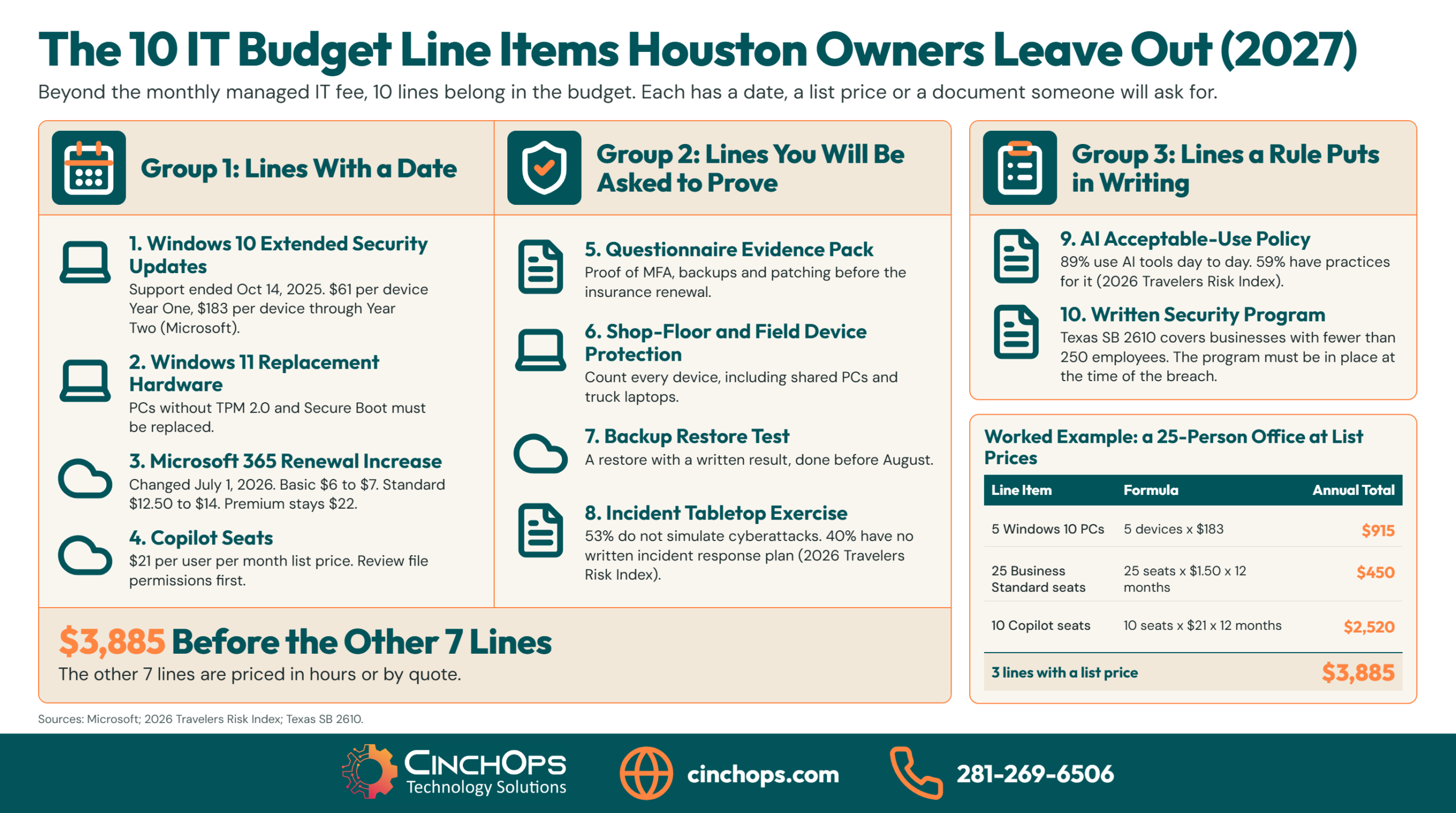
An IT budget checklist for 2027 has to cover more than the monthly managed IT fee. 10 line items are routinely missing from Houston small business budgets, and each one has either a date, a list price, or a document someone will ask for. Put them in before the budget is approved, because every one of them arrives anyway.
The pattern shows up in budget reviews every fall. An owner approves the IT provider's proposal, calls it the 2027 IT budget, and closes the file. Then the Microsoft 365 renewal lands higher than last year, a customer sends a security questionnaire, and 6 laptops turn out to be too old for Windows 11. None of those were surprises. They had dates. They just were not on the page.
This list is ordered the way a budget should be built: lines with a calendar date first, lines an insurer or customer will ask you to prove second, lines a rule requires third. Every line names its source: Microsoft, Travelers, Sophos, the FTC, the SEC or the Texas statute. 3 have a public list price you can multiply out today. The other 7 are priced in hours or by quote, because an invented dollar range is worse than none.
How This List of 10 Line Items Was Built
3 sources, 1 ordering rule, and what was left off.
Each of the 10 line items on this IT budget checklist comes from one of 3 places: a vendor's published price or deadline, a regulator's or insurer's published requirement, or a pattern from IT budget reviews with Houston businesses. Items are ordered by how fixed their date is, with calendar-dated costs first.
No line made the list because it sounded prudent. A line item qualified only if a named source puts a price, a date or a required document on it. Where a source publishes a price, the price is quoted with the source. Where no public price exists, such as the hours it takes to assemble insurance evidence, the item carries a formula and says so.
One finding from pulling these together is worth stating plainly: the lines owners leave out of an IT budget are the dated ones, and the line they include is the only one with no deadline attached. The managed IT fee recurs monthly and never forces a decision. The Windows 10 extended update price, the Microsoft 365 renewal and the insurer's questionnaire each force one on a specific day.
What was left off, and why. Percent-of-revenue benchmarks are not here, because no verifiable source supports a single figure for a 10 to 200 employee business. PC prices are not here either, since they move with the memory market and your quote will be more accurate than any average. Phone systems, internet circuits and line-of-business software renewals belong in the budget, but owners already remember those.
Compare a Budget That Carries These Lines With One That Does Not
All 10 line items in one table, with what each looks like when it is planned and when it is not.
A 2027 IT budget that carries all 10 line items turns each one into a scheduled decision with an owner and a month. A budget that leaves them out still pays for every one, at a worse price or at a worse moment, usually in the same quarter as something else.
The table below compares both versions of the same budget, 1 line item per row: what the planned version records, and what happens in a Houston office when the line is missing.
| Line item | In a budget that carries it | In a budget that leaves it out |
|---|---|---|
| 1. Windows 10 extended updates | A device count, a per-device price, and an end date for each straggler | Unpatched PCs, or a rushed purchase that also back-pays Year One |
| 2. Windows 11 replacement hardware | A list of PCs that cannot upgrade and the month each is replaced | Replacements bought one failure at a time |
| 3. Microsoft 365 renewal increase | The renewal month and the new per-user price times the seat count | A renewal invoice higher than last year with no line to charge it to |
| 4. Copilot seats | A named list of who gets a seat, and a permissions review first | Seats added mid-year by request, with nobody checking what Copilot can read |
| 5. Insurer and customer evidence | Hours set aside to assemble proof before the questionnaire arrives | Answers written from memory the week the form is due |
| 6. Protection on shop-floor and field devices | Every device counted, including shared and field machines | Office laptops protected, the plant floor and trucks not |
| 7. Backup restore test | A scheduled test with a recorded result | A backup nobody has restored from |
| 8. Incident tabletop exercise | A half day on the calendar with the right people in the room | The first run-through happens during a real incident |
| 9. AI acceptable-use policy | A written policy, a short training, and a tool list | Staff using AI tools daily with no rule on what goes into them |
| 10. Written security program | A document matched to headcount and industry, reviewed yearly | Controls that exist but cannot be shown to exist |
Read the right-hand column again with your own office in mind. In 35+ years doing this, the expensive version of every one of these lines has been the unplanned one, and the cost was rarely the purchase itself. It was the timing.
Start With the 4 Lines That Have a Date on Them
Line items 1 to 4: Microsoft set the dates and published the prices.
4 of the 10 IT budget line items are set by Microsoft's calendar: Windows 10 extended updates, Windows 11 replacement hardware, the Microsoft 365 price change that took effect July 1, 2026, and Copilot seats. Each has a published price or requirement, so each can be budgeted to the dollar.
1. Windows 10 extended security updates for the PCs you kept
Windows 10 Extended Security Updates cost $61 per device for Year One and the price doubles every consecutive year for a maximum of 3 years, according to Microsoft. Windows 10 support ended on October 14, 2025. The program is cumulative, so a business that enrolls a PC in Year Two pays for Year One as well. That makes Year Two $183 per device in total and the full 3 years $427 per device.
Budget it as: the number of Windows 10 PCs still in service, times the cumulative price, with a retirement month beside each. Microsoft notes one exception worth knowing: Windows 10 PCs that connect to Windows 365 Cloud PCs are entitled to the updates at no additional cost.
Ask: "How many Windows 10 devices do we still have, and what does keeping each one patched through 2027 cost?"
2. Replacement PCs for hardware Windows 11 will not accept
Windows 11 requires TPM version 2.0 and UEFI firmware that is Secure Boot capable, along with at least 4 GB of RAM and 64 GB of storage, per Microsoft's published requirements. A Windows 10 PC that lacks the TPM or the firmware cannot be upgraded in place. It has to be replaced, and that turns a free upgrade into a capital purchase.
Budget it as: the count of PCs that fail the requirement, times the price on your own hardware quote, spread across the months you plan to replace them. No average PC price is given here on purpose. A Sugar Land engineering firm running CAD needs a different machine than a front desk does, and your quote is the real number.
Ask: "Which of our PCs fail the Windows 11 hardware check, and in what order do we replace them?"
3. The Microsoft 365 renewal increase
Microsoft raised Microsoft 365 commercial prices effective July 1, 2026, and existing customers see the new price at their first renewal after that date. Under the announced update, Business Basic moved from $6 to $7 per user per month, Business Standard from $12.50 to $14, and Microsoft 365 E3 from $36 to $39. Business Premium stayed at $22. A business on a multi-year agreement keeps its current price until that agreement renews.
Budget it as: the per-user increase, times seats, times 12. For 25 people on Business Standard that is $1.50 times 25 times 12, or $450 a year. The amount is small. What makes it a budget problem is that it lands on a renewal date most owners cannot name without looking it up.
Ask: "What month does our Microsoft 365 agreement renew, and how many licenses are assigned to people who no longer work here?"
4. Copilot seats, and the review that comes before them
Microsoft 365 Copilot Business lists at $21 per user per month and requires a Business Basic, Standard or Premium license underneath it, according to Microsoft's partner announcements. At list price, 10 seats cost $2,520 a year. Microsoft's own site currently lists Business Premium with Copilot at $32 per user per month.
Budget it as: a named list of the people who get a seat, plus the hours for a file-permissions review before anyone is switched on. Copilot answers from whatever the user is already allowed to open. An office where the whole company can read the HR folder will find that out quickly.
Ask: "Who specifically gets a Copilot seat in 2027, and has anyone checked what those people can already see?"
Add the 4 Lines an Insurer or Customer Will Ask You to Prove
Line items 5 to 8: the cost is mostly time, and the deadline belongs to someone else.
4 IT budget line items exist because someone outside the business will ask for proof: evidence for insurer and customer questionnaires, endpoint protection on every device, a backup restore test, and an incident tabletop exercise. The 2026 Travelers Risk Index found 53% of businesses do not simulate cyberattacks and 40% have no written incident response plan.
5. An evidence pack for insurer and customer questionnaires
In 2022 a cyber insurance policy was declared null and void from its inception after the insurer alleged the insured used MFA only on its firewall, despite a signed MFA attestation at application. That case, Travelers v. International Control Services, is why the answers on a questionnaire have to match what is running. Lockton's guidance on the same point is that cyber applications have become longer and more complex, and that inaccurate answers can be costly.
Budget it as: hours, in the month before your insurance renewal and again whenever a large customer sends its own form. The pack is screenshots and reports: MFA enforcement, backup results, patch status, the incident plan. Assembled once and kept current, it answers most forms.
Ask: "If our insurer asked us to prove every yes on last year's application, how long would it take?"
6. Endpoint protection on shop-floor and field devices
Only 34% of organizations with 100 to 250 employees stopped a ransomware attack before encryption or extortion, compared with 46% of those with 3,001 to 5,000, according to Sophos' State of Ransomware 2026. Smaller companies stopped fewer attacks early. Devices left off the protection list make that worse.
On a Houston manufacturing floor or an oil and gas field crew, the machines most often left without endpoint detection are the shared shop-floor PCs and the laptops that live in trucks. They were bought outside IT, nobody is named as the user, and they still sit on the same network as accounting. Black Kite's 2026 manufacturing ransomware report puts the median revenue of a manufacturing victim at $42.9M, with 70.2% of 2026 victims in the $10M to $100M band. That is a mid-sized Houston plant.
Budget it as: a per-device license for every machine on the network, counted by walking the floor, with the count dated.
Ask: "Is every device on our network on the protection list, including the ones nobody logs into by name?"
7. A backup restore test with a written result
Organizations hit by ransomware reported an average recovery cost of $1.7M in Sophos' State of Ransomware 2026. A tested restore is what shortens that recovery. A backup job that reports success has copied data somewhere. Only a restore proves the data comes back, how long it takes, and who knows how to do it.
Budget it as: a few hours of technician time and a short disruption window, on the calendar before August. The National Hurricane Center puts the peak of the Atlantic hurricane season at September 10, with most activity between mid-August and mid-October. A Houston business wants its restore result in hand before that window opens.
Ask: "When did we last restore a real file and a whole system from backup, and where is that written down?"
8. An incident tabletop exercise
The 2026 Travelers Risk Index found 53% of businesses do not simulate cyberattacks and 40% have no written incident response plan, and in construction the figures are 69% and 52%. Professional services firms were the least likely to practice, with 78% reporting no simulation. A tabletop is a meeting where the owner, the office manager, IT and whoever handles the bank walk through a made-up incident and find out who does what.
Budget it as: half a day for 5 or 6 people, once a year, plus the time to fix what it turns up. The step-by-step version is in how to run a cybersecurity tabletop exercise.
Ask: "If our email were taken over at 4 p.m. on a Friday, who calls the bank, and do they know it is their job?"
Finish With the 2 Lines a Rule Requires You to Have in Writing
Line items 9 and 10: both are documents, and both get asked for after something goes wrong.
The last 2 IT budget line items are written documents: an AI acceptable-use policy and a written security program. Texas SB 2610 ties a legal protection to having the program in place at the time of a breach, and federal rules require one for tax preparers and investment advisers.
9. An AI acceptable-use policy
89% of organizations report day-to-day AI tool use while 59% have established practices for employee AI use, a 30-point gap in the 2026 Travelers Risk Index. In the same survey, 51% of businesses said they worry about employees putting sensitive data into unsanctioned tools. An acceptable-use policy is 1 or 2 pages: which tools are approved, what may never be pasted into them, and who to ask.
Budget it as: a few hours to write, 30 minutes of staff time to walk through, and a yearly review. For a Houston CPA practice or law firm the page on client data matters most, since the client did not agree to have a tax return summarized by a free chatbot.
Ask: "Which AI tools are our people using today, and have we told them what cannot go into them?"
10. A written security program matched to your headcount and industry
Texas SB 2610 bars exemplary damages against a business with fewer than 250 employees that maintained a conforming cybersecurity program, and the business must show the program was in place at the time of the breach. The standard scales by size. Under 20 employees it is password policies and training. From 20 to 99 it is the CIS Controls Implementation Group 1. From 100 to 249 it is a recognized framework such as NIST or the ISO/IEC 27000 series.
2 federal rules add to that for specific Houston industries. The FTC Safeguards Rule covers tax preparation firms, requires a written incident response plan, and says a firm without continuous monitoring must conduct annual penetration testing and vulnerability assessments every 6 months. The SEC's 2024 amendments to Regulation S-P require broker-dealers and registered investment advisers to keep a written incident response program and to notify affected customers no later than 30 days after becoming aware of an incident.
Budget it as: the hours to write or update the program, plus the testing your rule names. For a tax practice that is a penetration test line every year.
Ask: "If we had a breach tomorrow, what document would we hand over to show our program existed today?"
Want these 10 lines priced for your office?
Bring your device count, your Microsoft 365 renewal month and last year's insurance application. We will turn them into a line-by-line 2027 budget.
Talk to CinchOps"Every one of these 10 lines has a date or a document attached, and that is the whole reason they get missed. Nobody forgets the monthly IT bill. They forget the renewal in March and the questionnaire in May. Put a month next to every line and the budget stops surprising you."
How to Choose What Goes in a Houston IT Budget First
3 questions sort the 10 lines for any business.
To choose which IT budget line items go in first, sort them by 3 questions: which has a date that already passed, which is tied to a contract or policy renewal, and which depends on headcount or industry. Lines that fail the first question go in before anything else.
Windows 10 support ended on October 14, 2025, so any Windows 10 PC still in service is already past its date. Lines 1 and 2 are decided first for that reason: each PC is either enrolled in extended updates or scheduled for replacement, and leaving it in neither column is the only wrong answer.
Renewal-tied lines come second. Find 3 dates: the Microsoft 365 renewal, the cyber insurance renewal, and the largest customer contract that includes a security clause. Lines 3, 4 and 5 hang off those dates. Set the evidence work a month ahead of the insurance renewal. If the firm is also changing IT providers in 2027, the guide to switching managed IT providers in Houston covers how to time that move against the same dates.
Headcount and industry sort the rest. A 15-person office in Katy needs password policies and training under SB 2610, while a 120-person manufacturer in Cypress needs a recognized framework and protection on every floor device. A tax practice budgets a yearly penetration test. An investment adviser budgets the incident response program Regulation S-P describes. The tiers are laid out in what Texas SB 2610 requires for the safe harbor.
Local data says the program line is not optional in practice. The CinchOps Houston Area Security Index scanned 4,393 Houston-area businesses from the outside and graded 49.6% of them a D or F. Those are external signals only, and they are the first thing an insurer's scan or a customer's vendor review sees.
What Do the 10 Lines Add to a 2027 IT Budget in Houston?
A worked example at list prices, next to the managed IT rate.
For a 25-person Houston office, the 3 line items with public list prices add about $3,885 for 2027: $915 for 5 Windows 10 PCs on extended updates through Year Two, $450 for the Microsoft 365 Business Standard increase, and $2,520 for 10 Copilot seats. Managed IT in Houston typically runs $100 to $250 per user per month on top.
That example is arithmetic on published list prices, not survey data. 5 PCs at $183 each is $915. 25 Business Standard seats at $1.50 more per month is $450 a year. 10 Copilot Business seats at $21 a month is $2,520 a year. Your counts will differ, and the method is the point: every dated line can be multiplied out today.
The managed IT rate is the largest line and the most predictable one. The published CinchOps rate is a flat $100 to $250 per user per month, so the same 25-person office budgets $2,500 to $6,250 a month for managed IT, with no long-term contract, no hidden fees and no cancellation penalty. The full breakdown of what sits inside that rate is in the Houston managed IT pricing guide.
The other 7 lines are priced in hours or by quote. Replacement hardware comes from your own vendor quote. The evidence pack, restore test, tabletop, AI policy and written program are time, and a good provider will tell you in writing which of them the monthly rate already covers. For what changed in the underlying prices since last year, see what changed in your IT costs for the 2027 budget.
Half of these lines are security work
Evidence for the insurer, protection on every device, a restore test, a tabletop and a written program are the security half of an IT budget. See how CinchOps cybersecurity services cover them for Houston businesses.
See what is covered →How Can CinchOps Help a Houston Business Build This Budget?
CinchOps is a managed IT services provider based in Katy, Texas, serving small and mid-sized businesses across the Houston metro area. CinchOps specializes in cybersecurity, network security, managed IT support, VoIP, and SD-WAN for businesses with 10 to 200 employees.
For budget season, CinchOps provides managed IT support and budget planning specifically for 10 to 200 employee businesses in Houston, at a flat $100 to $250 per user per month with help desk requests answered in under 15 minutes.
How CinchOps measures against these 10 lines - judge for yourself:
- Line 1 - Windows 10 extended updates. No published CinchOps price for this one. Ask us for a device-by-device Windows 10 count with a retirement month on each.
- Line 2 - Windows 11 hardware. Hardware lifecycle and budget planning are inside the CinchOps monthly rate. The PCs themselves are quoted separately in writing.
- Line 3 - Microsoft 365 renewal. Ask us for your license count reconciled against your current staff list before the renewal month.
- Line 4 - Copilot seats. No packaged offer to point to. Ask us to run the permissions review first and show you what it found.
- Line 5 - Evidence pack. Ask for a sample of the reports we would hand your insurer: MFA status, patch status, backup results.
- Line 6 - Device protection. Endpoint security is inside the monthly rate and threat monitoring runs 24/7. The help desk is staffed Monday through Friday, 8 to 6.
- Line 7 - Restore test. Top-tier CinchOps plans include immutable, offsite, verified backups kept outside the Gulf Coast flood zone, covering laptops, servers, Microsoft 365 and Google Workspace.
- Line 8 - Tabletop. Ask us to facilitate one through CTO and CIO services, and ask to see the agenda before you commit a half day.
- Line 9 - AI policy. No template is published. Ask us what we would put on the client-data page for your industry.
- Line 10 - Written program. Ask which SB 2610 tier applies at your headcount and what we would write to meet it.
Terms are Zero-Zero-Zero: no long-term contracts, no hidden fees, no cancellation penalties, with a 30-day satisfaction guarantee. CinchOps the company is about 2 years old, led by a founder with 35+ years in IT, so ask for our oldest active client and call them. Read the Google reviews, the critical ones included, and compare them against the Houston MSP Review Index.
- Through managed IT support and CTO and CIO services, the dated lines get a device count, a renewal calendar and a month.
- Through cybersecurity services and business continuity and disaster recovery, the proof lines get reports you can hand to an insurer.
- CinchOps serves Houston, Katy, Sugar Land and Cypress, and works with CPA firms, manufacturing and construction.
A budget approved with one IT number will be reopened by March. Put a month and an owner beside each of these 10 lines before you sign off, and price the 3 that have list prices today. If you want a second set of eyes on the count, talk to CinchOps before the budget meeting.
Frequently Asked Questions
What should be on an IT budget checklist for 2027?
An IT budget checklist for 2027 should carry the managed IT fee plus 10 other lines: Windows 10 extended updates, Windows 11 replacement hardware, the Microsoft 365 renewal increase, Copilot seats, insurer and customer evidence, endpoint protection on every device, a backup restore test, an incident tabletop, an AI acceptable-use policy and a written security program.
What does an IT budget cost for a small business in Houston?
Managed IT in Houston typically runs $100 to $250 per user per month, and the published CinchOps rate is a flat $100 to $250 per user per month. A 25-person office therefore budgets $2,500 to $6,250 a month for managed IT, before Microsoft licensing, replacement hardware and the dated line items on this checklist.
How much do Windows 10 Extended Security Updates cost a business?
Microsoft prices Windows 10 Extended Security Updates for organizations at $61 per device for Year One, and the price doubles every consecutive year for a maximum of 3 years. The program is cumulative, so enrolling in Year Two means paying for Year One too, which brings the per-device total to $183.
Did Microsoft 365 prices go up for 2027 budgets?
Yes. Microsoft's commercial price update took effect July 1, 2026, and existing customers see it at their first renewal after that date. Business Basic moved from $6 to $7 per user per month, Business Standard from $12.50 to $14, and Microsoft 365 E3 from $36 to $39. Business Premium stayed at $22.
Does a small Texas business need a written cybersecurity program?
Texas SB 2610 does not force one, but it rewards having one. A business with fewer than 250 employees that maintained a conforming program at the time of a breach is protected from exemplary damages. The required standard scales by headcount, from password policies and training up to a recognized framework such as NIST.
When should a Houston business schedule its backup restore test?
Before August. The National Hurricane Center places the peak of the Atlantic hurricane season at September 10, with most activity between mid-August and mid-October. A Houston business that tests a full restore in early summer has time to fix what the test finds before the weeks when it is most likely to need the backup.
Discover More
Resource
Sources
- Microsoft Learn, Extended Security Updates (ESU) program for Windows 10 - $61 per device Year One, doubling yearly, 3-year maximum, cumulative; support ended October 14, 2025.
- Windows 11 requirements, Microsoft Learn - TPM 2.0, UEFI with Secure Boot capability, 4 GB RAM, 64 GB storage.
- Microsoft 365 Blog, new capabilities and pricing update and Team Ascend's partner summary - July 1, 2026 price update and the before-and-after prices.
- Partner Center announcements, Microsoft, December 2025 - Microsoft 365 Copilot Business at $21 per user per month; Business Premium at $22.
- Compare Microsoft 365 business plans, Microsoft - Business Premium with Copilot at $32 per user per month.
- Travelers, 2026 Risk Index: cyber - simulation, incident response plan and AI-use figures, including the construction and professional services breakouts.
- Sophos, State of Ransomware 2026 - 34% versus 46% stopped before encryption; $1.7M average recovery cost.
- Black Kite, 2026 Manufacturing and Distribution Ransomware Report - $42.9M median victim revenue; 70.2% in the $10M to $100M band.
- Insurance Journal, Travelers v. International Control Services - policy declared null and void after the MFA attestation dispute. See also Lockton's analysis.
- Texas SB 2610, enrolled text - under 250 employees, headcount tiers, program in place at the time of the breach.
- FTC, Safeguards Rule: What Your Business Needs to Know - tax preparation firms covered; written incident response plan; annual penetration testing without continuous monitoring.
- SEC, amendments to Regulation S-P (May 16, 2024) - written incident response program; customer notice within 30 days.
- NOAA National Hurricane Center, Tropical Cyclone Climatology - season peak September 10.
- CinchOps, Houston Area Security Index 2026 - 4,393 businesses scanned; 49.6% graded D or F (external signals only).


