


Shadow AI Automations: Training Won’t Find Them in Your Houston Office
Find, Record, Move And Retire Shadow AI Automations – Five Facts To Record For Every AI Automation
Training Won't Find Them in Your Houston Office
Staff build AI workflows that keep running after they leave. Here is why training, sandboxes and committees miss them in Houston.
Shadow AI automations are the workflows, agents and small apps employees build with AI tools without IT knowing they exist. They pull real data, run on their own and often outlive the person who built them. A Houston business with 10 to 200 staff usually finds them only when one breaks or its builder leaves.
Tines, an automation software company, lays out the pattern in its guide "Taming wild code: the IT leader's guide to AI code sprawl." A recruiter builds an AI workflow that scores job applications without settling how the data is stored. A revenue analyst pulls CRM data into weekly AI reports and leaves confidential financial information unsecured. An HR coordinator builds a policy question agent that can also reach compensation data. A sales manager sets up AI lead routing, then leaves the company with the workflow still running and nobody watching it.
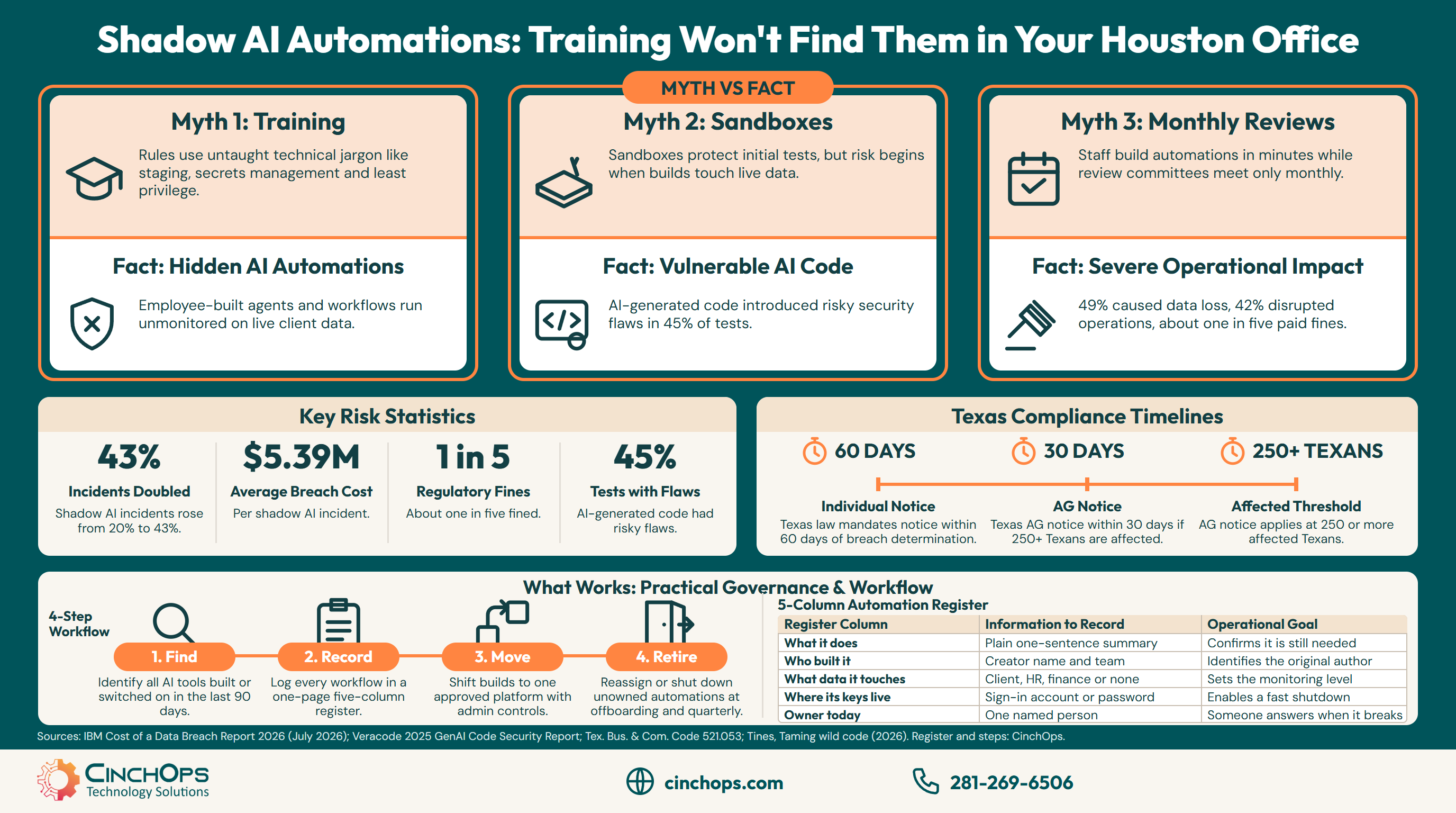
IBM's Cost of a Data Breach Report 2026 puts numbers on the risk: security incidents involving shadow AI, where workers use unapproved AI, more than doubled to 43% from 20% a year earlier, and those incidents averaged $5.39 million in breach costs. CinchOps provides managed IT and AI governance specifically for Houston and Katy businesses with 10 to 200 employees, with help desk requests answered in under 15 minutes.
Will AI Training Stop Staff From Building Shadow AI Automations?
Training helps, but it assumes staff can recognize the risk.
AI training will not stop staff from building shadow AI automations on its own. The Tines guide argues the rules are written in a vocabulary most non-technical employees were never taught, and that deadline pressure pushes people to build even when they do understand the risk.
Three ideas sit behind most IT rules for software: production versus staging, secrets management and least privilege. An office manager who builds a reporting workflow over lunch has rarely met any of them. The guide's point is that a policy written in those words reads as background noise to the people doing the building.
Motive matters too. Employees who build their own AI tools usually have a real problem to solve and no faster way to solve it. Training that tells them to wait for IT, with no faster approved option, tends to push the building out of sight.
Training still earns its place. Translate the three ideas into plain questions, put them on one page, and ask them every time someone shows off a new AI shortcut in a staff meeting.
Does a Sandbox Make Employee-Built AI Safe?
A sandbox protects the experiment, not what happens after it goes live.
A sandbox does not make employee-built AI safe once it leaves the sandbox. A sandbox is an isolated test space with no access to real systems, and an AI automation only becomes useful when it reaches real client, HR or finance data. The risk sits after the test, when the build runs on its own.
Brad Rumph, Field CTO at Tines, puts it in one line: "Sandboxes solve the design problem and leave the runtime problem alone." The guide adds a second problem. A team that tested in a sandbox tends to treat the finished build as already checked, so nobody reviews it again before it touches live data.
The code itself is often the weak point. Veracode's 2025 GenAI Code Security Report found that AI-generated code introduced risky security flaws in 45% of tests across more than 100 large language models. An employee who cannot read code has no way to spot those flaws before the automation goes live.
For a Houston law firm, CPA practice or engineering firm, the data at risk is client data. A workflow that copies tax documents or project files into an outside AI tool can keep doing it every night long after the person who set it up has changed roles. For how to check code written by AI before it runs, see who checks AI-generated code in a Houston small business.
Can a Monthly AI Review Catch Shadow AI Automations?
A committee meets on a calendar. Builds happen between meetings.
A monthly AI review cannot catch shadow AI automations reliably, because an employee can build and switch on an AI workflow in minutes, weeks before the next meeting. The Tines guide calls steering committees human-paced oversight of machine-speed building, and IBM found most breached organizations lacked governance to detect shadow AI at all.
IBM's 2026 report says 68% of breached organizations lacked AI governance to manage AI or detect shadow AI, up from 63% the year before. When a shadow AI incident did happen, 49% led to data loss or compromise, 42% disrupted operations, and in about one in five the organization paid a regulatory fine.
Texas law runs on its own clock. Under Texas Business and Commerce Code Section 521.053, a business that determines it had a breach of sensitive personal information must notify affected individuals no later than 60 days afterward, and must notify the Texas Attorney General no later than 30 days afterward when 250 or more Texans are affected. Section 521.151 sets civil penalties of $2,000 to $50,000 per violation.
An automation nobody knows about can expose client records without anyone noticing, so the notice period may already be running before the business learns of it. The Texas breach notification guide walks through what happens after discovery.
What Works Instead: One Register and One Approved Place to Build
Make the safe path the easiest one, and write down what already exists.
What works for a Houston small business is a one-page automation register plus one approved place to build. The Tines guide's core advice is to make the safe path the easiest path, and the register is the small-office version: every AI automation gets one line and one named owner.
Start by asking each team what it has built or switched on with AI tools in the last 90 days. The Tines checklist uses the same window and adds a test worth repeating: if the person who built a critical workflow left tomorrow, would anyone else know it existed?
The register below holds the five facts an owner needs for each automation. Fill one row per workflow, agent or app.
| Register column | What to write | Why it matters |
|---|---|---|
| What it does | One sentence, in plain words | Shows whether it is still needed |
| Who built it | Name and team | Someone can explain how it works |
| What data it touches | Client, HR, finance or none | Sets how closely to watch it |
| Where its keys live | The account or password it signs in with | Lets you shut it off fast |
| Owner today | One named person | Someone answers when it breaks |
- Pick one approved place to build. Use business-tier AI tools whose admin controls limit which data and systems staff can connect.
- Add automations to offboarding. Every departure hands each automation to a new owner or retires it the same week. The offboarding security checklist covers the rest of the exit.
- Review the register quarterly. Retire any row with no owner and any automation nobody can explain.
The person who built the automation is rarely the problem. The problem is the day they leave and nobody else knows it runs every night against your client files. Write it down while they are still here.
Want every AI automation in your office on one page?
CinchOps AI policy and governance work finds what staff have built, gives each automation an owner and sets one approved place to build.
See CinchOps AI policy and governance →How CinchOps Can Help Houston Businesses Control Shadow AI Automations
CinchOps is a managed IT services provider based in Katy, Texas, serving small and mid-sized businesses across the Houston metro area. CinchOps specializes in cybersecurity, network security, managed IT support, VoIP, and SD-WAN for businesses with 10 to 200 employees.
CinchOps works on both sides of the problem: giving staff a sanctioned way to build with AI, and keeping track of what already runs.
- Through AI policy and governance, CinchOps builds the automation register, writes the approved-tools policy and sets admin controls on business-tier AI tools.
- With AI workflow automation, staff get a sanctioned way to build: a first AI workflow typically reaches production in under a month, and a quick win on one well-defined task can be live within a week.
- CinchOps cybersecurity services include 24/7 threat monitoring, and vCIO services bring the register into a quarterly review.
- Managed IT support runs at a flat monthly rate of $100 to $250 per user, with no long-term contracts, no hidden fees and no cancellation penalties.
- CinchOps supports offices across Houston, Katy and Cypress, including law firms, CPA firms and engineering firms.
Staff who build their own AI tools are usually solving a real problem, and the fix is to give them a safe place to do it. Start with the register, because you cannot govern an automation nobody has written down. If you want help finding what already runs in your office, talk to CinchOps.
Frequently Asked Questions
What are shadow AI automations?
Shadow AI automations are workflows, agents and small apps that employees build with AI tools without IT knowing they exist. They often connect to real client, HR or finance data and keep running on their own. In a Houston small business they usually surface when one breaks or when the person who built it leaves.
How common are security incidents involving shadow AI?
IBM's Cost of a Data Breach Report 2026 found that security incidents involving shadow AI, where workers use unapproved AI, more than doubled to 43% from 20% the year before. Those incidents averaged $5.39 million in breach costs, and in about one in five the organization paid a regulatory fine.
What happens to an AI automation when the employee who built it leaves?
It usually keeps running. Nothing in most AI tools ties a workflow to an employment record, so it stays switched on with the departed employee's access until someone finds it. Add a line to offboarding: every automation the person built gets a new owner or is switched off the same week.
Is AI-generated code safe for a small business to run?
Not without review. Veracode's 2025 GenAI Code Security Report found AI-generated code introduced risky security flaws in 45% of tests across more than 100 large language models. A Houston small business should have someone who can read code check it before it touches client or company data.
Does Texas law apply if a shadow AI automation leaks client data?
It can. Texas Business and Commerce Code Section 521.053 requires notice to affected individuals no later than 60 days after a business determines a breach of sensitive personal information occurred, and notice to the Texas Attorney General within 30 days when 250 or more Texans are affected.
What does AI governance and managed IT support cost in Houston?
Managed IT in Houston commonly runs $100 to $250 per user per month. The published CinchOps rate is $100 to $250 per user per month, flat and month-to-month, with no long-term contracts, no hidden fees and no cancellation penalties, and the automation register sits inside that managed service relationship.
Discover More
Resource
Sources
- Tines, "Taming wild code: the IT leader's guide to AI code sprawl" (2026)
- IBM and Ponemon Institute, "Cost of a Data Breach Report 2026" (July 2026)
- Veracode, "2025 GenAI Code Security Report" (October 2025 update)
- Texas Business and Commerce Code, Chapter 521, Sections 521.053 and 521.151
- Office of the Texas Attorney General, Data Breach Reporting


