


What Is AI Workflow Automation? Use Cases for Houston Businesses
Name One Owner For Every Automated Workflow – Seven Checks Before Any Workflow Goes Live
A plain definition, ten use cases sorted by how much approval each one needs, and a readiness checklist for Houston teams.
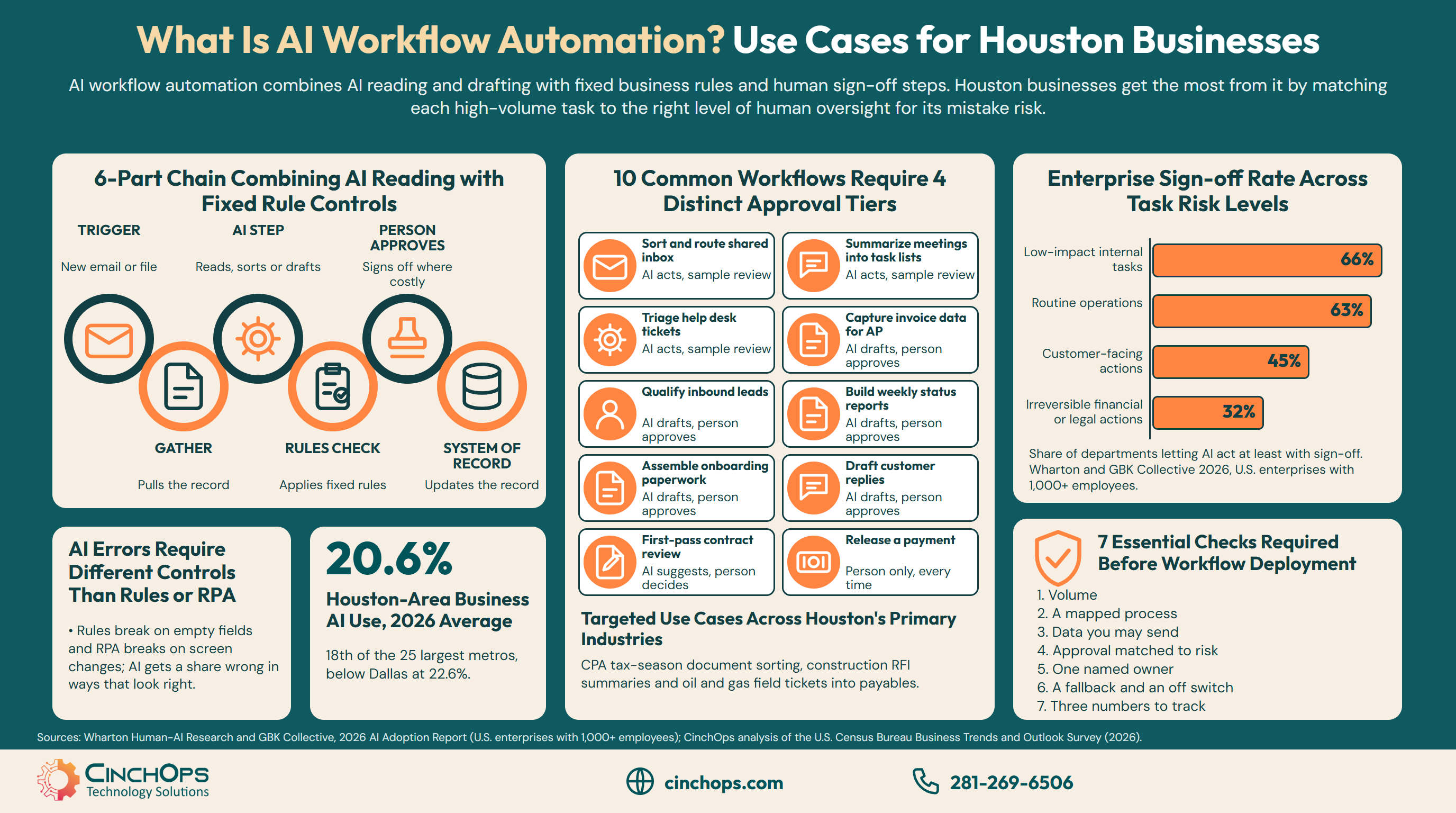
AI workflow automation is a chain of automated business steps, started by an event such as a new email or an uploaded invoice, in which at least one step uses an AI model to read, classify, summarize or draft, and the remaining steps follow fixed rules into the system your team already uses.
That definition matters for a Houston owner who just found "AI agents" switched on inside a tool the company already pays for. The software can now read a document and decide what it probably says. What it should be allowed to do next is a business decision, and it changes from one use case to the next.
Houston is still early here. CinchOps' analysis of the U.S. Census Bureau Business Trends and Outlook Survey puts Houston-area business AI use at 20.6% averaged across 2026, 18th of the 25 largest metros and below Dallas at 22.6%. That leaves room to start with the right jobs rather than the loudest ones.
How Is AI Workflow Automation Different From Rules-Based Automation and RPA?
Three kinds of automation that often get sold under one name, and the input each one can handle.
Rules-based automation follows fixed if-then steps on clean, structured data. Robotic process automation (RPA) clicks through screens the way a person would. AI workflow automation adds a model that can read unstructured input, such as an email, a scanned invoice or a call note, and turn it into something the rules can act on.
The difference shows up in what breaks each one. A rules flow breaks when a field arrives empty or in the wrong format. An RPA bot breaks when a vendor moves a button on the screen. An AI step rarely breaks outright; it gets a share of documents wrong in ways that look right, which is why the checking and approval steps around it matter more than the model itself.
- Rules automation fits "when a form is submitted, create the record and notify the owner."
- RPA fits a legacy system with no connector, where the only way in is the screen.
- AI workflow automation fits input a person used to have to read first: inboxes, PDFs, contracts, meeting transcripts.
Most useful workflows mix all three. The AI step reads the invoice, a rule checks that the total matches the purchase order, and a connector posts it to accounting. Calling the whole thing "an AI agent" hides the part a business owner most needs to see: where a person still signs.
Which AI Workflow Automation Use Cases Fit a Houston Business?
Ten common use cases, each paired with the approval level it needs before anything leaves the building.
The best AI workflow automation use cases for a small business are high-volume reading and drafting jobs, such as inbox routing, invoice capture and status reports. Each one needs an approval level matched to the cost of a mistake, from sample review for internal sorting up to a person-only step for releasing money.
Large enterprises already work this way. The 2026 Wharton and GBK Collective AI adoption report, a survey of U.S. enterprises with 1,000 or more employees, found that 48% of departments let AI do the work while a person approves before anything happens, 35% let AI suggest while a person decides, and 17% let it act on its own. Small businesses are moving the same direction: the U.S. Chamber of Commerce's 2026 small business technology report found 24% of small businesses already use agentic AI.
Here is the checklist, grouped by the approval level CinchOps would start each use case at:
- AI acts, with sample review: sort and route the shared inbox, summarize meetings into task lists, and triage help desk tickets.
- AI drafts, a person approves: capture invoice data for accounts payable, qualify inbound leads, build weekly status reports, assemble customer onboarding paperwork, and draft customer replies.
- AI suggests, a person decides: first-pass contract review.
- A person only, every time: release a payment.
Houston's industry mix points to a handful of specific versions of these jobs. They follow the same pattern: AI reads the paperwork, a person signs off on anything that leaves the firm.
- CPA firms can sort and name the client documents that pile up during tax season before a preparer opens them. See IT for CPA firms.
- Construction companies can summarize RFIs, submittals and daily logs into one weekly project report. See IT for construction.
- Oil and gas service companies can pull field ticket data into accounts payable for a person to approve. See IT for oil and gas.
- Law firms can turn intake forms into a prepared conflict-check request that an attorney still runs.
- Engineering firms can tag drawings and transmittals for document control.
None of these hands a client-facing decision to the model. That is the line worth holding while a Houston firm learns how its own documents trip the AI up.
Hand AI the reading, the sorting and the first draft. Keep the step that moves money or makes a promise to a customer behind a person's approval, and name that person before the workflow goes live.
What Should Be True Before You Automate a Workflow With AI?
Seven readiness checks to clear before any AI workflow goes into production.
Before a Houston business automates a workflow with AI, the process should run often enough to repay the build, be mapped on paper, draw from data the business is allowed to send to an AI tool, and have one named person who owns the errors, a human fallback and a way to switch it off.
- Volume. The job happens every day or every week, enough to repay the build effort.
- A mapped process. Two people asked to describe the steps give the same answer. If they don't, fix the process first.
- Data you may send. Client files, health records and financial data stay inside approved business accounts, never a free personal tool.
- Approval matched to risk. Sample review for internal sorting, a person approving anything that leaves the firm, and a person deciding anything irreversible.
- One named owner. A specific person answers for the workflow's mistakes.
- A fallback and an off switch. When the AI step fails, the work goes back to a person, and someone can stop the workflow in minutes.
- Three numbers to track. Time saved per month, error rate against manual work, and how often a person had to step in.
The data check is where most hesitation sits. In the 2026 Wharton and GBK Collective report, data security and privacy was the top barrier to letting AI act on its own, cited by 43% of managers. In the U.S. Chamber's 2026 report, 27% of small businesses not yet using AI said they worried it would expose private, proprietary or sensitive data. Both concerns point at the same fix: business accounts, written rules and a clear list of what never goes in.
Approval matched to risk is where large companies already draw lines. The Wharton report shows how sharply willingness drops as the stakes rise:
In that report, 66% of departments let AI act at least with sign-off on low-impact internal tasks and 63% on routine operations, dropping to 45% for customer-facing actions and 32% for irreversible financial or legal actions. Ownership is the weaker spot: no single owner for agent errors reached 30%, and 11% said nobody was clearly accountable or did not know. A 25-person Houston firm can fix that in one sentence, by writing down whose name goes on each workflow.
Want a second opinion on which workflow to automate first?
CinchOps maps the process, picks the platform that fits it, and builds every workflow with a human fallback, live monitoring and a kill switch. Start with the AI workflow automation service.
See how CinchOps builds AI workflowsHow CinchOps Can Help Houston Businesses Put AI Workflows Into Production
CinchOps is a managed IT services provider based in Katy, Texas, serving small and mid-sized businesses across the Houston metro area. CinchOps specializes in cybersecurity, network security, managed IT support, VoIP, and SD-WAN for businesses with 10 to 200 employees.
CinchOps builds AI workflow automation specifically for Houston-area small and midsize businesses and typically puts a first workflow into production in under a month. A quick win on a single, well-defined task can go live within a week, depending on the task. That time goes to mapping the process and picking the platform, building and testing against real documents, then setting approvals, a named owner and the go-live. Workflows touching regulated data take longer because of the review.
- Through the AI workflow automation service, CinchOps builds on Microsoft Power Automate and Copilot Studio for Microsoft 365 shops, Make and n8n for cross-platform work, AI agent frameworks where reasoning is needed, and RPA for legacy screens.
- Through business process automation, the rules-based steps around the AI step get built and maintained.
- Through managed IT support and cybersecurity, the accounts, permissions and data those workflows touch stay controlled.
- CinchOps reports time saved, error rate and exception rate monthly during a workflow's first year, then quarterly once it stabilizes.
- CinchOps serves Houston, Katy and Sugar Land businesses, along with the rest of the metro.
AI workflow automation earns its keep on the boring reading and sorting work, with a named person on every step that matters. If you are deciding what to hand over first, start with one high-volume job and an approval rule you can explain in a sentence, then talk to CinchOps.
Frequently Asked Questions
What is AI workflow automation in simple terms?
AI workflow automation is a set of automated business steps where at least one step uses an AI model to read, sort, summarize or draft, such as pulling the details out of an emailed invoice. Fixed rules then check the result and pass it into the system the business already uses, with a person approving costly steps.
Is AI workflow automation the same as an AI agent?
An AI agent is one component that can plan and take several steps toward a goal. AI workflow automation is the whole chain around it: the trigger, the data, the rules checks, the approvals and the system of record. A business can automate a workflow with a single AI step and no agent at all.
Which tasks should a business not automate with AI?
Do not let AI act alone on anything irreversible, such as releasing a payment, signing a contract or sending a final answer to a regulator. In the 2026 Wharton and GBK Collective report, only 32% of large-company departments let AI act even with sign-off on irreversible financial or legal actions, against 66% for low-impact internal tasks.
How long does it take to put an AI workflow into production?
CinchOps typically puts a first AI workflow into production in under a month. A quick win on a single, well-defined task can go live within a week, depending on the task. Workflows touching regulated data take longer because of the review. Every workflow ships with a human fallback, live monitoring and a kill switch.
What does AI workflow automation cost in Houston?
Cost depends on the workflow and the platform. Among small businesses paying for AI, the U.S. Chamber's 2026 report put median monthly AI spend at $250. CinchOps' published managed IT rate is $100 to $250 per user per month; AI workflow builds are scoped separately for each workflow after process discovery.
Discover More
Resource
Sources
- Wharton Human-AI Research and GBK Collective, "The Adaptive Advantage: Who's Winning With AI and How," 2026 AI Adoption Report (October 13, 2026)
- U.S. Chamber of Commerce Technology Engagement Center and Teneo, "Empowering Small Business: The Impact of Technology on U.S. Small Business," Fifth Edition (October 2, 2026)
- CinchOps, "Houston Small Business AI Adoption: The 2026 Census Report," analysis of the U.S. Census Bureau Business Trends and Outlook Survey
- U.S. Census Bureau, Business Trends and Outlook Survey data


