


What Does a Managed IT Provider Actually Do Day to Day?
Proactive Vs Reactive IT Support Explained – How To Check Whether Your IT Provider Is Doing The Work
A plain-English look at the daily, weekly, and monthly work a Houston business should get for its monthly IT fee.
What does a managed IT provider do when nothing is broken? That is the fair question behind every monthly invoice, and the honest answer is that roughly all of the value sits in the hours when your office is quiet.
A Houston business owner usually sees the IT company 2 times: when a laptop dies and when the bill arrives. Everything between those 2 moments is the actual job. Monitoring alerts at 2 a.m. Patches pushed on a Tuesday night. A backup job that failed and got fixed before anyone needed the file. A new hire whose laptop, email, and door badge all worked at 8:00 on the first day.
CinchOps provides managed IT support specifically for 10 to 200 employee businesses in the Houston metro, with help desk requests answered in under 15 minutes and a flat rate of $100 to $250 per user per month. This post lays out what that kind of fee should buy, hour by hour and month by month, so you can hold any provider to it.
What Does a Managed IT Provider Actually Do Day to Day?
The one-paragraph answer, written to stand on its own.
A managed IT provider is an outside company that runs a business's technology for a recurring fee. Day to day, a managed IT provider monitors computers, servers, and networks for faults and threats, installs security patches, verifies backups, answers employee help desk requests, manages user accounts, and advises the owner on technology spending.
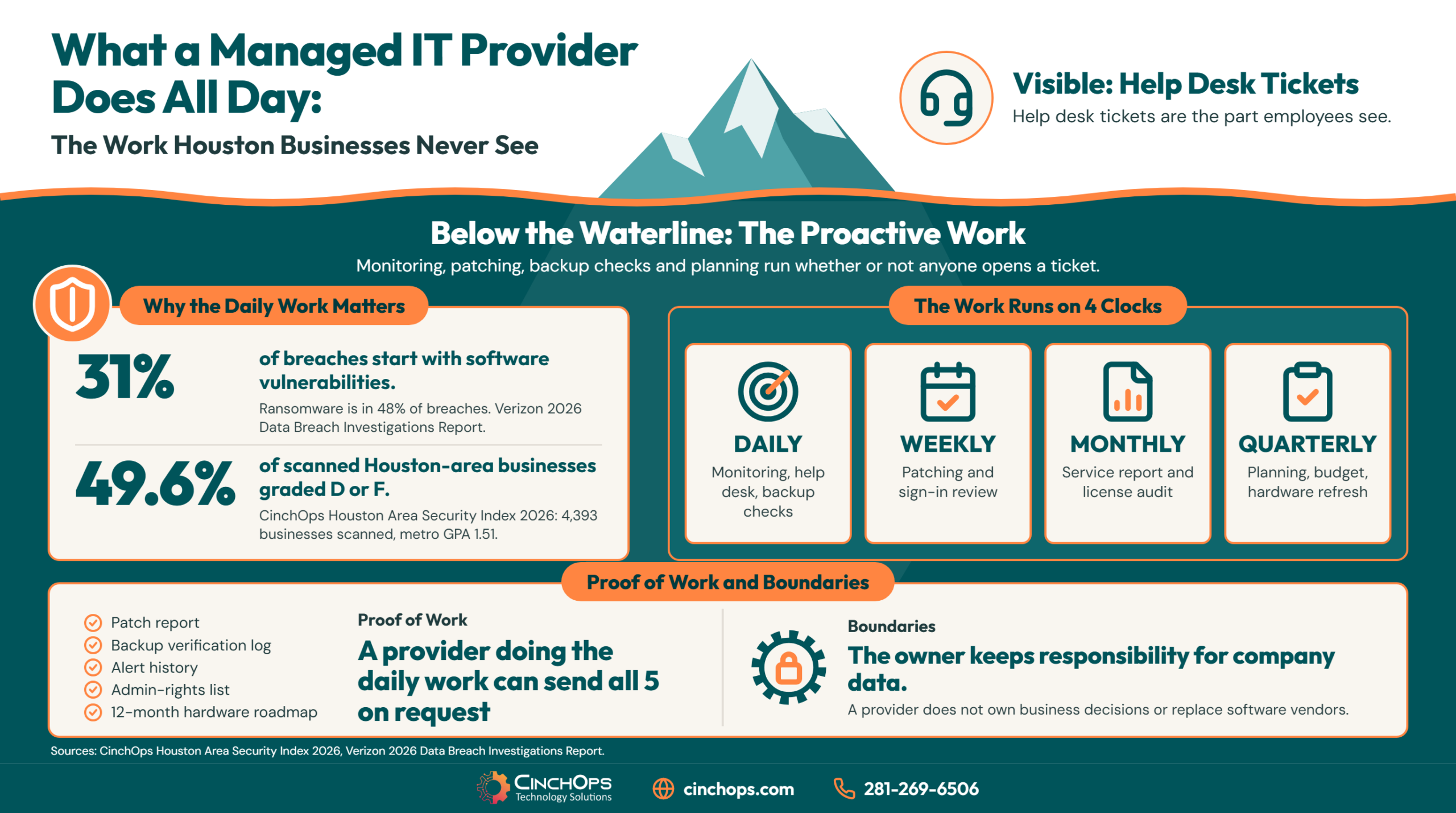
That definition splits into 2 kinds of work. Reactive work is what employees see: a ticket gets opened, an engineer fixes the problem. Proactive work is what nobody sees: the patch, the alert, the backup check, the license audit. A managed IT provider for a 40-person Houston engineering firm or CPA practice spends more of the week on the second kind than the first.
The pricing model is what makes that possible. A break-fix shop bills by the hour, so it earns more when more things break. A managed IT provider bills a flat monthly fee, so every outage it prevents is time it does not have to spend. The incentives point in opposite directions, and that difference shows up in what each company does on an ordinary Wednesday.
Most of the Daily Work Happens Before Anyone Opens a Ticket
5 jobs run every day whether or not an employee asks for anything.
The proactive side of managed IT is a set of daily routines: monitoring, patching, backup verification, security alert triage, and account management. Each one exists to catch a specific failure before it becomes downtime for a Houston business.
- Monitoring. Software agents on every computer and server report disk space, hardware health, failed services, and offline devices. An engineer reviews what fires and fixes what matters. A server at 95% disk capacity is a 10-minute job today and an outage on Friday.
- Patching. Operating systems, browsers, and business applications get security updates on a schedule, with a reboot plan that does not land in the middle of payroll. The Verizon 2026 Data Breach Investigations Report found that 31% of breaches start with software vulnerabilities, ahead of stolen passwords.
- Backup verification. Every backup job is checked for success, and failed jobs are rerun the same day. A backup that has been failing silently for 6 weeks is the most common unpleasant surprise in IT.
- Security alert triage. Endpoint protection, email filtering, and sign-in logs produce alerts all day. Someone has to decide which ones are noise and which one is a compromised mailbox. The same Verizon report puts ransomware in 48% of breaches.
- Account management. New hires get accounts, departing employees lose access the same day, and permissions get trimmed when someone changes roles.
Houston data backs up how often it does not run. The CinchOps Houston Area Security Index scanned 4,393 Houston-area businesses from the outside and graded 49.6% of them a D or F, with a metro-wide GPA of 1.51. Those are external signals only, but they are the signals an attacker sees first, and they are exactly the items a daily routine is supposed to keep clean.
What a Managed IT Provider Does Daily, Weekly, Monthly, and Quarterly
The work runs on 4 clocks. Here is what belongs on each one.
Managed IT work follows a cadence: daily monitoring and help desk, weekly patch cycles and reviews, monthly reporting and audits, and a quarterly planning conversation about budget and risk. A provider that cannot describe its own cadence probably does not have one.
| Cadence | What the provider does | What it prevents |
|---|---|---|
| Daily | Reviews monitoring alerts, works help desk tickets, checks every backup job, triages security alerts, processes account changes | Small faults turning into outages; a compromised account sitting unnoticed |
| Weekly | Deploys patches, reviews failed sign-ins, sets up new hires and closes out departures, looks for repeat tickets, chases devices that stopped reporting | Known vulnerabilities staying open; the same problem being fixed 5 times instead of 1 |
| Monthly | Sends a service report, audits licenses against the employee list, checks hardware age and health, reviews who holds admin rights | Paying for licenses nobody uses; a 7-year-old server failing without warning |
| Quarterly | Sits down with the owner to review risk, budget, upcoming hardware replacement, policy changes, and cyber insurance or audit requirements | Surprise capital expenses; a failed insurance renewal questionnaire |
The quarterly row is the one that separates a managed IT provider from a help desk. It goes by different names, usually vCIO or fractional CTO and CIO services, and it is where a Katy construction firm finds out in March that 12 laptops age out in October, instead of finding out in October.
Not sure which of these your provider is doing?
Bring your last invoice and your last service report. We will tell you what is covered and what is missing.
Talk to CinchOpsWhat Do Help Desk Tickets Actually Look Like?
The visible half of the job, by category.
Help desk tickets at a small or mid-sized business fall into a handful of repeating categories: account lockouts, new-employee setup, "is this email real" questions, printing and scanning, file access, and software installs. The help desk is the part of managed IT that employees judge the provider on.
- Lockouts and password resets. Someone returns from vacation, the phone was replaced, the authenticator app is gone. Short ticket, but the person cannot work until it closes.
- "Is this email real?" We see this one every week with Houston businesses, and it is the ticket a provider should want more of. A 3-minute answer beats a wire transfer to the wrong account.
- New hire and departure. Laptop imaged, accounts created, software licensed, access granted to the right folders and nothing else. On the way out: access removed the same day, mailbox forwarded, device recovered.
- Printing, scanning, and Wi-Fi. Unglamorous and constant. Scan-to-email breaking after a Microsoft 365 change is a regular.
- File and application access. "I can't open the shared drive" or "Procore won't sync." Often a permissions issue, sometimes a vendor issue the provider chases on the client's behalf.
- Slow computer. Sometimes a failing drive, sometimes 40 browser tabs. A good engineer checks the monitoring history before guessing.
Two numbers matter on the help desk: how fast a human responds, and whether the problem stays fixed. CinchOps answers help desk requests in under 15 minutes during office hours, Monday through Friday, 8 to 6, with a named engineer who knows the client's network. Threat monitoring runs 24/7 outside those hours. Ask any provider for both numbers in writing, and ask which one "24/7" refers to.
"If the only time you hear from your IT company is when something breaks, you don't have a managed IT provider. You have a repair shop on a subscription. Ask to see last month's patch report and backup log. A provider doing the daily work can send both in 5 minutes."
What a Managed IT Provider Does Not Do
The boundaries matter as much as the scope.
A managed IT provider does not own a client's business decisions, does not replace the software vendors behind line-of-business applications, and does not remove the client's legal responsibility for its own data. Most disputes between Houston businesses and their IT companies come from a boundary nobody wrote down.
- Application vendor support. A managed IT provider keeps CCH Axcess, QuickBooks, Procore, or Bluebeam installed, licensed, and reachable. A bug inside the application belongs to the vendor. A good provider opens that vendor case for you and stays on it.
- Your responsibility for your data. Microsoft's shared responsibility model states that the customer always retains responsibility for data, endpoints, accounts, and access management, even in the cloud. Hiring a provider delegates the work. It does not transfer the accountability.
- Projects outside the monthly scope. An office move, a new server, or a Microsoft 365 migration is usually quoted separately. That is normal. What is not normal is finding out after the invoice arrives.
- Compliance sign-off. A provider implements the controls that HIPAA, the FTC Safeguards Rule, or a cyber insurance policy call for. The attestation carries the owner's signature.
A 2022 joint advisory from CISA, the NSA, the FBI, and 4 allied agencies (AA22-131A) says the contract should specify "whether the MSP or the customer owns specific responsibilities, such as hardening, detection, and incident response." Take that literally. If the agreement does not say who responds to a compromised mailbox at 9 p.m. on a Saturday, the answer during an incident will be nobody.
The security work belongs in the monthly fee
Patching, endpoint protection, email filtering, and 24/7 threat monitoring are daily managed IT work. Treating them as optional extras is how gaps open. See how CinchOps cybersecurity services fit inside a managed plan for Houston businesses.
See what is covered →How to Tell Whether Your Provider Is Doing the Daily Work
5 requests any managed IT provider should be able to answer the same day.
Proactive IT work leaves records. A managed IT provider that is doing the daily work can produce a patch report, a backup log, an alert history, a current user list, and a hardware roadmap on request. A provider that cannot produce them is billing for work that is not happening.
- "Send me last month's patch report." It should list every device, its patch status, and the ones that are behind and why.
- "When was the last backup verified, and how?" A success message is not verification. Ask what was checked.
- "What alerts fired last month and what did you do?" Zero alerts is not a good answer. It means nothing is being watched.
- "Who has admin rights on our systems?" The list should be short and should not include anyone who left the company.
- "What do we need to replace in the next 12 months?" If there is no list, there is no planning.
My position: the monthly service report is the product. A flat fee with no reporting is a retainer for a phone number. If the answers to those 5 requests are slow, vague, or missing, read what a clean handoff looks like in the guide to switching managed IT providers in Houston, and what a new provider should uncover in the first 30 days of onboarding.
How CinchOps Can Help Houston Businesses With Day-to-Day IT
CinchOps is a managed IT services provider based in Katy, Texas, serving small and mid-sized businesses across the Houston metro area. CinchOps specializes in cybersecurity, network security, managed IT support, VoIP, and SD-WAN for businesses with 10 to 200 employees.
- Through managed IT support, CinchOps runs the daily monitoring, patching, and help desk work described above, with requests answered in under 15 minutes by a named engineer who knows your network.
- Through cybersecurity services, threat monitoring runs 24/7, so an alert at midnight is handled before your team logs in.
- Through business continuity and disaster recovery, top-tier plans include immutable, offsite, verified backups covering laptops, servers, Microsoft 365, and Google Workspace.
- Through CTO and CIO services, the planning conversation covers budget, hardware replacement, and the security questions your insurer or customers will ask.
- Pricing is a flat monthly rate per user, $100 to $250 per user per month, on Zero-Zero-Zero terms: no long-term contracts, no hidden fees, no cancellation penalties.
- CinchOps serves Houston, Katy, Sugar Land, and Cypress, and works with CPA firms, construction, and law firms.
You should be able to describe what your IT provider did last week without waiting for something to break. If you can't, ask for the patch report and the backup log, and judge the provider on how long it takes to arrive. If the answer is not good enough, talk to CinchOps and we will show you ours.
Frequently Asked Questions
What does a managed IT provider actually do day to day?
A managed IT provider monitors a business's computers, servers, and network for faults and threats, installs security patches, checks that backups completed, answers employee help desk requests, and manages user accounts. Most of that daily work is preventive, so employees only see the help desk portion of what the monthly fee covers.
What does a managed IT provider cost in Houston?
Managed IT in Houston is usually priced as a flat monthly rate per user. CinchOps charges $100 to $250 per user per month depending on the service level, with no long-term contracts, no hidden fees, and no cancellation penalties. A 25-person office at that range runs $2,500 to $6,250 per month.
What is the difference between a managed IT provider and break-fix IT support?
Break-fix IT support bills by the hour after something fails, so the company earns more when more breaks. A managed IT provider charges a flat monthly fee and does preventive work such as monitoring, patching, and backup checks every day. The flat fee rewards the provider for preventing problems rather than repairing them.
Does a managed IT provider work 24/7?
It depends on which service is meant. Many managed IT providers run automated threat monitoring 24/7 while the staffed help desk keeps business hours. CinchOps monitors threats 24/7, and its help desk is staffed Monday through Friday, 8 to 6. Ask any provider which of the two its "24/7" claim describes.
How do I know if my managed IT provider is doing its job?
Ask for records. A managed IT provider doing the daily work can send last month's patch report, a backup verification log, a list of alerts and what was done about them, and a current list of who holds admin rights. Slow or missing answers mean the preventive work is probably not being done.
Does a small business with 15 employees need a managed IT provider?
A 15-person business needs the daily work done by someone: patches installed, backups checked, departing employees removed, and suspicious emails answered. If one capable person inside the company reliably does all of that, a provider may be unnecessary. In most 15-person Houston offices, nobody does, and the gaps surface during an incident.
Discover More
Resource
Sources
- Verizon, 2026 Data Breach Investigations Report - 31% of breaches start with software vulnerabilities; ransomware present in 48% of breaches.
- CinchOps, Houston Area Security Index 2026 - 4,393 Houston-area businesses scanned; 49.6% graded D or F; metro GPA 1.51 (external attack-surface signals only).
- Microsoft Learn, Shared responsibility in the cloud - the customer always retains responsibility for data, endpoints, accounts, and access management.
- CISA, NSA, FBI and partner agencies, Cybersecurity Advisory AA22-131A - Protecting Against Cyber Threats to Managed Service Providers and their Customers, May 11, 2022.


