


Company Laptop Stolen in Houston? 8 Steps Before a Breach
Company Laptop Stolen In Houston: What Has To Happen In The First Hour – Stolen Work Laptop Checklist For Houston Field Crews
8 Steps Before a Breach
What a Houston business should do, in order, from the first hour to day 60.
The truck window is smashed and the laptop bag is gone. On that machine: saved passwords, a cached copy of the mailbox, and maybe a client file or two. When a company laptop is stolen, the hardware is the cheap part. What it can still open, and what is readable on its drive, sets the real cost.
Most owners in that moment ask some version of the same question: wipe it, file a police report, or hope it was a thief who only wanted something to pawn? The answer is all of the first two, in a specific order, and never the third. Hope is not a step anyone can document later.
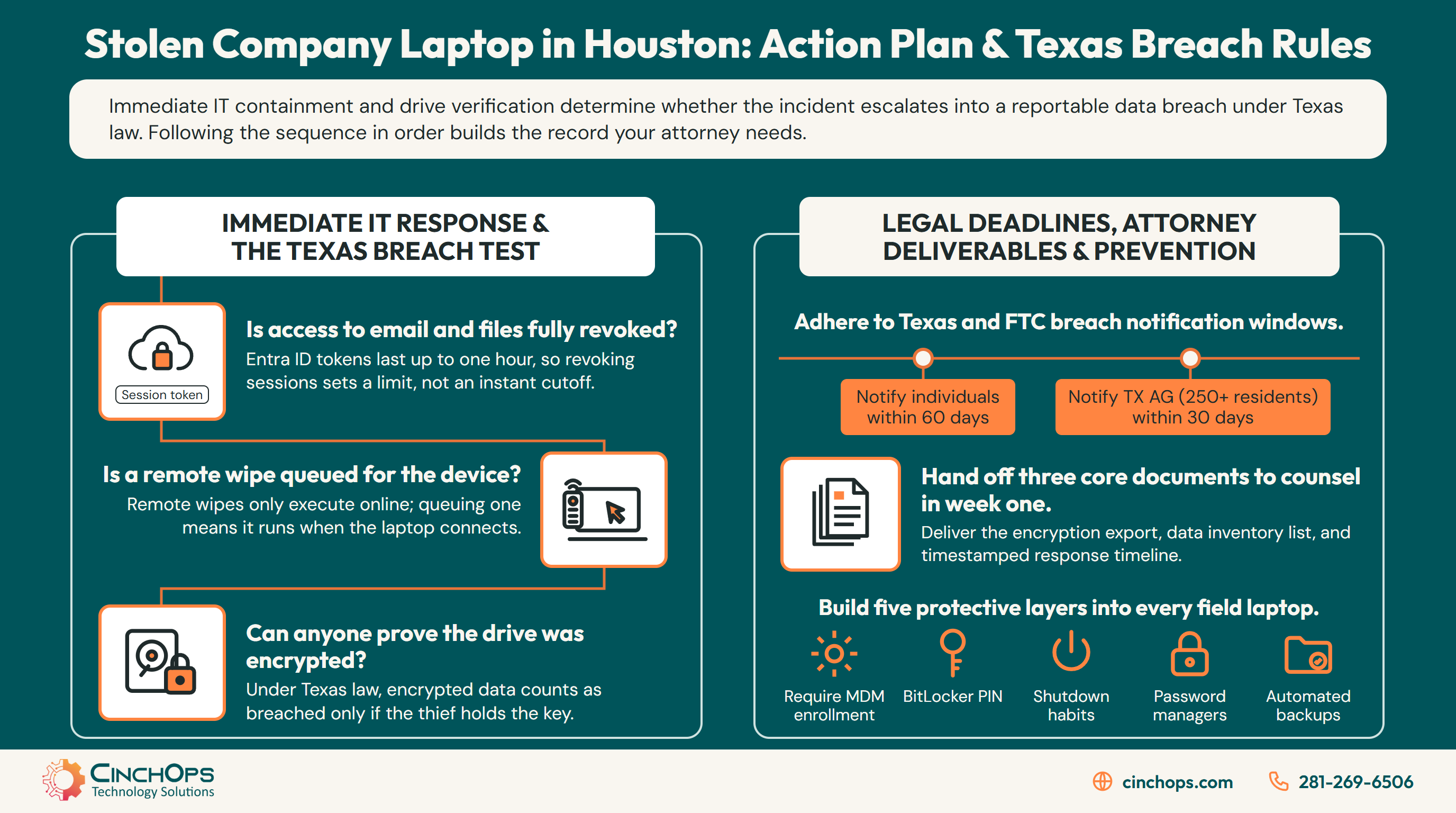
Each step protects something different. Cutting off sign-ins protects everything in the cloud and works even if the laptop never powers on again. A remote wipe protects what is stored on the laptop itself, but it only lands when the machine connects to the internet. Encryption protects the drive no matter what the thief does, and in Texas it is the fact that decides whether a stolen laptop becomes a breach you have to report.
CinchOps handles stolen-laptop response for Houston construction, oil and gas service and professional firms by revoking the user's sessions, issuing the remote wipe and pulling the encryption record, with a help desk that answers in under 15 minutes. The eight items below follow that sequence. For the first three, the question for an owner is not how to do it but whether it got done, and what proof exists.
Cut the Laptop Off From Your Accounts in the First Hour
Items 1 and 2: confirm the stolen laptop is cut off from company email and files, and that the wipe is queued.
The first hour after a company laptop is stolen belongs to access, not hardware. Revoking the user's sign-in sessions and resetting the password stops the laptop from reaching email, Teams, OneDrive and SharePoint, even if the thief never turns the machine on. The remote wipe goes out in the same hour and runs when the laptop connects.
1. Is the laptop cut off from company email and files?
Microsoft documents that access tokens issued by Entra ID last one hour by default, so a stolen laptop that is already signed in can keep reading mail until its sessions are revoked and its token runs out. That is why this comes before anything else. A thief who opens the lid while the laptop is still signed in does not need the password. The cached session does the work.
Your IT provider should be able to tell you, within the hour, that the user's sessions were revoked, the password was changed and the stolen laptop is no longer trusted by Microsoft 365. Ask whether anyone signed in from that laptop after it went missing, and ask for the time each of those things happened. If the employee used the same password anywhere else, that account needs a new one too.
Get it in writing: the time access was cut off, and whether the sign-in log shows any activity after the theft.
2. Is a remote wipe queued?
Microsoft's guidance is explicit that a remote wipe needs the device connected to the internet, and that an offline device still has access to any locally stored data. A wipe sent at 2 p.m. does nothing until the thief connects the laptop, which might be an hour later or never. That is the reason to send it early: queued is better than unsent.
Microsoft also offers a wipe for stolen Windows laptops that keeps going even if the device loses power, with the trade-off that some machines may not start again. For a laptop you are not getting back, that is an acceptable trade. If the laptop was never enrolled in device management, there is nothing to send, and that gap changes what the Texas question in item 7 has to assume.
Get it in writing: when the wipe was sent, whether the laptop has connected since, and when the wipe completed.
The split between the two steps is the part owners most often get backwards. Revoking access protects the cloud and works with the laptop switched off. The wipe protects the drive and waits for a connection. Neither covers the other, which is why both happen in the same hour.
For Houston firms with a help desk contract, this whole section is a single phone call. For firms without one, it is the reason someone in the office needs admin rights to Microsoft 365 that do not live on the stolen laptop. If the only admin account was signed in on that machine, call for help before doing anything else.
Find Out What the Thief Can Actually Read
Items 3 and 4: find out whether the drive was encrypted, then list whose data was on it.
Whether a stolen company laptop is an inconvenience or a reportable breach usually comes down to one fact: was the drive encrypted, and was the key kept somewhere the thief could not get it. Confirm it from the device record, then list what data lived on the machine so the Texas test in step 7 has facts to run on.
3. Can anyone prove the drive was encrypted?
Texas law treats encrypted data as breached only if the person who took it has the key needed to decrypt it, so the encryption record for a stolen laptop is the most important document anyone will pull this week. Owners tend to answer this from memory. The answer should come from the device record, which shows whether BitLocker was on and where the recovery key was stored.
Two details change the answer. Microsoft's BitLocker guidance says a laptop resuming from sleep does not ask for a startup PIN, and recommends shutting down or hibernating a device before it leaves an authorized user's control. A laptop that was asleep in the bag is in a weaker position than one that was shut down. And a password on a sticky note in the same bag is, for practical purposes, the key traveling with the data.
Get it in writing: the encryption status from the device record with the date it was pulled, where the recovery key is kept, and the employee's own words on whether the laptop was shut down, asleep or open, and whether any password was written down in the bag.
4. List what lived on the laptop, so you know whose data walked off
A stolen laptop rarely holds only one person's work: cached email, synced folders, downloaded client files and passwords saved in the browser all ride along, and each one belongs on a written list. The list decides two things later. It tells counsel whether sensitive personal information was on the drive, and it tells you which passwords and accounts beyond Microsoft 365 need to be changed today.
We see the same pattern with Houston field crews again and again: the laptop that rides in a truck is the one with the most saved passwords, because the person using it signs in from jobsites, gas stations and customer offices and lets the browser remember everything.
- Note whether Outlook kept a local copy of the mailbox and how many months it covered.
- List the OneDrive and SharePoint folders synced to the laptop, and the Downloads and Desktop folders the employee used.
- Flag any file with Social Security numbers, driver's license numbers, bank or card numbers, or health information.
- Change every password saved in the browser, plus VPN, Wi-Fi and line-of-business app credentials stored on the machine.
The questions run in a fixed order, and any single no is enough to treat the drive as readable. That is the conservative reading, and it is the one to start from until an attorney says otherwise.
For Houston CPA and tax practices, the stakes on step 3 are written into federal rules as well. The FTC Safeguards Rule covers tax preparation firms and requires encryption of customer information on your system, so an unencrypted laptop at a tax practice is a compliance gap on top of the theft. CinchOps covers that ground on its FTC Safeguards Rule page.
Report the Theft and Write Down Every Time
Steps 5 and 6: get a police case number, then build the written record every later decision depends on.
A police report gives a stolen company laptop the case number insurers and attorneys ask for, and in Houston many vehicle break-ins can be reported online. The written timeline matters even more. Texas breach deadlines run from the date a business determines a breach occurred, so the record of who knew what, and when, starts on day one.
5. File the police report the same day, so the theft has a case number
The Houston Police Department lets victims report qualifying motor vehicle burglaries online when the total loss is $50,000 or less, and the portal issues a temporary case number that HPD notes is a reference number, not an official HPD incident number. A laptop taken from a parked truck inside city limits usually fits. HPD gives you 30 days to complete a report once you start it, but there is no reason to wait.
Outside HPD's jurisdiction, the local agency runs its own process. Katy, Sugar Land and unincorporated Harris County all sit with different departments, and HPD's own page warns that an address that looks like Houston may belong to another agency. If anyone saw the thief or there is evidence for police to collect, call instead of filing online.
- Have the employee who had the laptop file the report, and name the company as the owner of the laptop.
- Include the make, model, serial number and asset tag from your hardware inventory.
- For anything outside the online criteria, call the HPD non-emergency line at 713-884-3131, or the agency that covers the address.
- Save the case number in the incident file and send it to your insurance broker with a short note.
6. Write the timeline today, because the Texas clocks run from your own dates
Under Texas Business and Commerce Code Section 521.053, notice deadlines count from the date a business determines a breach occurred, so a written, timestamped record of the stolen laptop response is what lets you show when that date was. Memory fades in days. An email thread with half the facts is worse than nothing, because it shows people knew things without showing what they did about them.
Keep it plain. One document, one owner, every entry with a date and time. In 35+ years doing this, the incidents that went smoothly with insurers and attorneys were rarely the ones with the best technology. They were the ones where someone wrote things down as they happened.
- Record when the laptop was last seen, when it was noticed missing, and when IT was told.
- Record when sessions were revoked, when the password was reset, when the wipe was sent and when it completed.
- Attach the encryption export from step 3, the data list from step 4 and the case number from step 5.
- Note every person told, including your attorney and insurance broker, with the date and time of each call.
The record above is the minimum. It fits on a single page, and every line on it comes from a step above.
For Houston construction and oil and gas service companies, the timeline has a second use. When a general contractor or an operator asks about the incident on next year's vendor questionnaire, this page is the answer, and it is far easier to hand over a dated record than to reconstruct one.
Decide Whether Texas Law Makes It a Breach
Step 7: apply the Texas definition to the facts from steps 3 and 4, with your attorney, before deciding nobody needs to be told.
A stolen company laptop is a Texas breach when it held sensitive personal information that was unencrypted, or encrypted with the key in the thief's hands. Affected people must then be notified within 60 days of the date you determine it occurred, and the Texas Attorney General within 30 days when 250 or more Texas residents are affected.
7. Run the Texas breach test with counsel, so the decision not to notify is on paper too
Texas defines sensitive personal information as a name combined with a Social Security number, a driver's license or government ID number, or a financial account or card number with its access code, when those items are not encrypted, plus information identifying an individual's health or health care. Put the data list from step 4 next to that definition and the answer is usually clear within an hour. Run the test inside the first week, while the facts are fresh.
The encryption record from step 3 decides most of these. Section 521.053 counts encrypted data as breached only when the person accessing it has the key. HIPAA works the same way for healthcare practices: HHS guidance says encrypted health information is secured only if the decryption key has not been breached, and tells covered entities to keep decryption tools on a device or at a location separate from the data. A password in the laptop bag fails both tests.
The penalties are real money. Section 521.151 sets a civil penalty of $2,000 to $50,000 per violation, plus up to $100 per person per day for failing to notify, capped at $250,000 for a single breach. Tax practices have one more clock: the FTC Safeguards Rule requires notifying the FTC within 30 days of discovery when unencrypted information of 500 or more consumers is involved.
- Call your attorney and your cyber insurance carrier before deciding anything, and log both calls in the timeline.
- Compare the step 4 data list against the Texas definition, and against HIPAA or the FTC Safeguards Rule if they apply to you.
- Count affected people and separate out Texas residents, since 250 is the Attorney General threshold.
- If the answer is no breach, write down why, with the encryption export attached. That memo is your defense if the question comes back.
If the answer is yes, the work moves from a stolen laptop to a notification project, and CinchOps has written that part out separately in 10 things to do after a breach when Texas gives you 60 days to notify. The four numbers above are the ones to have in front of you when you make the call.
Replace the Laptop and Close the Gap That Made It Costly
Step 8: get the employee working again from a managed build, then fix whatever made this theft harder than it needed to be.
Replacing a stolen company laptop takes an afternoon when files live in OneDrive, backups cover the device and the new machine enrolls in device management before it leaves the office. The bigger job is closing the gap the theft exposed, which for most Houston small businesses is a missing startup PIN, laptops left asleep, or passwords saved in the browser.
8. Rebuild from a managed build and fix the gap, so the next theft costs only hardware
A replacement laptop that is enrolled in device management, encrypted with a startup PIN and restored from backup before handoff turns the next truck break-in into a hardware purchase instead of a breach investigation. Every gap steps 1 to 7 turned up becomes a line item here. A laptop that was never enrolled gets enrolled. A drive that was TPM-only gets a PIN. A browser full of saved passwords gets a password manager.
Microsoft's BitLocker guidance recommends a TPM with PIN protector, disabling standby and hibernating or shutting down before a device leaves its user's control for machines that face skilled attackers with physical access. A laptop that spends nights in a truck at a Katy jobsite or a Pasadena yard is a fair candidate for that list, even if the employee finds the extra PIN annoying for the first week.
The five layers above are the checklist for every laptop that leaves the office. A business that can confirm all five for its field laptops has turned a stolen company laptop back into what the thief thought it was: a used computer.
Device management sits at the top because it is what makes the wipe, the encryption report and the password policy enforceable instead of hoped for. Without it, every other layer depends on someone remembering.
Would Your Laptops Pass the Truck-Window Test?
Book an IT checkup and CinchOps will confirm, laptop by laptop, which ones are enrolled, encrypted and backed up before one goes missing.
Book an IT CheckupNobody steals a laptop for the spreadsheets. The thief wants something to sell. Your job in the first hour is to make sure that is all they got, and the only way to prove it later is an encryption record you pulled that week and a timeline someone wrote while it was happening.
How CinchOps Can Help After a Company Laptop Is Stolen
CinchOps is a managed IT services provider based in Katy, Texas, serving small and mid-sized businesses across the Houston metro area. CinchOps specializes in cybersecurity, network security, managed IT support, VoIP, and SD-WAN for businesses with 10 to 200 employees.
When a client's laptop is stolen, the CinchOps help desk answers in under 15 minutes, revokes the user's sessions, sends the wipe and pulls the encryption record the same day. A named engineer who already knows the network builds the replacement, so the employee is not starting from a blank machine.
- Through managed IT support, the steps in this post run as a standing procedure, not a scramble.
- Endpoint security and Microsoft Entra ID management keep encryption, device records and sign-in controls in one place.
- Backup and disaster recovery on the top-tier plan includes immutable, verified backups that cover laptops, Microsoft 365 and Google Workspace.
- If the Texas test comes back yes, breach response gives your attorney the facts the notices are built on.
- CinchOps supports field-heavy firms across Houston and Katy, including construction, oil and gas and CPA firms.
A stolen laptop is going to happen to most businesses with people in the field, and it should be a bad afternoon, not a legal project. The difference is decided months earlier, by whether the laptop was enrolled, encrypted and backed up. If you are not sure how yours would hold up, talk to CinchOps.
Frequently Asked Questions
What should I do first when a company laptop is stolen?
Revoke the user's sign-in sessions and reset the password before anything else, because a laptop that is still signed in can keep reading email until its sessions end. Then send the remote wipe from your device management tool. Both take minutes, and both belong in the first hour after the theft is noticed.
Should I file a police report for a stolen work laptop in Houston?
Yes. A case number is what insurers and attorneys ask for first. The Houston Police Department accepts qualifying motor vehicle burglaries online when the total loss is $50,000 or less. Outside HPD's jurisdiction, such as Katy or Sugar Land, use that city's department or the county sheriff instead.
Can a stolen laptop be wiped if it is turned off?
Not until it connects. Microsoft's guidance says a remote wipe needs the device online, and an offline laptop keeps access to its local data. Send the wipe anyway so it runs the moment the laptop reaches the internet, and rely on encryption and revoked sign-ins to protect you until then.
Is a stolen encrypted laptop a data breach in Texas?
Usually not, if the key stayed safe. Texas Business and Commerce Code Section 521.053 counts encrypted data as breached only when the person who took it has the key to decrypt it. A password written in the laptop bag can change that answer, so confirm the facts with your attorney before deciding.
Who has to be notified if the stolen laptop held customer data?
If the Texas test says it is a breach, affected individuals must be notified within 60 days of the date you determine it occurred. The Texas Attorney General must be notified within 30 days when 250 or more Texas residents are affected. HIPAA and the FTC Safeguards Rule add their own notices for some businesses.
What does stolen-laptop protection cost a Houston business?
CinchOps prices managed IT and security at a flat $100 to $250 per user per month, with 24/7 threat monitoring. Immutable, verified backups that cover laptops are part of the top-tier plan. CinchOps works with no long-term contract, no hidden fees and no cancellation penalty, so the cost of a theft response is already in the monthly rate.
Discover More
Resource
Sources
- Texas Business and Commerce Code Chapter 521, Sections 521.002, 521.053 and 521.151 - definitions, encrypted-data rule, 60-day and 30-day notice deadlines, 250-resident threshold, civil penalties
- U.S. Department of Health and Human Services, Guidance to Render Unsecured Protected Health Information Unusable, Unreadable, or Indecipherable - decryption key kept separate from the data
- Microsoft Learn, Revoke user access in an emergency in Microsoft Entra ID - 1-hour default access token lifetime, revoke sessions, wipe requires an internet connection
- Microsoft Learn, Wipe devices with Microsoft Intune - wipe that continues if the device loses power, for lost or stolen devices
- Microsoft Learn, BitLocker countermeasures - startup PIN, sleep versus hibernate, shutting down before a device leaves its user
- Houston Police Department, Online Police Report - motor vehicle burglaries, $50,000 limit, temporary case number, 713-884-3131
- Federal Trade Commission, FTC Safeguards Rule: What Your Business Needs to Know - tax preparation firms, encryption, 30-day FTC notice at 500 or more consumers


