


Small Business Cyber Resilience in Houston: Plan the Recovery
Part 6 Of Building The Resilient Business – Four Steps To Cyber Resilience For Small Businesses
Plan the Recovery
Part 6 of Building the Resilient Business, a CinchOps series on IT resilience for small and mid-sized Houston companies.
Small business cyber resilience is the ability to keep working through a cyberattack and recover fast afterward. For a 10-200 person Houston company, that means planning for the attacker who gets in and deciding now what stops them from spreading, what they cannot touch and what comes back first.
Start with a Monday morning in a 40-person Katy office where nobody can open a file and the screens show a ransom note. The owner has three questions: is the attacker still inside, is there a backup they did not reach, and what do we turn back on first? A business that answered those questions ahead of time spends the day restoring. One that did not spends it deciding.
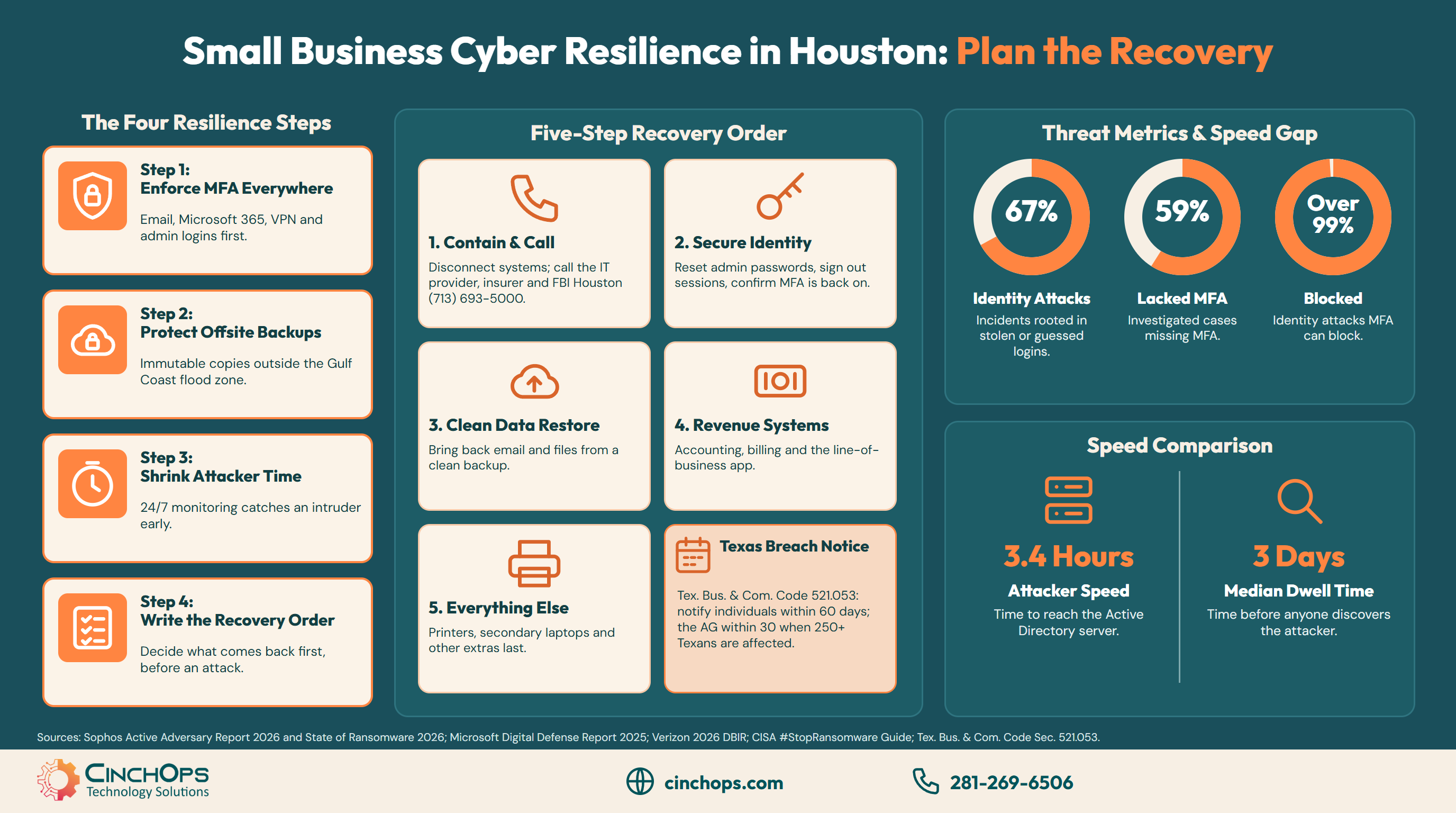
The odds of needing those answers are not small. Verizon's 2026 Data Breach Investigations Report found that 48% of breaches involve ransomware, and Sophos traced 67% of the incidents in its Active Adversary Report 2026 to identity-related attacks such as stolen or guessed logins.
This post is Part 6 of Building the Resilient Business, a CinchOps series on IT resilience. Part 1, What Is IT Resilience? named security as one of the six parts, and the 20-question resilience check scores it. Each later post goes deep on one part, and this one covers four steps a small business can finish in about a week.
CinchOps runs MFA, 24/7 threat monitoring and immutable offsite backups specifically for Houston-area businesses with 10 to 200 employees, with backup copies kept outside the Gulf Coast flood zone.
Step 1: Put MFA on Every Login
Most attacks start with a login, so the login is the first thing to lock.
Multi-factor authentication (MFA) means a password alone is not enough to sign in; the user also confirms with a phone app, key or code. Microsoft reports that MFA can block over 99% of identity-based attacks, which makes it the cheapest resilience step a small business can take.
Attackers prefer logins because a working password looks like a normal employee. Sophos found a lack of MFA in 59% of the cases it investigated for its 2026 report, and Microsoft says more than 97% of identity attacks are password attacks such as spraying common passwords across many accounts.
The Colonial Pipeline attack in 2021 is the best-known example. Colonial's CEO told a U.S. Senate committee that the attackers got in through a legacy VPN that used a compromised password and did not require multifactor authentication.
- Turn on MFA for email and Microsoft 365 first, then the VPN and any remote access tool.
- Give admin accounts the strongest option, such as an authenticator app with number matching or a hardware key. CISA calls this phishing-resistant MFA.
- Find the accounts that cannot do MFA, such as old shared logins, and retire or replace them.
A multi-factor authentication deployment for a 10-200 person office usually takes a few days, most of it spent helping staff enroll their phones.
Step 2: Keep a Backup Attackers Cannot Change
A backup the attacker can reach is a backup the attacker can delete.
A ransomware-safe backup is one that a stolen admin login cannot change or delete. CISA's #StopRansomware Guide tells organizations to maintain offline, encrypted backups of critical data and to test them regularly, and an immutable offsite copy, locked for its retention period, meets the same goal.
Many small businesses have a backup that sits behind the same admin login as everything else. When an attacker takes that login, they can delete the backup before they launch the ransomware, and the business finds out only when it tries to restore.
Houston adds a second reason to keep a copy somewhere else. A backup in the same building, or the same flood-prone part of the Gulf Coast, can be lost to the same storm that takes the office down. CinchOps keeps Microsoft 365 backups and server backups as immutable, offsite copies outside the Gulf Coast flood zone, and verifies them.
The test for this step is one question to whoever runs IT: if someone stole our admin password tonight, could they delete our backups? If the answer is yes, fix that this week.
Step 3: Shrink the Time an Attacker Has Inside
Attackers move in hours. Most small offices check in days.
Detection speed decides how much an attacker can do before someone stops them. In Sophos's Active Adversary Report 2026, attackers reached the Active Directory server a median 3.4 hours after getting in, while the median dwell time before discovery was three days.
That gap matters most for smaller companies. In the Sophos State of Ransomware 2026 survey, only 34% of organizations with 100 to 250 employees stopped the attack before encryption or extortion, compared with 46% of organizations with 3,001 to 5,000 employees.
A small office cannot staff a security team overnight, and it does not need to. Managed detection and response puts trained eyes on the alerts 24/7, so a login from an unusual place at 2 a.m. gets a response before the attacker reaches the server. CinchOps provides 24/7 threat monitoring; its office and help desk hours are Monday to Friday, 8 to 6.
Step 4: Write Down the Recovery Order Before You Need It
Five steps, in order, agreed on by the owner before the attack.
A recovery order is a short, written list of what a business brings back first after a cyberattack. CISA advises restoring systems based on a predefined critical asset list, by priority of critical services, and for most small businesses that means contain, identity, email and files, revenue systems, then everything else.
- Contain and call: disconnect affected machines, then call the IT provider, the cyber insurer and FBI Houston at (713) 693-5000. Keep the phone list on paper, since email may be down.
- Identity next: reset every admin password, sign out all sessions and confirm MFA is back on before anyone logs in to anything else.
- Bring back email and files from a clean backup taken before the attack, so the restore does not bring the attacker back.
- Then the revenue systems, such as accounting, billing and the line-of-business app, in the order the owner chose in advance.
- Everything else comes last: printers, secondary laptops and the tools nobody misses for a day.
Want help writing your recovery order?
CinchOps can sit down with the owner, set the order and the call list, and then test it in a tabletop exercise.
Talk to CinchOpsTexas law is one more reason to have the list ready. Under Texas Business and Commerce Code Section 521.053, a business must notify affected individuals no later than 60 days after it determines a breach occurred, and the Texas Attorney General within 30 days when 250 or more Texans are affected. The recovery order belongs inside a written incident response plan, and a tabletop exercise is the cheapest way to find out whether it works.
Assume someone will get in. The businesses that recover fastest already know what comes back first, and they kept one backup the attacker could not touch.
Find out how fast you could recover
CinchOps backup and disaster recovery keeps immutable, offsite copies outside the Gulf Coast flood zone and verifies them, so a restore is a plan rather than a hope.
See backup and disaster recoveryHow CinchOps Helps Houston Businesses Recover From Attacks
CinchOps is a managed IT services provider based in Katy, Texas, serving small and mid-sized businesses across the Houston metro area. CinchOps specializes in cybersecurity, network security, managed IT support, VoIP, and SD-WAN for businesses with 10 to 200 employees.
- Identity: MFA deployment for email, Microsoft 365, VPN and admin accounts, with help enrolling every user.
- Backups: Microsoft 365 backup and backup and disaster recovery with immutable, offsite copies outside the Gulf Coast flood zone.
- Detection: managed detection and response and cybersecurity services with 24/7 threat monitoring.
- Recovery planning: tabletop exercises and CTO/CIO services help the owner set the recovery order and the call list.
- Local coverage: CinchOps works with businesses in Houston, Katy and The Woodlands, including law firms, CPA firms and manufacturers.
No small business can promise an attacker never gets in, but every one can decide what happens next. Turn on MFA this week, check that one backup sits out of reach, and talk to CinchOps about writing the recovery order.
Frequently Asked Questions
What is cyber resilience for a small business?
Cyber resilience for a small business is the ability to keep working through a cyberattack and recover quickly afterward. In practice it means MFA on every login, backups an attacker cannot change, someone watching for intrusions around the clock and a recovery order the owner agreed on before anything went wrong.
Does MFA really stop most attacks on small businesses?
Microsoft reports that MFA can block over 99% of identity-based attacks, and Sophos found a lack of MFA in 59% of the incidents it investigated in its 2026 report. CISA recommends phishing-resistant MFA, especially for email, VPNs and accounts that reach critical systems. Turn it on everywhere, admin accounts first.
What makes a backup safe from ransomware?
A backup is safe from ransomware when a stolen admin login cannot change or delete it. CISA recommends offline, encrypted backups of critical data, tested regularly. Immutable offsite copies, which cannot be altered for their retention period, meet the same goal. Test a restore before you need one.
What does cyber resilience cost for a Houston small business?
Most of the work, such as MFA, monitoring and backups, sits inside managed IT. CinchOps prices managed IT and security at a flat $100 to $250 per user per month, with backup and recovery included in the top-tier plan. The recovery order itself costs an afternoon with the owner.
Who should a Houston business call after a ransomware attack?
Call your IT provider first to contain the attack, then your cyber insurer if you carry a policy. Report the attack to FBI Houston, staffed 24/7 at (713) 693-5000, or at ic3.gov. The FBI does not support paying a ransom.
Discover More
Resource
Sources
- Sophos, "Active Adversary Report 2026," press release
- Sophos, "State of Ransomware 2026," press release, July 2026
- Microsoft, "Microsoft Digital Defense Report 2025," October 16, 2025
- Verizon, "2026 Data Breach Investigations Report"
- CISA and MS-ISAC, "#StopRansomware Guide," September 2023
- GovInfoSecurity, "Colonial CEO at Senate Hearing Details Ransomware Attack," June 8, 2021
- FBI Houston field office
- Texas Business and Commerce Code, Chapter 521, Section 521.053


