


Small Business Data Management in Houston: Which Copy Is Right?
Where Small Business Data Actually Lives – If You Can’t Find It, You Can’t Restore It
Which Copy Is Right?
Part 5 of Building the Resilient Business, a CinchOps series on IT resilience for small and mid-sized Houston companies.
Small business data management is the work of deciding where each kind of business record lives, who owns it and how it comes back after a loss. When a 10-200 person Houston company skips that work, the result is messy data: the same contract in an inbox, on a desktop and in SharePoint, and nobody sure which copy is right.
Messy data is a resilience problem as much as a filing problem. A business cannot restore what it cannot find, cannot stand behind a decision built on the wrong version, and cannot tell customers whose information was exposed if nobody knows which files held it.
The Association for Supply Chain Management's 2025 white paper on visibility and traceability found that 40% of professionals surveyed report having poor data-management practices in place, and it names siloed systems that do not integrate as a main cause. The survey covers manufacturers, where "small" means under $100 million in revenue, so treat the number as framing. If large manufacturers struggle with it, a 30-person office running on email attachments is not exempt.
This post is Part 5 of Building the Resilient Business, a CinchOps series on IT resilience. Part 1, What Is IT Resilience? named data as one of the six parts, and the 20-question resilience check scores it. Each later post goes deep on one part, and this one turns messy data into a cleanup a small business can finish in about a week.
CinchOps manages Microsoft 365, SharePoint and backup specifically for Houston-area businesses with 10 to 200 employees, with immutable offsite backups kept outside the Gulf Coast flood zone.
Where Does Your Business Data Actually Live?
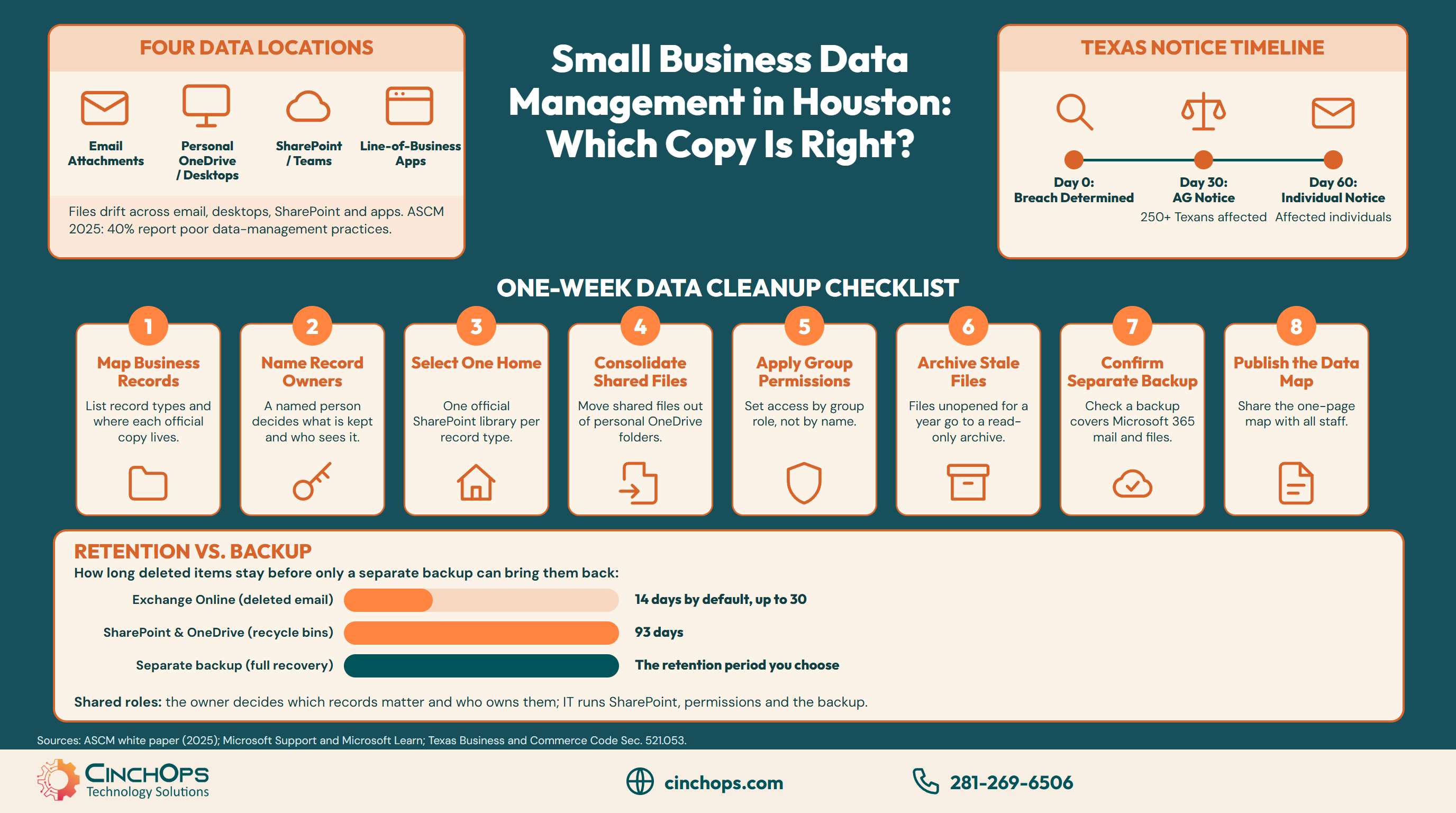
Most small businesses keep the same records in four places, and every copy drifts.
Business data in a small office usually lives in four places at once: email attachments, personal OneDrive folders and desktops, shared SharePoint or Teams sites, and line-of-business apps such as accounting or practice management software. Each copy drifts from the others, and the most complete version is often sitting in one person's OneDrive.
A typical drift looks like this. A shared drive stopped being used when the office moved to Microsoft 365, a Teams site appeared for every project, and the working files ended up on the owner's laptop. Nothing is lost yet, but nobody can say which copy counts.
Texas law adds a deadline. Under Texas Business and Commerce Code Section 521.053, a business that suffers a breach of sensitive personal information must notify affected individuals no later than the 60th day after it determines the breach occurred, and must notify the Texas Attorney General within 30 days when at least 250 Texans are affected. A Houston company that cannot say which folders held customer Social Security or account numbers spends that window searching instead of notifying.
The fix starts with a one-page map: each kind of record, where its official copy lives and who owns it. That page is the first step of any small business data cleanup.
A One-Week Data Cleanup Checklist for Small Businesses
Eight steps, each small enough to finish in a day or less.
A small business data cleanup takes about a week when it sticks to eight steps: map the records, name owners, pick one home per record type, move shared files out of personal folders, set group permissions, archive stale files, confirm backup coverage and publish the map.
- Map the records: list each kind of record, such as contracts, client files, invoices, HR files and project documents, and where its official copy lives today.
- Name an owner for each one, a person rather than a department, who decides what is kept and who can see it.
- Pick one home per record type, usually a SharePoint document library, and write it down.
- Move shared files out of personal OneDrive folders and desktops into that home, starting with anything a former employee worked on.
- Set permissions by group rather than by person, so access follows the role when people change jobs.
- Archive files nobody has opened in a year to a read-only location instead of deleting them.
- Confirm that a backup covers Microsoft 365 mail and files, not just laptops and servers.
- Publish the one-page map so staff know where to save and where to look.
Want help mapping where your data lives?
CinchOps can build the map and run the file moves for a 10-200 person office, then keep it tidy as part of managed IT.
Talk to CinchOpsThe first three steps take a morning with the owner and the office manager. Moving files takes the longest, so start with the record types that would hurt most to lose. Skip the urge to buy a new platform first: in most Microsoft 365 offices the cleanup runs on the SharePoint the business already pays for, once someone owns it.
Is Microsoft 365 Retention the Same as a Backup?
Recycle bins and retention windows buy time. A backup is a separate copy.
Microsoft 365 retention is not the same as a backup. Deleted SharePoint and OneDrive items stay in the recycle bins for 93 days, and Exchange Online keeps deleted email for 14 days by default, up to 30. After those windows close the items are gone, and under Microsoft's shared responsibility model the customer always keeps responsibility for its own data.
Those windows cover the everyday mistake, such as a file deleted on Monday and missed on Tuesday. They do not cover a deletion nobody notices until the window has closed, and they sit inside the same Microsoft 365 account as the files they protect.
The table compares the three safety nets a Microsoft 365 office usually has.
| Safety net | How long deleted items stay | What it covers | Who manages it |
|---|---|---|---|
| SharePoint and OneDrive recycle bins | 93 days | Files deleted by mistake and noticed within the window | Microsoft 365, automatically |
| Exchange Online deleted items | 14 days by default, up to 30 | Email deleted by mistake and noticed within the window | Microsoft 365, set by an admin |
| Separate backup | The retention period you choose | Mail and files restored after the windows close | The business or its IT provider |
The fix for this part is one question to whoever runs IT: does our backup cover Microsoft 365 mail and files, and when was a restore last checked? The CinchOps Microsoft 365 backup service keeps immutable, offsite copies outside the Gulf Coast flood zone and verifies the backups.
Messy data is a resilience problem. If nobody can say which copy is right, nobody can restore it, defend it or report on it when it counts.
How CinchOps Helps Houston Businesses Clean Up Their Data
CinchOps is a managed IT services provider based in Katy, Texas, serving small and mid-sized businesses across the Houston metro area. CinchOps specializes in cybersecurity, network security, managed IT support, VoIP, and SD-WAN for businesses with 10 to 200 employees.
- IT side: SharePoint services build the document libraries and group permissions, and OneDrive for Business management moves shared files out of personal folders.
- Backup: Microsoft 365 backup and backup and disaster recovery keep immutable, offsite copies outside the Gulf Coast flood zone.
- Business side: CTO/CIO services help the owner decide which records matter, who owns each one and how long to keep it.
- Local coverage: CinchOps works with businesses in Houston, Katy and Sugar Land, including CPA firms, law firms and engineering firms.
Messy data does not sort itself out, and it gets harder to untangle with every new hire and every new app. Pick one kind of record this week, give it a home and an owner, and talk to CinchOps if you want help with the rest.
Frequently Asked Questions
What is small business data management?
Small business data management is deciding where each kind of business record lives, who owns it, who can see it and how it comes back after a loss. For a 10-200 person Houston company it usually means one SharePoint home per record type, a named owner and a backup that covers Microsoft 365.
How do I clean up SharePoint and OneDrive for a small business?
Start with a one-page map of each record type and where its official copy lives. Then name an owner, pick one SharePoint library per record type, move shared files out of personal OneDrive folders, set permissions by group and archive files nobody has opened in a year.
How long does Microsoft 365 keep deleted files?
SharePoint and OneDrive keep deleted items in their recycle bins for 93 days from deletion. Exchange Online keeps deleted email for 14 days by default, and an admin can raise that to 30 days. After those windows close, only a separate backup can bring the items back.
What does small business data management cost in Houston?
Most of a first cleanup is staff time spread over about a week. Ongoing SharePoint, OneDrive and backup management usually sits inside managed IT, which CinchOps prices at a flat $100 to $250 per user per month, with backup and recovery included in the top-tier plan.
Who should own business data in a small company?
A named person should own each kind of record, not a department or the IT provider. The owner decides what is kept, who can see it and how long it stays. The IT provider runs the systems and the backup, and the owner makes the business calls.
Discover More
Resource
Sources
- ASCM, "Adapting to Uncertainty: Visibility and Traceability Strategies to Build Resilience," 2025
- Microsoft Support, "Restore deleted items from the site collection recycle bin"
- Microsoft Learn, "Recoverable Items folder in Exchange Online"
- Microsoft Learn, "Shared responsibility in the cloud"
- Texas Business and Commerce Code, Chapter 521, Section 521.053


