


Microsoft 365 Outage Root Cause: It Was Never Your Houston Office
What Microsoft’s Preliminary Outage Report Says – Four Questions To Ask Your Own IT After The Outage
It Was Never Your Houston Office
Microsoft's preliminary report traces the November outage to a server fix from July. Here is what Houston offices should take from it.
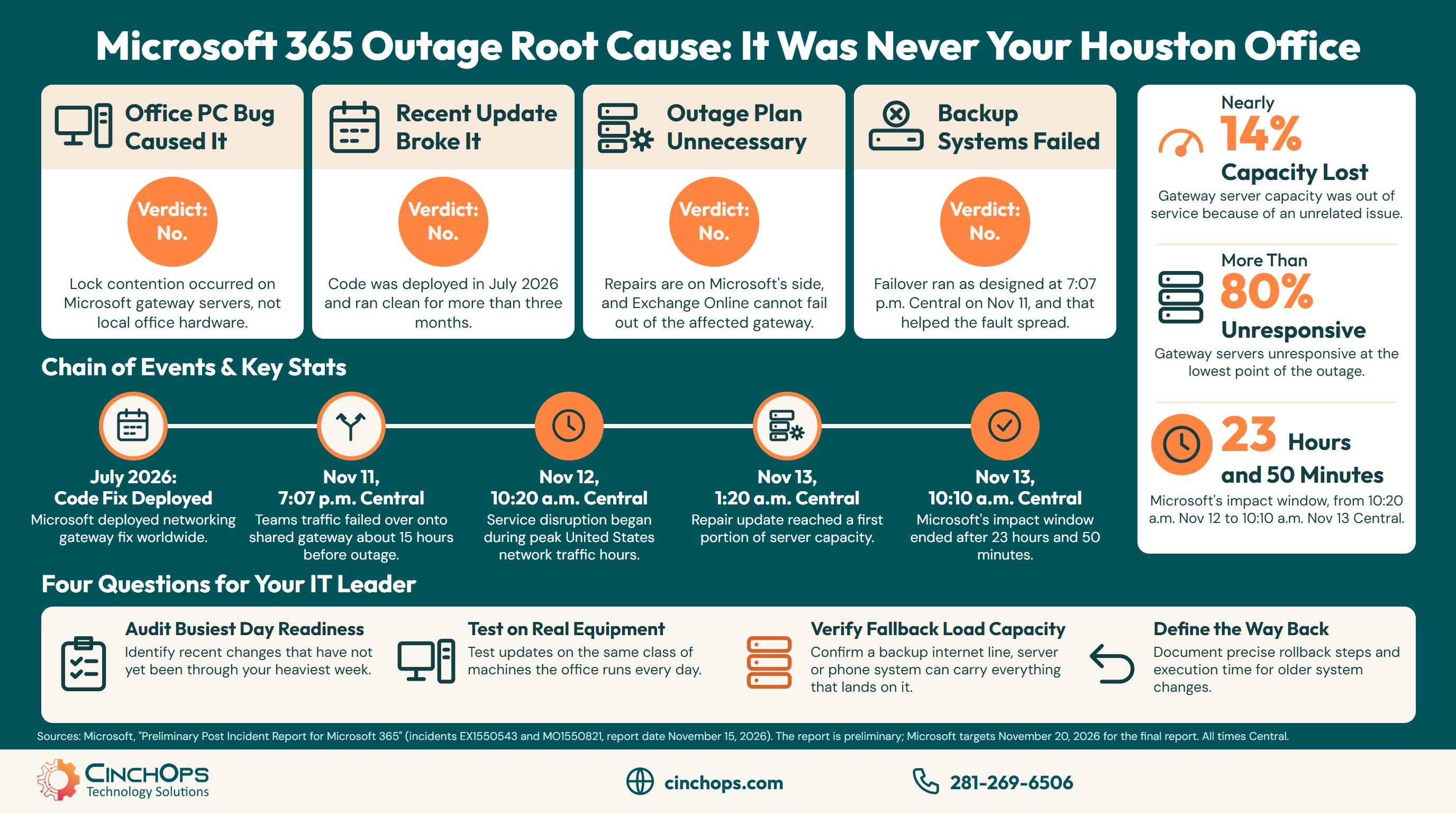
The Microsoft 365 outage root cause, according to Microsoft's preliminary Post Incident Report dated November 15, 2026, was a hidden defect in a fix that Microsoft built for its own networking gateway servers and began deploying in July 2026. Nothing in a Houston office caused it, and nothing in a Houston office could have fixed it.
If your staff spent Thursday, November 12 without Outlook, you probably heard several explanations before Friday lunch: a bad Windows update, a change Microsoft pushed that morning, a backup system that never kicked in. The report, filed under incidents EX1550543 and MO1550821, answers each of them, and the answers differ from the guesses.
This post sets four common assumptions against what the report says, with every time converted to Central. CinchOps provides managed IT support specifically for Houston and Katy businesses with 10 to 200 employees, with help desk requests answered in under 15 minutes.
Did a Windows Bug on Office PCs Cause the Microsoft 365 Outage?
No. The defect lived only on Microsoft's own gateway servers.
A Windows bug on office PCs did not cause the Microsoft 365 outage of November 12, 2026. Microsoft's preliminary report says the defect came from a fix prepared specifically for Microsoft 365 networking gateway servers, and that neither the defect nor the fix applies to broader Windows deployments. Houston businesses have no patch to install for it.
The networking gateway is the front door of Microsoft's cloud. The report describes it as the system that "fronts many Microsoft 365 services," so a connection from Outlook passes through it before it reaches a mailbox. Those gateway machines run Windows, which is why headlines called this a Windows bug. The software is Windows. The place is a Microsoft data center.
Lock contention means several tasks inside a program are waiting on each other for the same shared resource. Microsoft says lock contention inside an internal Windows process used up the processor and memory on the gateway servers under certain load, until the servers stopped responding.
The report names three technical factors and no attacker. During the outage, Microsoft's status updates said the company had seen no indication of malicious activity. The preliminary report also lists no action for customers to take, so keep installing normal Windows updates on your usual schedule.
Did a Change Microsoft Made That Week Break Microsoft 365?
No. The change went live in July 2026 and ran clean for more than three months.
The change behind the Microsoft 365 outage began deploying in July 2026, according to Microsoft's preliminary report. It reached every region over several weeks with no issues observed, then ran worldwide for more than three months without impact before the outage began on November 12, 2026.
Microsoft's load testing missed the defect. The report blames the traffic mix and the hardware in its labs: the contention gets worse on machines with more cores and newer hardware, and the tests tended to use weaker hardware with fewer cores. The Register's headline on the report put it plainly, calling the cause a "software defect introduced in July fix."
The age of the change also slowed the repair. Because the defect was months old, Microsoft says its normal rollback, flighting and feature flags could not quickly revert it. Engineers wrote a new update that returned the code path to the previously known good state in Windows. At 1:20 a.m. Central on Friday, November 13, that update reached a first portion of capacity. Microsoft then took groups of servers out of service, applied the update and restarted them, at times 50% or more of a region at once.
Did Microsoft's Backup Systems Fail to Kick In?
No. They ran as designed, and that spread the fault.
Microsoft's failover systems did kick in during the outage, and the preliminary report says their activity helped the failure spread. Teams traffic failed over onto the gateway shared with Exchange Online about 15 hours before the outage, and automatic rerouting then pushed the same load onto fewer and fewer servers.
Microsoft's automated failover moved Teams traffic at 7:07 p.m. Central on Wednesday, November 11. Microsoft calls that kind of failover part of normal operations. At the same time, nearly 14% of gateway server capacity was out of service because of an unrelated issue from the previous day. The report says the service had enough headroom that the lost capacity had no impact on its own.
Together, the extra load and the reduced capacity exposed the July defect. Requests built up until servers stopped responding, and Microsoft sets the start of impact at 10:20 a.m. Central on Thursday, during the peak window of traffic in the United States. Traffic management then moved users to healthy servers, which raised the odds of the same failure there. In less than two hours the defect had been hit across the fleet, and at the lowest point more than 80% of servers were unresponsive.
Two more safeguards fell short. The barriers between regions did not stop the cascade because of what Microsoft calls "a separate issue," which the preliminary report does not explain. Restarted servers were also overwhelmed by waiting traffic as soon as they returned, and Microsoft says its automated recovery was not designed for a failure that broad.
Does Microsoft's Fix Mean Houston Offices Can Skip an Outage Plan?
No. The repairs are on Microsoft's side, and email had no way around this failure.
Microsoft's fix does not replace an outage plan for a Houston office. The preliminary report lists five completed repairs on Microsoft's side and no action for customers. It also says Exchange Online, unlike Teams, OneDrive, SharePoint and Office apps, cannot fail out of the affected gateway for scale reasons.
Microsoft's window runs from 10:20 a.m. Central on Thursday, November 12 to 10:10 a.m. Central on Friday, November 13, which is 23 hours and 50 minutes. Downdetector reports began climbing at 11:39 a.m. Central, 79 minutes after Microsoft's own start time. For a Houston law firm with a filing deadline, a CPA practice or an engineering firm with a bid due, that window covered one full business day and the start of the next.
Three items are still open for the final report: the separate issue that let the failure cross regions, the full list of repair items, and the longer-term changes from Microsoft's full root cause analysis.
The report is also a free case study. Each thing that failed at Microsoft has a small-office version, and each one turns into a question an owner can put to whoever runs their IT.
- Busiest day. List the changes made in the last six months, and mark the ones that have not yet been through month-end, tax season or your heaviest week.
- Real equipment. Test updates on the same class of machines and the same workload the office runs every day.
- Fallback load. When a backup internet line, server or phone system takes over, confirm it can carry everything that lands on it.
- Way back. For any change older than a few weeks, write down how it would be undone and how long that takes.
For what staff should do in the first hour of an outage, see the Microsoft 365 outage plan for Houston businesses. For the hour-by-hour record of November 12 and 13, see the full Microsoft 365 outage timeline.
Microsoft had failover, spare capacity and a tested change, and still lost email for most of a day. No small business is going to out-engineer that. Know which work stops when email stops, and decide ahead of time how you will reach your clients without it.
Want an outage plan on paper before the next one?
CinchOps business continuity and disaster recovery covers the hours a vendor outage takes away, with a written plan your staff can follow.
See CinchOps business continuity →How CinchOps Can Help After the Microsoft 365 Outage
CinchOps is a managed IT services provider based in Katy, Texas, serving small and mid-sized businesses across the Houston metro area. CinchOps specializes in cybersecurity, network security, managed IT support, VoIP, and SD-WAN for businesses with 10 to 200 employees.
During the November outage, CinchOps logged Microsoft's updates as they were posted, kept clients informed in plain English and verified client systems as service came back. The same four jobs apply to any vendor outage.
- Through managed IT support, help desk requests are answered in under 15 minutes, so staff get a real answer about whether a problem is theirs or the vendor's.
- With business continuity and disaster recovery, CinchOps writes down which work stops when a cloud service stops and how staff reach clients without it.
- Through cloud services and vCIO services, CinchOps reviews changes against the four questions above before they go live.
- CinchOps cybersecurity services include 24/7 threat monitoring, which helps separate a vendor outage from an attack while it is happening.
- CinchOps supports offices across Houston, Katy and Sugar Land, including law firms, CPA firms and engineering firms.
Microsoft will publish its final report and move on to the next release. A Houston office should use the same week to write down what Thursday, November 12 cost and what would have made it cheaper. If that plan does not exist yet, talk to CinchOps about putting it on one page.
Frequently Asked Questions
What caused the Microsoft 365 outage on November 12, 2026?
Microsoft's preliminary Post Incident Report names three factors: a hidden defect in a fix built for its own networking gateway servers and deployed from July 2026, a surge in load after Teams traffic failed over onto the same gateway, and nearly 14% of gateway server capacity being out of service.
Do Houston businesses need to patch Windows PCs because of the Microsoft 365 outage?
No. Microsoft's preliminary report says the defect came from a fix prepared specifically for Microsoft 365 networking gateway servers, and that neither the defect nor the fix applies to broader Windows deployments. The report lists no action for customers. Keep installing normal Windows updates on the usual schedule.
How long did the Microsoft 365 outage last?
Microsoft's report puts the start at 4:20 p.m. UTC on Thursday, November 12, 2026 and the end at 4:10 p.m. UTC on Friday, November 13. In Central time that is 10:20 a.m. Thursday to 10:10 a.m. Friday, a window of 23 hours and 50 minutes.
Why did Teams come back before Outlook?
Microsoft runs two independent network gateway systems. Teams, OneDrive, SharePoint and Office apps were able to fail out of the faulty gateway, so they were partially restored earlier. Microsoft's preliminary report says Exchange Online, which carries Outlook email, cannot fail out of that gateway for scale reasons.
When will Microsoft publish the final outage report?
Microsoft says a final Post Incident Report will follow within five business days of full resolution and will replace the preliminary one. The repair table in the preliminary report targets November 20, 2026 for a full list of repair items, and says longer-term changes will be in the final report.
What does Microsoft 365 outage planning cost in Houston?
Managed IT in Houston commonly runs $100 to $250 per user per month. The published CinchOps rate is $100 to $250 per user per month, flat and month-to-month, with no long-term contracts, hidden fees or cancellation penalties. Outage planning is part of that managed service.
Discover More
Resource
Sources
- Microsoft, "Preliminary Post Incident Report for Microsoft 365," incidents EX1550543 and MO1550821, report date November 15, 2026 (Microsoft 365 admin center, Service health)
- Microsoft service health status page and @MSFT365Status updates, November 12 to 13, 2026
- The Register, "Microsoft blames monster email outage on software defect introduced in July fix" (November 16, 2026)
- Office Watch, "Microsoft 365 outage: what went wrong, in plain English" (November 2026)
- Techaeris, "Microsoft 365 Outage Takes Down Outlook, Teams and Copilot" (November 12, 2026)


