


Microsoft 365 Outage Timeline: What Houston Businesses Learned
Checking Your Systems After Microsoft 365 Comes Back – What To Watch For In Microsoft’s Post-Incident Report
What Houston Businesses Learned
Outlook, Teams and Copilot failed from 11:39 a.m. Central on November 12 into the next morning. Here is the timeline and the plan you need.
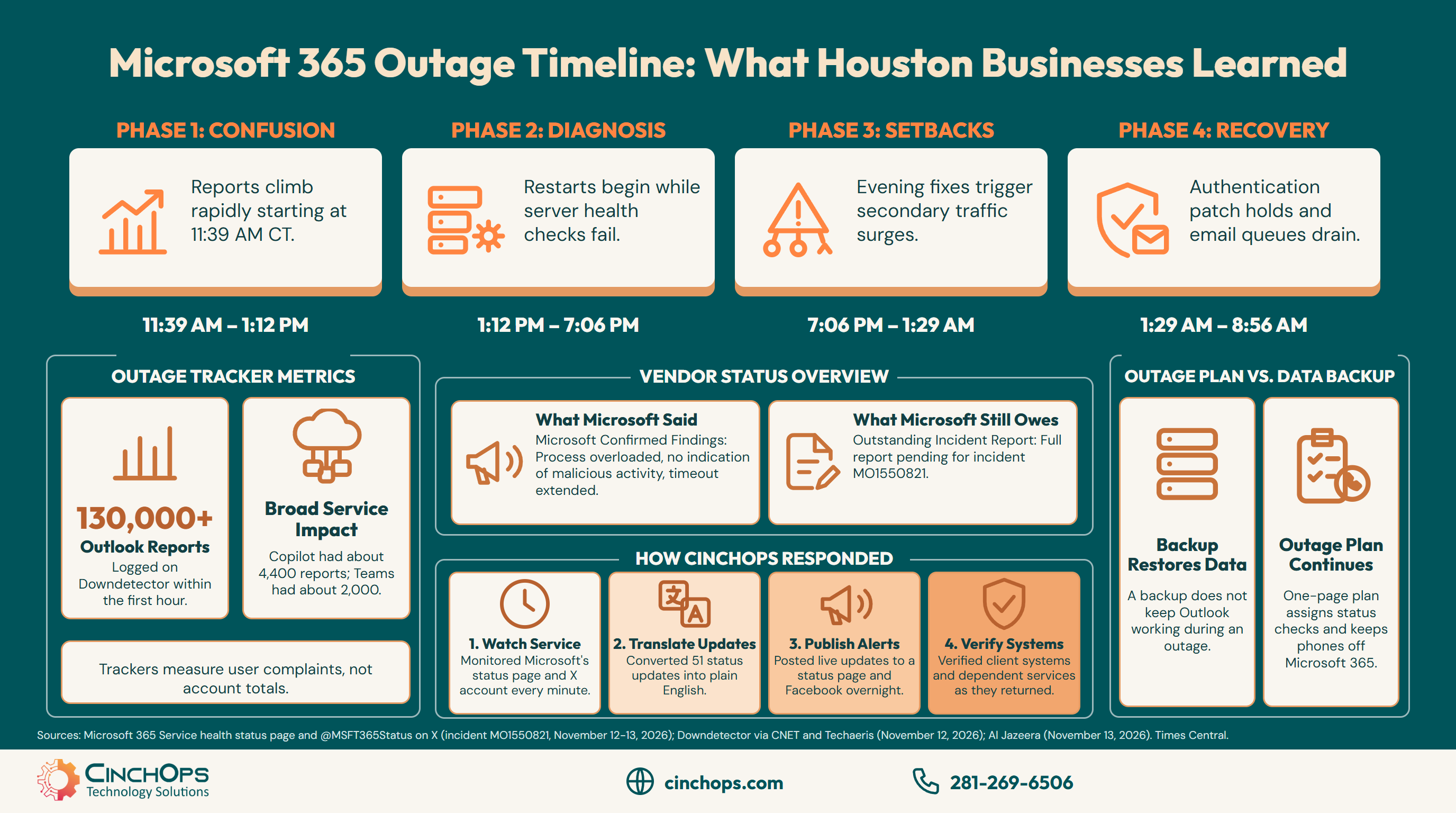
The Microsoft 365 outage timeline runs from 11:39 a.m. Central on Thursday, November 12, 2026, when Outlook problem reports started climbing on Downdetector, to 8:56 a.m. Friday, when Microsoft reported sustained improvement. For roughly 21 hours, Houston offices had trouble reaching email, Teams calendars, shared files and Copilot.
Microsoft posted 51 updates across its status page and its @MSFT365Status account on X during that stretch, and CinchOps logged every one of them as it appeared. Read in order, they show an outage that moved through four phases: a confused first hour, an afternoon of diagnosis, an evening when the fixes made things worse, and an overnight recovery that finally held.
The outage hit Houston at lunch on a Thursday, carried through the evening when law firms, CPA practices and engineering firms usually catch up on email, and did not settle until the next workday was already under way. Anyone who tried to plan around it was planning around a moving target.
CinchOps provides managed IT support specifically for Houston businesses with 10 to 200 employees that run on Microsoft 365, with help desk requests answered in under 15 minutes at a flat $100 to $250 per user per month.
The Microsoft 365 Outage Lasted About 21 Hours From First Report to Recovery
Ten moments from Microsoft's own updates, in Central time, from the first acknowledgment to the morning it held.
The Microsoft 365 outage of November 12-13, 2026 started with Exchange Online mailbox failures in the Americas at 11:54 a.m. Central, spread to every region within 13 minutes, and was traced at 7:06 p.m. to an overloaded process on Microsoft's servers. Recovery held after 1:29 a.m. Friday.
The afternoon was a run of restarts. At 1:12 p.m. Microsoft paused all deployments, moved traffic off the affected systems and began restarting servers. By 2:19 p.m. it had tied the failing health checks to one component that processes server health, and by 3:00 p.m. a different way of running those checks had brought part of the fleet back. Servers kept dropping out again once traffic reached them.
The evening was harder. Microsoft named the cause at 7:06 p.m.: the process that sets up secure connections on the affected servers was getting overwhelmed, and it began rolling back a recent network change that lined up with the start. Regions came back around 8:14 p.m., and then, at 9:07 p.m., Microsoft said the capacity change it had applied was not working as expected. By 10:57 p.m. it had found that its own fixes had set off a surge of traffic from its routing services.
Recovery came overnight. A patch to an upstream authentication and routing component showed positive results at 1:29 a.m., early stabilization followed at 3:10 a.m. along with a 48-hour email timeout so delayed messages would be held, and by 6:58 a.m. Microsoft reported broader recovery in North America. Its 8:56 a.m. update still listed the service as degraded.
More Than 130,000 Outlook Problem Reports Hit Downdetector in the First Hour
What the outage trackers and the news coverage counted, and where the numbers came from.
Downdetector logged more than 130,000 Outlook problem reports and nearly 50,000 Microsoft 365 reports in the first hour of the November 12 outage, according to CNET, with reports coming from 74 countries and territories, according to Al Jazeera. Copilot and Teams drew smaller counts.
Techaeris put Outlook at 128,874 reports by 12:09 p.m. Central and counted about 4,400 Copilot reports and about 2,000 Teams reports near noon Central. Those figures are user complaints, not a count of affected accounts, so the true number of people who could not open their mail is unknown. They do show how fast the problem spread: reports started climbing at 11:39 a.m. Central and Microsoft confirmed the outage 15 minutes later.
For a Houston office, the number that matters is time. Most of the business day on Thursday was affected, and email that should have arrived Thursday afternoon was still trickling in Friday morning, BleepingComputer reported, as Microsoft worked through its queues.
Microsoft Named the Cause but Still Owes a Full Post-Incident Report
What Microsoft confirmed during the outage, and what to watch for next in the admin center.
Microsoft said the November 12 outage came from an overloaded process that sets up secure connections on its servers, found no indication of malicious activity, and extended its email timeout window to 48 hours. It has promised a full Post-Incident Report with the root cause and defense-in-depth steps once recovery is complete.
The next step belongs to Microsoft. Admins should watch incident MO1550821 in the Microsoft 365 admin center for the resolved notice and the Post-Incident Report, which should explain why fixes applied on Thursday evening set off a second wave of traffic. That report is also the document to keep on file if a client, insurer or auditor later asks why a deadline slipped.
As of Microsoft's latest update, the outage was not a breach, but it was a phishing opportunity. Messages asking staff to re-verify a mailbox or sign in again after the outage should be treated as suspect and sent to whoever handles cybersecurity before anyone clicks.
CinchOps Tracked Every Microsoft Update and Kept Clients Informed Until Systems Returned
What CinchOps did for clients and the wider Houston business community from the first report to recovery.
CinchOps tracked all 51 Microsoft updates during the November 12-13 outage, published each one in plain English on a live status page and on Facebook, and kept its clients updated through the night. As service returned, CinchOps verified that client systems were reconnecting and that dependent services were working normally.
The tracking ran on a simple rule: check Microsoft's status page and its X account every minute, and post nothing that Microsoft had not said. Each update went onto the CinchOps Microsoft 365 outage status page within minutes, with the newest update on top and every earlier one kept in order underneath. More than a dozen of those updates also went out on Facebook overnight, each with the time, the source and when Microsoft expected to post again.
By about 9:00 a.m. Central on Friday, November 13, CinchOps clients were reporting their systems back online, while Microsoft's own status page still listed the service as degraded. That gap is normal in a recovery of this size, and it is the reason to check your own systems instead of waiting for Microsoft to declare the incident closed.
An Outage You Cannot Control Needs a Different Plan Than Backup
Where disaster recovery ends and an outage response plan begins, for offices across Houston, Katy and Sugar Land.
A disaster recovery plan restores your data and systems after something breaks. An outage response plan keeps a business working while a vendor such as Microsoft fixes a failure you cannot touch. The November 12 outage needed the second plan, and most small offices only have the first.
Backup still matters. Rushed staff delete the wrong folder or reset passwords during an outage, and a verified copy of Microsoft 365 mail and files outside Microsoft is how that gets undone. A backup does not open Outlook while Microsoft's servers are overloaded, though, and on November 12 nothing in a Houston office could.
An outage response plan fits on one page. It names who checks Microsoft's status and tells everyone else, so nobody starts local fixes. It lists the clients and partners to call when email is down, on paper or on a phone, not only in Outlook. It keeps the main phone line on a system that does not sign in through Microsoft 365. And it marks which work can wait a day and which cannot, because a law firm with a filing deadline and an engineering firm with a bid due feel a 21-hour outage very differently.
Run the numbers once. The CinchOps IT outage calculator puts a dollar figure on a lost afternoon, which makes the hour it takes to write the plan an easy decision.
Nobody in a Houston office could fix Microsoft's outage, and nobody needed to. What they needed was someone watching every update, telling them the truth in plain English, and checking their systems the moment service came back. Learn from this outage and plan for the next one.
Would your office know what to do during the next Microsoft 365 outage?
CinchOps business continuity and disaster recovery covers both halves: immutable, verified backups of Microsoft 365 mail and files, and a written plan for the hours a vendor outage takes away.
See CinchOps business continuity →How CinchOps Can Help Houston Businesses Through the Next Vendor Outage
CinchOps is a managed IT services provider based in Katy, Texas, serving small and mid-sized businesses across the Houston metro area. CinchOps specializes in cybersecurity, network security, managed IT support, VoIP, and SD-WAN for businesses with 10 to 200 employees.
CinchOps handles some vendor issues directly, monitors others until the vendor fixes them, and judges how each one affects a client's business. On November 12 that meant monitoring Microsoft, keeping clients informed, and verifying their systems on the way back. The pairing below shows where each outage problem meets a CinchOps service.
- Managed IT support answers help desk requests in under 15 minutes, so the first question in an outage gets a real answer early.
- A VoIP phone system that does not depend on Microsoft 365 keeps the main line, call forwarding and the voicemail greeting working when Outlook and Teams do not.
- Cybersecurity services include 24/7 threat monitoring, and outage-themed phishing gets the same attention as any other attack.
- Backup and recovery covers Microsoft 365 mail and files with immutable, verified copies, included in the top-tier plan.
- CinchOps vCIO services can turn the one-page outage plan into a working document for offices across Houston, Katy and Sugar Land, including law firms, CPA firms and engineering firms.
Microsoft will have another long outage, and it will land on someone's deadline. Write the one-page plan while November 12 is fresh, and talk to CinchOps if you want someone watching the next one for you.
Frequently Asked Questions
How long did the November 2026 Microsoft 365 outage last?
About 21 hours. Downdetector reports started climbing at 11:39 a.m. Central on November 12, 2026, and Microsoft reported sustained improvement at 8:56 a.m. Central on November 13, while still listing the service as degraded. Some delayed email kept arriving Friday morning as Microsoft cleared its queues.
What caused the Microsoft 365 outage on November 12?
Microsoft said the process that sets up secure connections on its affected servers became overwhelmed, and that fixes applied Thursday evening set off a surge of traffic from its routing services. A patch to an authentication and routing component held overnight. Microsoft has promised a full Post-Incident Report with the root cause.
Was the outage a cyberattack?
No. Microsoft said at 10:11 p.m. Central on November 12 that there was no indication the outage resulted from malicious activity, and repeated that through recovery. Treat any email asking staff to re-verify a mailbox or sign in again after the outage as possible phishing and report it before anyone clicks.
Will email sent during the outage still arrive?
Probably. Microsoft extended its email timeout window to 48 hours so delayed messages would be held instead of bouncing, and BleepingComputer reported delayed mail trickling in as service recovered. For anything time-sensitive sent on Thursday afternoon, call the recipient to confirm it arrived instead of waiting.
Does a backup protect a business from a Microsoft 365 outage?
Only partly. A Microsoft 365 backup restores mail and files after deletion, ransomware or a mistake, but it does not keep Outlook working while Microsoft's servers are down. For the outage itself, a business needs a one-page response plan, a phone line outside Microsoft 365 and a printed client contact list.
What does outage planning and monitoring cost a Houston business?
Managed IT for Houston businesses is usually priced per user per month. The CinchOps rate is $100 to $250 per user per month, flat, with help desk requests answered in under 15 minutes and 24/7 threat monitoring. Microsoft 365 backup and recovery are included in the top-tier plan.
Discover More
Resource
Sources
- Microsoft, Microsoft 365 Service health status page, incident MO1550821 (updates November 12-13, 2026)
- Microsoft 365 Status (@MSFT365Status) on X, incident EX1550543 and MO1550821 posts (November 12-13, 2026)
- CNET, Jon Reed, "Is Microsoft Outlook Down? What We Know Now" (live coverage, November 12, 2026)
- Techaeris, "Microsoft 365 Outage Takes Down Outlook, Teams and Copilot" (November 12, 2026)
- SFGATE, Matthew Brown, "Microsoft reports global outages, thousands of Outlook users affected" (November 12, 2026)
- Al Jazeera, "Microsoft hit by global outages: What happened and why?" (November 13, 2026)
- BleepingComputer, "Massive Microsoft 365 outage disrupts Outlook, Teams, Copilot worldwide" (November 2026)

