


IT Integration After an Acquisition in Houston: 12 Steps for 2026
What To Lock Down In The First 30 Days After You Acquire A Company – You Bought The Company. Did You Buy Its Admin Passwords Too?
12 Steps for 2026
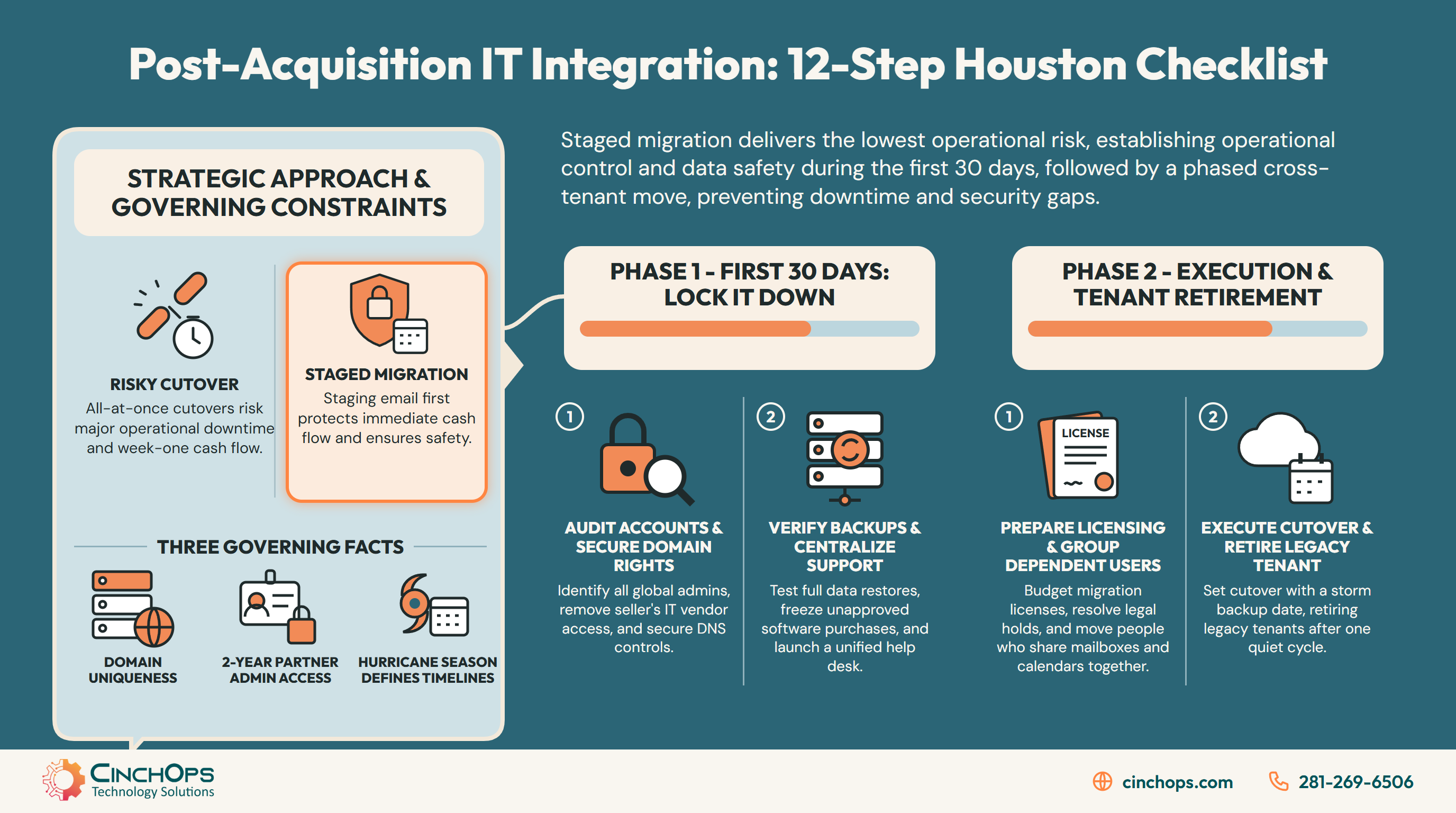
Twelve steps Houston owners can run in order, so the deal adds a company without adding an outage.
The deal closed and you now own a second set of laptops, a second domain and a second set of unknowns. IT integration after an acquisition, for a small business, comes down to one early choice: merge everything at once, run two systems forever, or stage the move with email first. These twelve steps sequence the IT side so nothing breaks and nothing gets inherited that should not be.
Most Houston owners who buy a competitor, a supplier or an add-on shop in Katy or Sugar Land inherit the same bundle: a second Microsoft 365 tenant, a domain registered to somebody's personal email, a small outside IT vendor who still holds admin rights, and backups nobody has tested. None of that shows up on the purchase agreement. All of it shows up the first time someone tries to send an invoice from the new company's address.
Vendor documentation sets most of the order. Microsoft Learn states that only one tenant can own a domain, so the acquired company's email domain cannot live in both tenants during the move. A partner admin relationship (GDAP) can last up to two years and auto-extends by six months until someone turns that off, per Microsoft's partner FAQ. And on the Gulf Coast, the National Hurricane Center's Atlantic season runs June 1 to November 30, which is half the calendar for any cutover weekend you pick.
CinchOps runs this sequence for Houston companies with 10 to 200 employees that have just absorbed another business, with a named engineer, a help desk that answers in under 15 minutes, and one flat rate per user instead of a separate migration project fee.
Should You Merge Everything at Once, Run Two Systems or Stage the IT After an Acquisition?
A staged integration, with access and backups locked down first and email moved as the first system, carries the least risk for a small business that just acquired another company.
The table below compares the three approaches owners reach for after closing, scored on what each one does to week-one cash flow, security exposure, staff disruption and cost.
| What you are judging | Merge everything at once | Run two systems indefinitely | Staged, email first |
|---|---|---|---|
| Week-one cash flow | At risk: invoices and payment emails move the same weekend as everything else, so one failed step stops billing | Safe at first; customers keep the old addresses and nothing changes | Protected: billing addresses move only after the domain and admin accounts are under your control |
| Security exposure | High during the cutover; unknown admin accounts and the seller's vendor access travel into your tenant | Grows over time; two sets of admins, two patch schedules, two places for a phishing email to land | Lowest; inherited access is removed before anything is merged |
| Staff disruption | Everyone changes email, files and logins on one Monday | Low, but staff juggle two calendars and two sets of credentials for good | Spread out: one change at a time, with a help desk number both teams know |
| What it costs | One large project invoice plus overtime when something breaks | Two sets of Microsoft 365 licenses and two IT bills with no end date | Per-user migration licensing plus a defined project; the old tenant's bill stops at the end |
| Who it fits | A seller with fewer than a handful of users and nothing on legal hold | A holding company that will resell the business or keep it fully separate | Most Houston owner-operators folding a second company into the first |
Staged integration means you take control of the acquired company's admin accounts, IT vendor access, domain and backups before you move a single mailbox, then migrate email and identity, then files, then shut down the old tenant.
Merging everything at once looks efficient on a whiteboard. In practice the weekend cutover is when you discover the mailbox on legal hold, the shared calendar the front desk runs on, and the accounting login tied to an ex-employee's address. Every one of those becomes a Monday-morning emergency in front of staff who are already nervous about the new owner.
Running two systems forever fails more quietly. Nothing breaks in month one. By month twelve you are paying for two Microsoft 365 tenants, two antivirus contracts and two IT vendors, and the acquired company's admin accounts are still controlled by people who never worked for you. Separate stays expensive and gets less secure every quarter.
How this 12-step list was built
The order of the twelve steps comes from three sources. The first is Microsoft Learn's cross-tenant mailbox migration guide (last updated March 26, 2026), which sets hard prerequisites: licensing, holds, domain ownership and delegate batching. The second is Microsoft's Partner Center documentation on granular delegated admin privileges (GDAP), which governs how long an outside IT vendor keeps admin access to a tenant. The third is the order CinchOps works in during onboarding audits, which is where most of the access and backup steps come from. None of the steps is ranked by a survey or a review dataset, because no public dataset measures small-business acquisition outcomes in Houston.
One finding from reading the Microsoft documentation end to end: most of the cross-tenant migration guide is about what does not move. Mailboxes on hold, signatures, Teams meeting links, Outbox items and cross-tenant delegate permissions all need a plan before the move starts, and the plan is what separates a quiet migration from a loud one.
What Should You Lock Down in the First 30 Days After You Acquire a Company?
Steps 1 to 6 put the acquired company's admin accounts, IT vendor access, domain, backups, software purchases and help desk under the buyer's control before any system is merged.
The first 30 days after an acquisition are for control, with no migration yet: find out who can change what, remove access the seller's people and vendors no longer need, and prove the data can be restored.
In 35+ years doing this, the acquisitions that go sideways are rarely the ones with old hardware. They are the ones where the buyer starts moving mailboxes before anyone knows who the global admins are. Each step below opens with why it matters, then says what your IT provider should confirm and what to get in writing.
Step 1 - Know every admin account before the first week ends
An acquired Microsoft 365 tenant usually has more global admins than the seller remembers, and each one can reset passwords, read mail and export data. Former employees, the owner's spouse and a vendor's shared login are common. Until you have the list, you cannot tell whether a change next month came from your team or from someone who still has the keys. This step costs an afternoon and decides the risk level of every step after it.
Your IT provider should be able to hand you one list of every account that can change something at the acquired company: Microsoft 365 admins, plus the domain registrar, DNS host, firewall, backup console and accounting system. Each account on it needs an owner and a decision next to it: keep, reduce or remove. The accounts you keep should end up under your company's control, not the seller's.
Get it in writing: the full admin list, the keep, reduce or remove decision for each account, and the date the review was finished.
Step 2 - Take the seller's IT vendor out of your tenant on your schedule
A partner admin relationship in Microsoft 365, called GDAP, can last up to two years and auto-extends by six months unless someone disables auto-extend, according to Microsoft's GDAP FAQ. That means the acquired company's outside IT vendor can keep admin access long after their contract ends. Microsoft also notes that removing the partner's tenant privileges does not remove roles they hold on an Azure subscription; those stay until you remove them separately.
Before anyone calls the seller's vendor, ask your IT provider to confirm what that vendor's contract says about notice and data return, and what admin access the vendor still holds in Microsoft 365 and in any Azure subscription. Access the business no longer needs should end on a date you choose, not whenever the relationship happens to expire.
Get it in writing: every access the seller's vendor held, the date each one ended, and anything left in place on purpose.
Step 3 - Own the domain and DNS before you touch email
Microsoft Learn states that only one tenant can own a domain, so the acquired company's email domain has to be released by one tenant before the other can claim it. If the registrar account sits under a departed office manager's Gmail, you cannot do that cleanly. Domain control also decides who can redirect your website and your mail, which makes it the first login to secure.
Your IT provider should confirm that the registrar account sits under a company-owned login with MFA, that a full copy of the current DNS records exists before anything changes, and which domain will be primary after the merge. None of this touches email yet. It gives the email move later a clean starting point.
Get it in writing: who owns the registrar login, where the DNS copy is stored, and which domain is primary after the merge.
Step 4 - Prove the acquired company's backups restore before you need them
A Houston business that acquires another company between June 1 and November 30 is integrating systems during the Atlantic hurricane season, as the National Hurricane Center defines it. Small sellers often keep backups on a device in the same office, which means the same flood zone as the server. A backup report that says "successful" proves the job ran; a restore proves you can get a file back. Run the restore while the seller's staff still remember where things live.
Ask your IT provider to prove a restore, not just show a backup report: a file, a mailbox and a full server brought back to a test location, with the time it took. They should also confirm that a copy lives outside the Gulf Coast flood zone where a compromised admin cannot delete it, and whether Microsoft 365 mail and OneDrive are backed up at all.
Get it in writing: what was restored, how long it took, where the offsite copy lives, and what is not backed up today.
Step 5 - Pause new software buying at the acquired company until the plan is set
Every subscription the acquired company signs after closing becomes a contract you will have to migrate, renew or cancel later. Department heads at a newly bought business often fix their own problems with a credit card, especially when they are unsure how the new owner will decide. A short purchasing pause, announced kindly, keeps the software list from growing while you are still counting it.
Your IT provider and your finance lead should be able to produce one list of every software vendor the acquired company paid in the last year, marked as overlap with your tools, unique to the acquired company, or unknown. Until the integration plan is approved, new requests should go to one named person instead of a company card.
Get it in writing: the software list with a status for each vendor, and who approves new purchases until the plan is set.
Step 6 - Give both teams one help desk number in week one
Staff at an acquired company report problems to whoever they reported to before the deal, which after closing is often a vendor who no longer has a contract. Tickets go nowhere, workarounds appear, and the new owner hears about it at the first all-hands. A single help desk number for both companies, published in the welcome email, gives you one queue of what is actually broken before the migration starts.
Your IT provider should give both companies one way to ask for help from day one, and be able to show you, after two weeks, what the acquired company's tickets have in common. The seller's vendor should also hear, in writing, where requests go now.
Get it in writing: the help desk contact both teams were given, the date the seller's vendor was told, and a two-week summary of the acquired company's tickets.
Six steps, no mailbox moved yet, and the acquired company is already safer than it was the day before closing. Owners who skip this stretch usually come back to it after the first surprise, at a worse moment.
How Do You Move Email, Files and Identity Without Breaking the Acquired Company?
Steps 7 to 12 move the acquired company's Microsoft 365 mail, files and accounts into the buyer's tenant, then shut the old tenant down only after nothing depends on it.
A Microsoft 365 tenant-to-tenant migration is the move of mailboxes, OneDrive files and user accounts from one company's Microsoft 365 tenant into another's, and it requires a per-user Cross Tenant User Data Migration license for every user moved.
Email goes first because it is the system customers and vendors see. Once invoices, quotes and payment confirmations come from one domain, the acquisition looks finished to the outside world even while files and line-of-business apps are still moving. Houston buyers in construction, oil and gas services and professional services feel this most, because their customers pay against email-delivered invoices.
Step 7 - Budget the Microsoft migration license before you pick a date
Microsoft Learn says cross-tenant migrations require a per-user license, billed as a one-time fee, and that Microsoft does not offer exceptions to the requirement. The Cross Tenant User Data Migration add-on is sold for Microsoft 365 Business Basic, Standard and Premium among other plans, and the same license covers the OneDrive move. Without it, each mailbox move fails with a license error, which is a bad thing to learn on a Saturday night.
Ask your IT provider how many users will actually move, since departed staff can often be archived instead, and what the migration license costs at today's price. That number belongs in the integration budget before anyone picks a date.
Get it in writing: the count of users moving, the license cost, and confirmation that every moving user is licensed in both tenants.
Step 8 - Settle legal holds with counsel before the mailbox move
Microsoft Learn states that mailboxes on any type of hold are not migrated cross-tenant, and the move for those mailboxes is blocked. Acquired companies carry litigation holds more often than buyers expect: an old employment claim, a warranty dispute, a records-retention rule. Removing a hold to make a migration work is a legal decision, and it belongs with the attorney who handled the deal.
Your IT provider should hand counsel a list of every mailbox under any kind of hold in the acquired company, and counsel should decide, mailbox by mailbox, whether it stays where it is, gets exported or is released. Held mailboxes stay put until that decision is made, and the old tenant's end date follows from it.
Get it in writing: the hold list and counsel's decision for each mailbox.
Step 9 - Move people who share mailboxes and calendars in the same batch
Microsoft Learn says cross-tenant mailbox and calendar permissions are not supported, so people who manage each other's mail have to move together. An owner whose calendar someone else manages, or a shared dispatch calendar a whole field crew reads, stops working if half the people move on Friday and half the next week. Grouping by who-works-with-whom avoids a week of "I can't see your calendar."
Ask your IT provider to group the move around who works with whom, not around departments: people who manage each other's mail or calendars, shared calendars, and the dispatch, billing and front-desk mailboxes with the people who use them most. People who share mail and calendars should move on the same day.
Get it in writing: the move batches, and which shared mailboxes and calendars travel with each one.
Step 10 - Tell staff exactly what will not come across
According to Microsoft Learn, mailbox signatures are not migrated cross-tenant, Teams meeting links are not updated and must be recreated, and items left in the Outlook Outbox do not move. None of that is a failure; it is how the migration works. Staff who hear it in advance treat it as a checklist. Staff who find it on Monday treat it as proof the new owner broke something.
Your IT provider should give staff a short note before the move that names what will not come across, such as signatures, recurring Teams meetings and anything left in the Outbox, along with the new standard signature. Staff who hear it in advance treat it as a checklist.
Get it in writing: the note sent to staff and the date it went out.
Step 11 - Pick a cutover date with a backup date behind it
A Houston email cutover scheduled between June 1 and November 30 needs a second date already on the calendar, because a named storm can close offices, cut power and pull staff away the same week. The domain moves from one tenant to the other during the cutover window, and Microsoft Learn notes the source and target tenants cannot share the same domain name. A short, planned window beats a long, improvised one.
Ask your IT provider for a cutover date and a fallback date two weeks later, both on the calendar before the first one arrives, and for a plan that keeps the old address working as an alias so replies to old threads still arrive. Customers should know which address to use before the switch.
Get it in writing: the cutover date, the fallback date, and what customers were told.
Step 12 - Retire the old tenant only after a full billing cycle of quiet
The last step of IT integration after an acquisition is shutting down the acquired company's old Microsoft 365 tenant, and it should wait until nothing has touched that tenant for a full billing cycle. Shutting it down early strands a held mailbox, a forgotten app login or a vendor still sending to the old address. Waiting forever means paying for it and leaving it unwatched. A quiet month is the evidence that it is safe.
Your IT provider should be able to show that nothing has signed in to the old tenant for a full billing cycle, that anything counsel said to keep has been exported, and that the seller's IT contract is closed. Only then should the licenses be cancelled.
Get it in writing: the date of the last sign-in to the old tenant, what was exported for counsel, and the date the old tenant and the seller's IT contract were closed.
The archive mailbox moves only when the archive is enabled on the source mailbox, and delegates keep working only when they move in the same batch, per Microsoft Learn. Everything in the right-hand column is predictable, which is the whole argument for writing it down before the cutover instead of after.
When you buy a company, you buy its passwords too. Find out who holds them before you plan the email move.
Book an IT Checkup for the company you just bought
An IT Checkup from CinchOps covers steps 1 to 4 on the acquired company: the admin account list, the seller's vendor access, domain and DNS ownership, and a real restore test. You get a written list of what to keep, what to remove and what to move first.
Schedule the IT Checkup →How Can CinchOps Help a Houston Business Integrate IT After an Acquisition?
CinchOps is a managed IT services provider based in Katy, Texas, serving small and mid-sized businesses across the Houston metro area. CinchOps specializes in cybersecurity, network security, managed IT support, VoIP, and SD-WAN for businesses with 10 to 200 employees.
Small-business IT integration after an acquisition in Houston is usually priced one of two ways: a separate migration project fee, or folding the new users into an existing per-user managed IT rate. CinchOps uses the second model: the published CinchOps rate is $100 to $250 per user per month, under Zero-Zero-Zero terms with no long-term contracts, no hidden fees and no cancellation penalties. Microsoft's one-time cross-tenant migration license is a separate line, billed per user moved.
How CinchOps measures against these 12 steps - judge for yourself:
- Steps 1 to 3 - access and domain. A named engineer who knows both networks builds the admin, vendor and DNS inventory and hands you the list.
- Step 4 - backups. CinchOps keeps backup copies geo-redundant and outside the Gulf Coast flood zone, immutable and verified; backup and recovery are included in the top-tier plan.
- Steps 5 and 6 - spend and support. Both companies get one help desk that answers in under 15 minutes.
- Steps 7 to 12 - the move itself. No published CinchOps migration count exists yet; CinchOps is about two years old, so ask for a reference client and the ticket trail from a real move, and read the timestamps.
Read the critical reviews as well as the good ones on the CinchOps Google profile, and compare providers on the Houston MSP Review Index.
- Through managed IT support, both companies run on one help desk, one patch schedule and one set of admin accounts.
- CinchOps plans and runs the Microsoft 365 tenant-to-tenant move in staged batches as part of its cloud services.
- Through cybersecurity, inherited admin accounts and vendor access are removed before anything is merged, with 24/7 threat monitoring on the combined tenant.
- With business continuity and disaster recovery in place, the acquired company's data is restore-tested before the first cutover.
- Through vCIO services, the integration plan, software overlap list and budget sit in one document the owner can take to the next board or lender meeting.
- CinchOps serves owners across Houston, Katy and Sugar Land, including construction, oil and gas and CPA firms that grow by buying smaller shops.
An acquisition is the one time an owner gets to rebuild IT on purpose instead of by accident, and staging it is how you keep that chance from turning into a lost week of billing. Start with control, move email next, and shut the old tenant last. If you want a second set of eyes on the company you just bought, talk to CinchOps.
Frequently Asked Questions
What is the first thing to do after you acquire another company?
Find every admin account in the acquired company's Microsoft 365 tenant, domain registrar, DNS host, firewall and backup system, then reset or remove the ones you do not need. Every later step, from moving email to retiring the old tenant, is safer once you know exactly who can change what.
Should we merge the acquired company's Microsoft 365 tenant into ours right away?
Not on day one. Lock down admin accounts, the seller's IT vendor access, the domain and backups first. Then move email and identity in batches, then files. Microsoft requires a per-user cross-tenant migration license and blocks mailboxes on hold, so a rushed merge tends to fail partway through.
Can the acquired company keep its own email domain?
Yes, as an alias in your tenant once the move is done. Microsoft Learn states that only one tenant can own a domain, so the domain leaves the old tenant and joins yours during cutover. Keeping it as an alias means replies to old email threads and customer bookmarks still reach the right people.
What happens to the seller's IT provider after the deal closes?
Their admin access does not end with their contract. Microsoft's GDAP FAQ says a partner admin relationship can last up to two years and auto-extends by six months unless someone disables auto-extend. Review partner relationships in the Microsoft 365 admin center and remove access you no longer want, including any Azure role assignments.
What does IT integration after an acquisition cost in Houston?
Folded into managed IT, the CinchOps rate is $100 to $250 per user per month, flat, with no long-term contract. Microsoft charges a separate one-time Cross Tenant User Data Migration license for each user moved between tenants. Running two companies on two IT bills indefinitely usually costs more than either.
How long should we wait before shutting down the old Microsoft 365 tenant?
Wait until the old tenant shows no sign-in activity for a full billing cycle and counsel has decided what happens to any mailbox on legal hold. Mailboxes on hold cannot move cross-tenant, so they set the real end date. Closing the tenant early strands data; leaving it open forever leaves it unwatched.
Discover More
Resource
Sources

