


IT Asset Visibility for Houston Businesses: See It, Then Trace It
Four IT Blind Spots Worth Checking First – Know Every Device, App And Account Your Business Depends On
See It, Then Trace It
Part 3 of Building the Resilient Business, a CinchOps series on IT resilience for small and mid-sized Houston companies.
IT asset visibility is knowing, at any moment, every device, software subscription and account the business depends on, and who has access to each. Traceability is the other half: a record of who did what, when and from where. For a 10-200 person Houston business, recovering from any disruption starts with both.
The terms come from supply chain management. The Association for Supply Chain Management's 2025 white paper on visibility and traceability defines visibility as "the ability to view important information throughout a facility or supply chain no matter where that information is located", and traceability as the registering and tracking of parts and materials by lot or serial number. Swap shipments for laptops, cloud apps and logins, and the same two questions decide how fast an office recovers.
This post is Part 3 of Building the Resilient Business, a CinchOps series on IT resilience. Part 1, What Is IT Resilience? defined the six parts. Each later post goes deep on one part, and this one covers the groundwork under all six: knowing what you have and what happened to it.
CinchOps manages IT specifically for Houston-area businesses with 10 to 200 employees, with 24/7 threat monitoring, a named engineer who knows the network and a help desk that answers in under 15 minutes.
Visibility Means Knowing What You Have Right Now
The four lists every small business needs, and the standard behind them.
IT asset visibility for a small business comes down to four current lists: devices, software and cloud apps, user accounts, and who has admin access. The CIS Controls put inventory first for a reason, since a business cannot protect, patch or recover a laptop or subscription that nobody knows exists.
CIS Control 1 in the CIS Controls v8.1 asks organizations to actively manage (inventory, track, and correct) all enterprise assets so they know the totality of what needs to be monitored and protected. For a 40-person office that standard is reachable without new software. The Microsoft 365 or Google Workspace admin console lists accounts and licenses, the company card statement lists the subscriptions, and a walk through the office finds the devices.
The weak spot is usually software rather than hardware. A cloud app bought on one employee's card, a trial that turned into a paid plan, or a file-sharing account set up for one client project sits outside every list, and it often holds company data. The first fix takes about a week: build the four lists, put an owner's name next to each, and date them.
Traceability Means Knowing Who Did What and When
Audit logs, how long Microsoft 365 keeps them, and why shared logins break them.
Traceability in IT is the audit trail: sign-ins, mailbox changes, file shares and admin actions, each tied to a named person and a time. CIS Control 8 asks businesses to collect, review and retain those logs, because they are how anyone works out what happened after a compromise and what to undo.
Microsoft 365 already keeps much of this record. Microsoft's documentation says Audit (Standard) keeps audit records for 180 days by default, and users with E5-level licenses get a one-year default for Exchange Online, SharePoint, OneDrive and Microsoft Entra activity. A business that discovers a mailbox compromise seven months after it started may find the earliest evidence already gone.
Two habits quietly break traceability. Shared logins mean the log shows an account rather than a person, and an audit log that nobody reviews only helps after the damage is done. The first fix: confirm auditing is on, give every person their own account, and put a monthly 30-minute log review on someone's calendar.
Visibility Without Traceability Leaves Half the Picture
A two-by-two view of where a business stands on visibility and traceability.
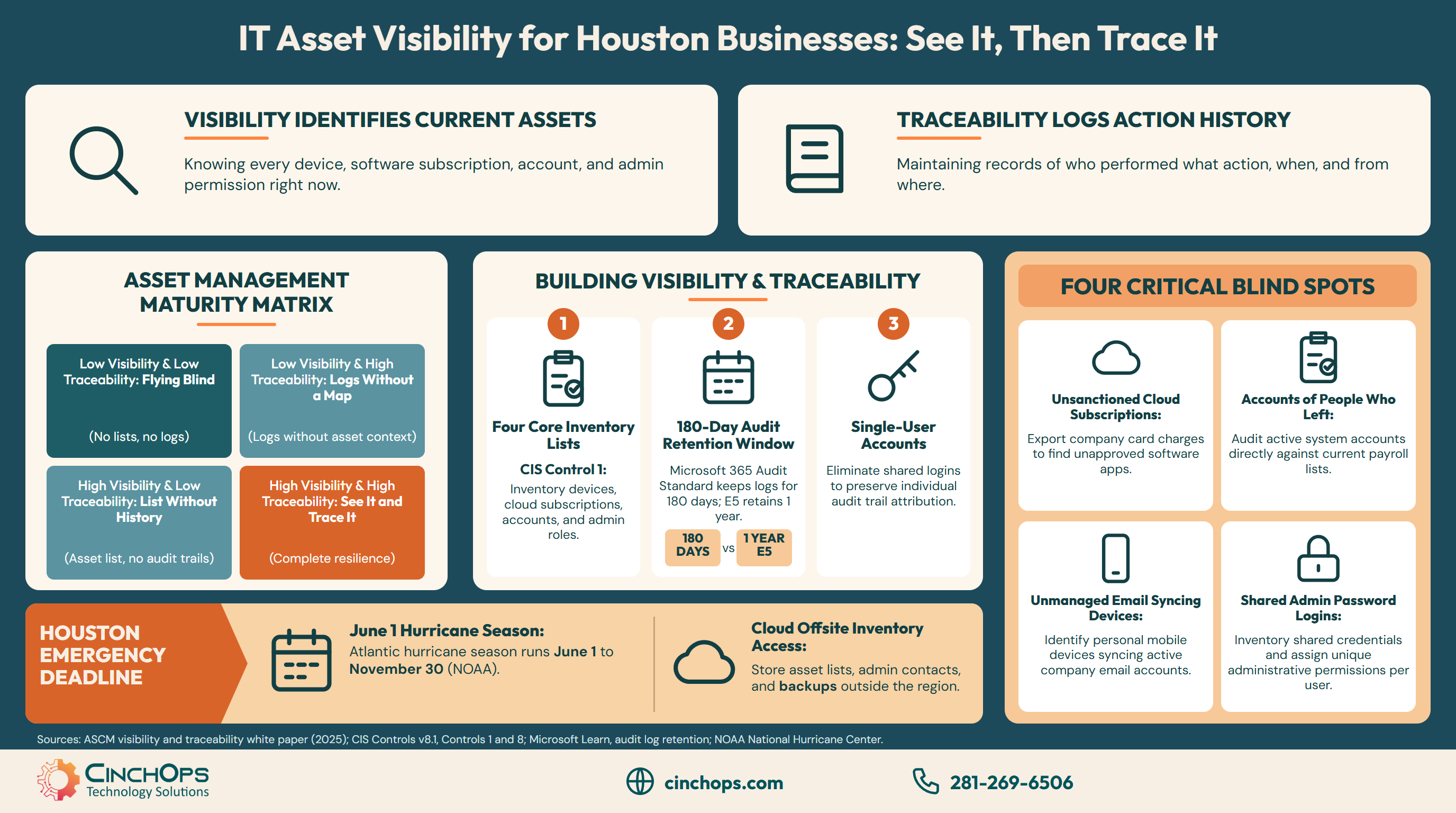
Visibility and traceability fail independently, which gives a business four possible positions. It can have a tidy device list and no usable logs, or months of logs and no idea which systems they cover. Only the combination lets a small team answer an incident question in hours instead of days.
Place the business honestly. A list that is a year old, or lives in one person's head, counts as low visibility. Logs left at the default setting, with nobody reviewing them and shared admin logins in use, count as low traceability. Most of the work to move up and to the right is organizing information the business already has.
Four Blind Spots Are Worth Checking First
The gaps that hide from both the inventory and the audit trail.
Four blind spots defeat visibility and traceability at once: cloud apps bought outside IT, accounts of people who have left, personal phones and laptops with company email, and admin logins shared by several people. Each can be found and fixed in about a week with tools the business already pays for.
Cloud apps bought on a company card hold data that no backup or offboarding checklist covers. Former employees' accounts that were disabled late, or never, keep access to email and shared files. Personal devices with company email synced to them carry data out of the building with no record of where it went. Shared admin logins erase the person from every log entry.
Look for all four in one sitting. Export the subscription charges from the card statement, compare the active accounts list with the payroll list, check which devices are syncing company email, and list every login that more than one person knows the password to.
Houston Puts a Deadline on Visibility
Why the asset list and the logs need to survive the office being closed.
In Houston, visibility has a seasonal deadline. The Atlantic hurricane season runs from June 1 to November 30, according to the National Hurricane Center, and a Gulf Coast storm can close the office, cut power and scatter devices across employees' homes for days. The asset list has to be readable from anywhere.
That changes where the lists live. A device inventory saved on the office server is unreachable on the day it matters most, and so is the only copy of the admin passwords. Keep the inventory, the admin contacts and the vendor support numbers in a cloud location the owner can open from a phone, alongside backups stored outside the region.
Houston's manufacturers and energy companies already run this discipline on the shop floor, tracking parts by lot and serial number. Applying the same habit to laptops, logins and subscriptions is a smaller job than most owners expect.
Every incident review starts with two questions: what do we have, and what happened to it. The businesses that recover fastest answered both before anything went wrong.
Get a current picture of every device and account
CinchOps managed IT support gives every client a named engineer who knows the network, backed by 24/7 threat monitoring across email and admin accounts.
See managed IT supportHow CinchOps Helps Houston Businesses See and Trace Their IT
CinchOps is a managed IT services provider based in Katy, Texas, serving small and mid-sized businesses across the Houston metro area. CinchOps specializes in cybersecurity, network security, managed IT support, VoIP, and SD-WAN for businesses with 10 to 200 employees.
- Visibility: managed IT support gives every client a named engineer who knows the network and a help desk that answers in under 15 minutes.
- Traceability: cybersecurity services add 24/7 threat monitoring and multifactor sign-in across email and admin accounts.
- Data: backup and disaster recovery keeps immutable, offsite copies of laptops, servers, Microsoft 365 and Google Workspace outside the Gulf Coast flood zone.
- Vendors and cost: CTO/CIO services cover vendor and contract reviews, and managed IT is billed at a flat monthly rate per user.
- Local coverage: CinchOps works with businesses in Houston, Katy and Cypress, including manufacturers, oil and gas companies and law firms.
IT asset visibility is some of the cheapest resilience work there is, because most of the information already exists. Build the four lists this month, check how long your audit logs are kept, and talk to CinchOps if you want help closing the blind spots.
Frequently Asked Questions
What is IT asset visibility?
IT asset visibility is knowing every device, software subscription and user account a business depends on, and who has access to each, at any moment. For a 10-200 person Houston business it means four current, dated lists that someone owns, so nothing that holds company data sits outside the plan.
What is the difference between visibility and traceability in IT?
Visibility shows what a business has right now: devices, apps, accounts and access. Traceability shows what happened: audit logs of sign-ins, file shares and admin changes tied to a named person and a time. Visibility helps prevent problems, while traceability explains an incident and shows what to undo.
How long does Microsoft 365 keep audit logs?
Microsoft's documentation says Microsoft 365 Audit (Standard) keeps audit records for 180 days by default. Users with E5-level licenses get a one-year default for Exchange Online, SharePoint, OneDrive and Microsoft Entra activity, and add-on licenses extend retention up to 10 years. Check the setting before you need the records.
What does IT asset visibility cost in Houston?
Building the four lists costs little beyond staff time, since the admin consoles and card statements already exist. Keeping them current usually sits inside managed IT, which CinchOps prices at a flat $100 to $250 per user per month under Zero-Zero-Zero terms: no long-term contracts, no hidden fees and no cancellation penalties.
How often should a small business update its IT asset inventory?
Update the IT asset inventory whenever someone joins or leaves, and review the whole list at least once a quarter. Houston businesses should also check it each spring, before hurricane season opens on June 1, so the list, the admin contacts and the backups are reachable if the office is closed.
Discover More
Resource
Sources
- ASCM, "Adapting to Uncertainty: Visibility and Traceability Strategies to Build Resilience," 2025
- CIS Controls v8.1, Control 1: Inventory and Control of Enterprise Assets
- CIS Controls v8.1, Control 8: Audit Log Management
- Microsoft Learn, "Manage audit log retention policies"
- NOAA National Hurricane Center, Tropical Cyclone Climatology

