


Key-Person Risk in Houston IT: No One Person Should Hold the Keys
How To Reduce Key-Person Risk In A Week – Building The Resilient Business
No One Person Should Hold the Keys
Part 8 of Building the Resilient Business, a CinchOps series on IT resilience for small and mid-sized Houston companies.
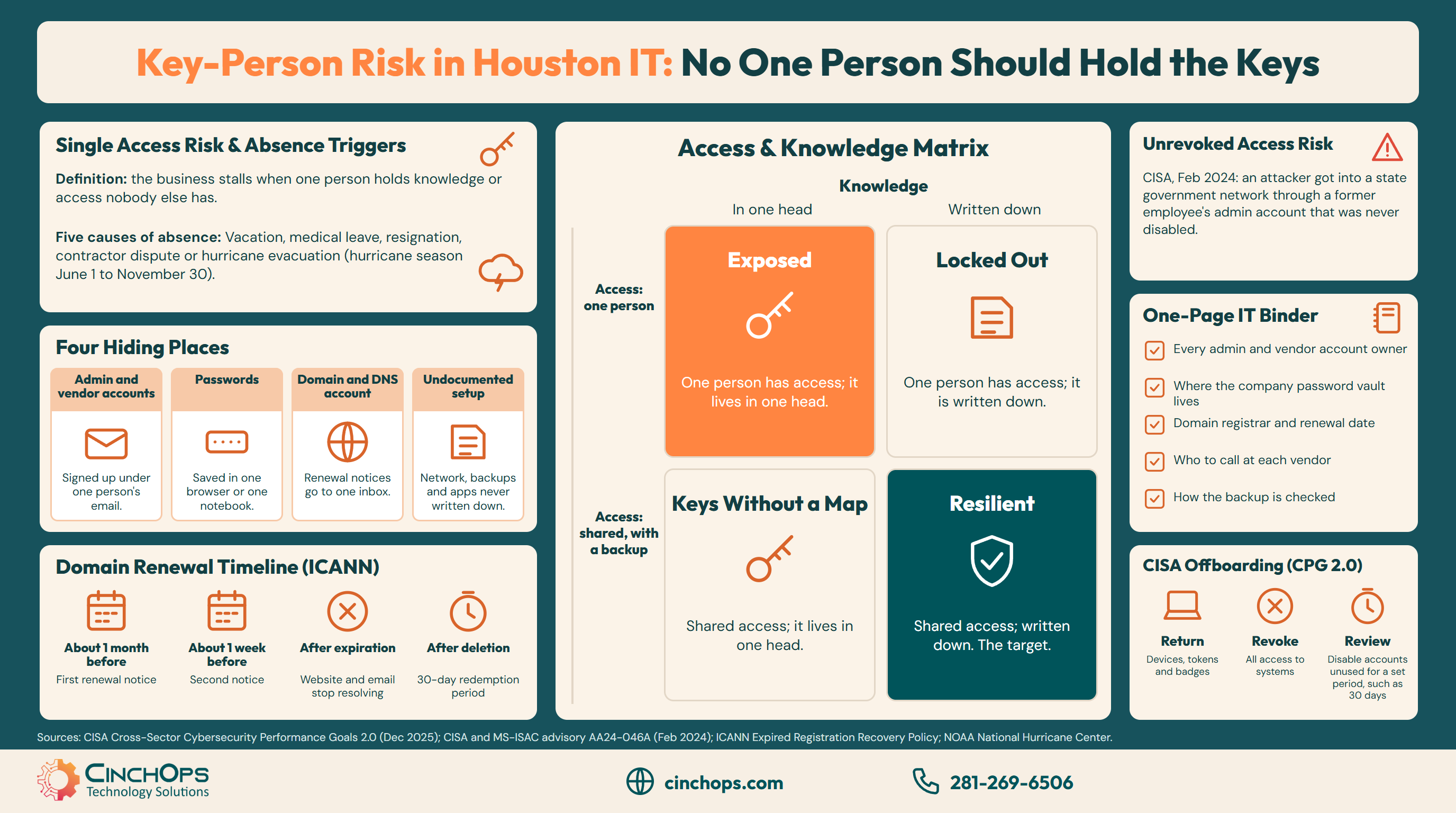
Key-person risk in small business IT is the risk that the business stalls because one person holds knowledge or access nobody else has. In a 10-200 person Houston company that person is often an office manager, a long-time employee or an outside IT contact who set things up years ago and kept the passwords.
Nobody plans it. The person who knew computers best set up the email, registered the domain with their own address, saved the admin passwords in their browser and became the one everyone asks. The arrangement works until that person resigns, retires, gets sick or is simply unreachable on the morning something breaks.
This post is Part 8 of Building the Resilient Business, a CinchOps series on IT resilience. Part 1, What Is IT Resilience? named people as one of the six parts, and the 20-question resilience check scores it. Each later post goes deep on one part, and this one looks at the risk of one person holding the keys.
CinchOps documents IT environments and runs company password vaults specifically for Houston-area businesses with 10 to 200 employees, so access and setup knowledge never depend on one person.
Key-Person Risk Means the Business Runs on One Person's Memory
The risk is about access and knowledge, not about trust.
Key-person risk is a resilience problem rather than a trust problem. The person holding the keys is usually loyal and capable. The risk is that the business has no second path to its own accounts, passwords and setup details when that one person is not available.
Absence takes many forms. A two-week vacation, a medical leave, a resignation with two weeks' notice or a falling-out with an outside contractor all leave the same gap. Houston adds one more: the Atlantic hurricane season runs from June 1 to November 30, according to NOAA, and the person with the passwords may be evacuated or without power on the day the office needs them.
The owner controls the fix. None of it requires new software beyond a password manager, and none of it requires the key person to leave. It requires writing down what they know while they are still here to explain it.
Key-Person Risk Hides in Four Places
Accounts, passwords, the domain and undocumented setup.
In most small offices key-person risk hides in four places: admin and vendor accounts signed up under one person's email, passwords saved in one browser or notebook, the domain and DNS account, and setup details for the network, backups and business apps that were never written down.
The accounts are the easiest to miss. A software subscription, the phone system portal or the firewall vendor account often sits under one employee's work or personal email, so password resets and renewal notices go to them alone. When that mailbox closes, the business loses the way back in.
Setup knowledge is the hardest to rebuild. Which backup runs when, why the line-of-business app needs a particular setting and which vendor to call for the internet line are details that live in heads. A short IT documentation binder turns them into something the next person can use.
The Access and Knowledge Matrix Shows Where to Start
Two questions place every system in one of four boxes.
Two questions sort every system: can more than one person get in, and is it written down how it works? The answers place each system in one of four boxes, and the box tells the owner what to fix first, starting with anything only one person can reach and only one person understands.
Exposed systems come first, because one absence stops them. Locked-out systems need a second login, which usually takes minutes. Keys without a map need a page of notes. The goal is to move every critical system into the resilient box, written down and reachable by two people, and to keep it there as staff change.
The Domain Account Is the Quietest Key
When the domain lapses, the website and company email stop together.
The domain account controls the company website and email, and it is often registered to one person's address. Under ICANN's Expired Registration Recovery Policy, registrars send renewal notices about one month and about one week before expiration, and DNS resolution is interrupted after the registration expires.
If those notices land in the inbox of someone who left, nobody sees them. The domain lapses, the website goes dark and company email stops arriving. ICANN requires a 30-day redemption period after a registration is deleted, so recovery is usually possible, but the outage and the scramble are avoidable.
The fix takes an hour: log in to the registrar, change the contact email to a shared company address, turn on auto-renew and store the login in the company password vault.
Offboarding Is Where Key-Person Risk Turns Into an Incident
A former employee's account that stays open is an open door.
Offboarding is the moment key-person risk becomes a security risk. CISA's Cybersecurity Performance Goals 2.0, published in December 2025, call for a defined process that revokes all access for departing employees, contractors and vendors, and that disables accounts left unused for a set period, such as 30 days.
The cost of skipping it is documented. In a February 2024 advisory, CISA described an attacker who got into a state government network through the account of a former employee with administrative privileges. The account had never been disabled after the employee left, and admin credentials stored on a server it could reach led to a domain administrator account.
For a small business the same rule applies on a smaller scale: turn off the accounts, change any shared password the person knew and move their vendor logins to a company owner on the day they leave. The remote employee offboarding checklist walks through the first 30 days step by step.
If the business stops when one person takes a vacation, you have a single point of failure with a name. Write down what they know and give someone a second key.
Move the passwords out of one person's head
CinchOps password management sets up a company vault with shared folders and owner access, so the business keeps its keys when people change.
See password managementHow CinchOps Helps Houston Businesses Remove Key-Person Risk
CinchOps is a managed IT services provider based in Katy, Texas, serving small and mid-sized businesses across the Houston metro area. CinchOps specializes in cybersecurity, network security, managed IT support, VoIP, and SD-WAN for businesses with 10 to 200 employees.
On the IT side, CinchOps sets up company password management, builds and maintains IT documentation for the network, backups and vendor accounts, and runs offboarding as part of managed IT services. On the business side, CTO/CIO services help the owner decide who holds the second key to each system. CinchOps works with businesses in Houston, Katy and Sugar Land, including CPA firms, law firms and wealth management firms.
Every growing business ends up with a person who knows where everything is. Keep that person, and write down what they know this week. If you want help building the binder and the vault, talk to CinchOps.
Frequently Asked Questions
What is key-person risk in small business IT?
Key-person risk in IT is the chance that the business stalls because one person holds knowledge or access nobody else has, such as admin passwords, vendor logins, the domain account or how the network is set up. If that person leaves, gets sick or cannot be reached, the business is locked out of its own systems.
How can a small business reduce key-person risk in a week?
Start with a list of every admin and vendor account and who owns it. Move shared passwords into a company password manager, change the domain registrar contact to a shared address, give a second person admin access and write a one-page summary of how the network and backups are set up.
Does a small business need a company password manager?
A company password manager stores shared credentials in one vault the business controls, instead of in one person's browser or notebook. CISA's performance goals tell organizations not to reuse passwords and point to password managers as the practical way to keep unique credentials for every account.
What should IT offboarding include when an employee leaves?
CISA's Cybersecurity Performance Goals call for a defined process that runs for employees, contractors and vendors: return devices, tokens and badges, revoke all access to systems and facilities, and disable accounts that stay unused for a set period, such as 30 days. Change any shared password the person knew.
What does fixing key-person risk cost for a Houston small business?
Most of the fix is time: an afternoon to list accounts and a few days to move passwords into a company vault. CinchOps prices managed IT at a flat $100 to $250 per user per month, and password management and IT documentation fit inside that work.
Discover More
Resource
Sources


