


Scalable IT in Houston: Size Your IT to Your Business
Scalable IT For Houston Small Businesses – IT Sized To Your Business
Size Your IT to Your Business
Part 10 of Building the Resilient Business, a CinchOps series on IT resilience for small and mid-sized Houston companies.
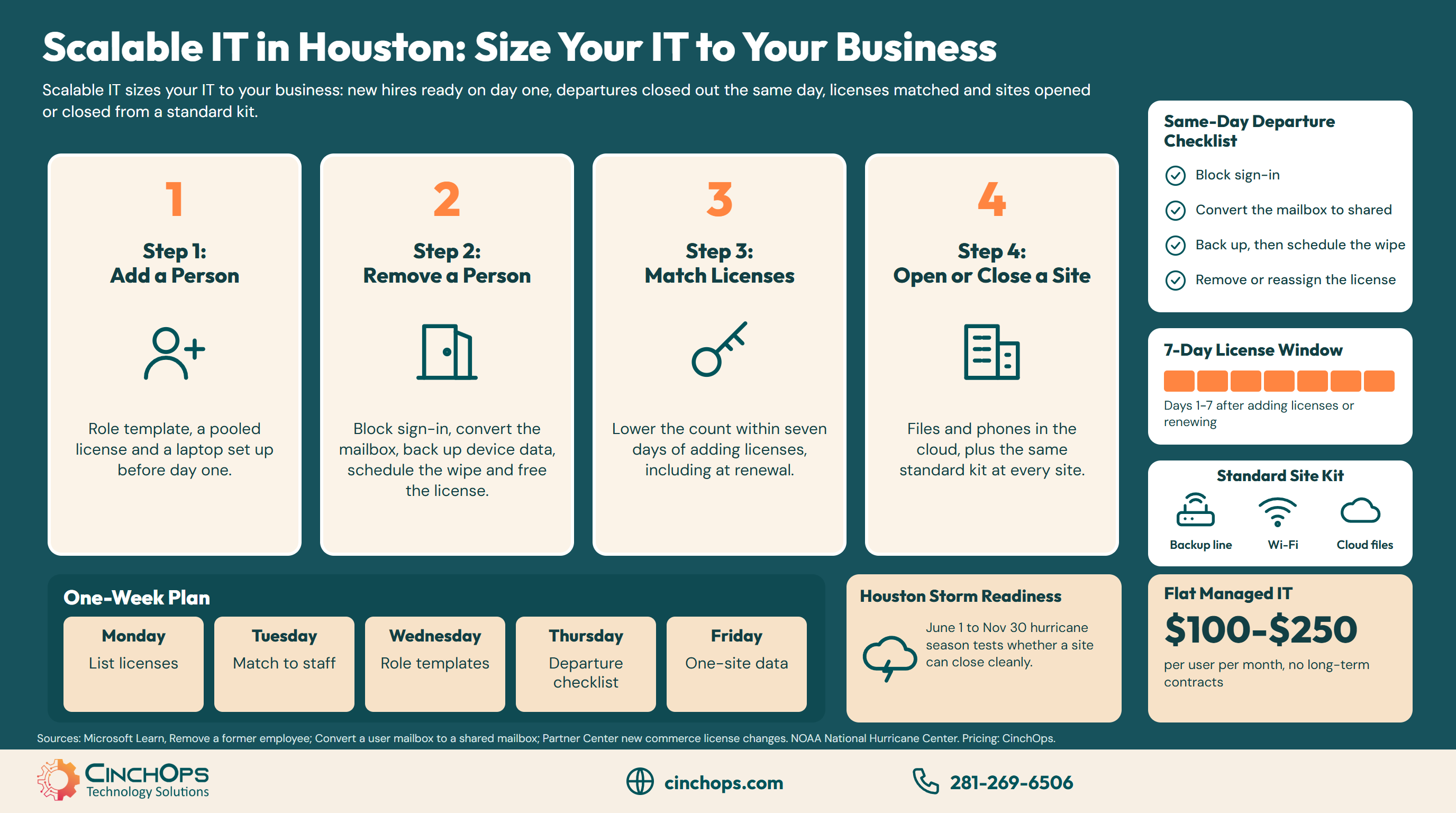
Scalable IT for a small business means the IT is sized to the business and changes with it: people and locations come and go without a new IT project each time. A Houston owner who signs a new contract on Friday and needs three more people on Monday should find that the IT side is the easy part.
Usually it is the hard part. A new hire waits a week for a laptop, a departed employee still has a working login a month later, and the Microsoft 365 bill keeps charging for people who left in the spring. Each of those comes from setup that was done by hand once and never written down, so it has to be worked out again every time.
This post is Part 10 of Building the Resilient Business, a CinchOps series on IT resilience. Part 1, What Is IT Resilience? named flexibility as one of the six parts, and the 20-question resilience check scores it. Each later post goes deep on one part, and this one covers sizing IT to the business as it changes.
CinchOps runs employee onboarding, offboarding and license cleanup specifically for Houston-area businesses with 10 to 200 employees, at a flat $100 to $250 per user per month with no long-term contracts.
Step 1: Get a New Hire Working on Day One
Build the setup once, then repeat it.
A small business gets a new hire working on day one by building the account from a role template and setting up the laptop before the start date. The laptop arrives with the company settings, apps and security already in place, so the first morning starts with signing in.
The account comes first. A role template sets the person's email, groups, shared folders and the apps their job needs, so the second accounting hire gets exactly what the first one got. The license comes from a small pool kept for new starts, which avoids a same-day purchase.
Provisioning means doing the setup before the start date: the laptop is enrolled in management, the apps and security tools are installed, and the access from the role template is tested. The work happens before the person arrives instead of on their first morning, so a new hire never spends day one waiting on IT.
The same template works in reverse when someone changes roles. Move them to the new role's group and their access follows the role rather than the person.
Step 2: Close Out a Departure the Same Day
A checklist, run the day the person leaves.
A small business closes out a departing employee the same day by blocking sign-in, keeping the mailbox, backing up company data from their phone and laptop, scheduling the wipe and freeing the license. Microsoft's guidance for removing a former employee from Microsoft 365 covers the same steps.
Block sign-in first, so the account stops working before anything else happens. Then keep the mail. Converting the mailbox to a shared mailbox lets a coworker read it, and Microsoft says a shared mailbox needs no license up to 50 GB, so the license can come off once the conversion is done.
Mind the clock on the license. When a license is removed, Microsoft keeps the former employee's email, contacts and calendar for 30 days and then deletes them for good, which is why the mailbox conversion comes before the license removal. Back up before anything is erased. Company data on a former employee's phone and laptop may be needed for legal or records reasons, so copy it first and schedule the wipe for after the backup is checked. When the wipe runs, the laptop is reset and provisioned again for the next person.
The full remote version, with what to do on day 0, day 7 and day 30, is in the remote employee offboarding checklist.
Step 3: Match Licenses to People on the Renewal Date
The window to cut seats is short, so plan for it.
A small business cuts unused Microsoft 365 licenses by reviewing the count before each renewal, because under Microsoft's new commerce rules a license count can be lowered only within the first seven days after the licenses were added, including at renewal.
That rule catches owners out. A business that goes from 30 people to 25 in March cannot drop the 5 extra annual licenses in March. It pays for them until the renewal, then has a seven-day window to lower the count. Miss the window and the extra licenses renew for another term.
Two habits fix it. Keep a list of every license with its renewal date, and compare the license count to the staff list a week before each one. A licensed account for someone who left is also an open door, so the review catches security gaps as well as waste. CinchOps runs this as a software license audit.
Paying for people who already left?
CinchOps can compare your Microsoft 365 licenses to your staff list and mark the renewal dates when the extras can come off.
Talk to CinchOpsStep 4: Open or Close a Location From a Standard Kit
Keep the data in the cloud and the site to a standard kit.
A small business opens or closes a location quickly when its files and phones live in the cloud and every site uses the same standard kit: an internet line with a backup connection, one firewall model, Wi-Fi and printers. A new site plugs in, and a closed site unplugs.
The delay usually hides in the server closet. When the shared files, the accounting system and the phone system sit on a box in one office, opening a second office means building a second copy or a fragile link back to the first. Moving files to cloud services and phones to VoIP removes that box from the plan.
Houston adds its own test. The Atlantic hurricane season runs from June 1 to November 30, according to NOAA, and a Houston office that closes for a storm week faces the same question as one closing for good: can everyone keep working from somewhere else? A business set up to close a site cleanly is also set up to ride out a storm closure. For multi-site firms, SD-WAN puts every location on the same managed network.
The table below compares how each of the four changes goes when the setup is hand-built and when it is standardized.
| Change | Hand-built setup | Standardized setup |
|---|---|---|
| Add a person | Laptop set up on the first morning, access copied from a coworker | Role template plus a laptop provisioned before day one |
| Remove a person | Login and license left running until someone notices | Same-day checklist: block, convert mailbox, back up, schedule the wipe, free the license |
| Open a location | New server or a fragile link back to the main office | Standard kit plugged in; files and phones already in the cloud |
| Close a location | Data migrated off a local server before the lease ends | Kit unplugged; people keep working from anywhere |
We set up a new hire's laptop and accounts before day one, close out a departure the day the person leaves, and spin a site up or down from the same standard kit.
Onboarding and offboarding, handled
CinchOps employee onboarding and offboarding sets up new people from a template and closes out departures the same day, for Houston-area businesses with 10 to 200 employees.
See onboarding and offboardingHow CinchOps Helps Houston Businesses Size IT to the Business
CinchOps is a managed IT services provider based in Katy, Texas, serving small and mid-sized businesses across the Houston metro area. CinchOps specializes in cybersecurity, network security, managed IT support, VoIP, and SD-WAN for businesses with 10 to 200 employees.
On the IT side, CinchOps builds the role templates, the departure checklist and the standard site kit, then runs them every time someone joins, leaves or moves. On the business side, CTO/CIO services help the owner time license changes to renewal dates and plan a new or closing location. Managed IT services are priced at a flat $100 to $250 per user per month under Zero-Zero-Zero terms: no long-term contracts, no hidden fees and no cancellation penalties. CinchOps works with businesses in Houston, Katy and Sugar Land, including construction firms, engineering firms and CPA firms.
A business that is hiring, reorganizing or opening a site should spend its energy on the people and the work, with the IT side running from a template. Start with the license list and the departure checklist this week, and talk to CinchOps if you want help building the rest.
Frequently Asked Questions
What is scalable IT for a small business?
Scalable IT means a small business can add or remove people and locations without a new IT project each time. New hires are set up from a role template and a laptop provisioned before day one, departures are closed out with a same-day checklist, licenses are matched to staff at each renewal and every location uses the same standard kit with files in the cloud.
How fast should a new hire be ready to work?
A new hire should be working on day one. With a role template for the account, a license kept ready in a small pool and a laptop set up with the company settings and apps before the start date, the only thing left on the first morning is signing in.
What should happen to a former employee's email?
Convert the mailbox to a shared mailbox so a coworker can read it, then remove the license. Microsoft says a shared mailbox needs no license up to 50 GB. If the license is removed first, Microsoft keeps the email, contacts and calendar for 30 days and then deletes them permanently.
Can I cancel Microsoft 365 licenses when someone leaves?
Under Microsoft's new commerce rules, a license count can be lowered only within seven days after the licenses were added, including at renewal. After that window, extra licenses stay on the bill until the next renewal. Free the license for the next hire, and review counts a week before each renewal date.
What does scalable managed IT cost in Houston?
Managed IT in Houston usually runs at a flat rate per user per month, so the bill follows headcount up and down. The published CinchOps rate is $100 to $250 per user per month, with no long-term contracts, no hidden fees and no cancellation penalties.
Discover More
Resource
Sources


